

Contents
Valuation and costing - Plugixa Inventory
Two different questions, and keeping them apart is what lets both stay right:
- What is the stock I hold worth? That is valuation.
- What did the stock that just left cost? That is costing.
Valuation: what you hold
Stock is valued at cost. The dashboard, the warehouse cards and the reports all use the item’s cost price, not its sale price.
An item with an empty cost price falls back to its sale price, which overstates what you hold by your entire margin. A stock value that looks implausibly large almost always means a cost price is missing rather than that business is good.
Valuation is computed from the per-warehouse stock rows, so it is answerable per location as well as in total.
Costing: what left
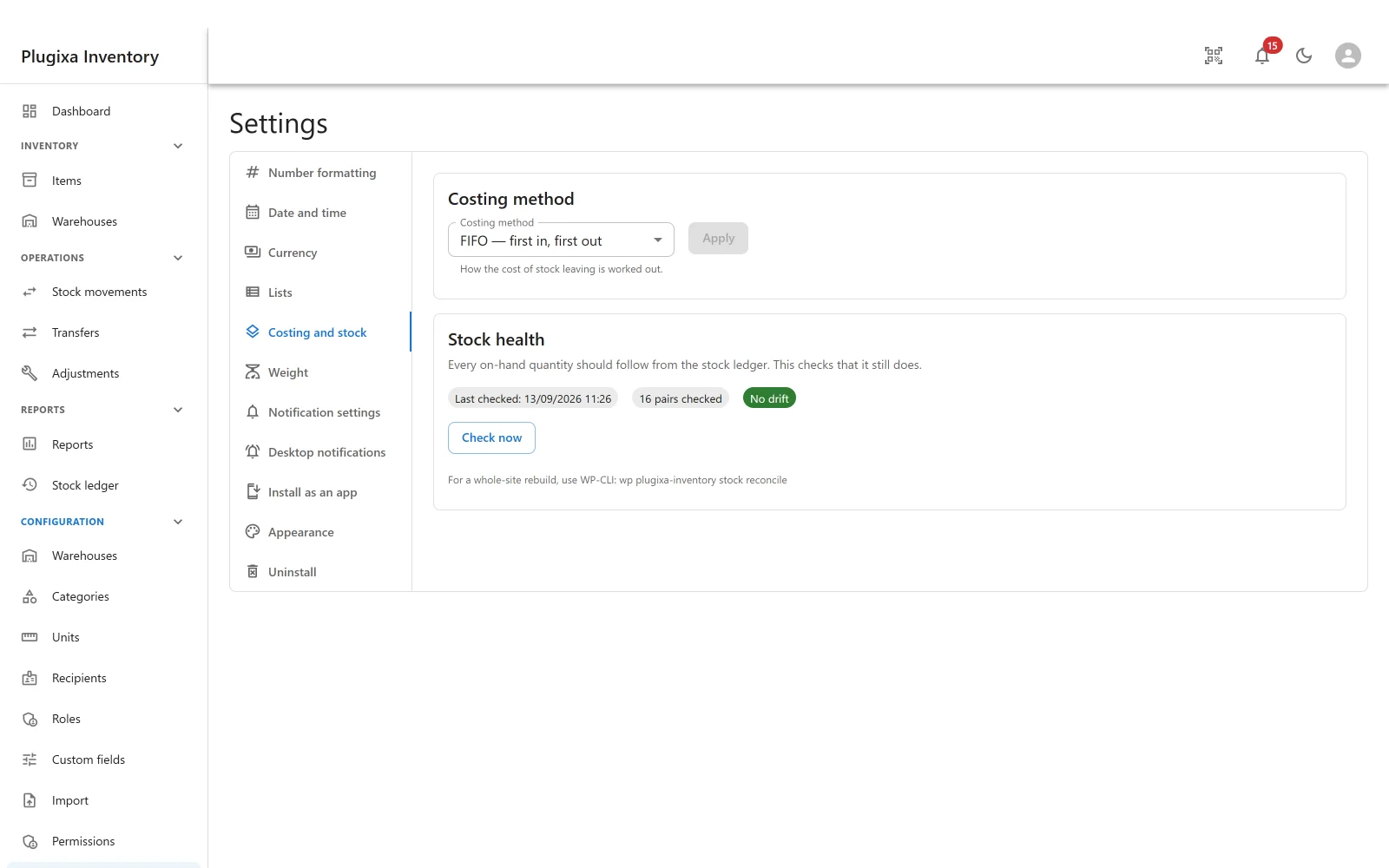
When stock leaves, what it cost is recorded on the ledger row that removed it. That figure is worked out by the site’s costing method, set under Settings -> Costing and stock.
Average cost (free)
Everything you hold of one item in one warehouse has one cost: the average of what you paid. Stock leaving is costed at that average.
It is simple, it needs no extra bookkeeping, and for most inventories it is right. It is what the free build costs stock at, and it is a real method rather than a placeholder.
FIFO and LIFO PRO
| Method | Costs stock out at |
|---|---|
| FIFO | What the oldest stock cost. First in, first out |
| LIFO | What the newest stock cost. Last in, first out |
Both work by keeping a layer per receipt: each delivery is remembered with its own date and its own cost, and a removal walks the layers in order, taking what it needs from each.
That is the difference in one sentence: average costing keeps one number per item and warehouse, and layer costing remembers every receipt separately. It is what lets a removal be costed at what that stock actually cost coming in, and it is what makes ageing layer-accurate rather than reconstructed.
FIFO and LIFO differ by the direction of one sort. They are one implementation with a parameter, not two, so a fix to the layer walk is a fix to both.
Switching the method on
Stock you already hold has no cost layers yet, because average costing does not keep any. Applying FIFO or LIFO opens one layer per past receipt, using the dates and costs already recorded in the ledger - so ageing and valuation keep the history they already have rather than starting from today.
The settings screen says how many item and warehouse pairs are still unseeded. They are opened in the background, or automatically the first time that stock moves, and Open them now does it immediately.
If the build changes
This is the case worth knowing about before it happens.
A site running FIFO whose build no longer provides it - a downgrade, or the module switched off - does not break and does not silently re-cost everything. Stock is costed at average cost, and the screen says so: the saved method is not available in this build, so average cost is being used.
The saved method comes back into force if that build returns. Choosing a method on the screen replaces it; nothing else does. The layers themselves are left alone.
Where it shows up
| Screen | Uses |
|---|---|
| Dashboard stock value | Valuation, at cost |
| Warehouse inventory value | Valuation, at cost, for one location |
| The cost column in the ledger | Costing, as at the moment stock left |
| Reports -> Transactions | Cost of goods sold, and average cost per unit |
| Reports -> Ageing PRO | Layers when they exist, a ledger reconstruction otherwise |
Transfers between your own warehouses are excluded from cost of goods sold. Moving stock is not a cost. A transfer carries its layer’s cost to the destination rather than revaluing it, so crossing the yard does not change what something cost.
Stock health
The same settings panel holds the check that proves on-hand still follows from the ledger. It reports and changes nothing on its own. See The Stock Ledger.
Troubleshooting
| Symptom | Usual cause |
|---|---|
| Stock value is far too high | Cost prices are missing, so those items fall back to the sale price. |
| Only Average cost is offered | FIFO and LIFO are a Pro module, or it is switched off in the App Manager. |
| “The costing method saved for this site is not available in this build” | A Pro method is saved and the module is gone. Average cost is in use, and the saved method returns with the build. |
| A removal was refused because it could not be costed | The cost layers no longer cover the stock on hand. Stock health lists where they disagree. |
| Ageing says stock had no receipt on record | It predates the ledger. Those units are counted as oldest, and the note says how many. |
| Cost of goods sold seems low | Internal transfers are excluded, on purpose. |
| Switching to FIFO showed unseeded pairs | Expected. Layers are opened from the ledger, in the background or on first movement. |
| A transfer changed an item’s cost | It should not. A transfer carries its layer’s cost rather than revaluing it. |
What to do next
- See the cost on each row: The Stock Ledger.
- Report on it: Reports PRO.
- Set the cost price: Items.
- Check the whole site: WP-CLI.