

Contents
Instructions - Plugixa Recipe
Instructions are cooking steps - the narrative part of a recipe. Plugixa Recipe supports grouped steps, per-step images, per-step videos, and step durations (which flow into HowTo schema output).
Model
Each step in wp_plugixa_recipe_instructions has:
| Field | Type | Description |
|---|---|---|
| group_name | VARCHAR(255) | Optional heading - e.g., “Make the dough” |
| group_order | INT | Sort position of the group |
| sort_order | INT | Step position within the group |
instruction_text * |
TEXT | Step description; allows basic HTML |
| image_id | BIGINT | WP attachment ID (per-step image) |
| video_url | VARCHAR(500) | Per-step video (YouTube / Vimeo / MP4) |
| duration | INT | Step time in minutes |
The instructions tab
Open a recipe and switch to the Instructions tab.
Adding steps
- Click + Add Step to add a step to the current group.
- Click + Add Group to start a new group (e.g., “Make the sauce”, “Assemble”, “Serve”).
Editing a step
Each step has:
- A rich-text editor for instruction_text (links, bold, italic, lists).
- An Image picker - choose from the WordPress media library.
- A Video URL field - YouTube, Vimeo, or direct MP4.
- A Duration (minutes) field - optional, surfaces in Google rich results.
Reordering
Drag the handle on each step to reorder within a group, or across groups. Drag the group header to reorder groups.
Rendering on the frontend
On the single recipe page, instructions are rendered as an ordered list, grouped by heading:
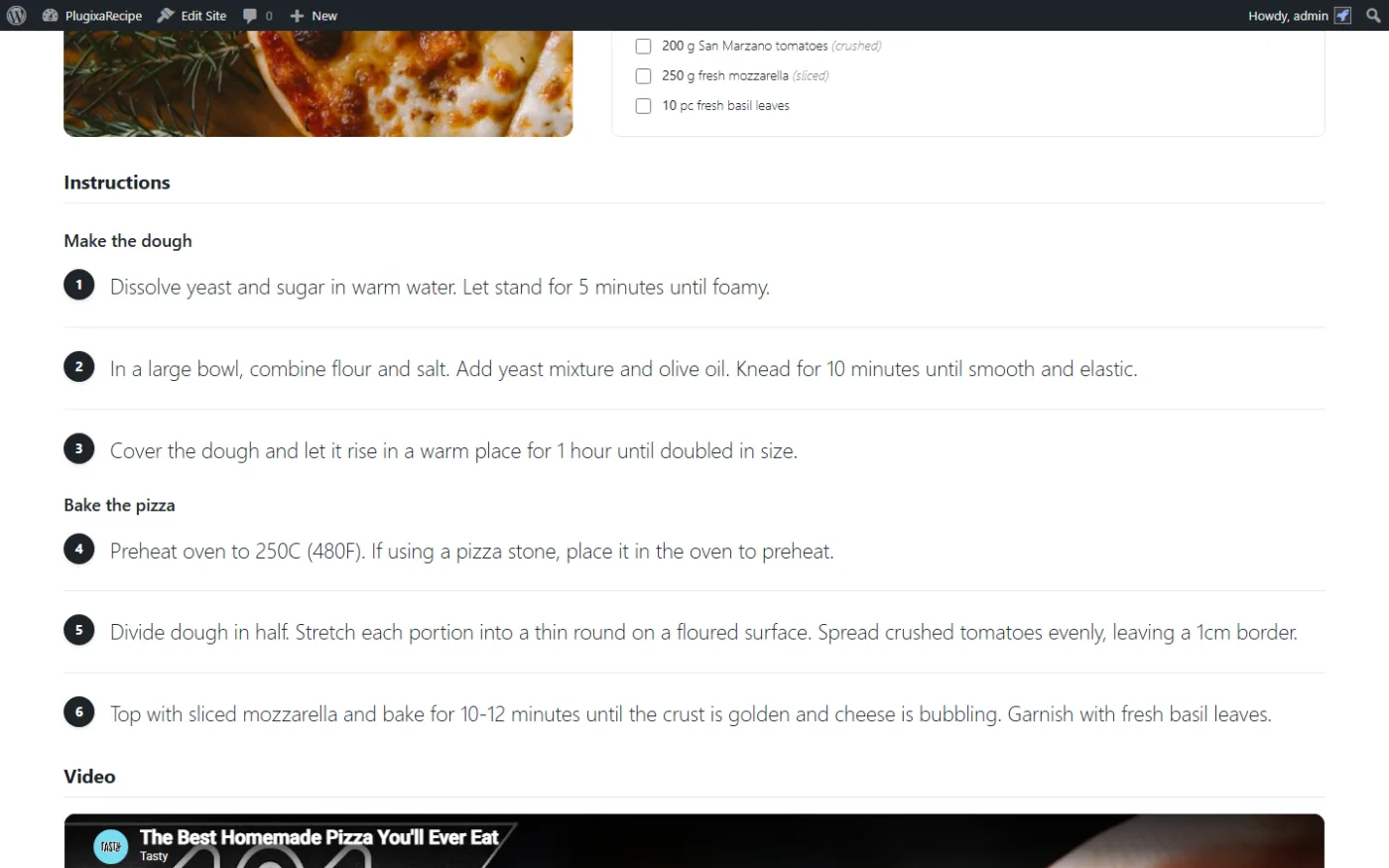
- Group headings become
<h3>elements. - Steps are numbered within each group.
- Per-step images appear above the text (responsive).
- Video URLs are embedded (YouTube/Vimeo) or rendered as HTML5
<video>.
Check-off mode
A frontend toggle lets a user mark each instruction as “done” - useful when cooking from the page. See assets/frontend/js/recipes.js - state is persisted to localStorage so users can reload / return.
HowTo schema (Pro)
When JSON-LD is enabled, instructions are output as a HowToStep array inside recipeInstructions. Per-step images and durations are included, giving Google everything needed for the recipe rich result to show step-by-step guidance.
"recipeInstructions": [
  {
    "@type": "HowToStep",
    "name": "Make the dough",
    "text": "Combine flour and water…",
    "image": "https://example.com/step-1.jpg",
    "totalTime": "PT15M"
  },
  …
]