

Contents
Recipes Management - Plugixa Recipe
The Recipes screen is the central workspace for creating, editing, organizing, and moderating recipes.
The recipe list
Click Recipes in the plugin menu. Every screen of the plugin opens inside its one Plugixa Recipe entry in the WordPress sidebar.
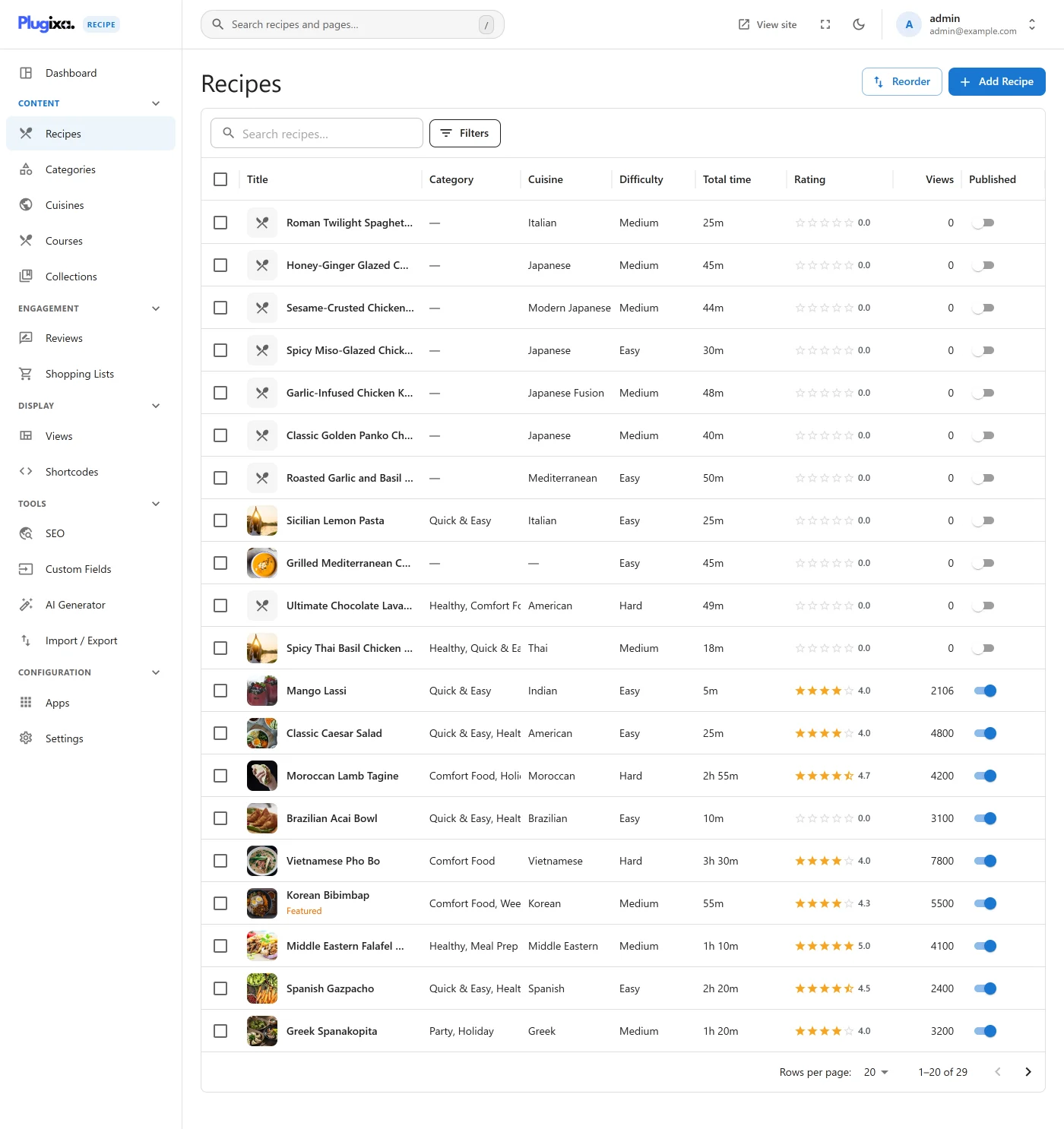
The table shows:
| Column | Description |
|---|---|
| Thumbnail | Main recipe image (if set) |
| Title | Links to the editor |
| Status | draft, published, pending, archived |
| Category / Cuisine | Comma-separated tags |
| Rating | Cached rating_average (0 to 5) and rating_count |
| Views | Cached view_count |
| Modified | Last modification timestamp |
| Actions | Edit, view, duplicate, delete |
Filters
Click Filter (top-right) to open the filter drawer. You can filter by:
- Status - draft, published, pending, archived
- Category - any category
- Cuisine - any cuisine
- Course - appetizer, main, dessert, …
- Difficulty - easy, medium, hard, expert
- Cost - budget, moderate, expensive, premium
- Diet flags - vegetarian, vegan, gluten-free, dairy-free, keto, low-carb, nut-free, paleo, sugar-free, halal, kosher
- Featured -
is_featuredflag - Editor’s pick -
is_editor_pickflag - Language - when WPML/Polylang is active
- Rating - minimum average rating
- Search - title / description full-text
Active filters are shown as chips above the table and can be removed individually.
Bulk actions
Select recipes using the row checkboxes, then choose:
- Publish / draft / archive
- Mark as Featured / Editor’s pick (or remove)
- Delete
Publishing a recipe, taking a published one down and moderating reviews need the WordPress publish capability (Authors and above by default). Contributors can still write drafts and submit them for review.
Creating / editing a recipe
Click Add Recipe, or a recipe’s title, to open the recipe editor. Since version 1.2.0 the editor is one page with a section bar instead of eight tabs:
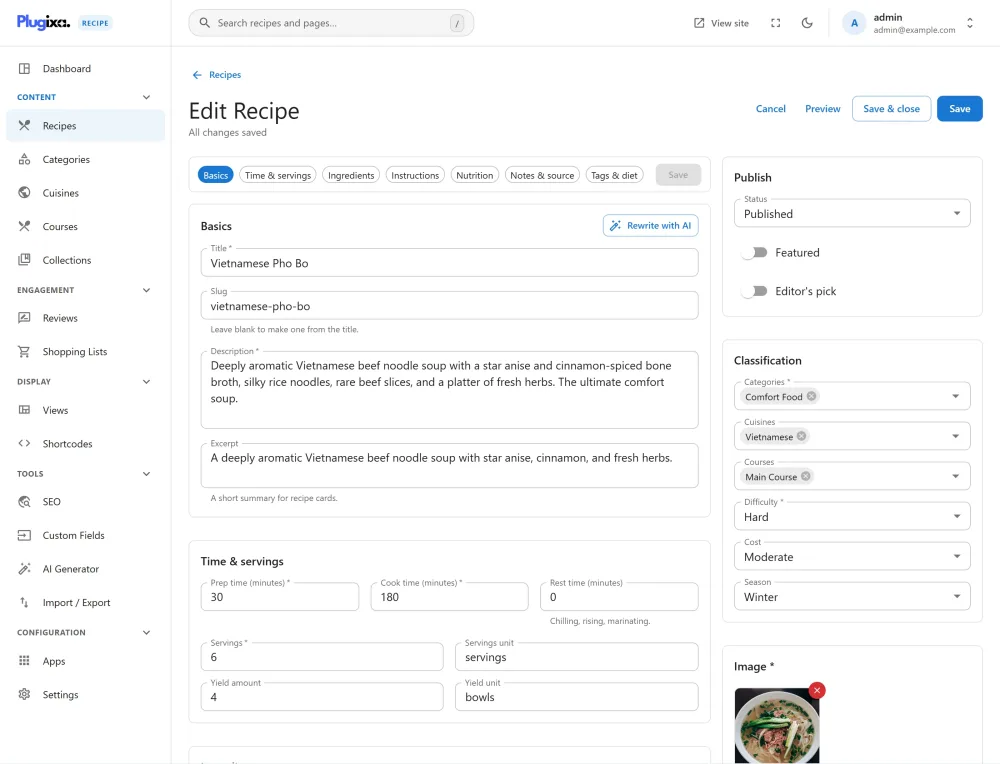
- Sections: Basics, Time & servings, Ingredients, Instructions, Nutrition, Notes & source, Tags & diet and SEO, plus your custom fields PRO.
- Ingredients and steps: drag to reorder, group under headings, paste a whole list, pick units and ingredients from suggestions. Each step can have a title, a timer, a tip, a video and a photo.
- Classification: categories, cuisines and courses are searched, and created, from the editor itself.
- Safety: a draft is kept in your browser, leaving with unsaved changes asks first, and Ctrl+S (Cmd+S on a Mac) saves.
The full tour, field by field, is on the Recipe Editor page.
Manual ordering
Default sort in shortcodes/views is by created_at DESC. To pin specific recipes at the top, use Recipes → Ordering. Drag recipes into your preferred sequence. The order is written to display_order and used whenever a shortcode sets orderby="display_order".
Duplicating a recipe
Use the row action Duplicate to clone a recipe (ingredients, instructions, nutrition, custom fields all copy). The new copy is set to draft with “(Copy)” appended to the title and slug.
Deleting a recipe
Deleting a recipe removes it plus its ingredients, instructions, nutrition row, reviews, and favorites (cascading deletes). Reviews in the trash are also dropped.
Recipe URLs
Each published recipe is available at:
/recipe/{id}/{slug}/
and a print-friendly version at:
/recipe-print/{id}/
An address for a recipe that does not exist answers 404. When a recipe is embedded in a post, its own address names that post as its canonical. See Permalinks & URLs for customization.