

Contents
On this page
Free vs Pro - Plugixa Recipe
Plugixa Recipe Free is a complete recipe plugin: you write recipes in the one-page editor, show them in listings and on their own pages, collect reviews, and every recipe page carries the structured data Google needs for recipe rich results. Pro adds the tools around it: what your readers do with a recipe (meal plans, shopping lists, cooking tools, sending you recipes), how recipe pages look (five page layouts), who may do what (roles and permissions), and AI, importing, SEO analysis and WooCommerce.
Changed in 1.4.0. Collections and meal plans, shopping lists, recipe submissions, the Nutrition Calculator and the Reader Tools moved from Free to Pro. Nothing is deleted: on a site that runs the free plugin, your collections, lists, submitted recipes and settings stay in your database, and they come back as they were when Pro is active. The servings adjuster, reviews, favorites, the nutrition label and the print page stay free.
Feature matrix
| Feature | Free | Pro |
|---|---|---|
| Core | ||
| Unlimited recipes / categories / cuisines / courses | ✅ | ✅ |
| One-page recipe editor: drag, group, paste, preview | ✅ | ✅ |
| Grouped ingredients & instructions, step timers, tips and photos | ✅ | ✅ |
| 11 diet flags | ✅ | ✅ |
| Nutrition label (15 nutrients and a serving size) | ✅ | ✅ |
| Nutrition Calculator (USDA FoodData Central, your own key) | ❌ | ✅ |
| Display | ||
| Grid / slider / masonry / list layouts | ✅ | ✅ |
| Unlimited saved views | ✅ | ✅ |
| Unlimited saved shortcodes | ✅ | ✅ |
| Visual shortcode builder | ✅ | ✅ |
| Two Gutenberg blocks (a recipe listing and a single recipe) | ✅ | ✅ |
| A recipe inside a post, round-ups, Jump to recipe | ✅ | ✅ |
| 8 widget shortcodes (categories, cuisines, latest, popular, related, search, recipe of the day, count) | ✅ | ✅ |
| Search form with course, difficulty, time and diet filters | ✅ | ✅ |
| Font picker with locally served fonts | ✅ | ✅ |
| Custom CSS per view | ✅ | ✅ |
| Recipe Layouts: five page layouts for recipe pages and archives, editable in the Site Editor | ❌ | ✅ |
| Readers and visitors | ||
| Servings adjuster on the recipe page | ✅ | ✅ |
| Print page | ✅ | ✅ |
| Pin button on the recipe photo | ✅ | ✅ |
| 5-star reviews with photos | ✅ | ✅ |
| Admin replies to reviews | ✅ | ✅ |
| Favorites (❤️) and the Saved recipes page | ✅ | ✅ |
| Reader Tools: ½× to 3× scale buttons, metric/US units, copy ingredients, step timers, cook mode, My notes | ❌ | ✅ |
| Collections & cookbooks | ❌ | ✅ |
| Meal plans | ❌ | ✅ |
| Shopping lists (admin lists, the visitor’s list, Add to shopping list) | ❌ | ✅ |
| Frontend submission form, My recipes, and members editing their own submissions | ❌ | ✅ |
| Multilingual | ||
| WPML + Polylang support | ✅ | ✅ |
| Translatable categories / cuisines | ✅ | ✅ |
| SEO | ||
| JSON-LD Recipe schema | ✅ | ✅ |
| Recipes in WordPress’s own sitemap | ✅ | ✅ |
| Open Graph + Twitter Card meta | ✅ | ✅ |
Clean URLs (/recipe/, /recipe-category/, …) |
✅ | ✅ |
| SEO Analyzer (0 to 100 per recipe) | ❌ | ✅ |
| AI | ||
| AI Generator (topic / URL / document) | ❌ | ✅ |
| OpenAI + Gemini providers | ❌ | ✅ |
| Document parser (PDF / DOCX) | ❌ | ✅ |
| Data | ||
| Custom fields | ❌ | ✅ |
| Import / Export (JSON / CSV) | ❌ | ✅ |
| Import from seven recipe plugins (WP Recipe Maker, Tasty Recipes, Create by Mediavine, WP Delicious, Cooked, Zip Recipes, Recipe Card Blocks) | ❌ | ✅ |
| Demo Data seeder (18 sample recipes) | ❌ | ✅ |
| Team | ||
| Roles & permissions: who may view, create, edit and delete each kind of content | ❌ | ✅ |
| Admin dark mode | ❌ | ✅ |
| Integrations | ||
| Elementor widgets | ✅ | ✅ |
| WooCommerce product tab & linking | ❌ | ✅ |
| Developer | ||
| REST API | ✅ | ✅ |
| Action / filter hooks | ✅ | ✅ |
| Template override | ✅ | ✅ |
How the two editions are built
The free edition, on WordPress.org, contains no Pro code at all. Pro is the same plugin with a pro/ folder that registers the Pro features as apps. Installing Pro over Free keeps every recipe, setting and View, and picks up the collections, shopping lists and submitted recipes a site made before 1.4.0.
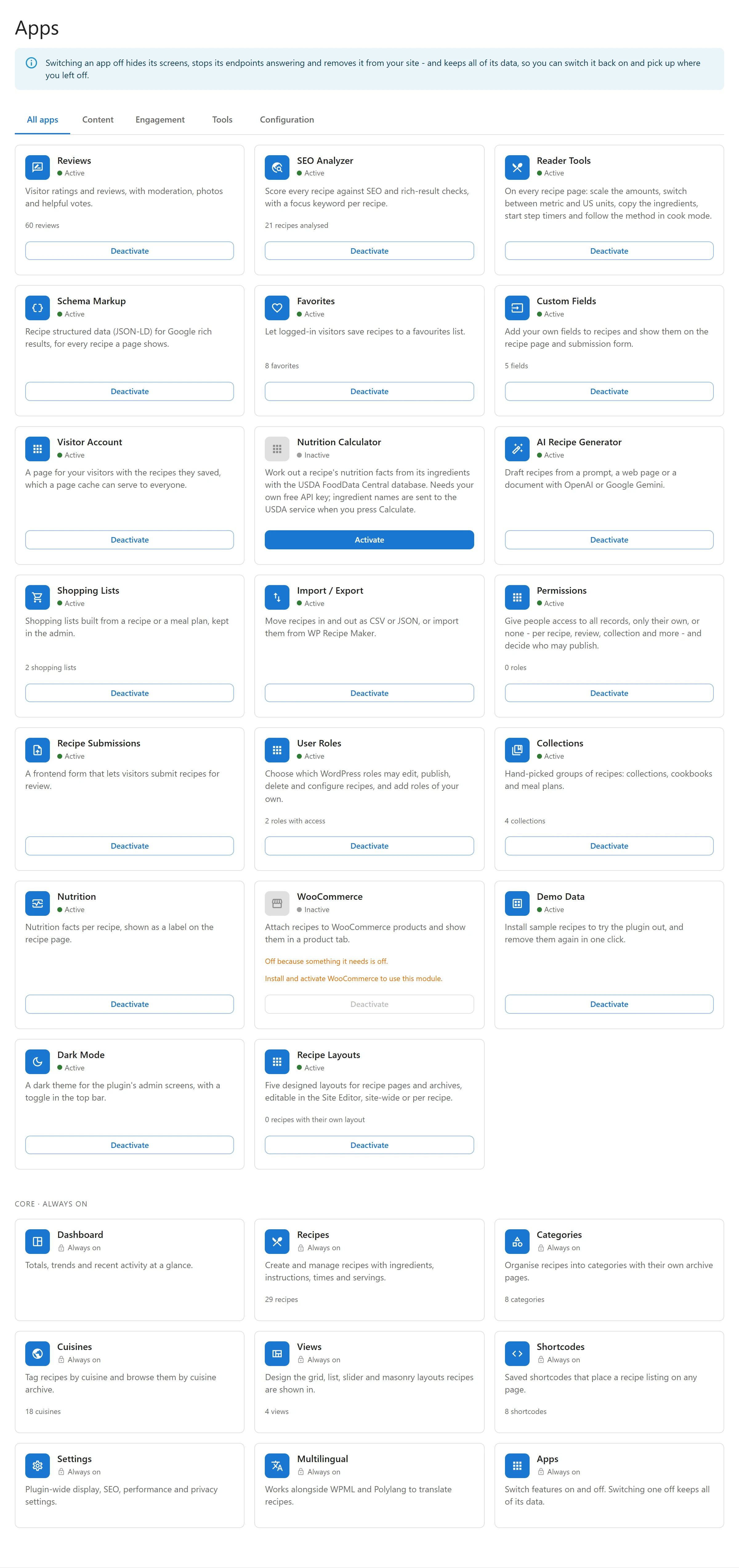
Every optional part of the plugin is an app, switched on and off in Plugixa Recipe > Apps. In Pro, the moved features keep the app names they had, so a switch you turned off stays off.
A page that holds a Pro shortcode
On a site that runs the free plugin, a page with [plugixa_recipe_form], [plugixa_shopping_list] or [plugixa_my_submissions] shows nothing to visitors. Whoever may switch apps on sees a short note on that page instead, with a link to Plugixa Recipe > Apps, so the empty page is not a mystery.
Upgrading
- Buy a Pro license from the Plugixa Recipe page.
- Download the Pro plugin from the link in your purchase email or your Plugixa account, and install it in Plugins > Add New > Upload Plugin.
- Activate your license key when the plugin asks for it. The Pro features become active immediately.
Support
Free users: community support via the WordPress.org forums. Pro users: priority email support at support@plugixa.com.
Quick Links
Share