

Contents
SEO Analyzer - Plugixa Recipe
Plugixa Recipe ships with a per-recipe SEO analyzer that scores recipes on a 0–100 scale with actionable recommendations. Results are stored in wp_plugixa_recipe_seo_analysis, so the score is cached between recipe edits and visible at a glance in the recipe list.
The SEO dashboard
Navigate to Recipes → SEO Analyzer.
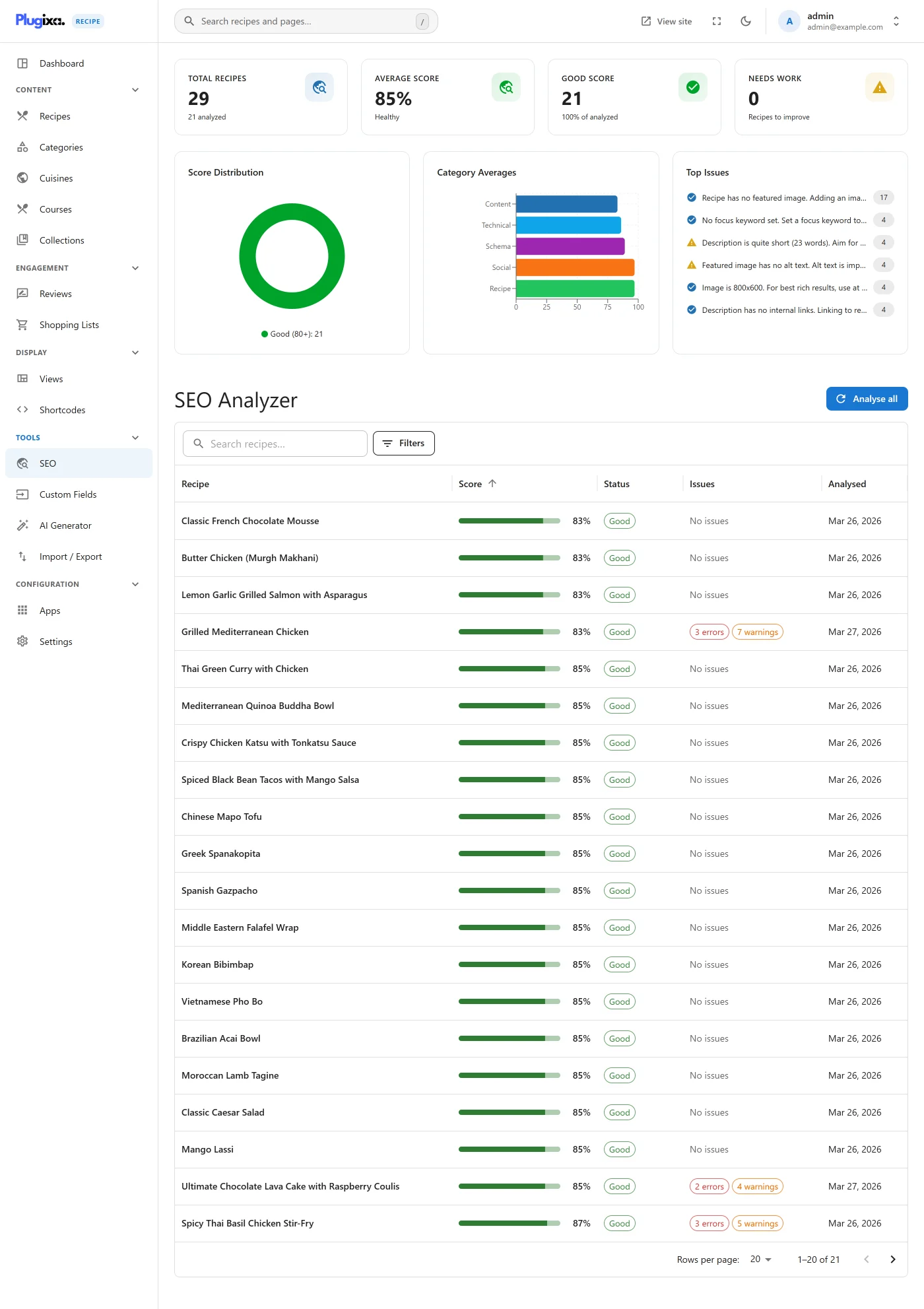
The dashboard shows:
- Your site’s average score across all recipes.
- Distribution (how many recipes in 0–49, 50–69, 70–89, 90–100).
- Top issues across the site (e.g., “32 recipes missing description”).
- A table of recipes sorted by score with per-row drill-down.
Running analysis
Click Analyze on the dashboard to queue a site-wide analysis. The work runs in batches of 10 recipes via the REST controller to stay within server request limits.
Individual recipes are re-analyzed automatically when you save them - no manual step required.
The SEO report (per recipe)
Click a recipe in the list to open its report. The report is grouped into five categories:
| Category | What’s checked |
|---|---|
| Content | Title length, description length, word count, ingredient / instruction presence, images, video |
| Technical | Slug quality, image ALT tags, internal links, permalink structure |
| Schema | JSON-LD presence, required fields for Recipe schema, valid nutrition |
| Social | Open Graph meta, Twitter Card meta, sharing image presence |
| Recipe | Recipe-specific: nutrition completeness, time fields, servings, difficulty, cuisine / category assignment |
Each check has:
- A type (
error,warning,info). - A score impact (points subtracted from 100 if failing).
- A human-readable message and suggestion.
Acting on suggestions
Click Apply suggestion on a check to jump directly to the recipe editor with the relevant field focused. Most fixes take seconds - the analyzer is designed to guide edits, not just grade them.
Category scoring
Each of the 5 categories gets a per-category score (0–100) based on its weighted checks:
content:   85
technical: 72
schema:    100
social:    68
recipe:    90
──────────────────
overall:   83 (weighted)
Preventing re-analysis
Some recipes are intentionally short (“my grandma’s one-line wisdom”). To skip them from the analyzer, toggle SEO analysis off on the recipe’s Extras tab.
Using the score
The cached seo_score column on recipes lets you:
- Filter the recipe list by score.
- Sort the recipe list:
[plugixa_recipe orderby="seo_score" order="DESC"]. - Hide low-scoring recipes from public output during a content-quality push.
Hooks
See HOOKS for the full SEO analyzer hook list.