

Contents
Custom fields - Plugixa CRM
Every business has a field nobody else needs. This is where yours goes, without a plugin fork.
Custom fields are part of the paid build. Like every paid feature here, the
code is simply absent from the free download rather than switched off: there is no
Custom fields item under Administration and /custom-fields is not a route. See
Free vs Pro, including what happens to
your answers if a subscription lapses - nothing is deleted.
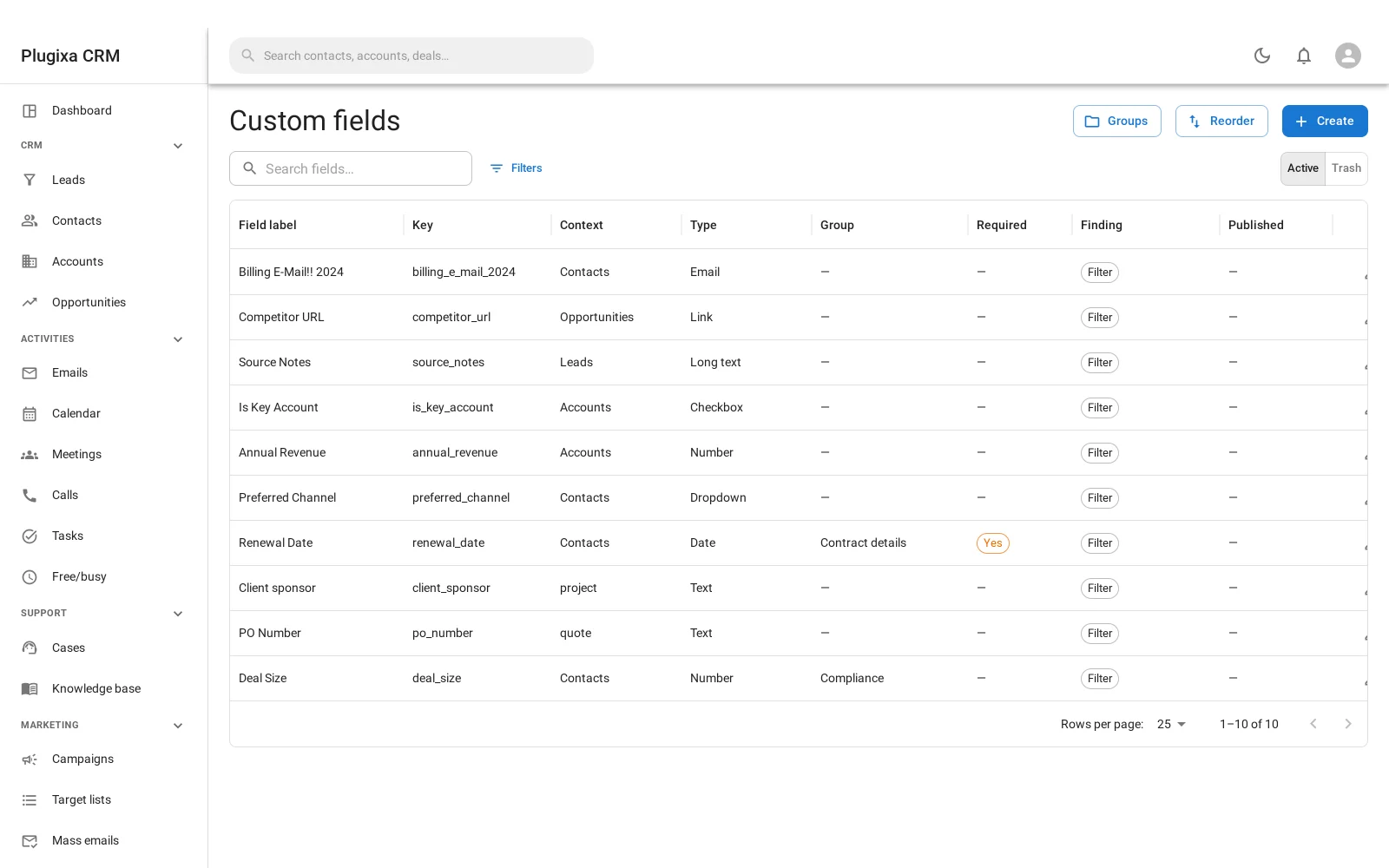
Ten types
| Type | Holds |
|---|---|
| Text | One line |
| Paragraph | Several |
| Rich text | Formatted content |
| Number | A number |
| Date | A date |
| Dropdown | One of a list you define |
| Checkbox | On or off |
| Link | A URL |
| Email address | An address |
| Attachments | One or more files |
The type decides where the answer is stored
This is not an implementation detail. It is the reason the feature is worth having.
A number is stored in a numeric column and a date in a date column, not as text. That is what makes these questions answerable, and answerable quickly:
- Deals where company size is over 5,000
- Contracts renewing before March
A field stored as text sorts 9 above 10 and cannot answer either question with an index. Typed storage is what separates a custom field from a note.
A field’s type locks once it has answers
Once records have answered a field, its type cannot be changed. The screen says so.
The reason is simple: the stored values could not be read back under the new type. A date column asked to return text, or text asked to return a number, does not convert - it fails or lies.
If you need a different type, create a new field. The old one can be removed once you have moved what you need.
Groups and order
Fields can be put into groups, which become sections on the form, and reordered within them. An entity with fifteen custom fields is still a form somebody can read if they are grouped sensibly.
On four entities
Contacts, accounts, leads and opportunities. A field belongs to one entity type, so the contact form does not grow every column anybody ever wanted anywhere.
Cases, documents and the rest are not offered. The server would accept them - the list of what a field may be defined against is a single array in the admin app - but no record screen outside those four renders the panel, so a field defined elsewhere could be saved and then never seen. That combination is how this feature once went on offering Quotes for thirteen versions after quotes were removed, so the list stays deliberately short and the two halves are derived from one another rather than maintained side by side.
They behave like real fields, with two limits worth knowing
A custom field is not a second-class citizen:
- It appears in filters on the list screen, grouped under their own heading and placed last so a long list of them cannot bury the entity’s own columns. A field can be taken out of the drawer individually without being deleted.
- It is searchable, for the text-like types, from the same box as everything else.
- It is exported, in both CSV and XLSX, and a number field is written as a real number rather than as text.
The two limits:
- Import does not map custom fields. Export writes them; the import mapper offers only the entity’s own columns. Bringing values in means setting them on the records afterwards.
- Field-level permissions do not reach them. Field-level ACL is declared against an entity’s own columns, and the access resolver has no concept of a custom-field key - so a custom field cannot be hidden from one role while the record stays visible. What does apply is the permission on the record: if somebody cannot read the contact, they read none of its custom fields either. Do not use a custom field to hold something only some readers of a record should see.
Troubleshooting
| Symptom | Usual cause |
|---|---|
| The type cannot be changed | Records have answered it. Create a new field instead. |
| A number sorts oddly | It was created as text. Typed storage is the fix, which means a new field. |
| The field is not on the form | It belongs to a different entity, or to one of the entities that do not carry the panel. Only contacts, accounts, leads and deals do. |
| It is missing from filters | Its “filterable” switch is off, or it belongs to a different entity. Roles do not filter this list. |
| A date filter finds nothing | Values entered before the field was a date field are not converted. |
| Attachments show as ids | They should render as files. Report it. |
| A colleague cannot see the field | Check whether they can see the RECORD. Field-level permissions do not apply to custom fields. |
| Deleting a field lost the answers | Yes. Removing a field removes what was stored in it. |
| There is no Custom fields screen at all | It is a paid feature and this is the free build. |
What to do next
- Where fields appear: Accounts and Contacts.
- Who can see a record at all: Roles, Teams and Permissions.
- Get values out: Import and Export.
- What is paid and what happens if you stop: Free vs Pro.