

Contents
On this page
Inbound email and email-to-case - Plugixa CRM
Point the CRM at a mailbox you already own and incoming mail arrives as records. Send it to a group address and it becomes a support case by itself.
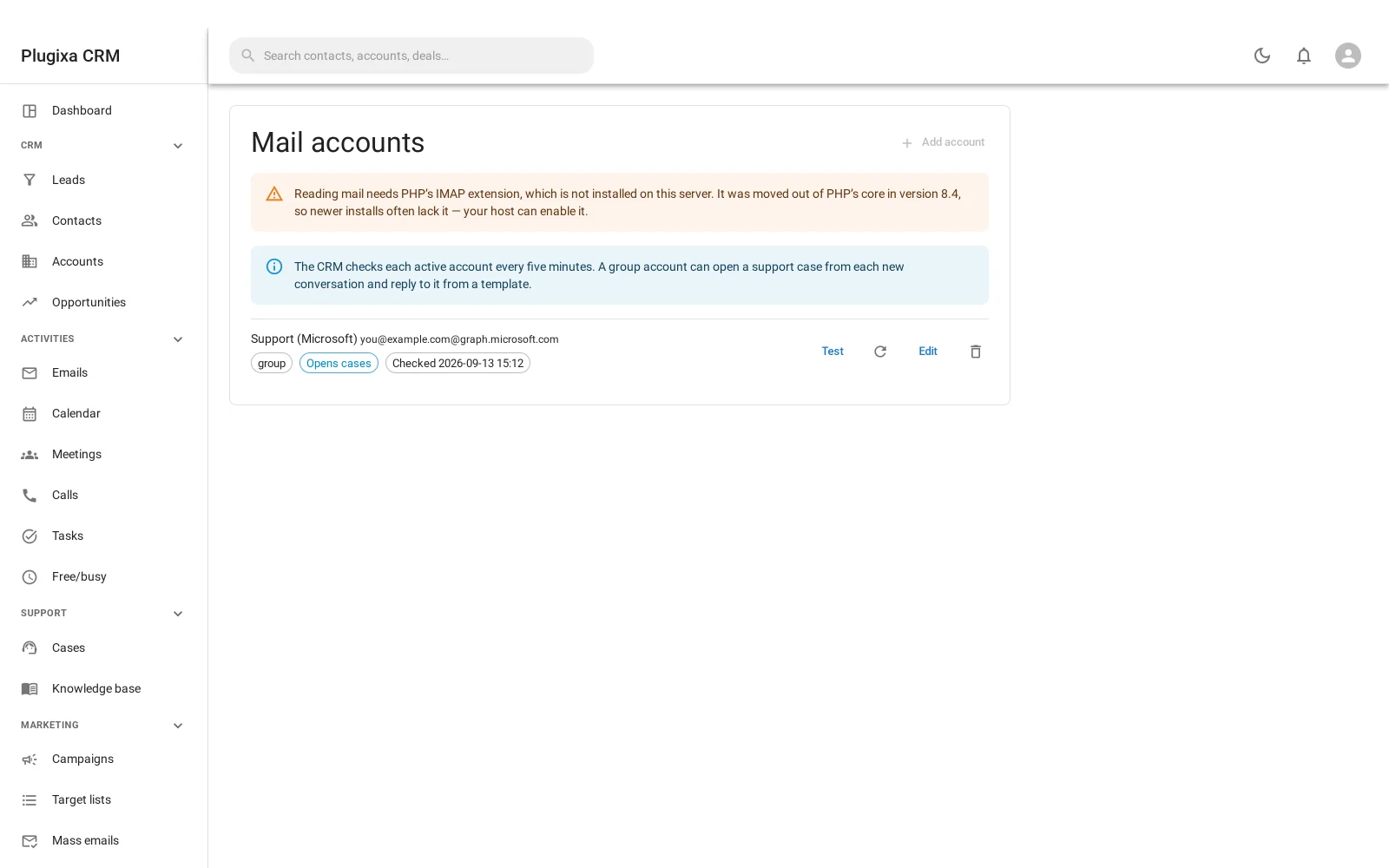
This is the only part of Plugixa CRM that talks to a server you do not control, and it is declared as such in the plugin’s
== External services ==section. It reads; it never sends. Sending is a separate feature.
Two kinds of mailbox
| Type | What it is for |
|---|---|
| Personal | One person’s mailbox. Their mail, filed against the records it concerns |
| Group | A shared address such as support@. This is the one that can open cases |
Only a group account with the case option switched on opens cases. A personal mailbox files mail against records and does nothing else, which is what you want: your own inbox should not be manufacturing support tickets.
Setting one up
Administration -> Mail accounts -> Create. You need the IMAP host, the port, the encryption, the username and the password, and which folder to monitor.
The password is encrypted before it is stored, using a key derived from your
site’s own security keys in wp-config.php. That protects it if your database is
exposed. It cannot protect it from somebody who can already read your site’s
files, and nothing can.
Test connection checks it before you save. Fetch now runs immediately rather than waiting.
The fetch runs every five minutes
On a scheduled job with its own five-minute recurrence, because WordPress ships nothing shorter than hourly and support mail sitting for an hour is support mail nobody answered.
Like all WordPress scheduling it depends on traffic unless you have a real cron.
A message read twice is stored once
Messages are keyed on their Message-ID, not on subject or date.
Every mail client on earth sets one, it is globally unique by construction, and it survives everything that would otherwise duplicate a conversation: a re-poll after an interruption, two accounts monitoring the same address, a folder move, a restore.
A message with no Message-ID is still stored, because a handful of automated senders omit it. It just cannot be de-duplicated the same way.
Email-to-case
A message to a monitored group address opens a case. A reply attaches to the case that already exists rather than opening a second one.
That second half is what decides whether the feature is usable at all. Without it, a three-message conversation is three cases, and your queue count stops meaning anything by the end of the first week.
How the thread is followed
Through the mail headers - In-Reply-To - which is the same mechanism every mail
client uses to draw a conversation.
That matters because of what it avoids: no subject-line tags, no token in the reply-to address, nothing for a customer to accidentally delete by editing the subject or starting a fresh compose. It works with whatever the customer happens to be writing from.
Who gets the case
| Strategy | Assigns to |
|---|---|
| None | Nobody. It sits in the queue |
| Round robin | The next person on the team, in turn |
| Least busy | Whoever has the fewest open cases |
Microsoft 365 mailboxes
Microsoft switched off password sign-in for mail in October 2022, so a Microsoft mailbox cannot be connected with a username and password at all. The premium Microsoft 365 connector PRO reads such a mailbox through the same sign-in used for the calendar, with nothing to type.
IMAP remains free and unchanged for every provider that still allows it.
Troubleshooting
| Symptom | Usual cause |
|---|---|
| Nothing is fetched | The account is inactive, WP-Cron has not run, or the credentials are wrong. Use Test connection. |
| Mail arrives but no case is opened | The account is personal, or the case option is off. Only group accounts open cases. |
| Every reply opens a new case | The reply has no In-Reply-To header, which happens when somebody composes fresh rather than replying. |
| The same message appears twice | It has no Message-ID, so it cannot be de-duplicated. |
| Connecting a Microsoft mailbox fails on the password | Microsoft disabled password sign-in for mail. Use the Microsoft 365 connector. |
| “Username or password is wrong” and it is not | See above: for Microsoft, it is neither true nor useful. |
| A case has no owner | The assignment strategy is set to none. |
| Fetching is slow or times out | Narrow the monitored folder. A whole archive is not a queue. |
What to do next
- What a case is: Cases.
- Send the reply: Sending Email.
- Connect a Microsoft mailbox: Microsoft 365 PRO.
- What leaves your site: Privacy and Data.
Quick Links
Share