

Contents
On this page
Tags, attributes, roles and exclusions - Plugixa Extra Product Options
The free plugin puts a group on all products, chosen products or categories. Pro adds more targets, exclusions and a choice of customers, in the same Where it shows settings.
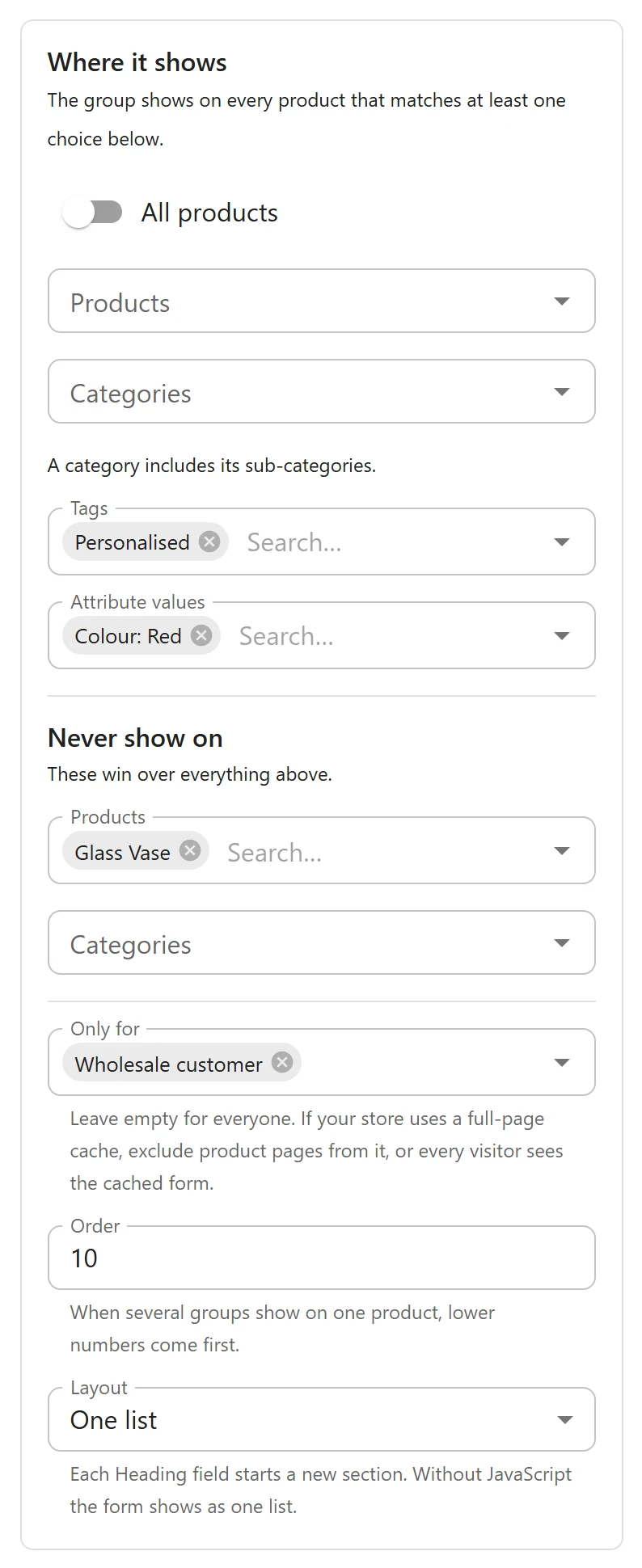
More targets
| Setting | The group shows on |
|---|---|
| Tags | Every product with one of the chosen product tags |
| Attribute values | Every product that has one of the chosen values of a global attribute, such as Color: Red or Material: Oak |
They add to products and categories: the group shows on every product that matches at least one target. For example, a Personalisation group can target the Personalised tag, and you only need to tag a product to give it the group.
Attribute values come from the attributes under Products > Attributes. A product matches when the value is set on the product, whether or not it is used for variations.
Never show on
Never show on lists products and categories the group must skip, whatever else matches. They win over everything above, sub-categories included. A Gift options group can show on All products and never on the Gift cards category.
Only for some customers
Only for limits the group to customers with one of the chosen roles. Pick Guest (not signed in) for visitors who are not signed in. Leave it empty for Everyone.
Uses:
- A Trade options group for the Wholesale customer role only.
- A Delivery contact group asking guests for a phone number, which signed-in customers already gave.
On the product page and in the cart, the group only applies to customers with a chosen role.
Page caching
A group for some roles makes the product page differ from one visitor to another. If your store uses a full-page cache, exclude product pages from it, or make sure it does not serve cached pages to signed-in customers, or every visitor sees the cached form. The editor reminds you of this under Only for.
The summary in the list
The Applies to column of the groups list sums everything up, such as 2 categories, 1 tag, 1 excluded, some customers only.
Fast on any store
Tags and attribute values are looked up with the same single cached query as products and categories. Exclusions and roles are checked for each visit, after the cache, because a role belongs to the shopper, not to the product.
Quick Links
Share