

Contents
On this page
Per character, per unit and one-time fees - Plugixa Extra Product Options
Pro adds three price types for prices that grow with what the customer types, or that are paid once whatever the quantity.
| Price type | For | Charged |
|---|---|---|
| Per character | Text and text area fields | The amount times the characters typed, per item |
| Per unit typed | Number and slider fields | The amount times the number typed, per item |
| One-time fee | Any field, and any choice | The amount once per cart line, whatever the quantity |
Set them like any price: under Pricing in a field’s General tab, or on a choice in the Options tab for a one-time fee.
Per character
For engraving, embroidery or lettering. With Per character at 0.50, the text Emma & Leo costs 4.00: eight characters are charged. Spaces, tabs and line breaks are free, as most engraving shops do it. Every other character counts, including punctuation and emoji.
Beside the field, the product page shows the price as (+ 0.50 per character), and the live total follows each letter typed.
Combine it with Max. characters to cap the text, and with Customers must fill this in when the engraving is part of the product.
Per unit typed
For products sold by length, area or time, as an extra on top of the product. With Per unit typed at 2.40 on a Metres of fabric number field, typing 3.5 adds 8.40.
Set the field’s Minimum, Maximum and, for decimals, its Step, so customers can only type sizes you sell.
One-time fee
For a setup cost, a printing plate, artwork or a design check: paid once per cart line, whatever the quantity. An order of 50 printed mugs with a Logo setup fee of 25.00 pays 25.00 once, not 50 times.
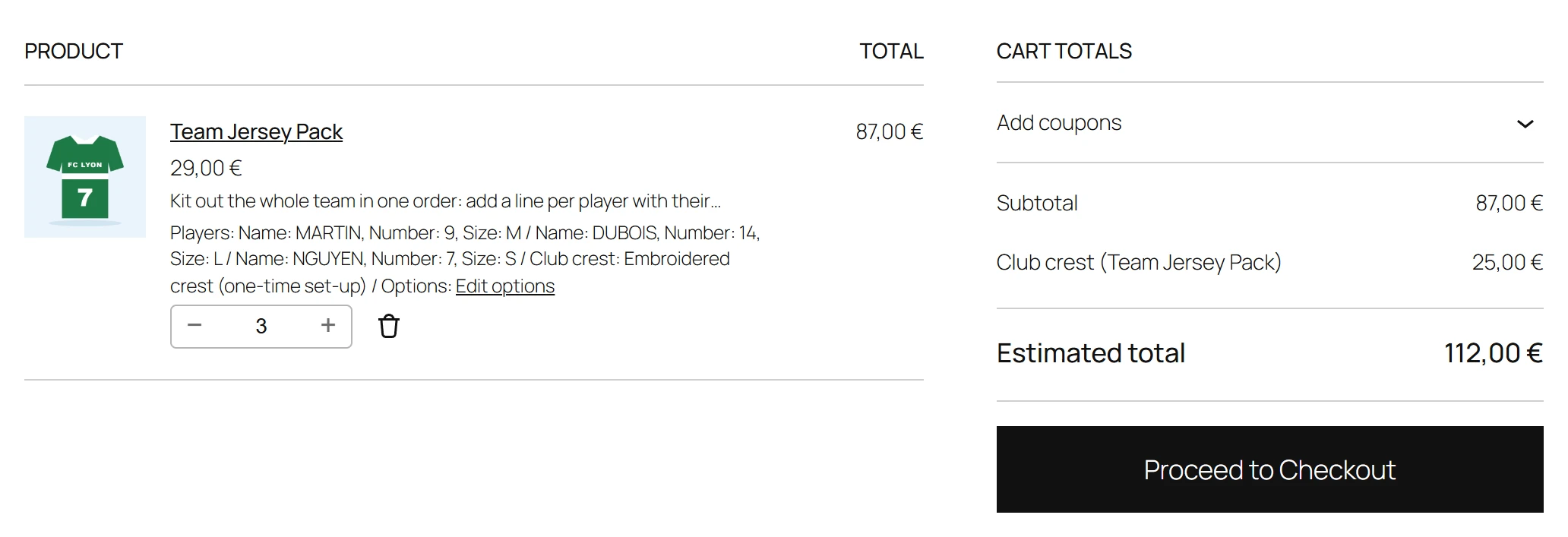
- On the product page, the live total shows the fee on its own One-time fees line, not in the per-item options.
- In the cart, the fee is a separate fee line named after the option and the product, such as Logo setup (Printed mug). It is taxed like the product.
- A one-time fee can sit on a whole field (charged when the field is filled in) or on a single choice (charged when that choice is picked).
If the customer adds the same product twice with different options, each cart line pays its own fee.
Related
- Combine several values into one price: Price formulas.
- Put a sale price on any of these: Sale prices.
Quick Links
Share