

Contents
Switch from another plugin - Plugixa Extra Product Options
Moving from another product options plugin should not mean rebuilding every form by hand. Pro reads the other plugin’s data and creates matching draft groups. The other plugin and its data are not changed.
| Plugin | What is brought in |
|---|---|
| WooCommerce Product Add-Ons (WooCommerce.com) | Global add-on groups with their categories and order, and add-ons set on single products |
| YITH WooCommerce Product Add-Ons & Extra Options (version 2 and later) | Blocks with their products, categories, exclusions and roles, and their add-ons |
| PPOM for WooCommerce | Field groups with their categories, tags and products |
Before you start
- Keep the other plugin installed. It can be deactivated: its data is still there to read.
- Make a backup of your site, as before any big change.
Bringing them in
- On the Option groups list, click Switch from….
- The Bring in your options from another plugin dialog lists each plugin it found, with what it holds, such as Sets of options: 12 · Fields: 47.
- Click Bring them in. The page says 12 draft group(s) created.
- Read the list under Please check these before publishing: (see below).
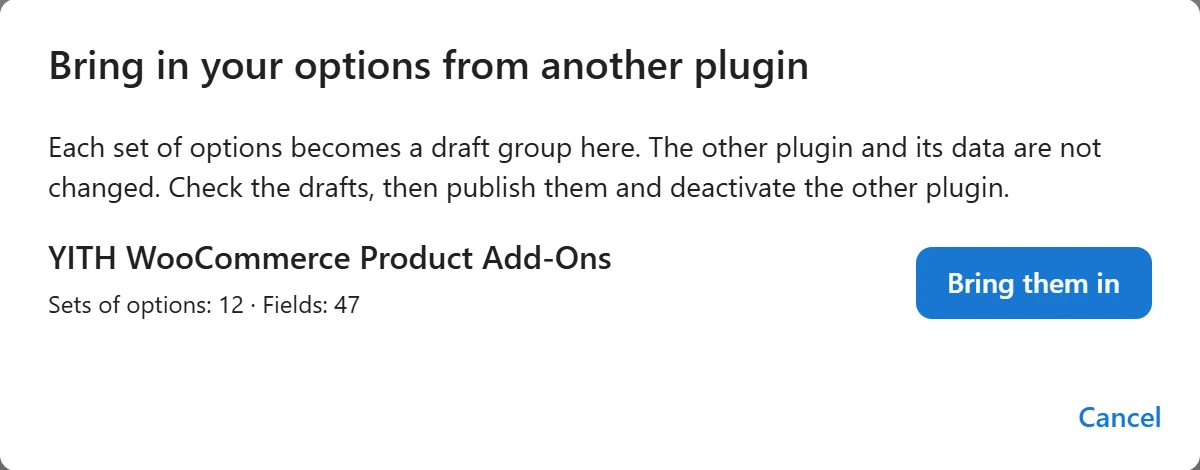
Each set of options becomes one draft group: nothing changes on the store yet.
Check, then publish
Field types, prices, required fields, choices, limits and show/hide rules are carried over wherever there is an equivalent. What has no exact equivalent is imported as close as possible and listed under Please check these before publishing, by field, for example:
- Card message: a show/hide rule could not be carried over; set it again.
- Gift box: added other products; set it again with the “Linked product” price.
Open each draft, check the notes, compare it with the product page as it is today, and publish. Then deactivate the other plugin, so customers do not see both forms at once.
Running it again
Running Switch from… again does not create the same groups twice: the dialog says 12 were already imported. It only brings in sets of options added since. To start over, delete the drafts first.
Past orders
Orders placed with the other plugin keep their options as the other plugin saved them. Only new orders use Plugixa Extra Product Options.
Quick Links
Share