

Contents
On this page
Price tables - Plugixa Extra Product Options
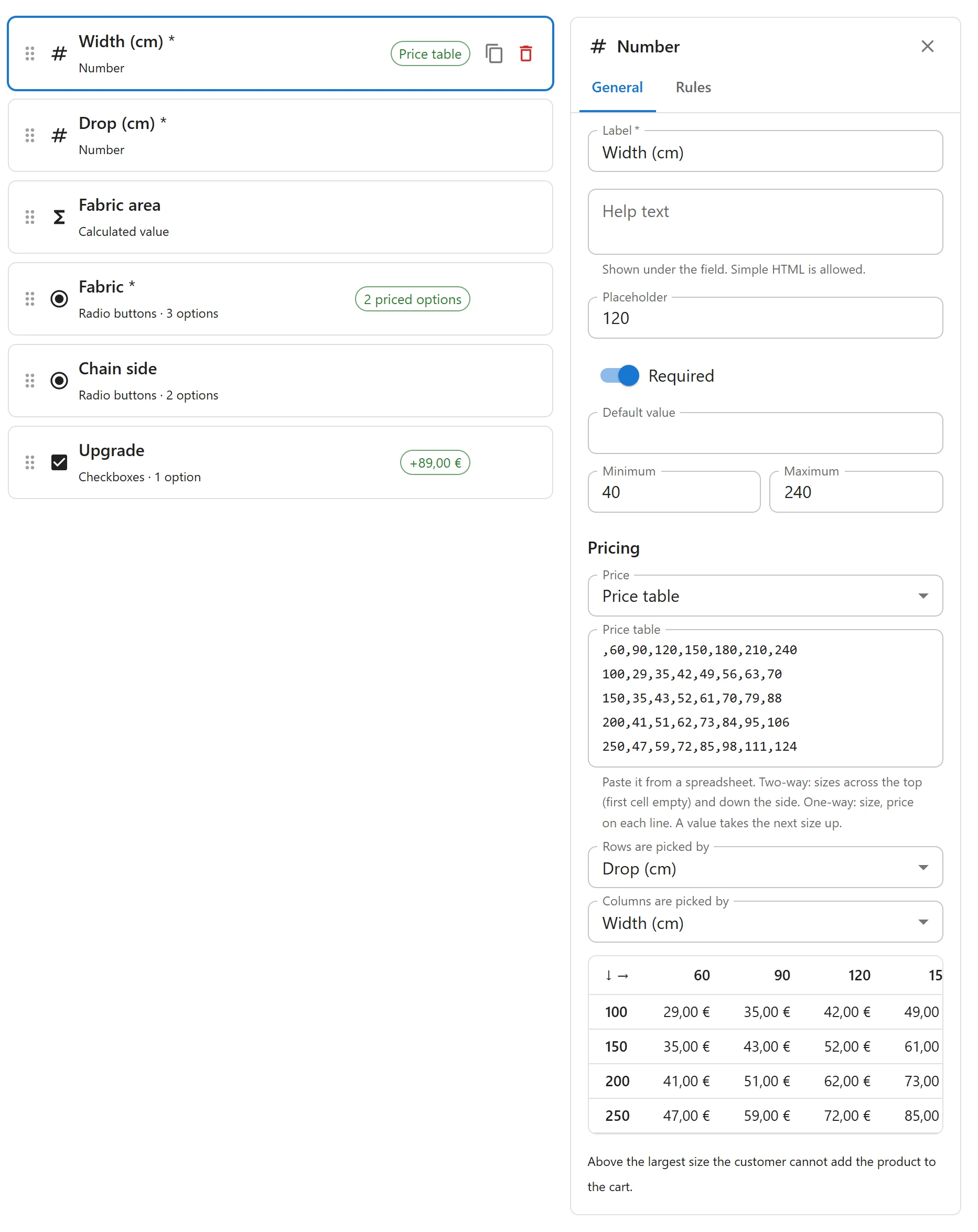
A price table prices an option from a list of sizes, the way blinds, glass, frames and banners are sold: “a blind up to 120 wide and 80 high costs 22”. You paste the table from a spreadsheet, and the plugin finds the price for the sizes the customer types.
Two kinds of tables
Two-way: sizes across the top and down the side, prices in between. Leave the first cell empty.
| 100 | 150 | 200 | |
|---|---|---|---|
| 50 | 10 | 14 | 18 |
| 100 | 16 | 22 | 28 |
| 150 | 22 | 30 | 38 |
One-way: one size and one price per line.
| Size | Price |
|---|---|
| 50 | 8 |
| 100 | 12 |
| 200 | 20 |
Setting up a table
- Add the Number fields that give the sizes, for example Width (cm) and Height (cm).
- Select the field that should carry the price, usually the last size field.
- Under Pricing, set Price to Price table.
- Paste the table into Price table, straight from your spreadsheet.
- Pick the fields that choose the price: for a two-way table, Rows are picked by and Columns are picked by; for a one-way table, Size is picked by.
You can also pick Quantity ordered as a size, which turns a one-way table into prices by quantity: up to 10 items, up to 50 items, and so on.
How sizes are matched
Sizes are up to: a value takes the first size at or above it. With the table above, a blind 120 wide and 80 high is priced as 150 by 100: 22. A value smaller than the first size takes the first size.
Above the largest size there is no price. The customer cannot add the product to the cart, and sees We have no price for this size. Please choose a smaller size. Set the size fields’ Maximum to your largest sizes so customers know the limit before they type.
Pasting from a spreadsheet
Copy the cells in Excel, Google Sheets or LibreOffice and paste them. Tabs, commas and
semicolons all work as separators. When cells are separated by tabs or semicolons, a comma in a
number is read as the decimal mark, so 12,50 is 12.50.
The editor checks the table and tells you what is wrong:
- The price table has a cell that is not a number, with the cell.
- Line 3 of the price table should have 4 cells.
- The price table lists the same size twice.
A group cannot be published while a table has an error or its size fields are not chosen.
The price is per item
A table price is charged once per item, like any field price, and only when the field carrying it is filled in. It is not affected by sale prices or discounts by role: the table is the price.
Related
- When the price follows a rule rather than a table: Price formulas.
Quick Links
Share