

Contents
On this page
Checkout and redemption - Plugixa PDF Vouchers for WooCommerce
A voucher is spent through the coupon field of the cart or checkout. It works the same in the Classic Cart and Checkout and in the Block Cart and Checkout.
Spend a voucher
- The customer adds products to the cart.
- They type the voucher code in the coupon field and apply it. Letter case, spaces and dashes do
not matter:
px-m9p2-fu55andPXM9P2FU55find the same voucher. - The cart shows Gift voucher applied. Available balance: followed by the balance.
- The voucher pays for as much of the order as its balance covers. The customer pays the rest with any payment method.
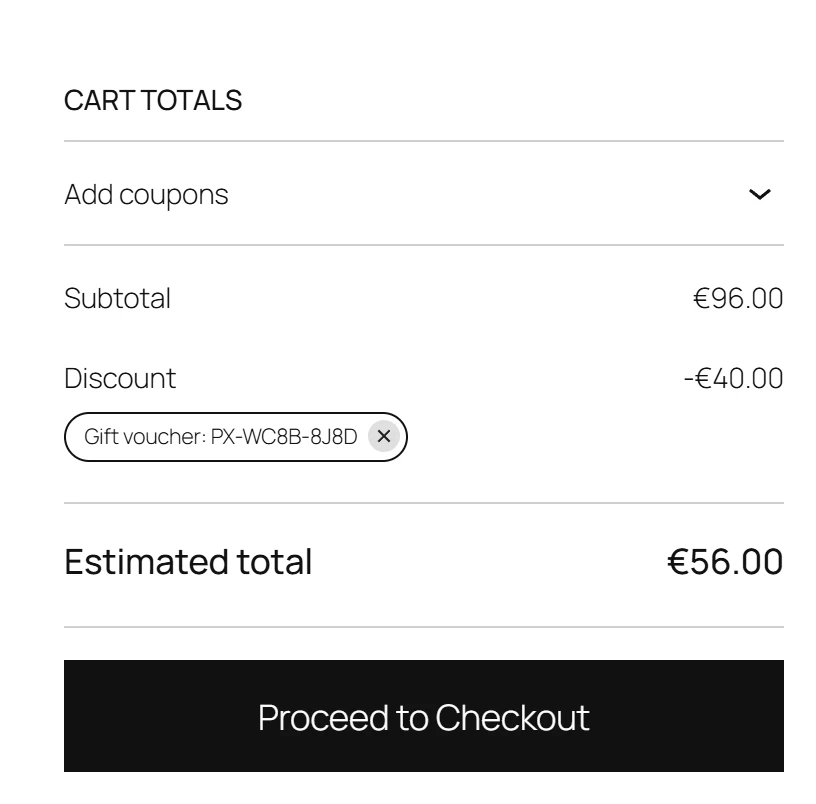
In the cart totals, the voucher reads Gift voucher: followed by the code.
A customer can use several vouchers on one order, and a voucher together with a regular WooCommerce coupon.
Partial redemption
When the order costs less than the balance, only what the order needs is taken. A gift card keeps the rest for the next order, as many times as it takes, unless its Number of uses is limited. A single-use voucher closes after its first use, whatever is left on it. See Voucher products.
The voucher is applied like a fixed WooCommerce coupon. WooCommerce takes it off the order the same way it takes off a fixed cart coupon.
What a voucher can pay for
- A gift card pays for every product in the cart except other vouchers.
- A product voucher pays only for its own products or categories. Other lines are paid in full.
- No voucher pays for a voucher product, unless Allow paying for a voucher with another voucher is ticked in Settings.
How the money moves
The balance changes in three steps, each written to the voucher’s history:
| Step | When | What happens |
|---|---|---|
| Hold | The order is placed | The amount the order takes is reserved on the voucher. |
| Redeem | The order is paid (Processing or Completed) | The reservation becomes final. |
| Release | The payment fails or the order is cancelled | The reserved amount goes back on the voucher. |
An order that is never paid gives its reservation back after Release unpaid holds after (minutes), 60 minutes by default. Orders On hold, such as bank transfers, keep their reservation until they are paid or cancelled. A check runs every hour.
If the customer goes back and submits the checkout again, the earlier reservation is released first, so the voucher is never reserved twice for one order.
A voucher cannot be spent twice. When two people check out with the same code at the same moment, only one of them gets the balance; the other sees Your gift voucher balance changed while you were checking out. Please review your order and try again.
Orders created by hand in WooCommerce > Orders with a voucher code are charged when they are set to Processing or Completed.
Messages the customer can see
| Message | Why |
|---|---|
| This voucher has no balance left. | The balance is spent. |
| This voucher has already been used. | A used-up voucher. |
| This voucher has expired. | Its expiry date has passed. |
| This voucher is not active yet. | A pending voucher, for example a physical card not shipped yet. |
| This voucher is no longer valid. | The voucher was voided. |
| A voucher cannot be used to buy another voucher. | The cart holds only voucher products. |
| This voucher cannot be used for the products in your cart. | A product voucher with none of its products in the cart. |
| This voucher can only be used when paying in followed by a currency | The shop shows another currency than the voucher’s. See Multi-currency PRO. |
A code that is not a voucher and not a WooCommerce coupon gets WooCommerce’s usual “does not exist” message.
Protection against guessing codes
A voucher code is worth money, so the coupon field is protected. A visitor who enters 10 codes in 15 minutes that are neither vouchers nor real coupons is locked for 30 minutes. During the lock no new voucher code works for them, even a correct one, and they see the same message as for a wrong code. Vouchers already in their cart keep working. Staff who can redeem vouchers are never locked.
The limits can be changed with the plugixa_pdfv_code_guess_limits filter. Sites behind a proxy
can pass the real visitor address with plugixa_pdfv_client_ip. See
Hooks.
When an order is refunded or cancelled
A cancelled or fully refunded order gives back what it took from each voucher, and the order notes say how much went back to which voucher. See Refunds and cancellations.
Redeem at the counter
To take a voucher in your shop, open it in Plugixa PDF Vouchers > Vouchers, click Redeem and enter the amount. See Voucher details and history. Pro adds Scan to redeem PRO on a phone and Plugixa POS.
Quick Links
Share