

Contents
On this page
Top-ups - Plugixa PDF Vouchers for WooCommerce
With top-ups, a customer reloads a gift card they already own. The amount they pay is added to that card’s balance; no new code is made.
Turn it on for a product
- Edit a voucher product and open its PDF Voucher tab.
- Tick Top-ups: Buyers can add this amount to a gift card they already have, instead of getting a new one.
- Click Update.
The product stays a normal voucher product: buyers can still get a new voucher from it.
How the customer tops up
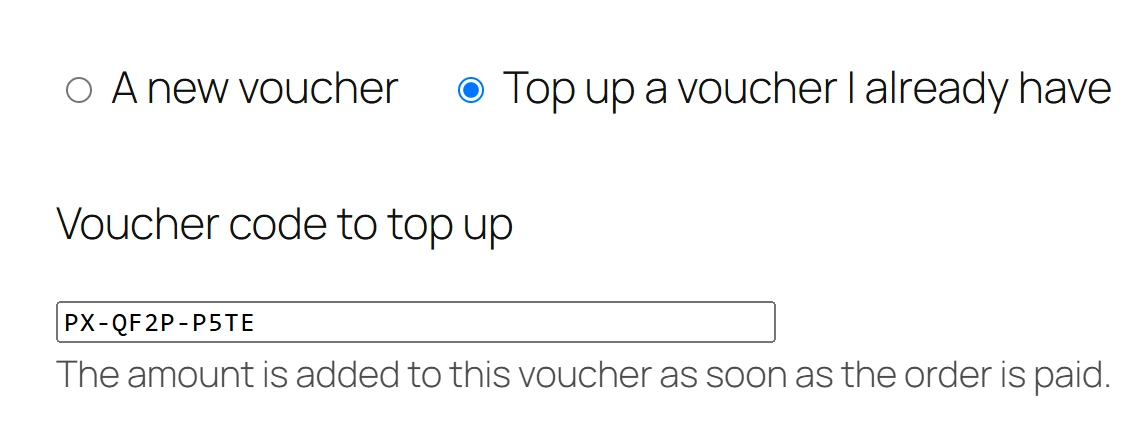
- On the product page, they choose Top up a voucher I already have instead of A new voucher.
- They type the Voucher code to top up. The amount is added to this voucher as soon as the order is paid.
- They choose the amount (a variation, or any amount with Custom amounts) and add it to the cart.
A top-up has no recipient: the gift form fields are not used. The cart line and the order show Top-up for with the code, half hidden.
Which vouchers can be topped up
Only gift cards that are active or used up, and not expired. A product voucher cannot be reloaded, because it is tied to its products and its number of uses.
For any other code, the product page says This voucher cannot be topped up. Please check the code. The message is the same whatever the reason, so the form cannot be used to find out whether a code exists. It also counts towards the same code-guessing lock as the coupon field.
When the order is paid
The amount is added to the voucher with a Value added line in its history, and the order notes say so, for example €50.00 was added to voucher followed by the masked code. A used-up gift card becomes active again.
Bonus value and campaigns apply to top-ups too: a 10% bonus on a €50 top-up adds €55.
If the voucher stopped being reloadable between the cart and the payment (it was voided, say), the customer still gets the value: a new voucher is issued for the amount, and the order notes say Voucher (code) could no longer be topped up, so a new voucher was issued for this amount instead.
When the voucher’s currency differs from the order’s, the amount is converted with the rates of your multi-currency plugin. See Multi-currency.
Cancelled or refunded top-ups
If the top-up order is cancelled or refunded, the amount is taken back off the voucher. If part of it was already spent, only what is left is taken back and the order notes say The top-up of voucher (code) was taken back, but (amount) of it had already been spent.
Quick Links
Share