

Contents
On this page
Refunds and cancellations - Plugixa PDF Vouchers for WooCommerce
Vouchers follow the status of their WooCommerce orders. There are two cases: an order that bought a voucher, and an order that was paid with a voucher.
An order paid with a voucher
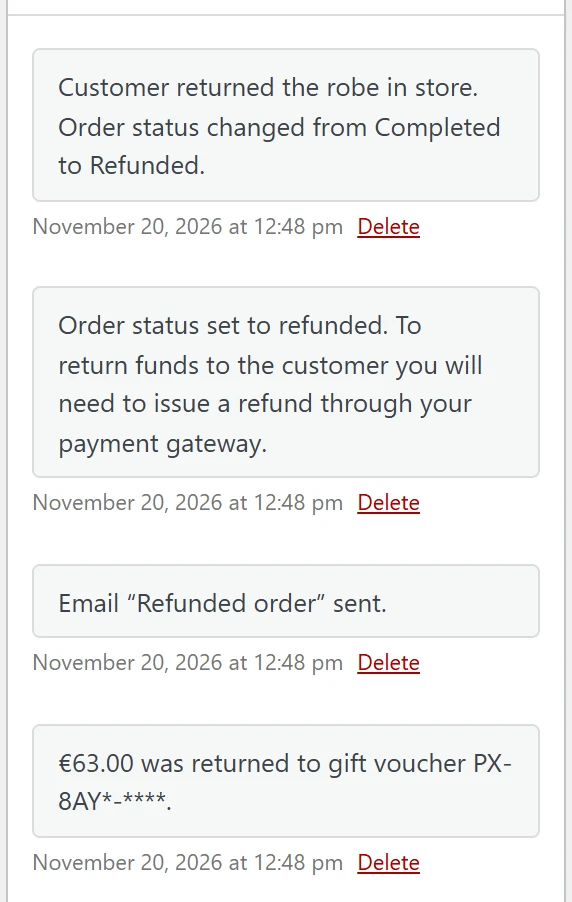
When an order that used a voucher is set to Cancelled or Refunded:
- An amount still reserved on the voucher (an unpaid order) is Released.
- An amount already spent is put back on the voucher as Refunded to voucher.
- The order notes say how much went back to which voucher, for example €20.00 was returned to gift voucher followed by the masked code.
A used-up voucher that gets money back becomes active again. A voucher that expired or was voided in the meantime still receives the money in its history, but stays closed: open it and change its expiry date if the customer should be able to spend it.
If the payment of an order fails (Failed), its reservation is released at once.
An order that bought a voucher
When the order that bought vouchers is set to Cancelled or Refunded, its vouchers are Voided: the codes stop working and what was left on them is closed.
If part of a voucher had already been spent, it is voided all the same and the order notes warn you: Voucher (code) was voided, but (amount) of it had already been spent. Decide with the customer what to do about the spent part.
Vouchers that already expired or were voided are left as they are.
Partial refunds
A partial refund in WooCommerce (an amount, not the whole order) does not change any voucher:
- For an order paid with a voucher, the refund goes back through the payment method as usual. To put money back on the voucher instead, use Adjust balance on the voucher with the amount and a reason. See Voucher details and history.
- For an order that bought several vouchers, refunding one unit before the vouchers are created means that unit gets no voucher. Once vouchers exist, void the one you refunded by hand.
Refund as store credit
Pro adds refund as store credit PRO: instead of returning money to the card, the refund goes onto a voucher in the same step, and the order gets a real WooCommerce refund. See Store credit and wallet.
Expired and voided vouchers
- A voucher closed by its expiry date can be reopened by moving its expiry date into the future.
- A voided voucher cannot be reopened. Create a new voucher by hand if needed. See Vouchers.
Quick Links
Share