

Contents
On this page
Service vouchers - Plugixa PDF Vouchers for WooCommerce
A service voucher is sold for an experience rather than an amount: “1 massage”, “Dinner for two”, “5 yoga classes”. Staff mark sessions as used, and can note an appointment.
Make a service voucher product
- Edit a voucher product and open its PDF Voucher tab.
- Fill in Service, for example
Massage, 60 minutes: Fill this in to sell a service voucher: it is used by sessions instead of by amount, and each session takes an equal share of its value. - Set Sessions, from 1 to 100.
- Click Update.

Vouchers sold from this product are product vouchers that count sessions. Their number of uses is the number of sessions.
The money behind the sessions
A service voucher keeps its money value, so the outstanding balance, the history and VAT stay exact. Each session takes an equal share of what is left; the last session takes the rest. For example, a 5-class voucher sold for €60 uses €12 per class.
Use a session
- Open the voucher in Plugixa PDF Vouchers > Vouchers.
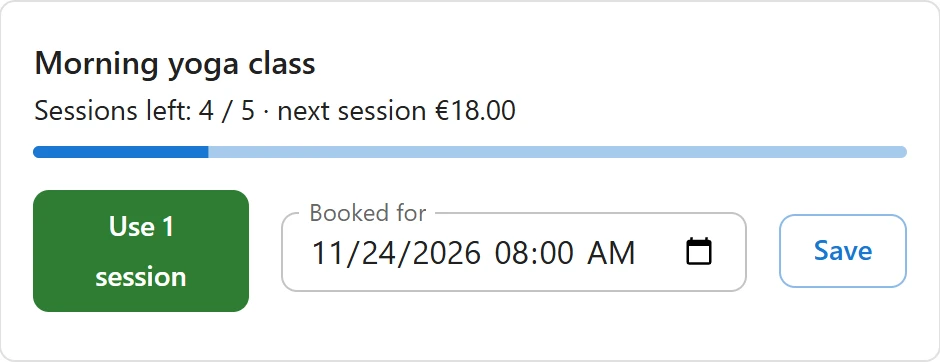
- The service panel shows Sessions left and what the next session is worth.
- Click Use 1 session.
The history gets a Redeemed line with the note Session 1 of 5. After the last session the voucher is used up. When no session is left, the plugin says No sessions are left on this voucher.
Using a session needs the redeem permission, so counter staff can do it. See Staff access.
Note an appointment
In the same panel, enter a date and time under Booked for and click Save. Clear removes it. This is a note for your staff: the plugin does not send reminders or manage a calendar. Noting an appointment needs the edit permission.
On the PDF
Three more placeholders are available in your designs:
| Placeholder | Prints |
|---|---|
{service_name} |
The service, for example Massage, 60 minutes |
{sessions} |
The number of sessions |
{sessions_left} |
The sessions left |
See PDF designs.
Online
A service voucher is a product voucher: online, it pays only for the products or categories set on its product, and each order counts as one session.
Quick Links
Share