

Contents
On this page
The gift form - Plugixa PDF Vouchers for WooCommerce
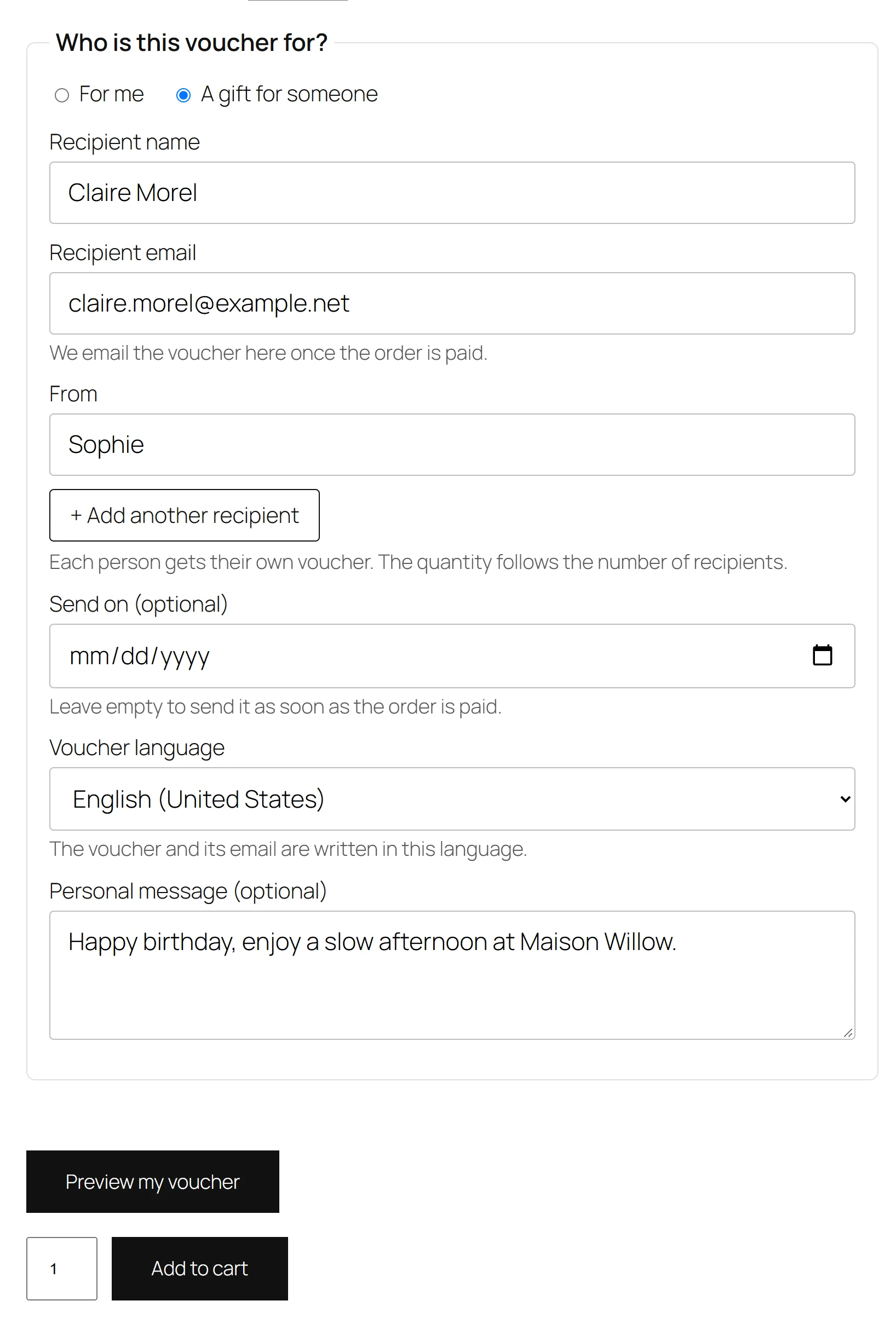
Every voucher product page shows a short form above the Add to cart button. The buyer says whether the voucher is for themselves or a gift, and for a gift, who it is for.
The fields
The form is titled Who is this voucher for? and has two choices.
| Choice | What the buyer fills in |
|---|---|
| For me | Only the optional Personal message. The voucher is made out to the billing name and sent to the billing email. |
| A gift for someone | Recipient name, Recipient email, From (the sender’s name) and the optional Personal message. |
Under Recipient email the form says We email the voucher here once the order is paid.
Checks before the cart
When the buyer clicks Add to cart for a gift, the plugin checks the form:
- Recipient name must be filled in: Please enter the name of the person the voucher is for.
- Recipient email must be a valid address: Please enter a valid email address for the recipient.
- The Personal message can be at most 300 characters.
If a check fails, the product page shows the message and keeps what the buyer typed.
A voucher product added to the cart without the form (from a shop page button, for example) is a voucher for the buyer.
In the cart and checkout
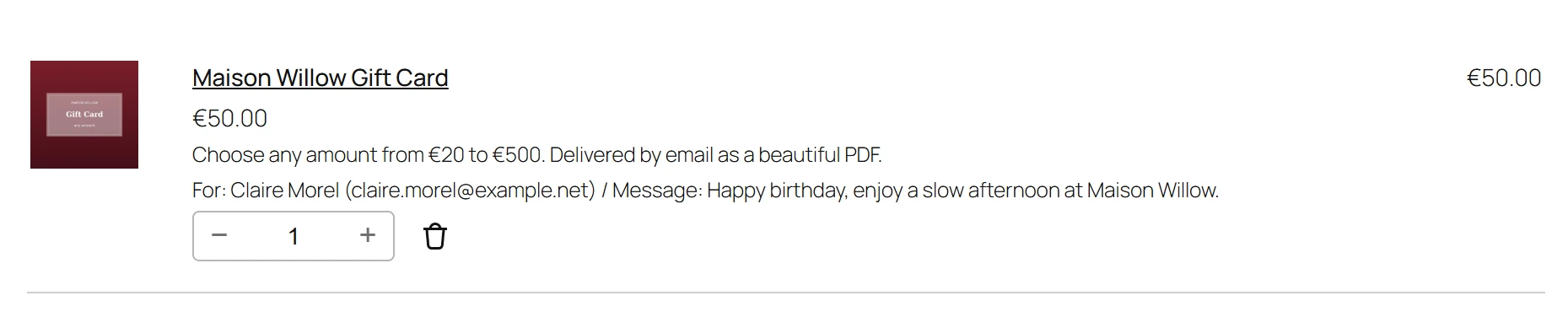
Two gifts to two different people stay two separate cart lines. Each line shows For, with the recipient’s name and email, and Message, with the first words of the message. This works in the Classic and the Block Cart and Checkout.
In the order
The details are saved on the order line. In the order screen, the customer’s order emails and My Account, they show as Voucher for, Recipient email, From and Message. The language the buyer was shopping in is saved too, so the PDF and the voucher email use it. See Languages, WPML and Polylang.
When the order is paid, each voucher is created with these details and emailed. See Emails and delivery.
| On the voucher | For me | A gift for someone |
|---|---|---|
| Recipient name | Billing first and last name | Recipient name |
| Recipient email | Billing email | Recipient email |
| From | Empty | From |
| Message | Personal message | Personal message |
The recipient name, sender and message are printed on the PDF when the design shows them. See PDF designs.
More fields with Pro
Pro adds fields to the same form, product by product:
- the amount, when the buyer chooses it: Custom amounts PRO
- more recipients in one purchase: Several recipients
- a delivery date: Scheduled delivery
- the recipient’s mobile number: SMS and WhatsApp
- the design and a photo: Buyer’s choice of design
To show the form on a page other than the product page, use the Voucher form block.
For developers
The form has hooks to add fields of your own: plugixa_pdfv_product_form_before,
plugixa_pdfv_product_form_gift_fields, plugixa_pdfv_posted_item_data,
plugixa_pdfv_validate_item_data and plugixa_pdfv_order_item_meta. See
Hooks.
Quick Links
Share