

Contents
Buyer's choice of design - Plugixa PDF Vouchers for WooCommerce
Instead of one design per product, you can offer a few and let the buyer choose: a birthday design, a thank-you design, a festive one. The buyer can also add a photo and see the real PDF before paying.
Offer designs on a product
- Edit a voucher product and open its PDF Voucher tab.
- Under Designs the buyer can choose, tick the designs to offer. Tick two or more to show a choice on the product page. None: the design above is used.
- Tick Buyer can add a photo if you want it: Shown in drag-and-drop designs that have an image named “photo”.
- Click Update.

Only active designs are offered, in the order they appear in the list. See PDF designs.
What the buyer does
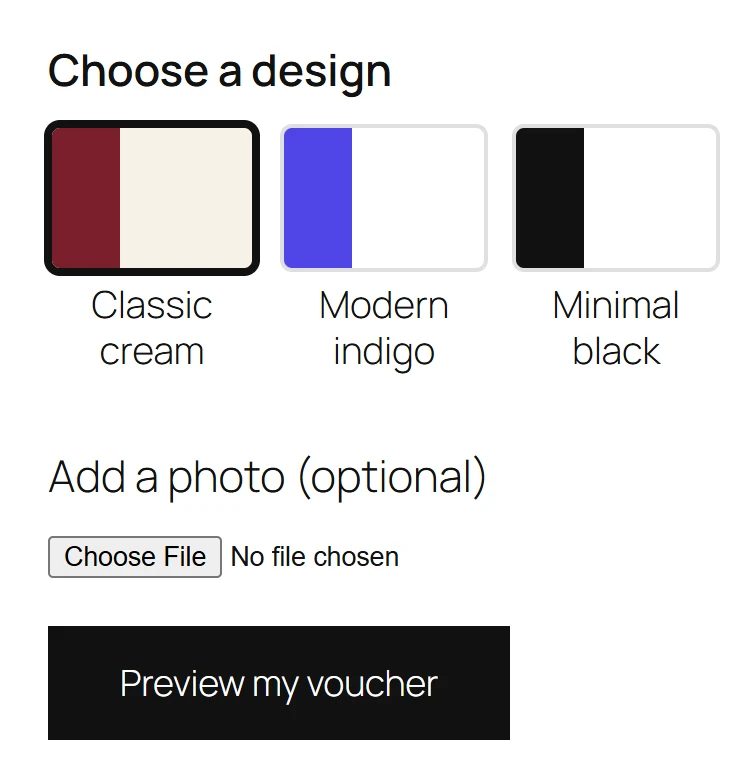
- Under Choose a design, they click the design they like.
- Optionally, under Add a photo (optional), they pick a JPEG, PNG or WebP photo of up to 8 MB. The page says Photo added. when it is uploaded.
- They click Preview my voucher to see the real PDF with their recipient, sender and message, then Open the PDF or Close.
- They add the voucher to the cart. The cart line shows Design and, with a photo, Photo: Added.
The voucher is issued with that design, and a PDF printed again later still uses it.
The preview
The preview is the real PDF of the chosen design, with a PREVIEW watermark and a code that redeems nothing. It only renders designs the product offers, and it is rate-limited, because shoppers use it without an account.
The photo
The photo appears in drag-and-drop designs that contain an image element named photo. Build
one in the Drag-and-drop designer and offer it
with Buyer can add a photo ticked. Ready-made layouts such as Classic have no photo spot.
To protect your customers’ privacy, the photo is never stored as sent: it is decoded, resized to at most 1600 pixels and saved again as a JPEG, which removes its metadata (phone photos can carry the GPS position of a home). Photos live in the plugin’s private uploads folder. A photo that never made it into an order is deleted after 3 days.
Messages the buyer may see: The photo must be smaller than 8 MB., Please choose a JPEG, PNG or WebP photo., The photo could not be uploaded., and in the cart The photo could not be found. Please add it again.
Quick Links
Share