

Contents
Year-end expiry rules - Plugixa PDF Vouchers for WooCommerce
In some countries, how long a voucher stays valid is counted in calendar years, not in days. In Germany, for example, a voucher is commonly treated as valid for three years from the end of the year it was bought: one bought on 2 March 2026 is valid until 31 December 2029. “N days after purchase” cannot express that, so Pro adds a year-end rule.
This page describes what the plugin computes. Check the rules that apply to your shop with your accountant or lawyer.
Set the rule on a product
- Edit a voucher product and open its PDF Voucher tab.
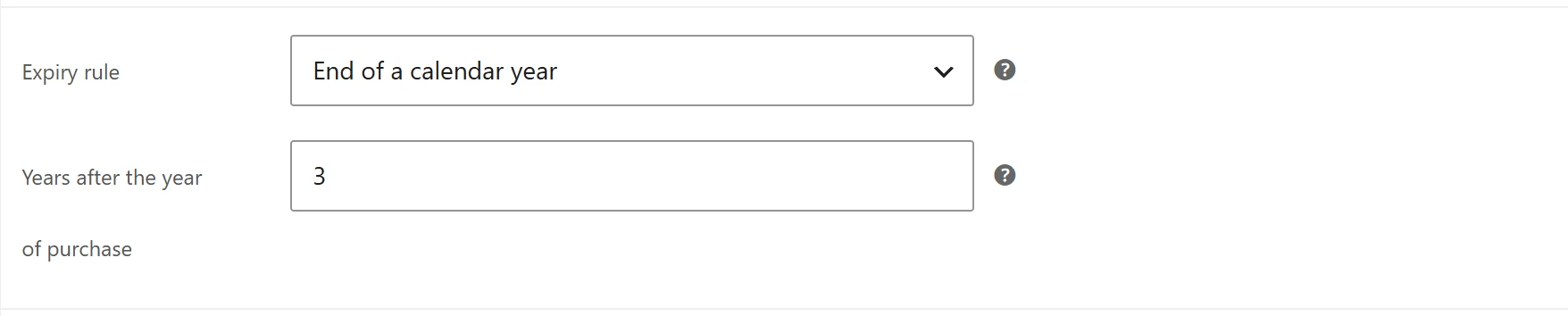
- Under Expiry rule, choose End of a calendar year: Ends on 31 December. Replaces the days and the fixed date.
- Set Years after the year of purchase, from 0 to 10 (3 by default): 0 = end of the year of purchase. 3 = the German rule: bought in 2026, valid until 31 December 2029.
- Click Update.
Use the days or date above goes back to the normal Valid for (days) and Or expires on settings. See Voucher products.
What the plugin computes
The voucher expires on 31 December at 23:59:59, in your store’s time zone, the chosen number of years after the year it is created.
| Bought on | Years | Valid until |
|---|---|---|
| 2 March 2026 | 0 | 31 December 2026 |
| 2 March 2026 | 1 | 31 December 2027 |
| 2 March 2026 | 3 | 31 December 2029 |
| 30 December 2026 | 3 | 31 December 2029 |
The rule replaces the product’s days and fixed date. The expiry date is fixed when the voucher is created; changing the rule later does not change existing vouchers. To change one voucher’s expiry, use Change on the voucher page. See Voucher details and history.
Remind customers before it ends
A balance that expires unspent is a lost return visit. Pair long validity with Expiry reminders, which email the holder 30 and 7 days before the end.
Quick Links
Share