

Contents
On this page
Dashboard - Plugixa PDF Vouchers for WooCommerce
The dashboard is the first screen of Plugixa PDF Vouchers. It greets you by first name and shows what your vouchers are worth today and what happened to them lately.
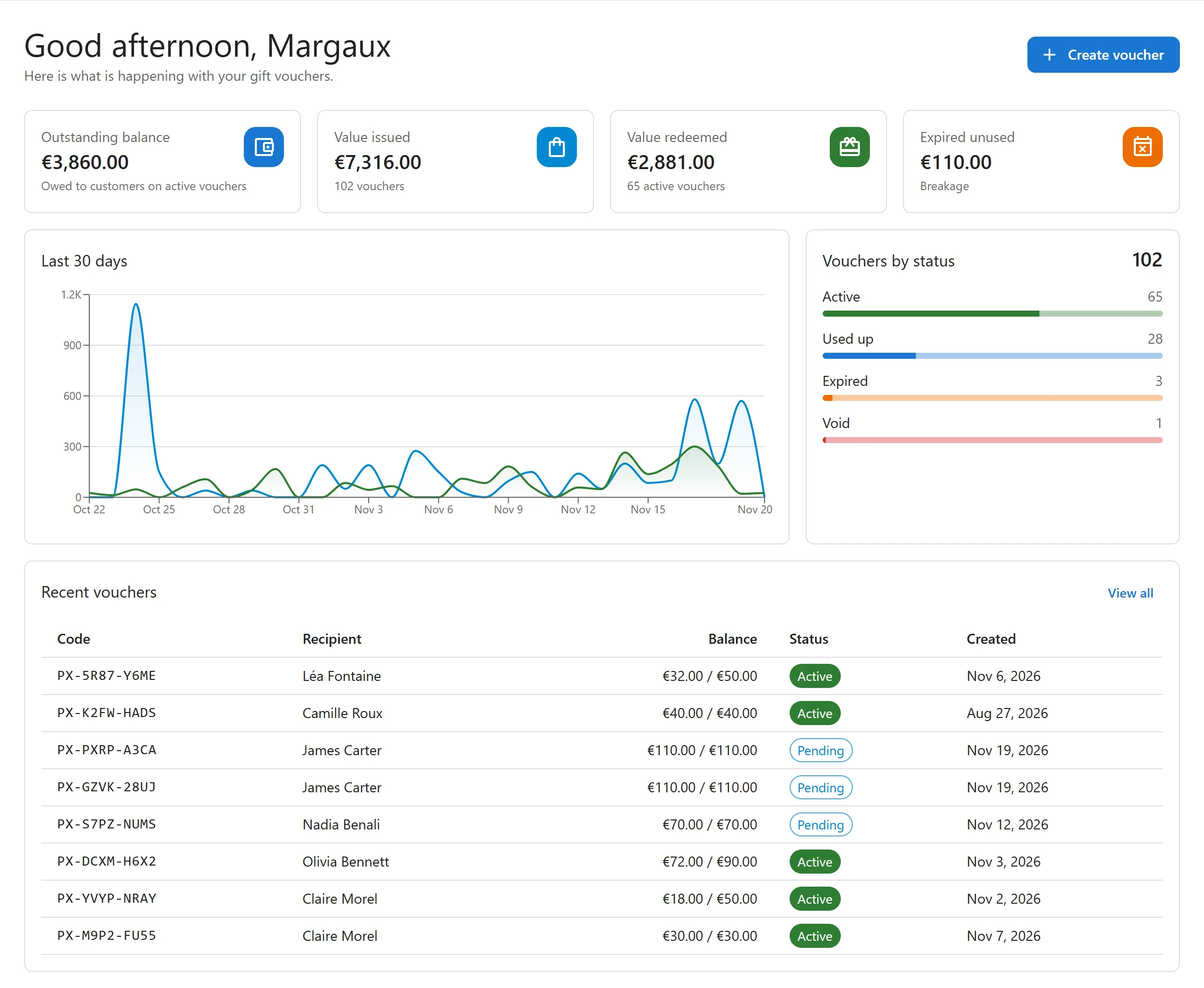
The four tiles
| Tile | What it counts | Line under the figure |
|---|---|---|
| Outstanding balance | The sum of the balances of all active vouchers. Click the tile to open the voucher list. | Owed to customers on active vouchers |
| Value issued | The total starting value of every voucher ever created, sold or made by hand. | The number of vouchers |
| Value redeemed | Everything spent from vouchers, online or at the counter, minus what was refunded back onto them. | The number of active vouchers |
| Expired unused | The value that was left on vouchers when they expired. | Breakage |
The outstanding balance is money you owe your customers. Only active vouchers count in it, so a pending voucher, such as a physical card not shipped yet, is left out until it becomes active.
Amounts are shown in your WooCommerce currency.
Last 30 days
The chart shows, day by day, the value Issued (new vouchers and value added) and the value Redeemed.
Vouchers by status
How many vouchers are Active, Used up, Expired and Void, with a bar for each and the total at the top.
Recent vouchers
The eight newest vouchers with their Code, Recipient, Balance (what is left out of the starting value), Status and Created date. Click a code to open the voucher, or View all for the full list. See Vouchers.
The Create voucher button at the top makes a voucher by hand. It only shows for users who are allowed to create vouchers (see Staff access).
A fresh install
Until the first voucher exists, the dashboard says No vouchers yet. and points you to Sell as a voucher on a product. If the setup wizard was not finished, a banner says A few steps are left to get your first voucher on sale. with a Finish setup button. See Getting started.
More figures with Pro
Reports and exports PRO show the same figures over any period, with your top voucher products, CSV exports and a liability statement for your accountant.
Quick Links
Share