

Contents
On this page
SMS and WhatsApp - Plugixa PDF Vouchers for WooCommerce
With a Twilio account, the recipient gets the voucher code by text message or WhatsApp as well as by email: a short message with the code and a link to the PDF.
Set up Twilio
You need a Twilio account (twilio.com) with a phone number that can send text messages, and for WhatsApp a WhatsApp sender approved by Twilio. Messages are sent and billed through your own account; Twilio’s terms and privacy policy apply.
- Go to Plugixa PDF Vouchers > Settings, box Text message and WhatsApp.
- Enter your Account SID (it starts with
ACand has 34 characters) and Auth token, from the Twilio console. - Enter Send text messages from: your Twilio number in international format, for example
+33612345678. - Optionally enter Send WhatsApp from (optional): your WhatsApp sender number.
- Click Save.
- Type your own mobile in Send a test to, pick Text message or WhatsApp and click Send test. You should receive Test message from (your site): gift voucher messages are working.
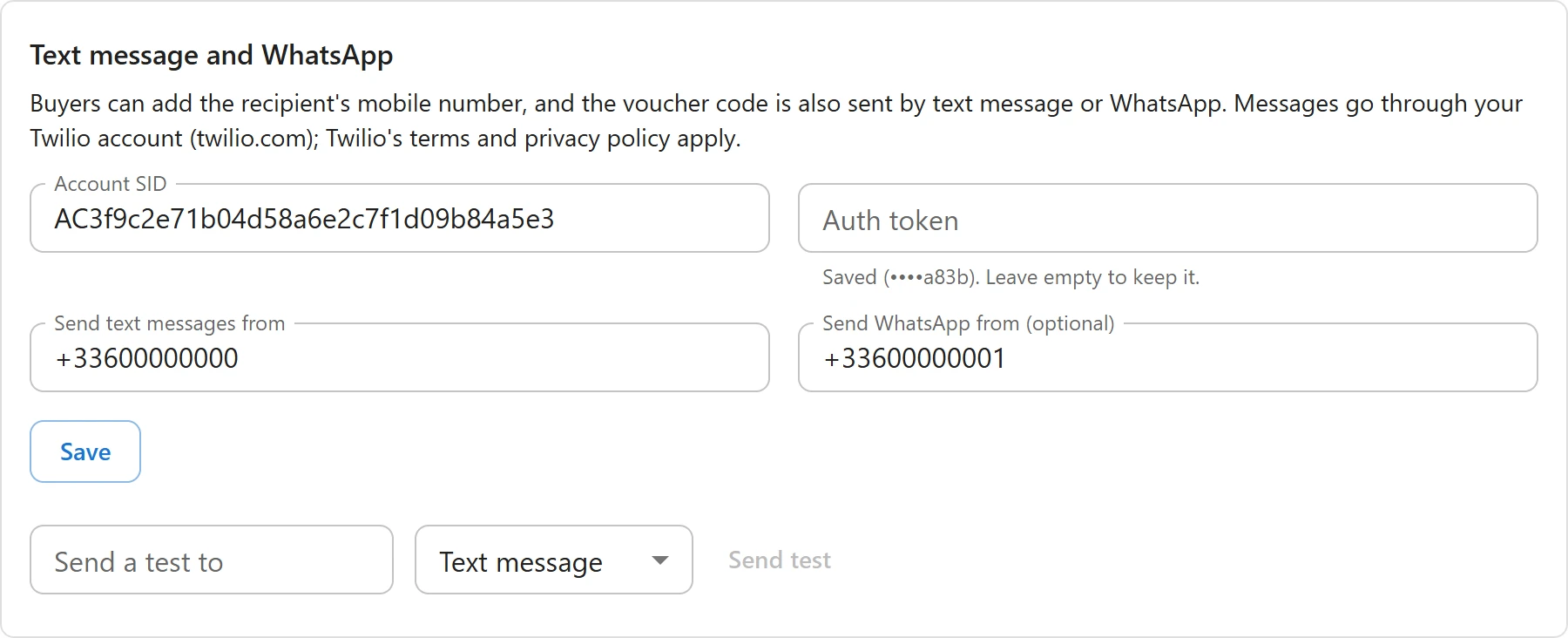
The auth token is kept on your server in its own option and is never sent back to the browser: afterwards the field only says Saved with the last four characters, and Leave empty to keep it. when you change other fields.
What the buyer sees
Once Twilio is set up, the gift form has a Recipient mobile (optional) field: We also send the voucher code to this number. Use the international format, starting with + and the country code. If both channels are set up, the buyer picks Text message or WhatsApp.
A number in the wrong format gives Please write the mobile number in international format, for example +33612345678. The cart line shows the channel and the number.

When messages are sent
A message goes out whenever the voucher is delivered:
- when the order is paid,
- on the chosen day, for a scheduled delivery,
- when you create a voucher by hand with Email the voucher to the recipient now ticked,
- when you click Resend email on the voucher.
The message reads, for example: “Sophie sent you a €50.00 gift voucher for Maison Willow. Code: PX-M9P2-FU55. Your voucher:” followed by the signed PDF link.
Each attempt is listed in the voucher’s delivery history next to the emails, as Sent, Failed with Twilio’s answer (for example Twilio refused the message), or Skipped when Text messages are not set up. See Voucher details and history.
Privacy
The recipient’s mobile is stored on the voucher, included in WordPress personal data exports (Recipient mobile) and cleared by an erase request. Numbers and messages are sent to Twilio only when a voucher has a mobile number. See Privacy and uninstall.
Quick Links
Share