

Contents
On this page
Lots and serial numbers - Plugixa Inventory
Some stock needs more than a quantity. A tube of sealant has a batch and a date it must be used by. A drill has a serial number of its own. Plugixa Inventory can track either, item by item:
- Lots: a lot number and an expiry date for each batch received. Stock is taken first-expiring-first-out, and a daily alert warns before lots expire.
- Serial numbers: one record per unit, so you know exactly which units are in stock and can find one by scanning its serial.
Lots and serial numbers are a Pro app, new in version 1.2.0. The Lots screen is under Inventory > Lots, and every item’s page has a panel for it.
Choosing how an item is tracked
On the item’s page, the Lots panel has three choices:
| Choice | Use it for |
|---|---|
| Not tracked | Everything that is just a quantity. The default. |
| Lots | Anything with a batch or a use-by date: sealants, adhesives, food, medicines. |
| Serial numbers | Units you need to tell apart: tools, laptops, meters, anything with a warranty. |
Stock the item already holds when you switch tracking on starts as No lot (or No serial). Nothing about the quantity changes. Use Name this stock to give it a lot number and expiry date, or Number these units to enter its serials.
How an item is tracked can only be changed while none of its stock sits in a named lot or serial.
Lots
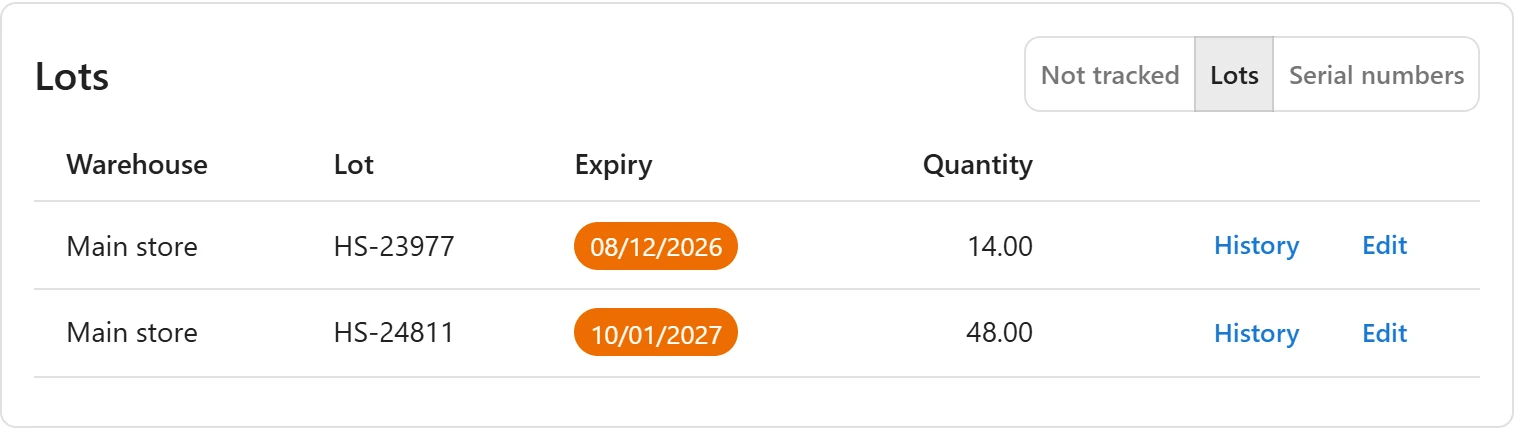
Where lot numbers come from
You enter the Lot and its Expiry when you receive a delivery against a purchase order. Stock that arrives any other way, without a lot, goes into No lot, and you can name it afterwards. Tracking never refuses a stock change.
First-expiring-first-out
When stock of a lot-tracked item is removed, sold, checked out or written off, it is taken from the lot that expires first. In the example above, the next tubes used come from HS-23977, which expires in December, before anything is taken from HS-24811.
A transfer keeps the lots: what leaves one warehouse as lot HS-24811 arrives in the other as lot HS-24811, with the same expiry date.
Expiry warnings
The expiry date is shown in amber once the lot is inside its warning period, 30 days by default, and in red once it has passed.
Once a day, the Lots expiring soon alert names every lot that is about to expire or already has. It can go to the notification bell, by email and as a desktop notification. Choose who receives it in Notifications.
The Lots screen
Inventory > Lots lists the stock of every lot-tracked and serial-tracked item, by lot, across all warehouses. Filter it to Expiring in 30 days, Expired or No lot.
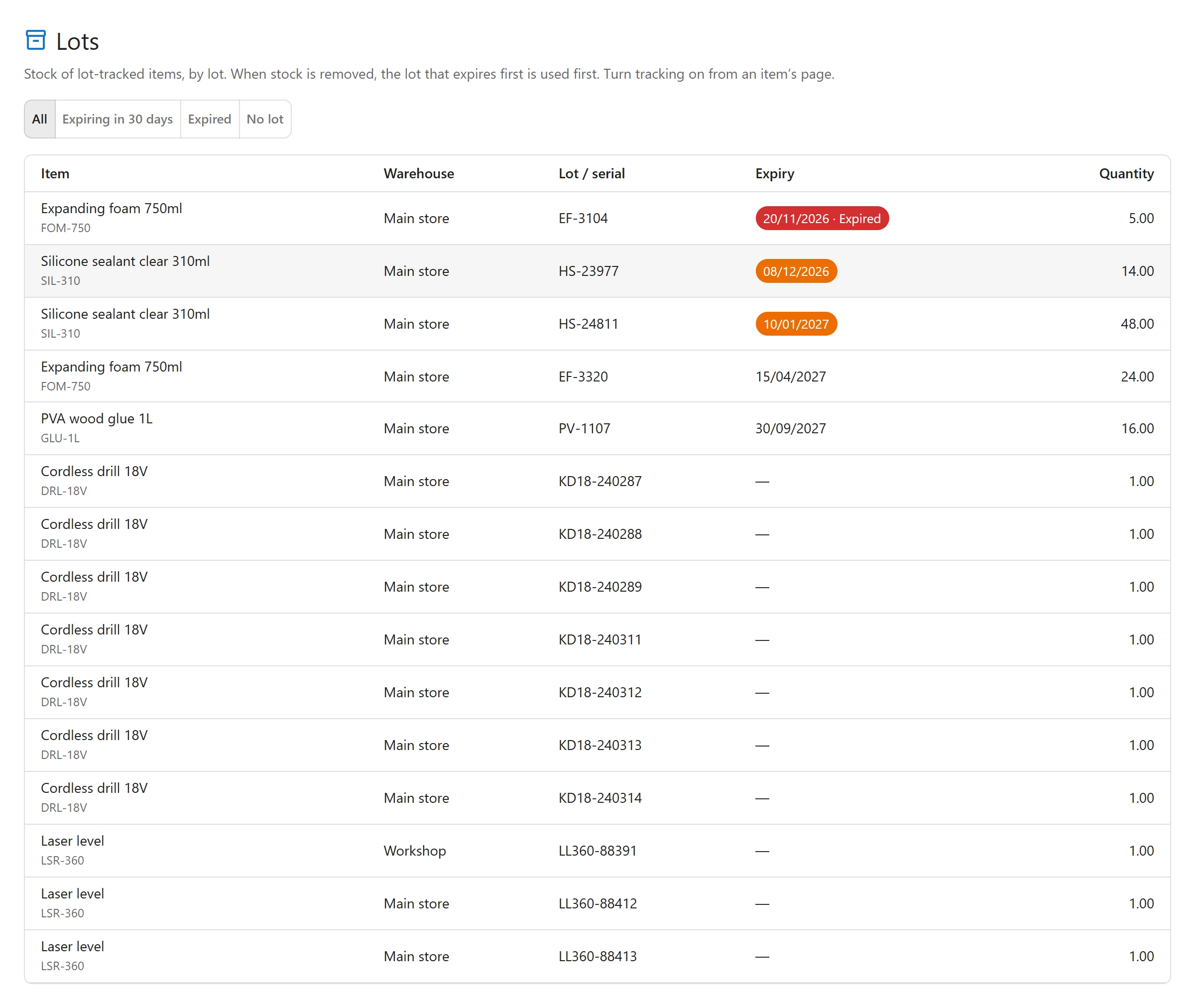
History on a lot shows everything that happened to it: received, removed, transferred in and out, a lot number given, and corrections.
If the lots of an item ever stop adding up to its stock on hand, the screen says so and offers Fix now. Missing stock goes into No lot. Stock counted twice comes out of No lot first, then out of the lots that would be used last, so the lots most likely to be right are kept.
Serial numbers
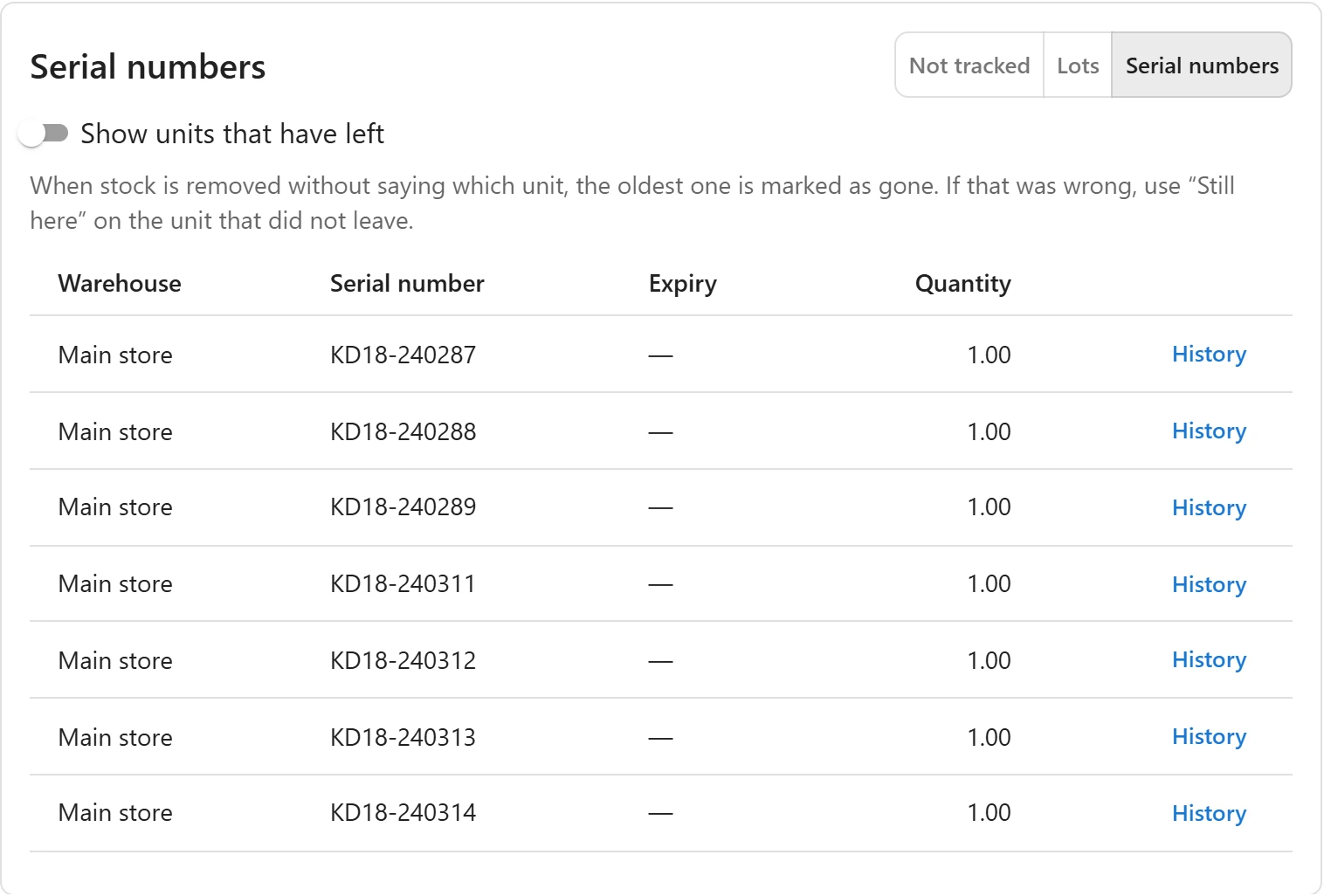
Entering serials
Serial numbers are entered when you receive a delivery, one per line, one per unit. A serial that is already in stock, or listed twice, is refused. Units that arrive without serials can be numbered later from the item’s page with Number these units.
When a unit leaves
A stock movement says how many units leave, not always which ones. When it does not say, the oldest unit is marked as gone.
If that was the wrong unit, click Still here on the unit that did not leave and choose The unit that left instead. The two are swapped and the stock count does not change. Show units that have left lists the units that are gone as well.
Finding a unit by its serial
Scan or type a serial number into the item lookup and it finds the item, while that unit is in stock. See Scanner and quick search.
Troubleshooting
| Symptom | Usual cause |
|---|---|
| Stock shows as “No lot” | It arrived without a lot, or was there before tracking was switched on. Use Name this stock. |
| I cannot switch an item from lots to serials | Some of its stock is in named lots. Use or remove that stock first. |
| The wrong lot was used | Lots are taken first-expiring-first-out. A lot with no expiry date is used after the dated ones, and stock with no lot last of all. |
| A serial cannot be found by scanning | That unit has left stock, or its serial was never entered. |
| “The lots no longer add up to the stock on hand” | Click Fix now. |
What to do next
- Receive goods with lots and serials: Purchase orders.
- Count stock: Stock takes.
Quick Links
Share