Contents
Members Management — Plugixa Team
The Members page is the hub for creating, editing, and organizing team members. Open it from Plugixa Team → Members.
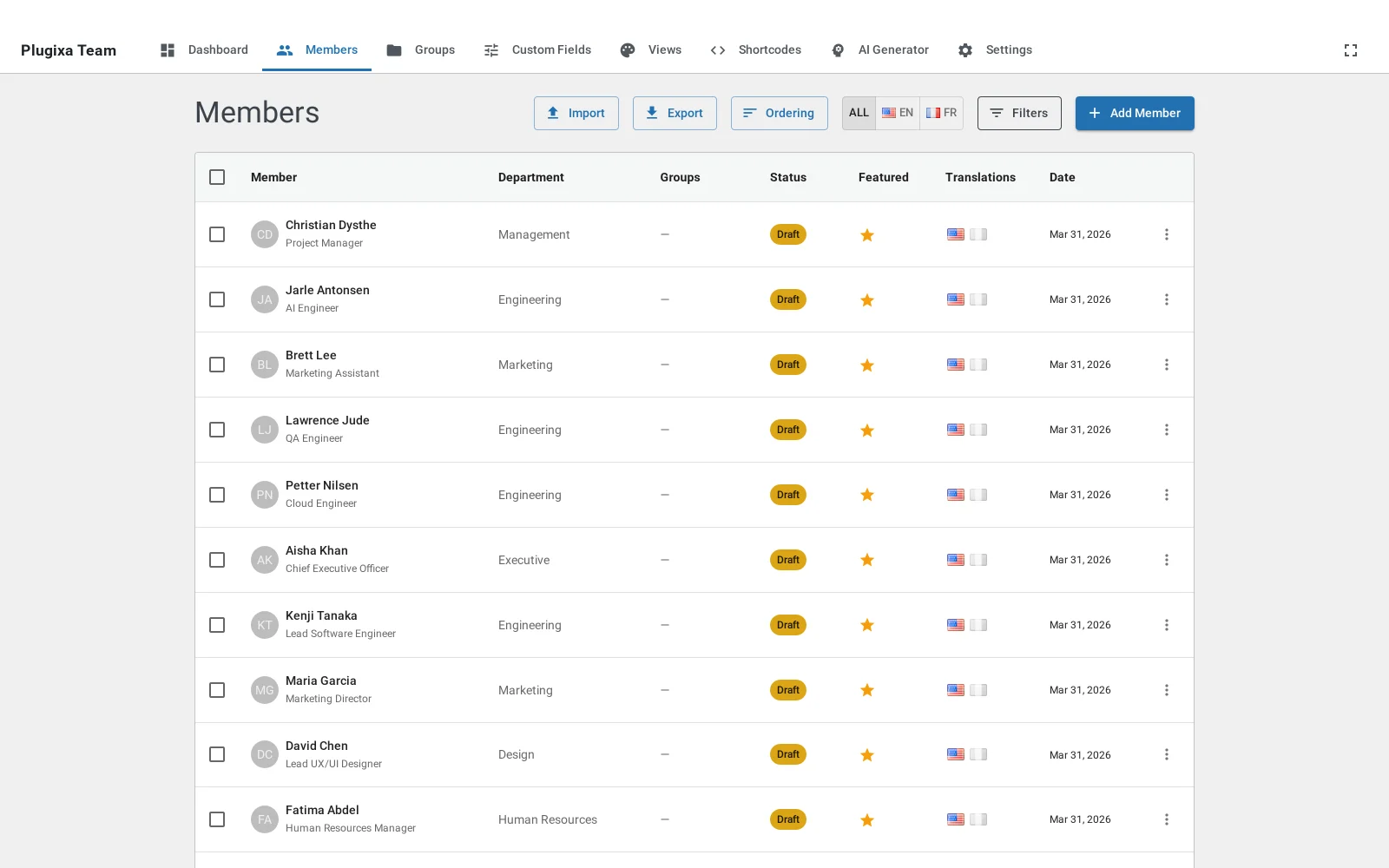
List view

The list shows members with photo, name, job title, status, and groups. Common actions:
- Search — typeahead across name, job title, email, department.
- Filters (via the filter drawer) — status, groups, department, featured-only.
- Bulk actions — publish, draft, feature, delete (select rows first).
- Inline actions — edit, delete, duplicate.
- Drag-and-drop ordering — available on the Members Ordering page, two modes: global order or per-group order.
- Language filter — when Multilingual is active, the language switcher pins the list to a single language or shows “All” (one row per translation group).
Statuses
| Status | Frontend visibility | Notes |
|---|---|---|
published |
Visible | Default for manual entries. |
draft |
Hidden | Default for AI-generated and submitted members PRO. |
hidden |
Hidden | Same as draft but semantically “archived”. |
Create or edit a member

Open a member (or click Add New). The form is a single long page organized into logical sections.
Identity
| Field | Notes |
|---|---|
| First name | Required. |
| Last name | Optional but recommended. |
| Slug | Auto-generated from the name; must be unique within a language. |
| Job title | E.g. “Senior Engineer”. |
| Department | Free-text (not a group — departments are used for filtering only). |
| Hire date | Optional, used in the org-chart and when ordering by hire date. |
| Parent member | Used for org-chart layout (parent/child hierarchy). |
Photo
Click the upload area to open the WordPress media library. Any image already in Media works. The plugin stores photo_id (the WP attachment ID) and uses responsive srcset on the frontend for optimal loading.
If no photo is set, templates show a fallback controlled by the view’s Photo tab:
initials— first letters of first/last name with configurable bg/text colors.icon— a generic person icon.none— skip the photo block entirely.
Bio
Two rich-text fields powered by the WordPress TinyMCE editor (same Add Media / Visual / Code tabs as the post editor):
- Short bio — shown in compact layouts and as the “excerpt” in grid/list.
- Bio — full biography; shown in accordion and detail views.
If Short bio is empty, templates render a truncated version of Bio (HTML stripped, capped by the view’s excerptLength, default 120 chars).
Contact info
Email, phone, mobile, website URL, location. Each is optional, and each is displayed (or hidden) per the view’s Display toggles.
Social links
Add any number of platform / URL rows. Supported platforms with icons:
LinkedIn · Twitter/X · GitHub · Facebook · Instagram · Dribbble · Behance · YouTube · TikTok · Pinterest · Snapchat · Reddit · Medium · Stack Overflow · Discord · and a generic “Website” fallback.
To add a platform not in the list, use the generic URL field and it will render with a default icon.
Skills
Add rows of name / percentage / color for progress bars. Percentage is 0–100; color is a hex value. Skills render differently by layout:
- Grid / masonry / list — horizontal bar with fill and label.
- Accordion — stacked below the bio.
- Org-chart / inline / table — hidden by default.
Groups
Assign the member to one or more groups. Members can belong to any number of groups, and the Members Ordering page lets you set a different display order per group via the member_groups pivot table’s display_order.
Ribbon badge
A small corner badge on cards, useful for tags like “Speaker” or “Founder”:
- Ribbon text — a short label.
- Ribbon color — hex; white text by default.
- Hide globally with the view’s
showRibbontoggle or per-shortcode withshow_ribbon="0".
Custom fields PRO
If you’ve defined custom fields (Plugixa Team → Custom Fields), they appear at the bottom of the member form as type-aware inputs — text, textarea, URL, number, date, select, checkbox, color, file, email, phone (11 types total). See Custom Fields.
Featured toggle
is_featured — a boolean flag. Use it for “team leads” or “spotlight” displays via the shortcode attribute featured_only="1".
Translations
When Polylang is active, the form shows Translation Tabs at the top. Each tab is a language with a flag icon and a status indicator (filled / empty / default). Shared fields (photo, email, social links, skills, …) appear once and sync across languages. Translatable fields (name, job title, bio, short bio, ribbon text, slug) are per-tab. One Save creates/updates/deletes all translations atomically. See Multilingual.
The list itself is language-aware — use the Filters drawer on the members page to pin the list to a single language or see every translation group:


Reorder members

Members → Ordering offers two modes:
Global order
Drag members across the whole list. The saved order (members.display_order) is used when a shortcode has no group filter.
Per-group order
- Pick a group from the grid.
- Drag members to order them within that group.
The per-group order is stored in the member_groups.display_order pivot column, so the same member can appear in a different position in each group.
Bulk actions

Select rows and click Bulk actions:
- Publish — set status to
published. - Draft — set status to
draft. - Feature / Unfeature — toggle
is_featured. - Delete — permanent. A confirmation dialog warns first.
Duplicate a member
Click the Duplicate icon in the row actions menu. A new member is created with -copy appended to the slug and status set to draft.
Search tips
- Multi-word search tokens are AND-matched.
- The search spans first name, last name, job title, email, and department — quickest way to find someone is their last name or job title.
REST API
GET /wp-json/plugixateam/v1/members?search=engineer&groups[]=3&status[]=published
POST /wp-json/plugixateam/v1/members
GET /wp-json/plugixateam/v1/members/{id}
PUT /wp-json/plugixateam/v1/members/{id}
DELETE /wp-json/plugixateam/v1/members/{id}
PATCH /wp-json/plugixateam/v1/members/{id}/status
POST /wp-json/plugixateam/v1/members/reorder
DELETE /wp-json/plugixateam/v1/members/bulk
POST /wp-json/plugixateam/v1/members/bulk-action
All endpoints require the edit_posts capability. See HOOKS.md for request/response filter hooks.
Related
- Groups — organize members into groups
- Views — control how members look on the frontend
- Shortcodes — embed members on any page
- Custom Fields PRO
- Import / Export PRO
- Multilingual