Contents
Shortcodes — Plugixa Team
Plugixa Team ships two shortcodes:
[plugixa_team]— display team members.[plugixa_team_form]— frontend submission form. PRO
Quick start
[plugixa_team]
Displays all published members using the default view.
[plugixa_team] attributes
Defaults are the plugin-wide defaults — they can be changed globally in Settings, overridden per-view, or overridden per-shortcode via the attributes below.
Data source
| Attribute | Default | Values | Description |
|---|---|---|---|
id |
0 |
int | Load a saved shortcode configuration by ID. |
view_id |
0 |
int | View ID — overrides the saved shortcode’s view. |
view |
"" |
slug | View slug (alternative to view_id; resolved to ID). |
group |
"" |
slug(s) / ID(s) | Comma-separated group slugs or IDs. |
department |
"" |
string(s) | Comma-separated department names. |
limit |
-1 |
int | Max total members fetched (-1 = all). |
orderby |
display_order |
display_order, created_at, first_name, last_name, hire_date |
Sort field. |
order |
ASC |
ASC, DESC |
Sort direction. |
featured_only |
0 |
1 / 0 |
Only show featured members. |
language |
auto | language code | Force a language (overrides Polylang detection). |
Display toggles
An empty value means “use the saved view config”. A 1 forces on; a 0 forces off.
| Attribute | Default | Description |
|---|---|---|
show_photo |
(view) | Show member photo. |
show_name |
(view) | Show name. |
show_job_title |
(view) | Show job title. |
show_department |
(view) | Show department. |
show_bio |
(view) | Show bio / short bio. |
show_email |
(view) | Show email as mailto: link. |
show_phone |
(view) | Show phone as tel: link. |
show_social |
(view) | Show social icons. |
show_skills |
(view) | Show skills bars. |
show_ribbon |
(view) | Show ribbon badge. |
Groups nav
| Attribute | Default | Values | Description |
|---|---|---|---|
groups_nav |
(view) | yes, no |
Override view’s groups-nav enabled state. Uses the view’s displayStyle (tabs/pills/dropdown), defaulting to tabs. |
show_member_count |
no |
yes, no |
Show per-group member count badges. |
Dark mode
| Attribute | Default | Values | Description |
|---|---|---|---|
dark_mode |
disabled |
disabled, enabled, auto |
auto follows prefers-color-scheme. |
Pagination
| Attribute | Default | Values | Description |
|---|---|---|---|
pagination |
1 |
1 / 0 |
Enable / disable pagination. |
pagination_style |
(view) | numbers, load_more, infinite_scroll |
Visual style. |
per_page |
8 |
int | Items per page. |
Pagination is automatically disabled for carousel layouts (Swiper handles paging).
Schema / SEO
| Attribute | Default | Values | Description |
|---|---|---|---|
schema |
1 |
1 / 0 |
Emit JSON-LD Organization + ItemList schema for this instance. |
Per-shortcode schema combines with the global enable_schema setting — both must be on.
Examples
Filter by group
[plugixa_team group="engineering"]
[plugixa_team group="engineering,design,marketing"]
Specific view
[plugixa_team view="masonry"]
[plugixa_team view_id="5"]
Featured members, dark mode, no pagination
[plugixa_team featured_only="1" dark_mode="auto" pagination="0"]
Groups navigation with counts
[plugixa_team groups_nav="yes" show_member_count="yes"]
Side layout via view; compact per-shortcode
[plugixa_team view="compact-list" show_bio="0" show_skills="0" per_page="12"]
Full example
[plugixa_team
view="grid"
group="engineering,design"
orderby="last_name"
order="ASC"
featured_only="0"
groups_nav="yes"
show_member_count="yes"
pagination="1"
pagination_style="load_more"
per_page="12"
dark_mode="auto"
schema="1"
]
The visual Shortcode Builder

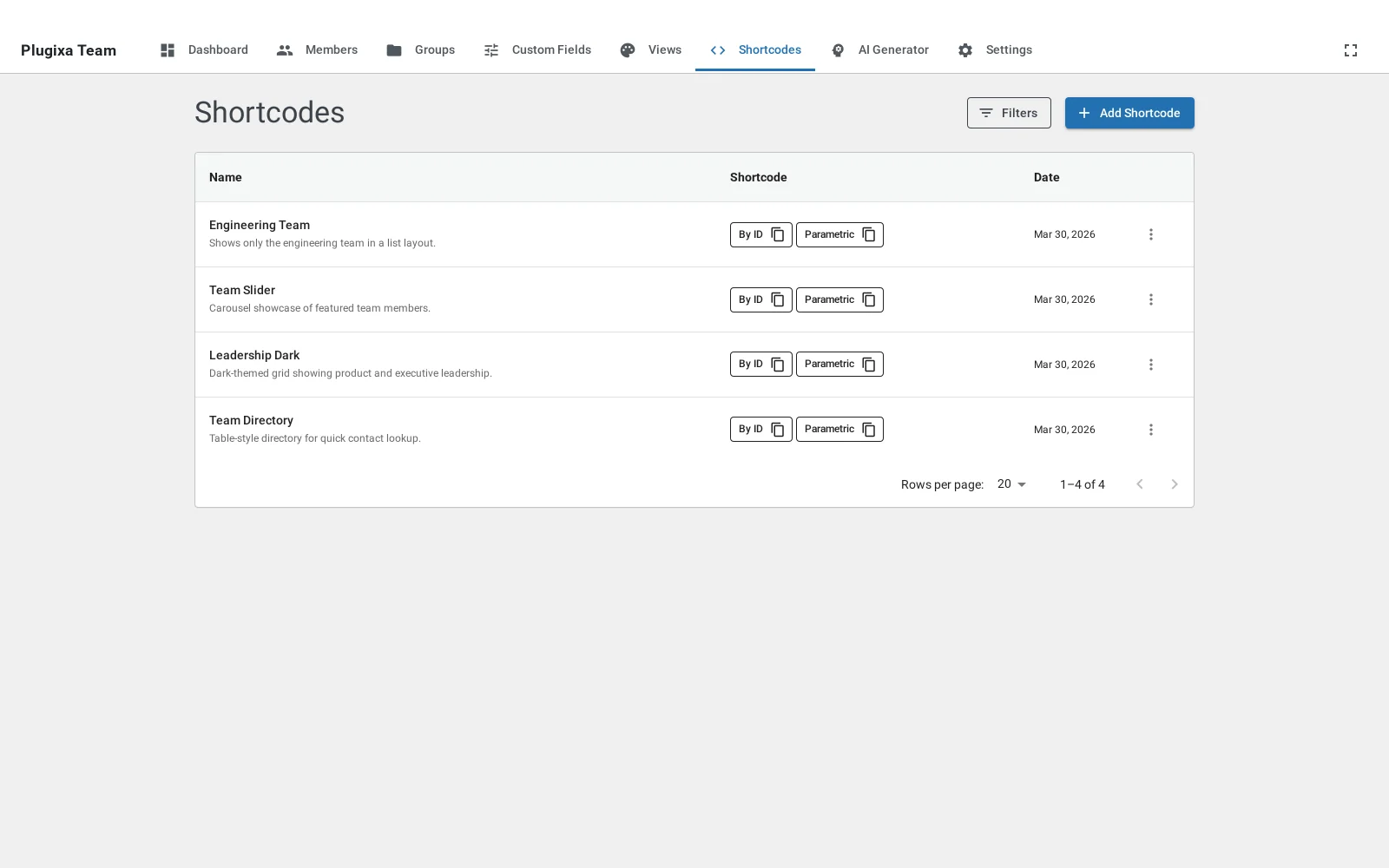
Instead of memorizing attributes, use the builder at Plugixa Team → Shortcodes → Add New.

Configure through tabbed sections:
- Shortcode Details — name, slug, description.
- Query — view, groups, department, ordering, featured-only.
- Display Options — show/hide toggles.
- Dark Mode — three-state Light / Dark / Auto.
- Pagination — enabled, style, per page, load-more label.
- Schema — per-shortcode JSON-LD toggle.


A sticky live preview on the right shows the rendered output with your chosen view and filters, using real published members.

Save and reuse
Click Save Configuration to store the shortcode under a name. Access saved configurations from the list ([plugixa_team id="7"]).
[plugixa_team_form] PRO
The frontend submission form. See Submission Form for the complete setup (reCAPTCHA, photo upload, approval workflow, inline vs modal).
[plugixa_team_form]
The form respects the plugin’s Submission Settings:
- Which fields are shown.
- Which fields are required.
- Inline or modal display.
- Photo upload enabled / disabled.
- reCAPTCHA v3 on / off.
The Gutenberg block
See Blocks — the block exposes the same options through a visual sidebar, no shortcode typing required.
Settings cascade
When a setting appears in multiple places, this is the priority order (highest wins):
- Shortcode attribute — e.g.,
[plugixa_team show_bio="0"]. - Shortcode config record — saved via the builder (loaded when
id="…"). - View config — the view selected via
view/view_id. - Global settings — Plugixa Team → Settings.
Use in PHP / template files
<?php echo do_shortcode( '[plugixa_team group="leadership" limit="5"]' ); ?>
For programmatic rendering with type-safe PHP arguments, call the class directly:
echo \PlugixaTeam\Frontend\Shortcodes::render_team( [
'view_id' => 3,
'group' => 'engineering',
'featured_only' => true,
'per_page' => 8,
] );
Use in widgets
- Appearance → Widgets → add a Shortcode widget.
- Paste
[plugixa_team]or[plugixa_team id="7"].
Troubleshooting
The shortcode is printed as text
- Confirm the plugin is active.
- Check that quotes are straight (
"), not curly (""). The WP visual editor sometimes converts them — paste from a plain-text editor. - If you’re using a page builder, use the builder’s Shortcode widget, not a raw HTML block.
“No members found”
- Check the group slug — typos are the #1 cause. Compare the slug in Groups to what’s in your shortcode.
- Confirm members are
published, notdraftorhidden. - If multilingual, check the current language matches the member’s language. Try
language="en"explicitly.
Design looks different from the view preview
- The shortcode overrides the view. Check whether you’ve accidentally set
dark_mode,show_*, orpaginationinline. - Theme CSS conflicts — use browser DevTools to find the overriding rule. Target
.pxt-custom-team-rootspecifically.
Carousel flickers or doesn’t slide
- Make sure the view’s layout is
carousel. - Check that Swiper loaded (look for
plugixateam-swiperin network requests). If a caching plugin is deferring scripts, add an exception forswiper-bundle.min.js.
Related
- Views — design presets
- Groups —
group/groups_navattributes - Blocks — Gutenberg block
- Submission Form PRO
- Settings — global defaults