Contents

Multilingual (Polylang) — Plugixa Team

Plugixa Team integrates with Polylang out of the box. When Polylang is active, the plugin automatically detects it and makes your members, groups, and custom fields translatable. No separate setup or switch is required.

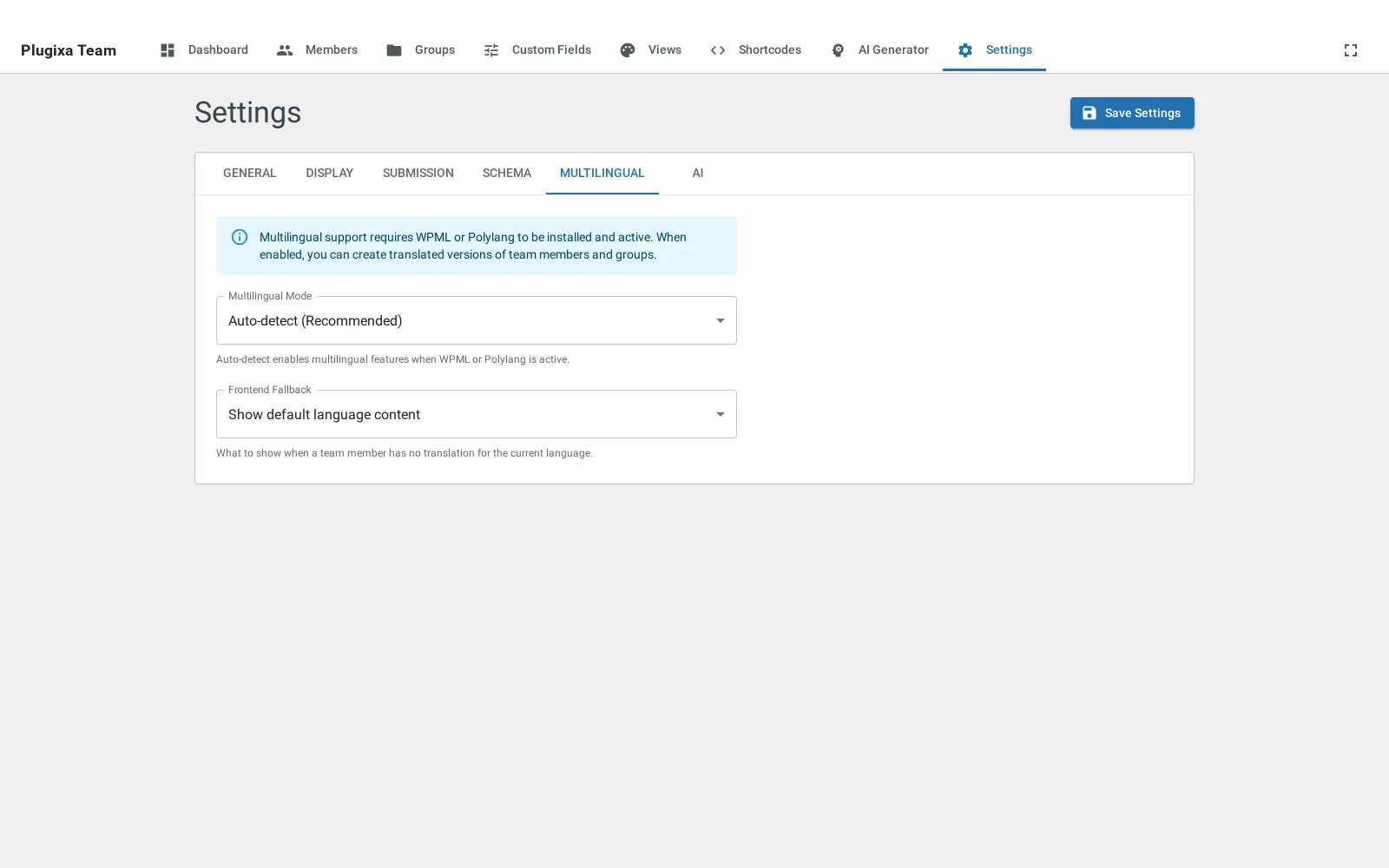
Multilingual settings

Note: WPML detection is in place but the admin UX is built around Polylang. Teams using WPML should evaluate compatibility first.

How it works (in 30 seconds)

Plugixa Team uses the Translation Group pattern. Every member, group, and custom field has two extra columns:

  • language_codeen, fr, de, etc.
  • translation_group — a UUID shared by all translations of the same item.

Items with the same translation_group UUID are translations of each other, regardless of language.

┌─────────────────────────────────────────────────┐
│ wp_plugixateam_members                          │
├──┬──────────────────────┬──────────┬────────────┤
│id│ first_name           │ lang     │ group      │
├──┼──────────────────────┼──────────┼────────────┤
│ 1│ Jane Smith           │ en       │ abc-123…   │  ← English
│ 2│ Jeanne Martin        │ fr       │ abc-123…   │  ← French (same group)
│ 3│ Johanna Schmidt      │ de       │ abc-123…   │  ← German (same group)
│ 4│ Carlos Gómez         │ en       │ def-456…   │  ← different member
└──┴──────────────────────┴──────────┴────────────┘

Enable / disable

Multilingual is on by default when Polylang is detected. You can toggle it from Plugixa Team → Settings → Multilingual.

Setting Values Default Effect
multilingual_enabled auto, off auto auto = enable when Polylang is present. off = ignore language, show everything.
multilingual_fallback default_language, hide default_language What to show for items that don’t have a translation in the current language.

Fallback behavior

The admin list has a language filter inside the Filters drawer. Switching the toggle re-fetches the list for the selected language, or “All” to see every translation group in a single list:

Members — English filter

Members — All languages

When a visitor requests a language and the member has no translation:

  • default_language (default) — show the default-language version. Best for SEO and team sites where every member should always appear.
  • hide — omit the member entirely. Best when strict per-language content is a requirement.

Which fields are translatable

Plugixa Team splits fields into translatable (per-language) and shared (synced across all translations). Shared fields are copied automatically when you create a translation, so you don’t have to set the photo, email, or social links again in every language.

Members

Type Fields
Translatable first_name, last_name, slug, job_title, bio, short_bio, ribbon_text
Shared department, photo_id, email, phone, mobile, website_url, location, social_links, skills, ribbon_color, is_featured, status, display_order, parent_id, hire_date, custom_fields, source

Groups

Type Fields
Translatable name, slug, description
Shared display_order

Custom fields PRO

Type Fields
Translatable field_label, placeholder
Shared field_key, field_type, field_options, is_required, show_in_frontend, show_in_form, menu_order

Member custom-field values (stored in the plugixateam_meta table) are per-translation — each language’s copy of a member has its own values, so you can write “Senior Engineer” in English and “Ingénieur senior” in French.

Creating translations

Plugixa Team uses a batch translation editing pattern. Instead of opening a separate form per language, one form shows all languages as tabs — one click to save, all translations updated atomically.

  1. Open any member, group, or custom field form.
  2. Each language appears as a tab at the top, with a flag icon and a status indicator:
    • 🟢 Filled — a translation exists.
    • ⚪ Empty — no translation yet (typing in the tab creates one on save).
    • 🏷️ Default — the site’s default language.
  3. Switch tabs to edit each language’s translatable fields. Shared fields appear once above the tabs (editing them syncs across all languages).
  4. Click Save. One REST call creates, updates, or deletes every translation in a single database transaction.

Deep-linking to a specific language

You can open a form pre-switched to a language:

/wp-admin/admin.php?page=plugixateam&action=edit&id=5&lang=fr

Clicking a flag icon in the list view uses this pattern — it navigates to the edit form with the target language tab active (no auto-creation; you type and save to create the translation).

REST API

# Get the full translation group (shared + translatable fields split) for batch editing
GET /wp-json/plugixateam/v1/multilingual/members/{id}/translation-group

# Atomic batch create / update / delete
POST /wp-json/plugixateam/v1/multilingual/members/batch-translations

# Individual operations (available but rarely needed from the UI)
GET    /wp-json/plugixateam/v1/multilingual/members/{id}/translations
POST   /wp-json/plugixateam/v1/multilingual/members/{id}/translations
PUT    /wp-json/plugixateam/v1/multilingual/members/link-translations
DELETE /wp-json/plugixateam/v1/multilingual/members/{id}/translations/{lang}

Replace members with groups or custom-fields for those entities. See Hooks for filtering these responses in custom code.

Frontend behavior

Automatic language detection

On the frontend, the shortcode detects the current language from (in priority order):

  1. URL ?lang= query parameter — useful when a shortcode appears on an untranslated page.
  2. Polylangpll_current_language().
  3. Fallback — the site’s default language.

Only members matching the current language are rendered. Fallback behavior follows the multilingual_fallback setting.

Forcing a language in a shortcode

[plugixa_team language="fr"]

Useful for:

  • A language-specific landing page without setting up full page translation.
  • Embedding members in a single language from a custom language picker.

Group filtering across languages

When the shortcode’s group attribute references a group slug, Plugixa Team automatically resolves the group’s translation group and filters by any translated copy of that group. So group="engineering" works even when the current language’s group has a localized slug.

Where language is stored

Database columns

Every multilingual-aware table has these columns:

language_code      VARCHAR(10)    -- e.g., 'en', 'fr'
translation_group  VARCHAR(36)    -- UUID v4

INDEX idx_language_code (language_code)
INDEX idx_translation_group (translation_group)

Tables with these columns: wp_plugixateam_members, wp_plugixateam_groups, wp_plugixateam_custom_fields.

Migration for existing installs

When you upgrade to a multilingual-aware version:

  1. The activator adds language_code and translation_group columns if missing.
  2. A one-time migration backfills every existing member/group/field with:
    • language_code = site default language
    • translation_group = a new UUID (unique per item)
  3. A flag in options prevents this from running twice.

Your existing members continue to work with no user action.

Usage in custom code

Check if multilingual is active

if ( \PlugixaTeam\Multilingual::instance()->is_multilingual_active() ) {
    // Polylang is installed AND the feature isn't disabled
}

Get the current language

$lang = \PlugixaTeam\Multilingual::instance()->get_current_language();
// → 'en', 'fr', etc.

Build a language-aware WHERE clause

$ml      = \PlugixaTeam\Multilingual::instance();
$current = $ml->get_current_language();
$default = $ml->get_default_language();

[ $where_sql, $where_values ] = $ml->build_language_where(
    'm',                  // table alias
    'plugixateam_members', // logical table
    $current,
    $default
);

$sql = "SELECT * FROM {$wpdb->prefix}plugixateam_members m WHERE 1=1 $where_sql";
$members = $wpdb->get_results( $wpdb->prepare( $sql, ...$where_values ) );
\PlugixaTeam\Multilingual::instance()->link_translations(
    'plugixateam_members',
    $source_member_id,
    $target_member_id
);

Admin list filtering

The admin member / group / custom-field list pages include a LanguageSwitcher at the top:

  • Pick a single language to view members in that language only.
  • Pick All to view the default-language row per translation group (no duplicates). This sends group_by_translation=1 to the REST API.

The selected language is persisted in localStorage so switching pages keeps the filter.

Troubleshooting

I see the same member in every language

  • Check that the member has a non-empty language_code. Empty = “belongs to every language” (legacy behavior).
  • In Settings → Multilingual, set multilingual_fallback to hide to filter strictly.

Translation not showing up on the frontend

  1. Confirm the translated member has status = published. Each translation has its own status.
  2. Confirm the language_code matches the URL language (e.g., fr, not fr_FR).
  3. Check the admin list with the specific language filter — if the translation isn’t there, the batch save didn’t persist.

My existing members have no language

The one-time migration runs on activation. If it didn’t fire (e.g., you updated the plugin files without re-activating), deactivate and reactivate the plugin. The migration is idempotent and skips rows that already have a language.

Group filter doesn’t match a translated group

The shortcode resolves groups by their translation group, not their slug alone. If you renamed the slug in one language, the group’s translation group UUID stays the same, so matching still works. If it doesn’t: check that both groups share the same translation_group value in the database.

Quick Links