

Contents
App manager - Plugixa Car Wash
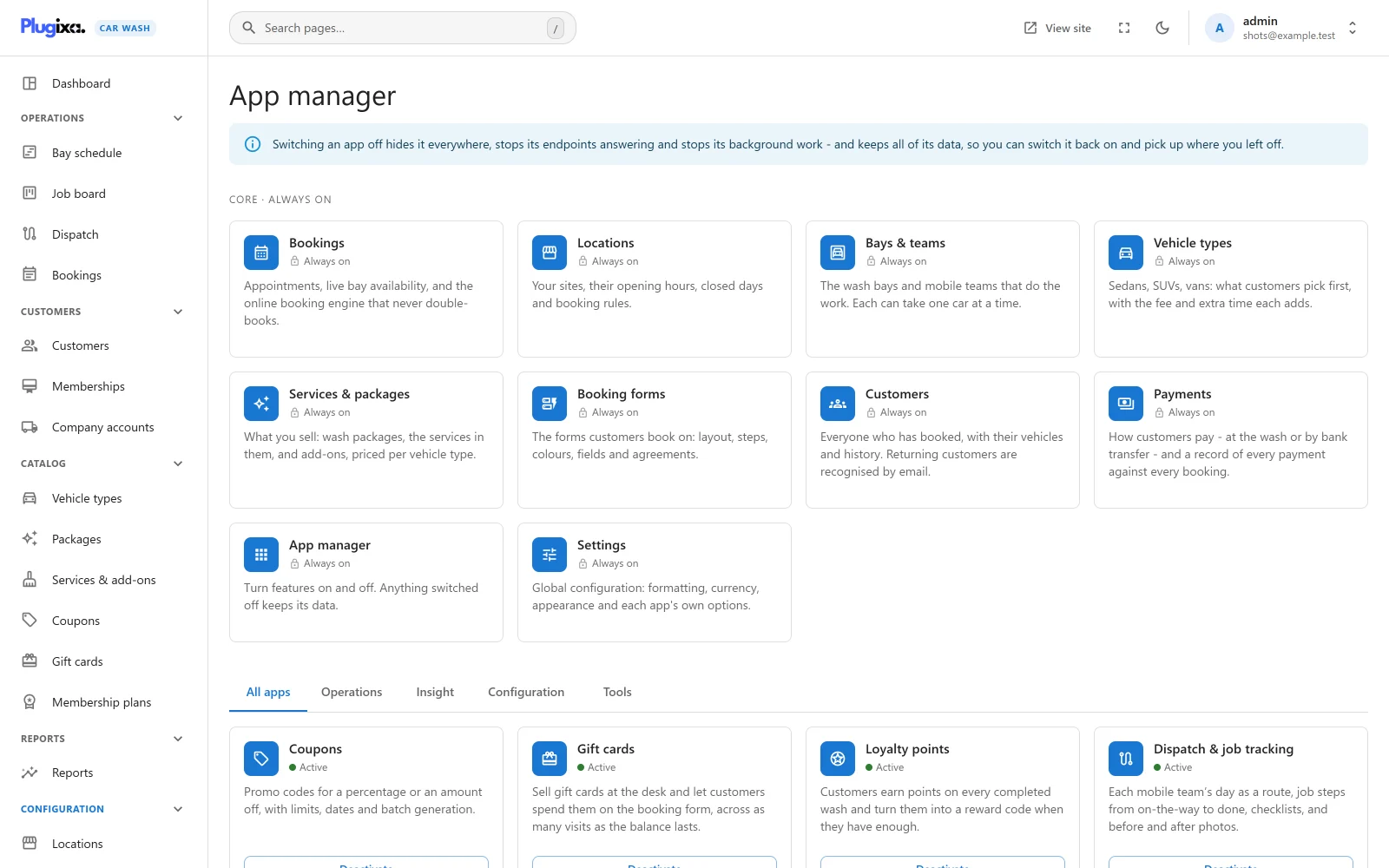
The plugin is built from apps: Bookings, Locations, Coupons, Email notifications and so on. The App manager lists them all and lets you switch off the ones you do not use, so the menus, the settings and the booking form show only what your business needs.
Open it from Plugixa Car Wash, then App manager, the last item of the Configuration group in the app’s sidebar.
Only a site administrator can use it (the WordPress manage_options
capability). Both its reading and its switching are refused for anybody else,
whatever car wash permissions they hold, so no arrangement of
roles
can lock an administrator out of it.
What switching an app off does
The notice at the top sums it up: switching an app off hides it everywhere, stops its endpoints answering and stops its background work, and keeps all of its data, so you can switch it back on and pick up where you left off.
In detail:
| Effect | What happens |
|---|---|
| Hidden everywhere | Its screens leave the sidebar and their addresses stop opening. A sidebar group left with nothing in it disappears. |
| Its settings stay visible | A section of Settings that belongs to the app stays in the list, dimmed, and says “This app is switched off in the App manager.” with a button back here. Nothing in it is lost. |
| Endpoints stop answering | Its REST API routes are not registered, and none of its hooks run: a switched-off Coupons app takes no code, a switched-off Email notifications app sends no email. |
| Background work stops | Its scheduled tasks are cleared from WordPress cron the moment you switch it off, and are not scheduled again while it is off. |
| Data is kept | Its tables, its records and its settings stay exactly as they are. Its tables are still created and upgraded when the plugin updates, so switching it back on later finds them ready. |
Nothing on this screen deletes anything, as the note at its foot says. To erase the plugin’s data, see Privacy and uninstall.
Core: always on
The first section, Core · always on, holds the apps the rest are built on. Each card carries a lock and “Always on”, and has no button.
| App | What it is |
|---|---|
| Bookings | Appointments, live bay availability and the online booking engine. |
| Locations | Your sites, their opening hours, closed days and booking rules. |
| Bays & teams | The wash bays and mobile teams that do the work. |
| Vehicle types | What customers pick first, with the fee and extra time each adds. |
| Services & packages | Packages, the services in them, and add-ons, priced per vehicle type. |
| Booking forms | The forms customers book on. |
| Customers | Everyone who has booked, with their vehicles and history. |
| Payments | How customers pay, and a record of every payment against every booking. |
| App manager | This screen. |
| Settings | Formatting, currency and each app’s own options. |
A request to switch one of them off through the REST API is refused with “This app is part of the core and cannot be switched off.”
The apps you can switch
Below the core section, tabs file the other apps by kind: All apps, Operations, Insight, Configuration and Tools. A tab with nothing in it says “Nothing here yet.”
Each card shows the app’s icon, its name, a dot with Active or Inactive, its description, and, where the app has records, a count such as “3 roles”. The button reads Deactivate while the app is switched on and Activate while it is off. Every app is on when the plugin is first installed.
In the free plugin
| App | Tab | Needs | Switched off |
|---|---|---|---|
| Coupons | Operations | Bookings | The Coupons screen goes, the booking form shows no promo code field and no code is taken. See Coupons. |
| Customer accounts | Operations | Customers, Bookings | The customer account page and its sign-in links stop working. See Customer account. |
| Email notifications | Operations | Bookings | No booking email is sent, to customers or to you. See Emails. |
| Export | Tools | Nothing | The Export CSV button leaves the bookings and customers lists. See Bookings. |
With Pro
| App | Tab | Needs |
|---|---|---|
| Gift cards PRO | Operations | Bookings, Payments |
| Loyalty points PRO | Operations | Bookings, Customers, Coupons |
| Memberships PRO | Operations | Bookings, Customers |
| Dispatch & job tracking PRO | Operations | Bookings, Bays & teams |
| Fleet accounts PRO | Operations | Bookings, Customers, Payments |
| Reminders & text messages PRO | Operations | Bookings, Email notifications |
| Mobile service PRO | Operations | Bookings |
| Calendar feed PRO | Operations | Bookings |
| Stripe payments PRO | Operations | Payments |
| Reports PRO | Insight | Bookings |
| Roles and permissions PRO | Configuration | Nothing |
| Roles PRO | Configuration | Nothing |
| Dark mode PRO | Configuration | Nothing |
| Install as an app PRO | Tools | Nothing |
| Webhooks PRO | Tools | Bookings |
Each is described on its own page; see the list in the Free vs Pro page.
Switching Roles and permissions off is safe in the open direction: nobody is checked against the permission roles any more, and everybody with car wash access can do everything again, as in the free plugin. See Roles and permissions.
Apps that need other apps
Some apps rely on another. Loyalty points hands out its rewards as coupon codes, so it needs Coupons; Reminders & text messages sends its emails through Email notifications.
- Switching off an app others need switches them off too. Their own button still reads Deactivate, because nobody switched them off, but their dot says Inactive and the card reads “Off because something it needs is off.” They come back by themselves when the app they need is switched on again.
- Switching on an app whose needs are off is refused. The message reads “Switch these on first:” and lists them.
When a switch is refused, a message at the foot of the screen reads “That could not be changed:” and the reason.
Free and Pro
The choices you make here are stored in the WordPress option
plugixa_carwash_apps, one flag per app. Saving a choice changes only that
app’s flag. A site that goes from Pro back to the free plugin keeps the flags of
the Pro apps it can no longer see, so installing Pro again restores them as you
left them.