

Contents
Gift cards - Plugixa Car Wash
Gift cards PRO are stored value. You issue a card when you sell one at the desk, the customer types its code on the booking form, and the card pays for the booking, in full or in part. Whatever is left stays on the card for the next visit.
A gift card is money, not a discount. It comes off after tax, and it is recorded as a payment on the booking, so the booking’s payment status, its “still to pay” figure and the reports all count it. A coupon, by contrast, lowers the price before tax.
Gift cards are managed under Catalog -> Gift cards.
The list
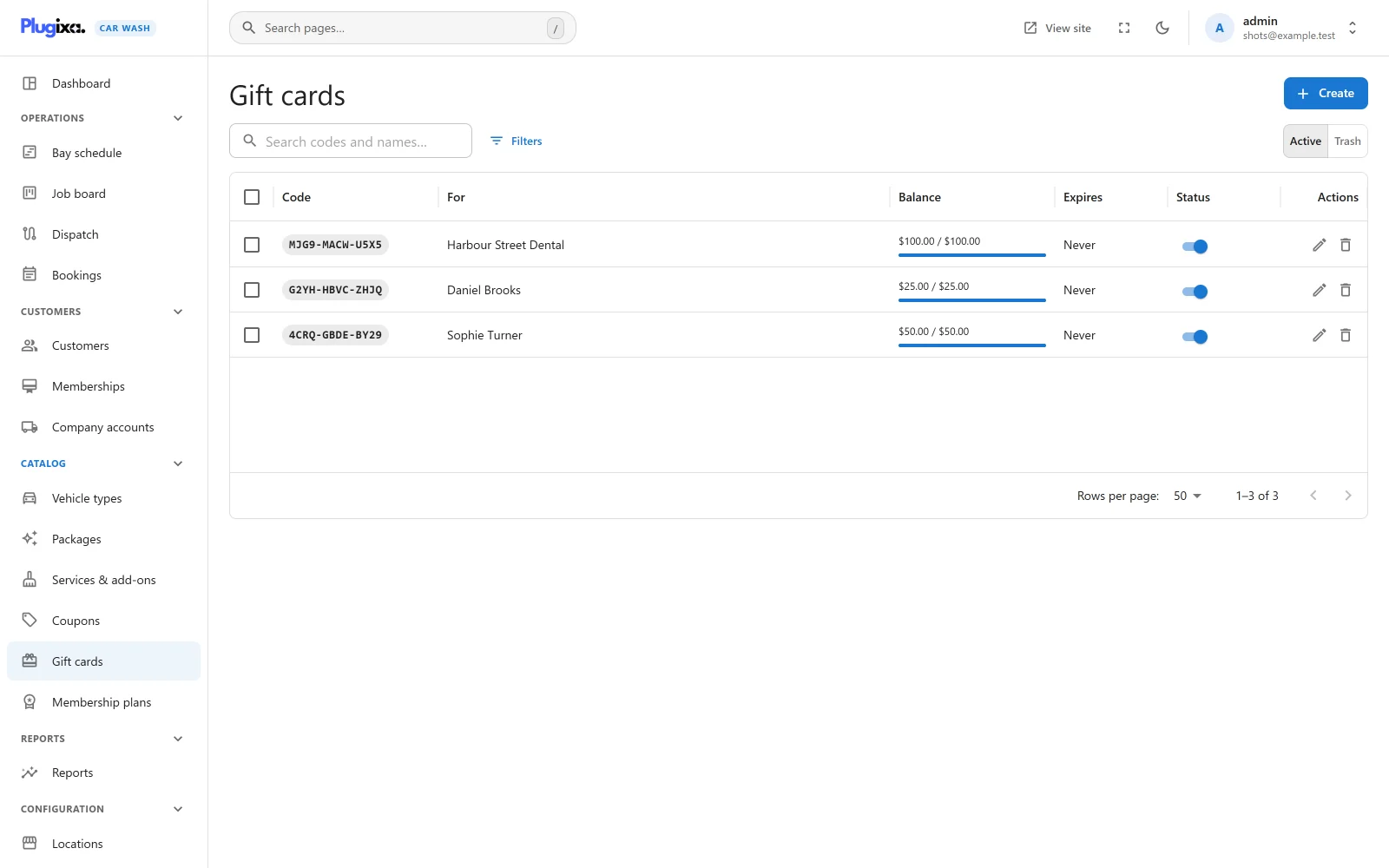
Each row shows the code, who the card is for, the balance against the original value with a bar, the expiry date (Never when there is none) and a switch to publish or unpublish the card. Search finds a card by its code, the recipient’s name or email, or the buyer’s name.
Issuing a card
Press Create. The screen is titled Issue a gift card.
| Field | Default | Notes |
|---|---|---|
| Value | Required | What the card is worth, from 0.01 to 100,000. Its balance starts at this value. |
| Code | Random | Leave it empty for a random 12-character code, the safest choice. Or type your own: 6 to 40 letters and digits. |
| For | Empty | The recipient’s name. |
| Their email | Empty | The recipient’s email, for your reference. |
| From | Empty | Who bought it. |
| Expires | Never | The last day the card can be used. “Empty for never. Check your local rules: many places forbid expiry.” |
| Message | Empty | A message to go with the card. |
| Status | Published | Unpublished stops the card from being used. |
The card’s currency is the site’s currency on the day it is issued.
A random code uses only letters and digits that cannot be confused when read
aloud: no 0, O, 1, I or L. The screen shows it in groups of four for
readability, for example 4CRQ-GBDE-BY29.
The plugin does not email or print the card. Give the customer the code yourself, on a card, a voucher or in an email you send.
What cannot change
Once a card is issued, its Value, Code and currency are fixed: they are what was sold. Everything else can be edited. To change the money on a card, use an adjustment.
Balance and history
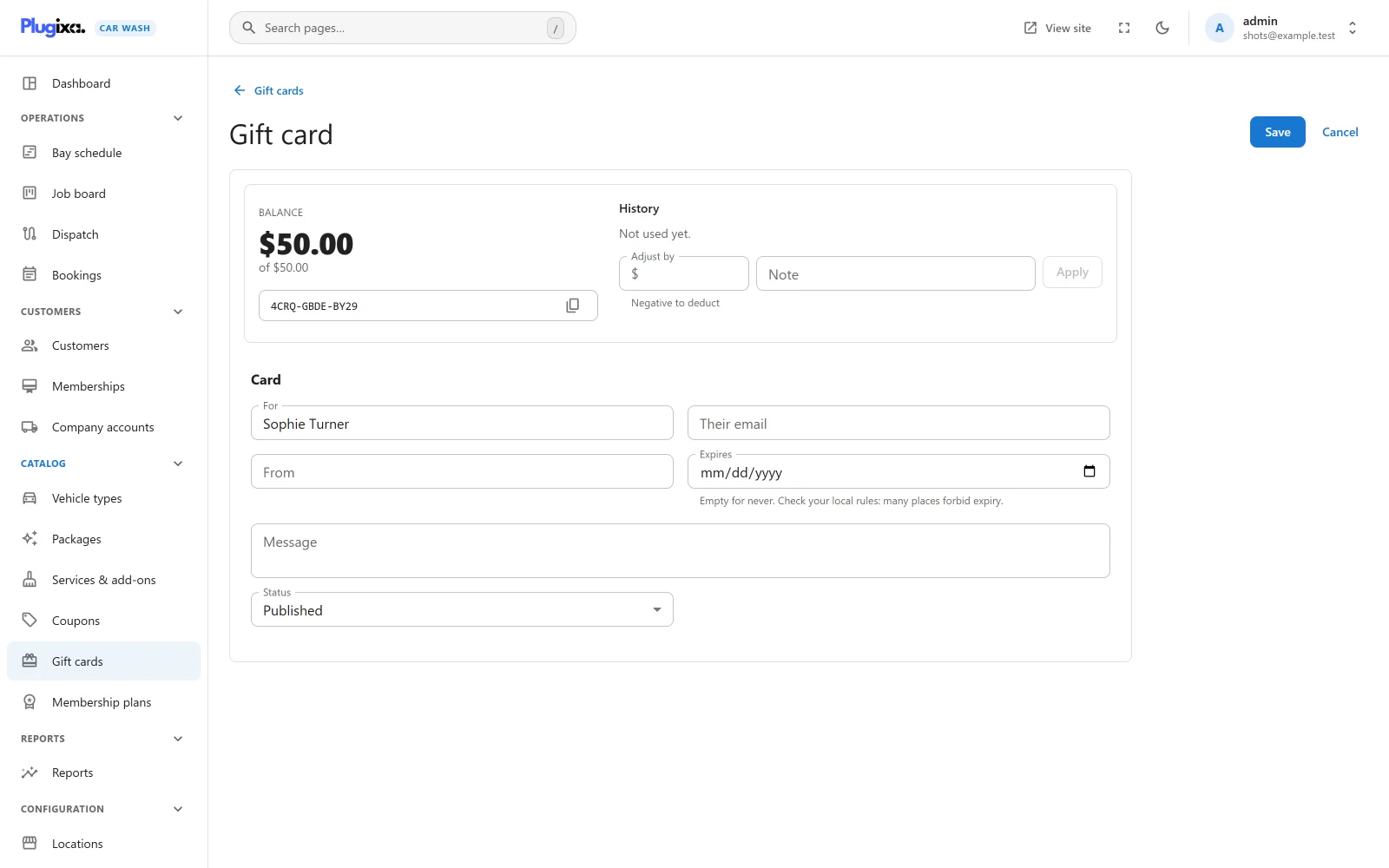
The top of a card’s page shows:
- Balance, with “of” the original value,
- the code, with a copy button,
- History: every change to the balance, newest first, with its date, the booking number or note, and the amount. “Not used yet.” while it has none.
Adjusting the balance
Under History:
- Enter an amount in Adjust by. A positive amount adds (a top-up sold at the desk, a goodwill credit); a negative amount deducts.
- Add a Note saying why. Without one, the history says “Adjusted by staff”.
- Press Apply.
The balance cannot go below zero. An adjustment that would take it there is refused: “The balance cannot go below zero.”
Spending a card on the booking form
The code box on the payment step, Have a promo code?, takes gift card codes as well as coupon codes. It is shown while any coupon is published or any published card still has money on it.
- The customer opens Have a promo code?, types the code into Promo code
and presses Apply. Case, spaces and dashes do not matter:
4crq gbde by29finds4CRQGBDEBY29. - The summary shows Code applied, a line Gift card ••BY29 with the amount it covers, and To pay: what is left.
- The card covers the booking’s total after tax, up to its balance.
One code per booking: a customer uses either a gift card or a coupon, not both.
Partial use
| Card balance | Booking total | Card pays | Left on the card | Customer still pays |
|---|---|---|---|---|
| 50.00 | 44.00 | 44.00 | 6.00 | Nothing |
| 25.00 | 44.00 | 25.00 | 0.00 | 19.00 |
When something is left to pay, the customer pays it with the method they choose: at the wash, by bank transfer, or online by Stripe, which then charges only the rest. When the card covers everything, there is nothing to pay and no checkout. A card that covers part of a Stripe booking does not confirm it: the booking is confirmed once Stripe has taken the rest.
When the booking is made
- The amount is taken off the card and written in its history with the booking number.
- A gift card payment is recorded on the booking with the note “Gift card ••BY29”. See Payments.
Taking the money off the card is a single database step that only succeeds while the balance covers it. If the same card was spent elsewhere between the summary and the booking, the booking takes whatever is left, and the rest stays to pay. Two bookings can never spend the same money twice.
Cancelling gives the money back
When a booking that used a card is cancelled (by staff, by the customer, or because an online payment was not completed in time), everything it took goes back on the card, with “Returned: booking cancelled” in the card’s history and a refund row “Returned to gift card” on the booking.
A no-show keeps the money on the booking.
Codes that are refused
The summary shows the reason, and the booking cannot be made with the code:
| Message | Why |
|---|---|
| “That gift card cannot be used.” | The card is unpublished |
| “That gift card has expired.” | Today is after its Expires date |
| “That gift card has been used up.” | The balance is zero |
| “That gift card is in a different currency.” | It was issued in another currency than the booking’s |
A code that is not a gift card is checked as a coupon instead.
How it fits with other adjustments
A gift card is recognised at priority 5 of the plugixa_carwash_quote filter,
before coupons (10) look at the code, and its credit is worked out at priority
50, last of all, against the total that the
membership (8),
company rate
(9), coupon (10) and
travel fee
(20) have already settled. So a card can pay a travel fee, and a member pays
only the extras with it.
A booking charged to a company account goes on the account for what the card did not cover.
If Pro is removed
Cards and their history stay in the database and come back with Pro. Without it, gift card codes are not recognised on the booking form, and the gift card payments already recorded stay on their bookings. See Free vs Pro.