

Contents
Webhooks - Plugixa Car Wash
Webhooks PRO tell another system what happens in your car wash: a
CRM, an accounting tool, Zapier or your own code. Each event is sent as a signed
JSON POST moments after it happens, retried for about nine hours if the other
end is down, and logged for 30 days.
Open Plugixa Car Wash -> Webhooks. The entry is in the Configuration group of the menu.
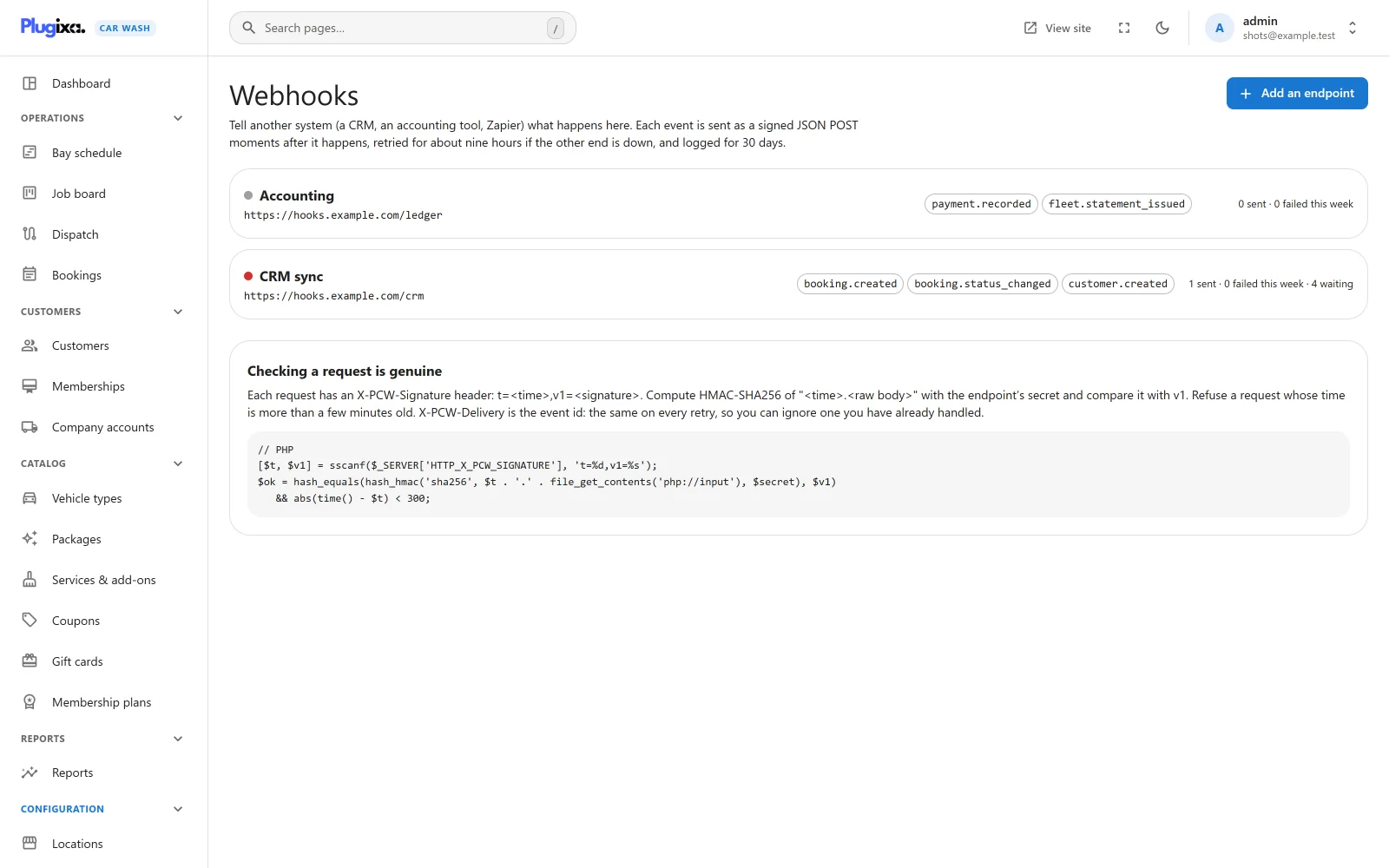
Each endpoint in the list shows its name and address, a dot for its last delivery (green when it succeeded, red when it failed, grey before anything was sent), the events it receives, and how many deliveries succeeded and failed in the last seven days. A Paused chip marks a paused endpoint, and a count of waiting deliveries appears while any are queued.
Who can manage webhooks
Only a user with the plugixa_carwash_manage_settings capability sees the
Webhooks entry, and the webhook routes refuse everybody else. A webhook sends
customer data to an address of your choice and its page shows the signing
secret, so it is kept to people who manage settings. See
Roles and permissions.
If the entry is missing for an administrator, the Webhooks app is switched off in the App Manager.
Adding an endpoint
- Click Add an endpoint.
- Fill in the form and click Save.
| Field | Notes |
|---|---|
| Endpoint URL | “Where each event is POSTed as JSON. It must be reachable from the internet.” A full http:// or https:// address. Anything else is refused with “Enter the full address of the endpoint, starting with https://.” |
| Name | For you, for example CRM, Zapier or accounting. Left empty, the endpoint is named after the address’s host. |
| Events to send | Tick the events this system wants, or Every event, including ones added later. At least one is required: “Choose at least one event to send.” |
| Active | On: events are sent as they happen. Off: the endpoint is paused. |
The endpoint is saved with a new signing secret, and its page opens.
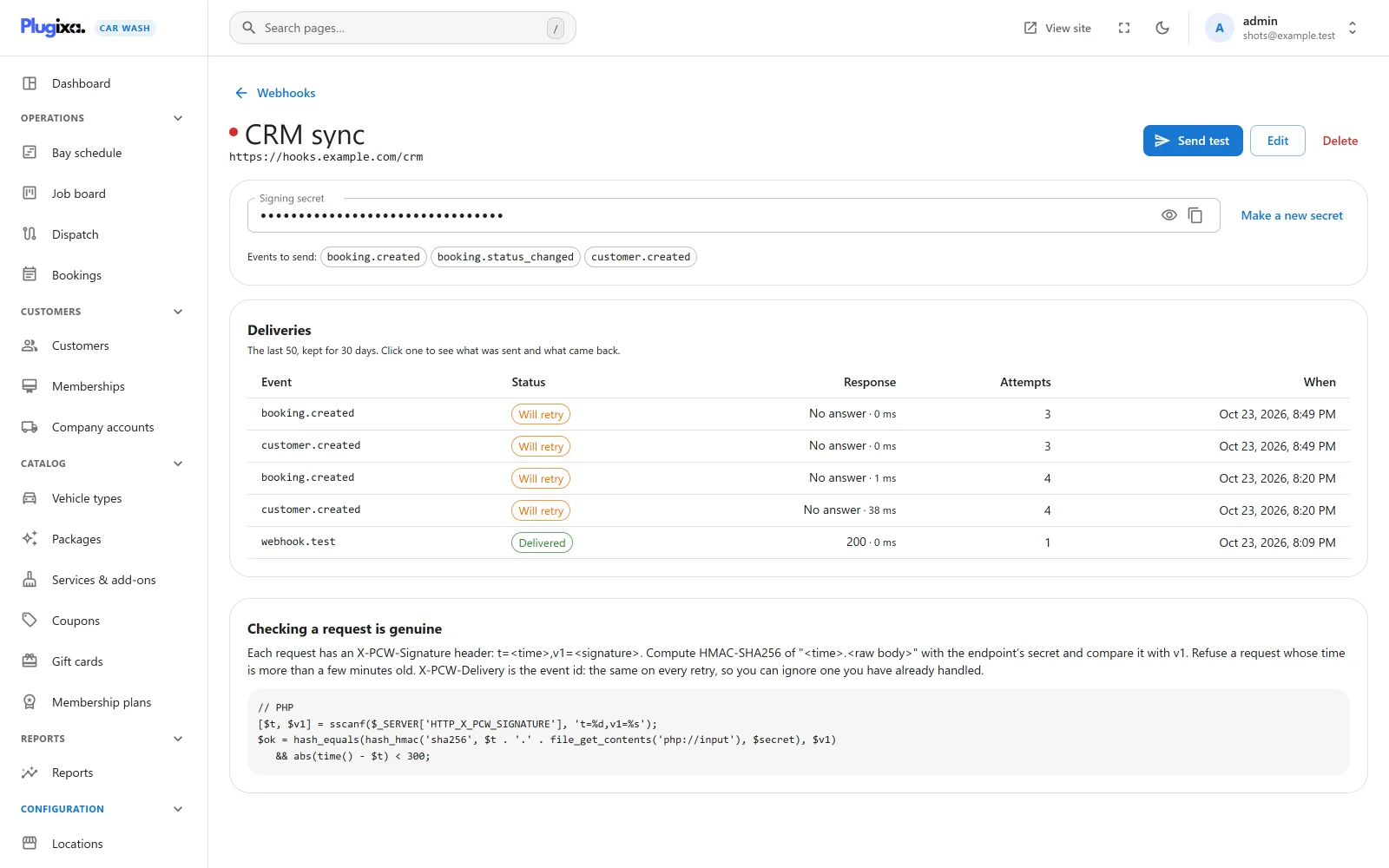
On the endpoint’s page:
| Control | What it does |
|---|---|
| Send test | Sends a webhook.test event now and reports the answer: “Test delivered: the endpoint answered 200 in 84 ms.” or “Test failed:” with the reason. A paused endpoint can still be tested. |
| Edit | Change the address, name, events or the Active switch. |
| Delete | Deletes the endpoint and its whole delivery log. To stop sending for a while, pause it instead. |
| Signing secret | Hidden until you click the eye. The copy button puts it on your clipboard. |
| Make a new secret | Replaces the secret. The old one stops working at once, so the receiving system rejects requests until it has the new one. |
Paused endpoints
Nothing is queued for a paused endpoint. An event that happens while it is paused is not kept for later: switching it back on sends only what happens from then on.
Events
| Event | Sent when | data holds |
|---|---|---|
booking.created |
A booking was made, online or by staff. | booking, and source: online or staff |
booking.status_changed |
A booking was confirmed, started, completed, cancelled or marked a no-show. | booking after the change, from and to |
booking.moved |
A booking moved to another time, bay or team. | booking after the move, and before with its old start_at, end_at and resource_id |
payment.recorded |
A payment or refund was recorded against a booking. | payment (id, booking_id, provider, amount, currency, status) and the booking after it |
customer.created |
A new customer was added, by staff or by a first booking. | customer: the customer record |
job.stage_changed |
A mobile job moved on: on the way, arrived, washing, done. Needs Dispatch. | stage (en_route, arrived, working or done), job (booking_id, stage, en_route_at, arrived_at) and booking |
fleet.statement_issued |
A company account was sent its statement. Needs Company accounts. | statement, and account (id, name, contact_name, email, phone, tax_id) |
webhook.test |
You clicked Send test. It cannot be subscribed to. | message |
A refund in payment.recorded has a negative amount and the status
refunded. A Stripe payment is recorded once, when Stripe confirms it, with the
provider stripe. A refund made in Stripe’s own dashboard is recorded too, and
sends its own payment.recorded.
A booking.status_changed is also sent when the plugin changes a status by
itself, for example when an online payment hold runs out and the booking is
cancelled.
What is sent
Every request is a POST with a JSON body of this shape:
| Key | Holds |
|---|---|
id |
The event’s id, a UUID. The same on every retry and resend of this delivery. |
event |
The event name. |
created_at |
When the event was queued, in UTC, ISO 8601. |
data |
The event’s data, as in the table above. |
A booking is the booking as the staff screens see it, minus four things: the
private link token that lets its holder cancel the booking, the staff notes, the
status history, and the ids of the staff who created and changed it. Times such
as start_at are in UTC; local_date and local_time are the start at the
booking’s location. Money amounts are numbers in the booking’s currency.
A booking.created delivery looks like this:
{
  "id": "3f2c8a1e-6b0d-4e5f-9a7b-2c1d0e9f8a76",
  "event": "booking.created",
  "created_at": "2026-10-23T09:15:02+00:00",
  "data": {
    "booking": {
      "id": 42,
      "number": "CW2026-0042",
      "form_id": 1,
      "location_id": 1,
      "resource_id": 2,
      "customer_id": 17,
      "customer_vehicle_id": 21,
      "vehicle_type_id": 3,
      "package_id": 2,
      "start_at": "2026-10-24 09:00:00",
      "end_at": "2026-10-24 09:45:00",
      "blocked_until": "2026-10-24 09:50:00",
      "duration": 45,
      "status": "confirmed",
      "hold_expires_at": null,
      "first_name": "Olivia",
      "last_name": "Bennett",
      "email": "olivia@example.com",
      "phone": "07700 900123",
      "company": "",
      "vehicle_make": "Toyota Corolla",
      "vehicle_plate": "AB12 CDE",
      "address": "",
      "message": "",
      "agreements": [
        { "text": "I accept the terms.", "accepted": true }
      ],
      "currency": "GBP",
      "subtotal": 50.0,
      "discount": 0.0,
      "coupon_code": "",
      "tax": 0.0,
      "total": 50.0,
      "payment_method": "cash",
      "payment_status": "unpaid",
      "source": "online",
      "page_url": "https://example.com/book/",
      "created_at": "2026-10-23 09:15:01",
      "modified_at": "2026-10-23 09:15:01",
      "items": [
        { "role": "package", "item_id": 2, "name": "Deluxe Wash", "price": 40.0, "duration": 30 },
        { "role": "addon", "item_id": 5, "name": "Hand wax", "price": 10.0, "duration": 15 }
      ],
      "location": { "id": 1, "name": "Harbour Street Car Wash" },
      "local_date": "2026-10-24",
      "local_time": "10:00",
      "resource": { "id": 2, "name": "Bay 2", "color": "#1976d2" },
      "payments": []
    },
    "source": "online"
  }
}
A booking made by staff has form_id null and an empty page_url. The
payments list has one entry per payment with id, provider, amount,
currency, status, reference, note, created_at and paid_at.
Headers
| Header | Value |
|---|---|
Content-Type |
application/json; charset=utf-8 |
User-Agent |
PlugixaCarWash-Webhooks/1.0.0, with the plugin’s version |
X-PCW-Event |
The event name |
X-PCW-Delivery |
The event’s id, the same as id in the body |
X-PCW-Signature |
t=<unix time>,v1=<signature> |
Checking a request is genuine
Anybody can send a POST to your endpoint. The signature proves a request came
from your site and was not changed on the way.
v1 is the HMAC-SHA256, in lowercase hex, of the text <t>.<raw body>: the
t value from the header, a full stop, and the request body exactly as it
arrived, keyed with the endpoint’s signing secret. To check a request:
- Read
tandv1fromX-PCW-Signature. - Compute the HMAC-SHA256 of
t + "." + raw bodywith your secret. - Compare it with
v1in constant time. Refuse the request if they differ. - Refuse it if
tis more than a few minutes from your clock, so an old request replayed at you is not accepted. - Keep the
X-PCW-Deliveryids you have handled, and answer 200 without acting again when one comes back. Retries and resends reuse the id.
Sign the raw body, before any JSON parsing: re-encoding the JSON changes the
bytes and the signature no longer matches. Each attempt is signed afresh, so a
retry carries a new t.
PHP:
$secret = 'whsec_...'; // The endpoint's signing secret.
$body   = file_get_contents( 'php://input' );
$header = $_SERVER['HTTP_X_PCW_SIGNATURE'] ?? '';

if ( ! preg_match( '/^t=(\d+),v1=([a-f0-9]{64})$/', $header, $m ) ) {
	http_response_code( 400 );
	exit;
}

$expected = hash_hmac( 'sha256', $m[1] . '.' . $body, $secret );

if ( ! hash_equals( $expected, $m[2] ) || abs( time() - (int) $m[1] ) > 300 ) {
	http_response_code( 400 );
	exit;
}

$event = json_decode( $body, true );
// $event['event'], $event['data'] ...
http_response_code( 200 );
Node.js with Express:
const crypto = require('crypto');
const express = require('express');

const app = express();
const SECRET = process.env.PCW_WEBHOOK_SECRET; // The endpoint's signing secret.

// express.raw keeps the body as the exact bytes that were signed.
app.post('/carwash', express.raw({ type: 'application/json' }), (req, res) => {
  const match = /^t=(\d+),v1=([a-f0-9]{64})$/.exec(req.get('X-PCW-Signature') || '');
  if (!match) return res.sendStatus(400);

  const [, t, v1] = match;
  const expected = crypto.createHmac('sha256', SECRET).update(`${t}.`).update(req.body).digest('hex');
  const fresh = Math.abs(Date.now() / 1000 - Number(t)) <= 300;

  if (!fresh || !crypto.timingSafeEqual(Buffer.from(expected), Buffer.from(v1))) {
    return res.sendStatus(400);
  }

  const event = JSON.parse(req.body.toString('utf8'));
  // event.event, event.data ...
  res.sendStatus(200);
});
The Webhooks page shows the same instructions under Checking a request is genuine, with a short PHP version.
Delivery and retries
Nothing is sent while the customer or the staff member waits. The event is written to the delivery log during the request that caused it, and a scheduled job sends it moments later, on WordPress’s scheduler. A slow or dead endpoint can never slow down or fail a booking.
Your endpoint must answer with a 2xx status within 10 seconds. Anything else
counts as a failure: another status, a timeout, a connection error, or a
redirect, which is not followed so the signed body never goes to an address you
did not enter.
A failed delivery is retried with growing gaps:
| Attempt | When |
|---|---|
| 1 | Straight away |
| 2 | 1 minute after attempt 1 |
| 3 | 5 minutes after attempt 2 |
| 4 | 30 minutes after attempt 3 |
| 5 | 2 hours after attempt 4 |
| 6 | 6 hours after attempt 5 |
Six attempts over about nine hours. When the sixth fails, the delivery is marked Failed and stays in the log to be sent again by hand.
Deliveries are not guaranteed to arrive in order. A delivery that is being
retried can arrive after a later event. Use created_at in the body to order
them.
Each run of the scheduled job sends up to 25 deliveries that are due, and books another run when more are waiting. An hourly run picks up anything a missed run left behind. A delivery left at Sending for more than 10 minutes by a request that died is put back in the queue by the next run.
The scheduled job runs on WP-Cron, which only fires when somebody visits the site. On a quiet site, deliveries and retries can be late. See Reminders and text messages for a real server cron.
The delivery log
The endpoint’s page lists its last 50 deliveries, newest first, with the event, the status, the HTTP response and how long it took, the number of attempts and when. Deliveries are kept for 30 days.
| Status | Meaning |
|---|---|
| Queued | Waiting for its first attempt. |
| Sending | Being sent now. |
| Will retry | An attempt failed; another is scheduled. |
| Delivered | The endpoint answered 2xx. |
| Failed | Every attempt failed, or a test or resend failed. |
Click a delivery to see the event id, the attempts and the next try, the body that was sent, and the endpoint’s answer (its first 1,000 characters).
Send again
Send again in that window sends the same body, with the same event id, now. It works on a delivered or failed delivery as well as a waiting one. Only a delivery that is being sent at that moment is refused, with “That delivery is being sent right now.”
A resend is a single attempt with no retries. If you click Send again on a delivery that is still waiting for a retry and the resend fails, the delivery is marked Failed and its remaining automatic retries are cancelled. Let a retrying delivery run its course, or be ready to send it again by hand.
A test send works the same way: one attempt, logged, no retries.
Addresses that are refused
Requests are sent with WordPress’s safe HTTP functions. An address that leads to
the server itself or to a private network is refused when sending, so a webhook
cannot be used to reach what the site can see and the internet cannot:
localhost, 127.0.0.1, and the private ranges such as 10.x.x.x,
172.16.x.x to 172.31.x.x and 192.168.x.x. WordPress also only allows the
ports 80, 443 and 8080 for these requests.
The address is checked each time a delivery is sent, not when you save it, so an address that later points somewhere private is still caught. The delivery fails with “This address points at a private or local network, which webhooks may not reach.” To test against a receiver on your own computer, expose it with a public tunnel address.
Without Pro
The free edition sends no webhooks and has no Webhooks page. Your endpoints and their log stay in the database if Pro is removed. Developers can react to the same events in PHP with the plugin’s actions: see Hooks.