

Contents
Services and add-ons - Plugixa Car Wash
A service is one thing done to a vehicle: a snow foam pre-wash, an interior vacuum, a hand wax. Services are the building blocks of your catalogue, and each one can play two parts:
| Part | Where it appears | What the customer pays for it |
|---|---|---|
| Inside a package | A line in the package’s “What’s included” checklist. | Nothing extra. The package price covers it. |
| As an add-on | The “Add some extras?” step, on top of a package. | The service’s own price for their vehicle. |
One switch on the service, Customers can add this on top of a package, decides whether it can be sold as an add-on. A service can be both: included in the Full Detail package and sold as an add-on to the Express Wash.
Open the list from Plugixa Car Wash, then Services & add-ons in the Catalog group of the app’s sidebar.
The list
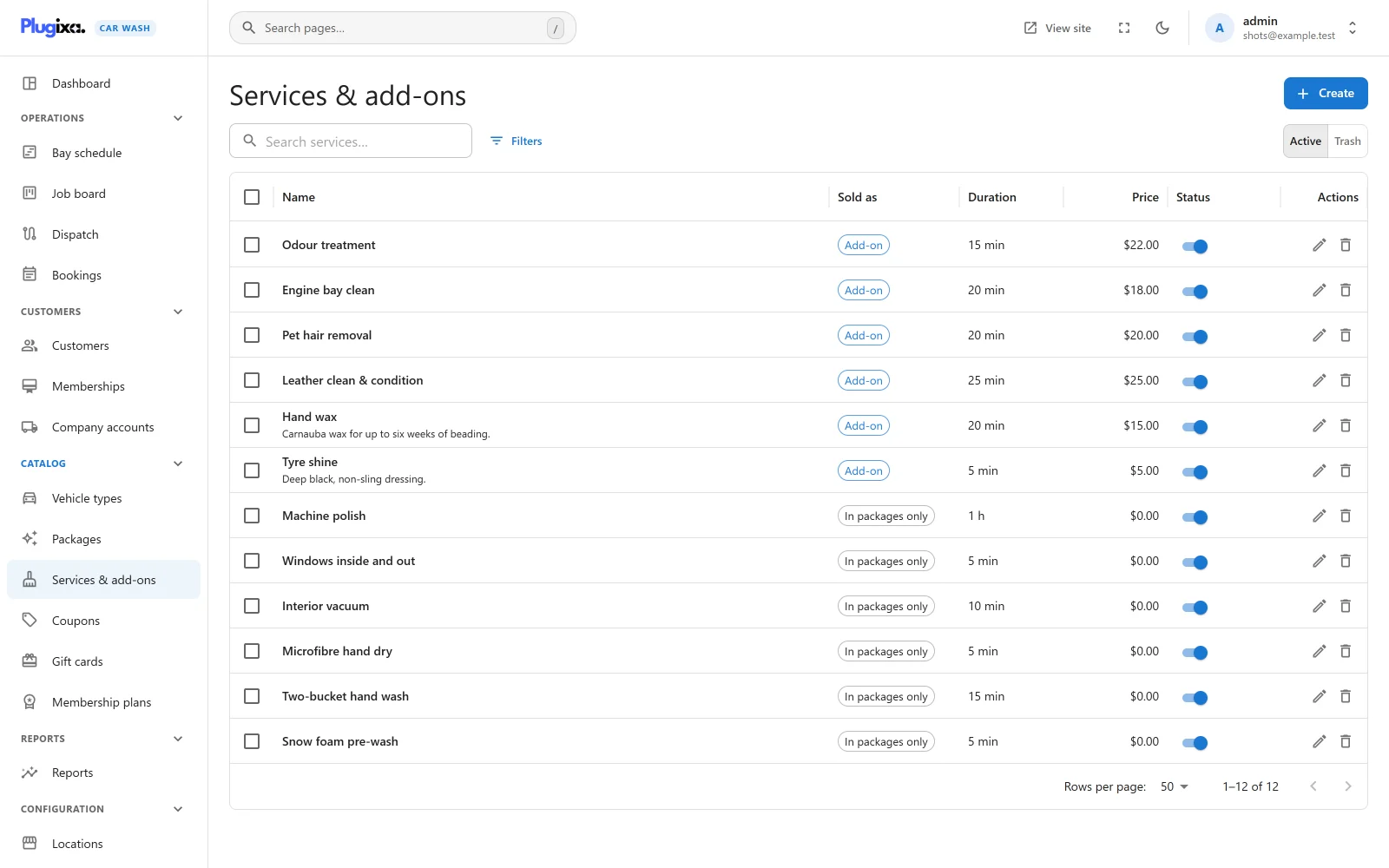
| Column | What it shows |
|---|---|
| Name | The service’s name, its photo as a thumbnail when it has one, and its description underneath. |
| Sold as | Add-on when customers can add it on top of a package, In packages only when they cannot. |
| Duration | Its own time, written as “20 min” or “1 h”. |
| Price | Its own price. |
| Status | A switch between Published and Unpublished. |
The search box reads “Search services…”. Filters narrows the list by Sold as an add-on, Price and Status. Export CSV downloads the list. Tick rows to publish, unpublish or trash several services at once.
An empty list reads “No services yet”, with a hint that a service is one thing done to a car, such as a hand wash or a wheel shine, which you put in packages or sell as an add-on.
Adding a service
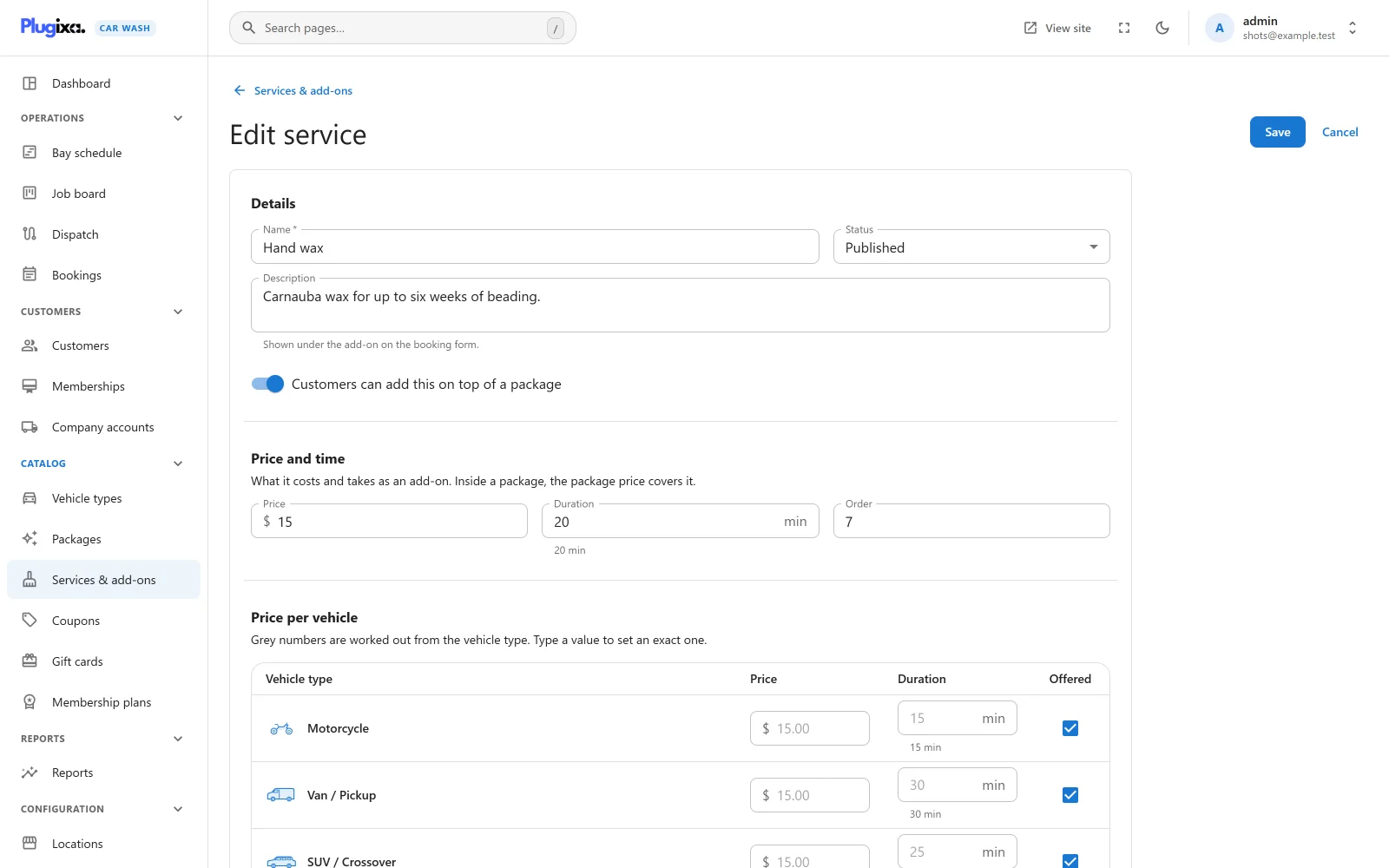
Click Create.
Details
| Field | Default | Notes |
|---|---|---|
| Name | Empty | Required, up to 190 characters. Placeholder “e.g. Wheel shine”. “A name is required.” |
| Status | Published | Published or Unpublished. |
| Description | Empty | “Shown under the add-on on the booking form.” |
| Customers can add this on top of a package | On | Off, the service can only be included in packages, and the list says In packages only. |
Price and time
“What it costs and takes as an add-on. Inside a package, the package price covers it.”
| Field | Default | Limits | Notes |
|---|---|---|---|
| Price | 0 | 0 to 1,000,000, two decimals | Charged when the service is an add-on, or sold on its own. |
| Duration | 10 min | 0 to 1,440 minutes | Added to the booking’s length when the service is an add-on. The readable form appears underneath. |
| Order | 0 | 0 to 100,000 | Lower numbers are shown first. |
Inside a package neither number is used. The package has its own price and duration; on the package form the services’ times are only added up as a guide.
Price per vehicle
“Grey numbers are worked out from the vehicle type. Type a value to set an exact one.”
It works as on a package, with one difference: a service never carries the vehicle’s extra fee. The grey price on every row is the service’s own price; only the grey duration changes, by the vehicle’s time multiplier.
| Column | What it does |
|---|---|
| Price | Type a number to charge exactly that for this vehicle. Clear it to go back to the service’s own price. |
| Duration | Grey, it shows the service’s duration x the vehicle’s time multiplier, rounded to the nearest minute. Type minutes to set an exact time. |
| Offered | Untick to withhold the service from this vehicle. |
In the screenshot, Hand wax is $15.00 for 20 minutes: $15.00 for every vehicle, 15 minutes for a motorcycle (x 0.75), 25 minutes for an SUV (x 1.25) and 30 minutes for a van (x 1.5).
A typed price has to be zero or more and a typed time between 0 and 1,440 minutes, or the save stops with “A vehicle price cannot be negative, and a time must be between 0 and 1,440 minutes.”
Image
A photo from the media library, shown as a thumbnail in the admin list. The booking form does not show service photos.
Using a service inside a package
On the package, pick the service in What’s included. It becomes a line of the package card’s checklist, in the order you picked it.
A service that is included in a package cannot be trashed. The refusal says “This service is included in 1 package. Remove it from the package first.” An unpublished service stays in the package but drops out of the checklist the customer sees.
Selling a service as an add-on
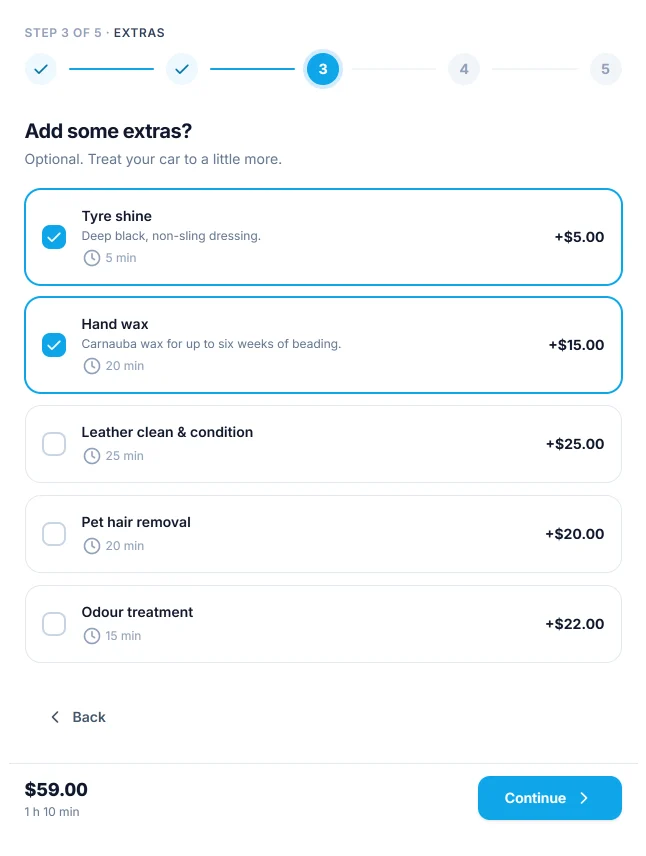
On a form that sells Packages and add-ons, the step after the package is titled “Add some extras?” with the hint “Optional. Treat your car to a little more.” Each add-on is a row with its name, description, time and price for the chosen vehicle, written as “+$15.00”. The customer ticks as many as they like, or none.
Which add-ons appear:
- Only published services switched to Customers can add this on top of a package.
- Only the ones the chosen package offers in its Add-ons offered list, or all of them when that list is empty.
- Not the ones unticked under Offered for the chosen vehicle.
When no add-on is left after those three rules, the step is skipped. Choosing an add-on, or removing one, clears the chosen time, because the length of the job has changed.
A form that sells Packages only never shows this step, and refuses a booking request that carries add-ons with “This form does not offer add-ons.”
Selling services one by one
A booking form set to Individual services has no package step. Instead a “Choose your services” step lists every published service, whether or not it is switched to add-on, and the customer has to pick at least one (“Pick one or more.”).
On such a form the vehicle’s extra fee has no package to ride on, so it is added as its own line, named after the vehicle: “SUV / Crossover surcharge”. See Vehicle types.
In the admin
When staff create a booking in the admin, they may leave the package out and add any published service, add-on or not. See Bookings.
Status, trash and restore
An Unpublished service is offered nowhere: not as an add-on, not on a services form, not in a package’s checklist. Deleting a service moves it to the trash, unless a package includes it. Switch the list to Trash to Restore it or Delete permanently.
Bookings keep the names and prices of the services they were made with.
What is stored
| Table | Holds |
|---|---|
{prefix}plugixa_carwash_services |
One row per service, with its price, duration and add-on switch. |
{prefix}plugixa_carwash_package_items |
Which packages include a service, and which offer it as an add-on. |
{prefix}plugixa_carwash_price_rules |
The exact prices, times and “not offered” marks typed per vehicle. |