

Contents
Company accounts - Plugixa Car Wash
Company accounts PRO are for businesses whose people wash their vehicles with you: a courier firm, a plumber’s vans, a car dealer. You link the company’s drivers to its account. When a driver books, they get the company’s rate and can charge the wash to the company instead of paying. Each month the company receives one statement for everything charged, and you mark it paid when the money arrives.
The App Manager calls this app Fleet accounts. In the admin it lives under Customers -> Company accounts.
The list
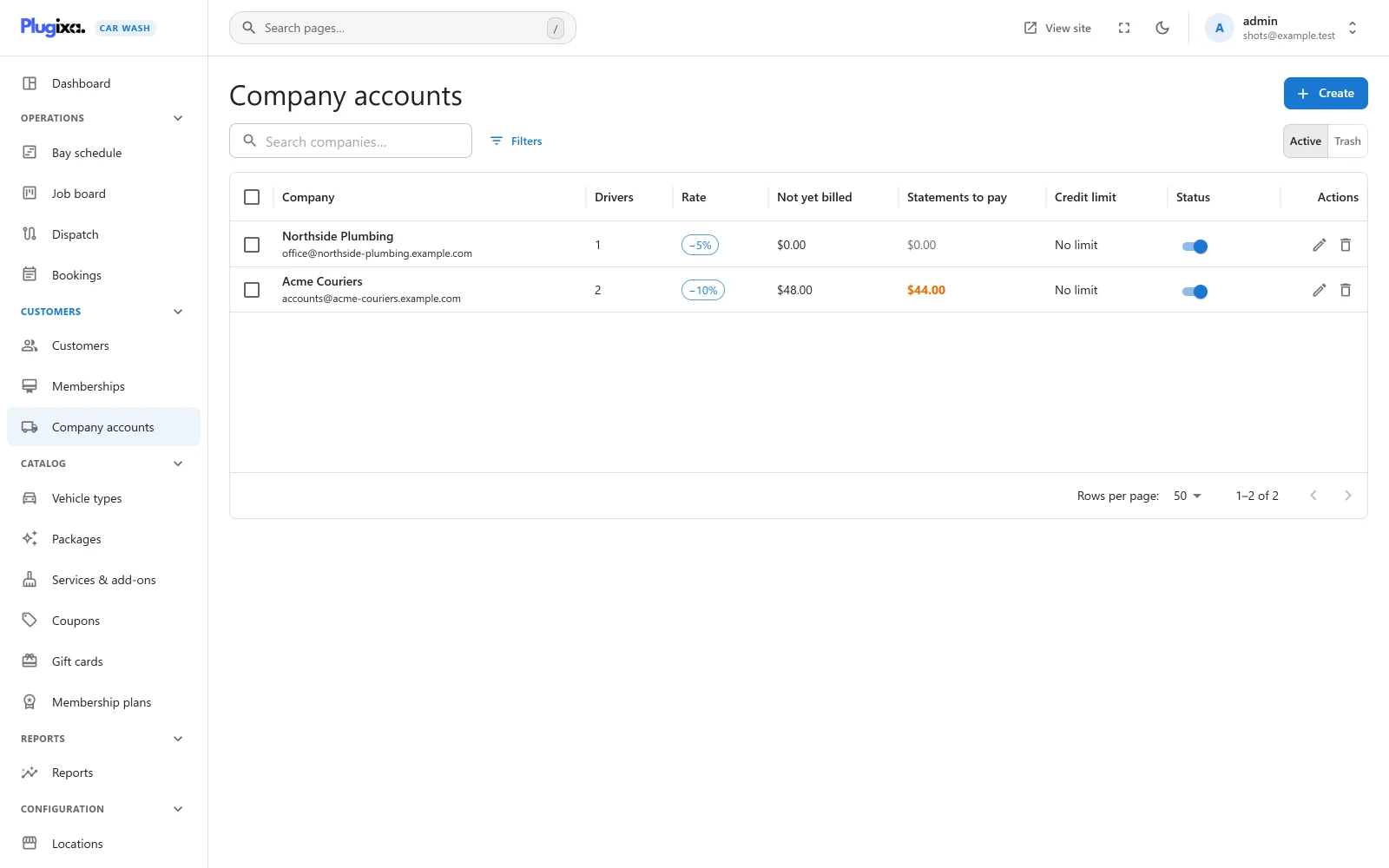
| Column | Shows |
|---|---|
| Company | Name and billing email |
| Drivers | How many customers are linked to the account |
| Rate | The company discount |
| Not yet billed | Washes charged to the account and not on a statement yet |
| Statements to pay | Issued statements not yet paid, highlighted when above zero |
| Credit limit | The limit, or No limit |
| Status | Published or unpublished |
Setting up an account
Press Create.
| Field | Default | Notes |
|---|---|---|
| Company | Required | The company’s name. Customers see it as “Charge to Acme Couriers”. |
| Contact | Empty | Who you deal with. |
| Billing email | Empty | “Statements are sent here.” Without a valid address, statements are made but not emailed. |
| Phone | Empty | |
| Billing address | Empty | |
| Tax number | Empty | |
| Company rate | 0 % | Percent off every booking a driver makes while signed in, or that staff make for them. 0 to 100. |
| Credit limit | 0 | The most the company may owe at once. 0 means no limit. |
| Payment terms | 30 days | How long the company has to pay a statement, counted from the day it is issued. |
| Notes | Empty | For staff. |
An unpublished account stops working at once: its drivers get no company rate, cannot charge to it, and the monthly run skips it. Nothing already charged is lost. Unpublish an account rather than delete it: an account that still owes money cannot be deleted (“This company still owes money. Settle its statements first, or unpublish it to stop new charges.”).
Drivers and managers
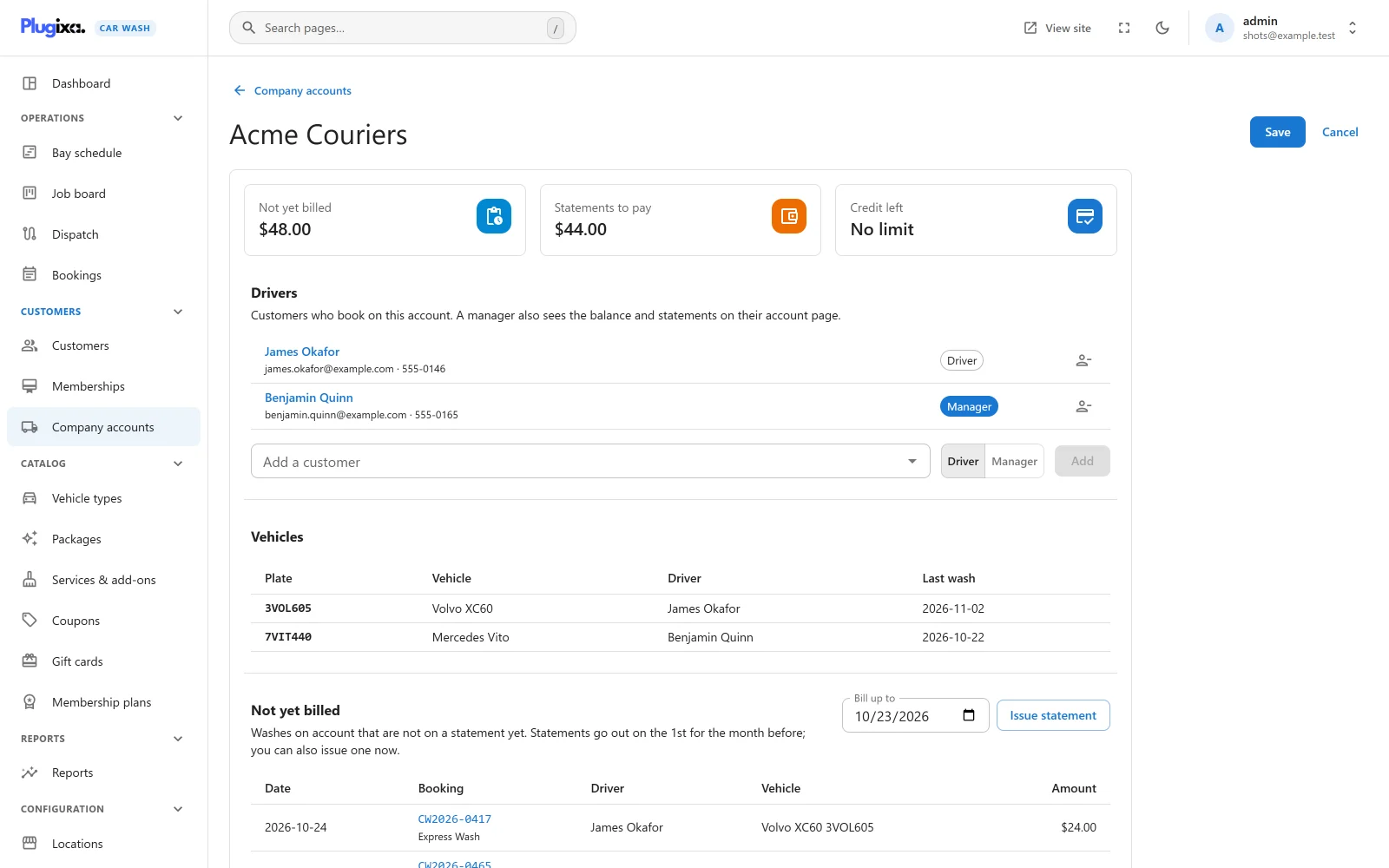
On the account’s page, under Drivers:
- Pick a customer in Add a customer.
- Choose Driver or Manager.
- Press Add.
| Role | Can |
|---|---|
| Driver | Book at the company rate and charge washes to the account |
| Manager | The same, and see the account’s balance and recent statements on their account page |
A customer belongs to one company at most. Adding a customer who is already on another account moves them to this one. Adding them again with the other role changes their role. The icon at the end of a row removes them from the account; what they already charged stays on it.
Under the drivers, Vehicles lists the plates washed on the account, with the vehicle, the driver and the date of the last wash.
The top of the page shows Not yet billed, Statements to pay and Credit left (the limit less both, or No limit).
Booking on account
The company rate and the account are only offered when the server knows the booker is a driver:
- Online, the driver must be signed in on their account before booking. Typing a driver’s email address on the booking form gets neither the rate nor the account, and a booking that names the account anyway is refused.
- Staff making a booking for the driver’s email address get the company rate.
For a signed-in driver:
- The summary shows a discount line, for example “Acme Couriers rate (-10%)”.
- The payment step offers Charge to Acme Couriers, “Added to your company’s monthly statement.”, beside your usual methods. It is never offered to anyone else.
- Choosing it books the wash with nothing to pay now. The booking stays unpaid and is charged to the account for what it still owes.
How the rate is worked out
The rate is applied at priority 9 of the plugixa_carwash_quote filter: after a
membership (8),
before a coupon (10)
and before a travel fee
(20). It is a percent of the booking’s lines at that point, so a driver who is
also a member gets the rate on what the membership left, and the travel fee is
charged in full.
The amount charged to the account is what is still due once the booking is made, so a gift card used on the same booking lowers the charge.
The credit limit
With a credit limit above 0, the account is offered only while:
not yet billed + statements to pay + this booking's amount due <= credit limit
Once a booking would take the company over its limit, the summary says “Your company account has reached its credit limit, so this booking must be paid another way.” and Charge to is not offered. A booking that names the account anyway is refused with “This booking cannot be charged to your company account. Choose another way to pay.”
Staff are not held to the limit: they can see the balance and decide.
Charges from the booking screen
A booking’s page has a company account card when its customer is a driver:
- Charge to Acme Couriers puts an existing booking on the account, for what it still owes. A cancelled booking, or one with nothing left to pay, cannot be charged.
- A booking on the account shows “On account with Acme Couriers” and “Goes on the next statement”, with Take off the account to remove it. The booking is then paid at the wash.
- Once the booking is on a statement, the card links to it with Open statement, and it cannot be taken off: “This booking is on a statement already. Void the statement first.”
Cancelling a booking that is not on a statement yet takes its charge off the account. A booking cancelled after its statement was issued stays on that statement: void the statement, and the next one is made without it.
Statements
Issuing a statement
Statements are issued two ways:
- Automatically, once a month. A daily background task bills every published account for everything charged up to the last day of the previous month that is not on a statement yet. Run every day, it finds nothing new until the next month.
- By hand, on the account’s page, under Not yet billed: choose Bill up to (today by default) and press Issue statement.
A statement takes every unbilled charge whose wash is on or before Bill up to. As it is made, each charge is brought up to date with what its booking still owes: a charge whose booking was cancelled, or has since been paid, is dropped. With nothing to bill, no statement is made: “There is nothing to bill up to that date.”
| On the statement | Value |
|---|---|
| Number | FS-YYYY-NNNN, for example FS-2026-0001. The year is the year of Bill up to, and the count runs across all accounts in that year |
| Period | From the date of the earliest wash on it to Bill up to |
| Due | The day the statement is issued plus the account’s Payment terms. Billing up to a past date never gives a due date that has already gone: with 30-day terms, a statement issued on 1 November for October is due on 1 December |
| Total | The sum of its charges |
The statement is emailed to the Billing email with the subject “Statement FS-2026-0001 for Acme Couriers”: one line per wash (date, driver, vehicle and what was booked, amount), the total due, and “Payment is due by” the due date.
The action plugixa_carwash_fleet_statement_issued fires with the statement and
the account. See Hooks.
Paying, voiding and printing
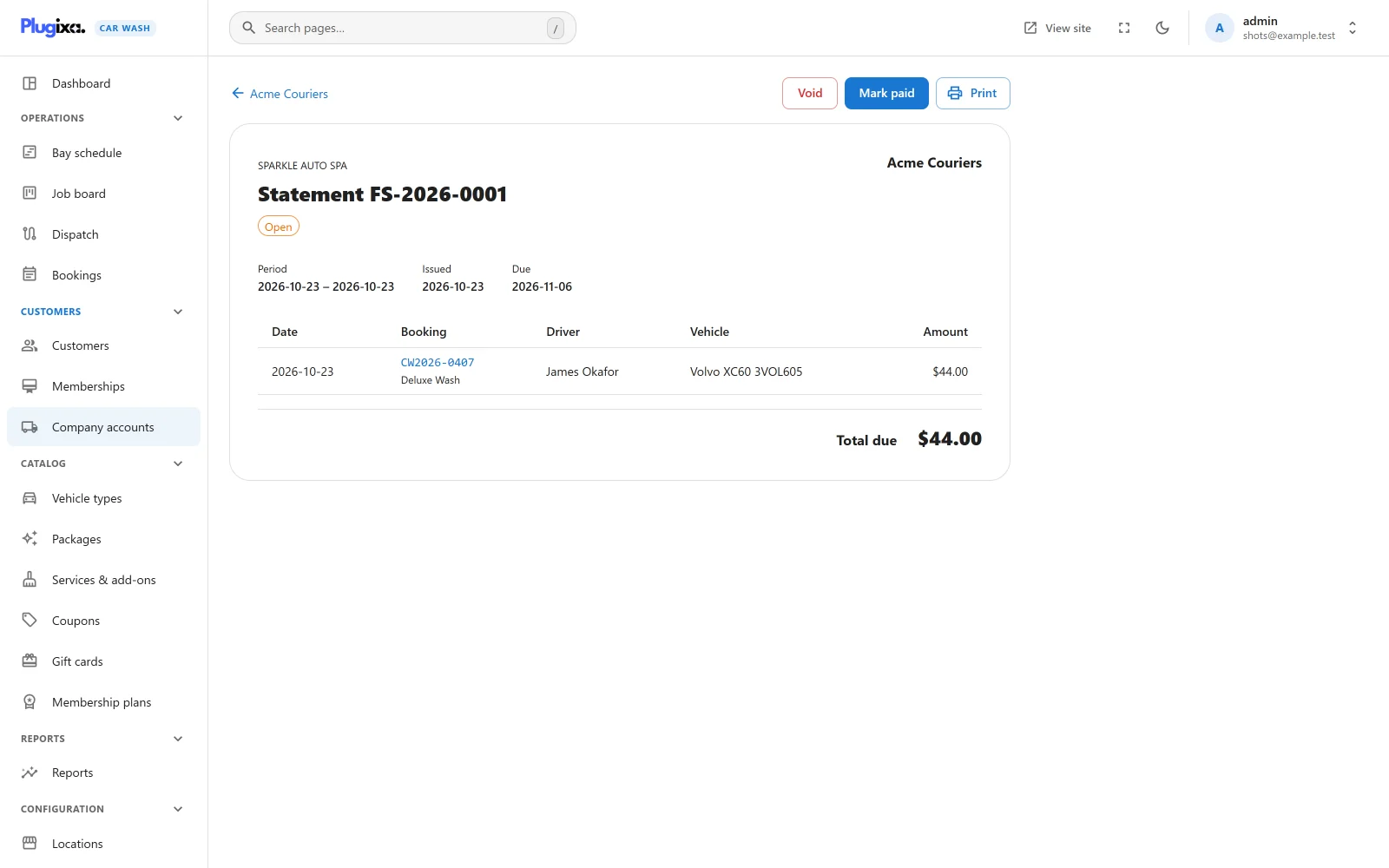
Open a statement from the Statements list on the account’s page.
| Status | Meaning |
|---|---|
| Open | Issued and not paid |
| Overdue | Open, and past its due date |
| Paid | Marked paid |
| Void | Withdrawn |
- Mark paid records a payment on every booking on the statement, with the note “Statement FS-2026-0001”, so each booking becomes Paid. Use it when the company’s money arrives.
- Void asks “Void this statement? Its washes go back to not yet billed.” Its charges are unbilled again and go on the next statement. Only an open statement can be voided or paid.
- Print prints the statement from your browser, or saves it as a PDF.
What managers and drivers see
On their account page, every driver sees a card titled with the company: “You book for this company. Choose “Charge to” the company when you pay and the wash goes on its monthly statement.”, and the company rate when there is one.
A manager also sees:
- Not yet billed and Statements to pay,
- the latest statements (up to three, void ones left out), each with its total and “paid” or “due” and its due date,
- a bar of the balance against the credit limit, when there is one.
If Pro is removed
Accounts, charges and statements stay in the database and come back with Pro. Without it, nobody gets the company rate or can charge to an account, no statements are made, and payments already recorded stay on their bookings. See Free vs Pro.