

Contents
Reports - Plugixa Car Wash
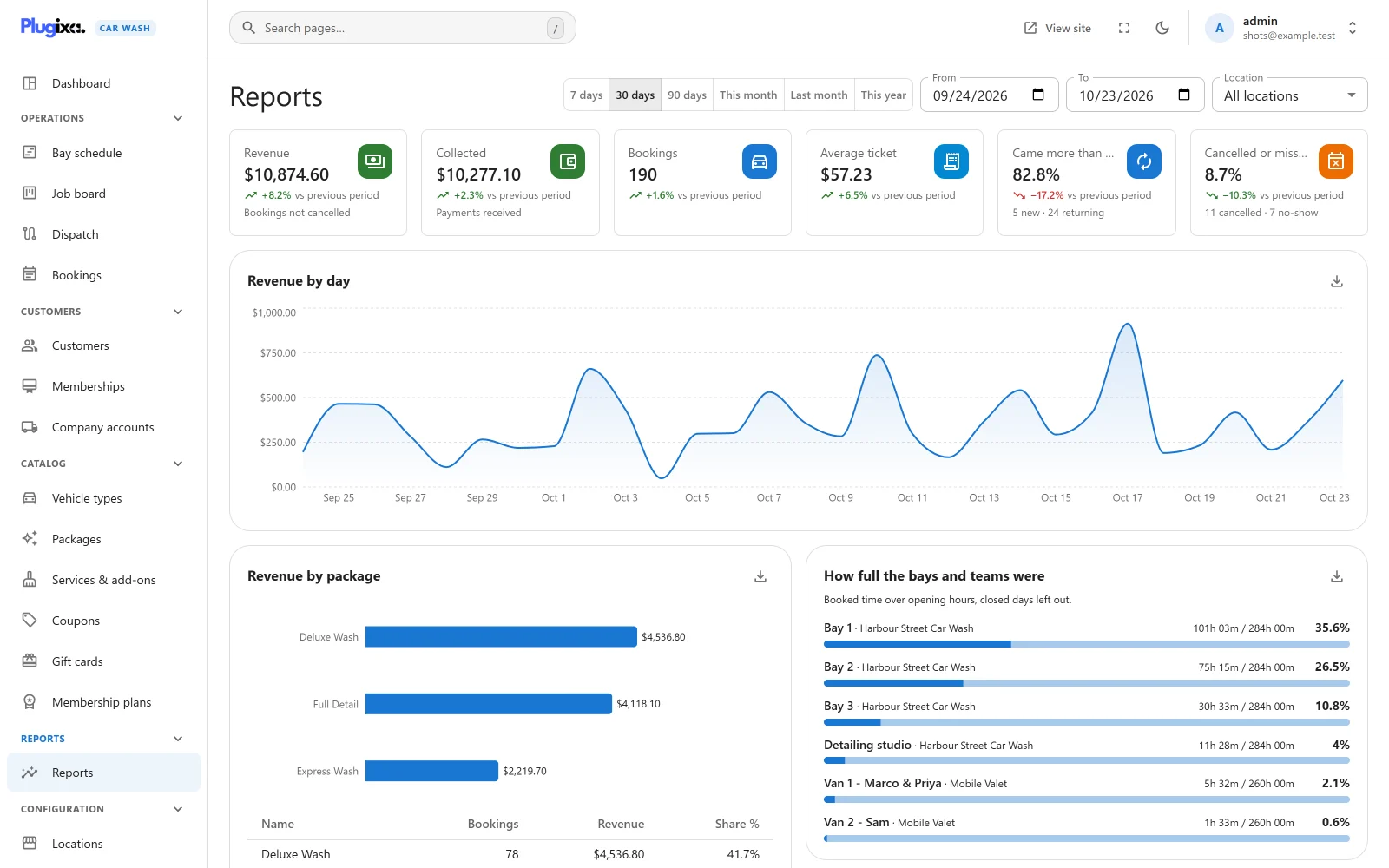
Reports PRO show how the business did over any period: what the bookings were worth and what was actually paid, how full each bay and team was, when customers come, which add-ons sell, and what discounts, memberships, gift cards and company accounts gave away. Every table downloads as a CSV file.
Open Plugixa Car Wash -> Reports.
Who can see reports
Reports need the plugixa_carwash_export capability, the same right as taking
data out of the plugin. A user without it has no Reports entry in the menu,
and the report route refuses them. Administrators have it. To give it to staff,
see Roles and permissions.
If the menu entry is missing for an administrator too, the Reports app is switched off in the App Manager.
Choosing the period
| Control | What it does |
|---|---|
| 7 days, 30 days, 90 days | That many days, ending today. 30 days is chosen when the page opens. |
| This month | From the 1st of this month to today. |
| Last month | The whole of last month. |
| This year | From 1 January to today. |
| From and To | Any first and last day. Changing either one clears the preset buttons. |
| Location | All locations, or one location. Shown only when you have more than one location. |
The presets use the calendar of the computer you are looking from. The period and location are kept in the page address, so a bookmarked or shared link opens the same report.
A report covers at most 366 days. A longer period is refused with “A report covers up to 366 days.” A From after To is refused with “Choose a start date on or before the end date.”
Which bookings are counted
Reports read the live booking tables every time the page loads. Nothing is stored or summarised in advance, so a booking you change now shows the next time you open or refresh the report.
- A booking belongs to the day it is for, not the day it was made. The day is read in your WordPress time zone.
- Bookings awaiting payment are left out. A booking in its online payment hold is not counted until it is confirmed.
- Trashed bookings are left out.
- Cancelled and No-show bookings are counted separately. They appear only in the Cancelled or missed tile. Everywhere else, “bookings” means the rest: Pending, Confirmed, In progress and Completed.
The figure tiles
Six tiles run across the top.
| Tile | What it shows |
|---|---|
| Revenue | The sum of the totals of the counted bookings: what the period’s appointments were expected to bring, paid or not. A Pending booking counts in full. Cancelled and no-show bookings do not count. |
| Collected | Money received, net of refunds, for bookings at the chosen location: the payments with the status Paid whose payment date falls inside the period, less the refunds recorded inside the period. Each counts on the day it happened, a payment when it was received and a refund when it was recorded, whatever day the booking is for. A period with more refunded than received can show a negative amount. |
| Bookings | How many bookings are counted. |
| Average ticket | Revenue divided by Bookings. |
| Came more than once | Of the customers with a counted booking in the period, the share who had more than one in it. Under it: how many were new and how many were returning. A customer is returning when they had a counted booking that started before the period. |
| Cancelled or missed | The share of the period’s bookings that were cancelled or marked a no-show. Under it: how many of each. |
Revenue and Collected answer two different questions, and neither stands in for the other. Many washes are paid at the bay and marked paid later, so on a given day the two rarely match.
Change against the previous period
Each tile shows its change against the period of the same length just before, as “+8.2% vs previous period”. For the last 30 days, that is the 30 days before them. The arrow is green when the change is good: a rise for most tiles, a fall for Cancelled or missed. When the previous period had zero, no change is shown.
For the two percentage tiles the change is relative: a rate that went from 10% to 12% shows +20%.
Revenue by day or by week
The chart shows Revenue and the number of bookings per day. For a period longer than 62 days it shows them per week instead, each week starting on Monday, and its title changes to Revenue by week.
Revenue by package
The counted bookings grouped by their package, with bookings, revenue and each package’s share of the revenue. The chart shows the eight largest; the table below it shows them all. A booking with no package is listed as “No package”. A package deleted since still appears under its name.
How full the bays and teams were
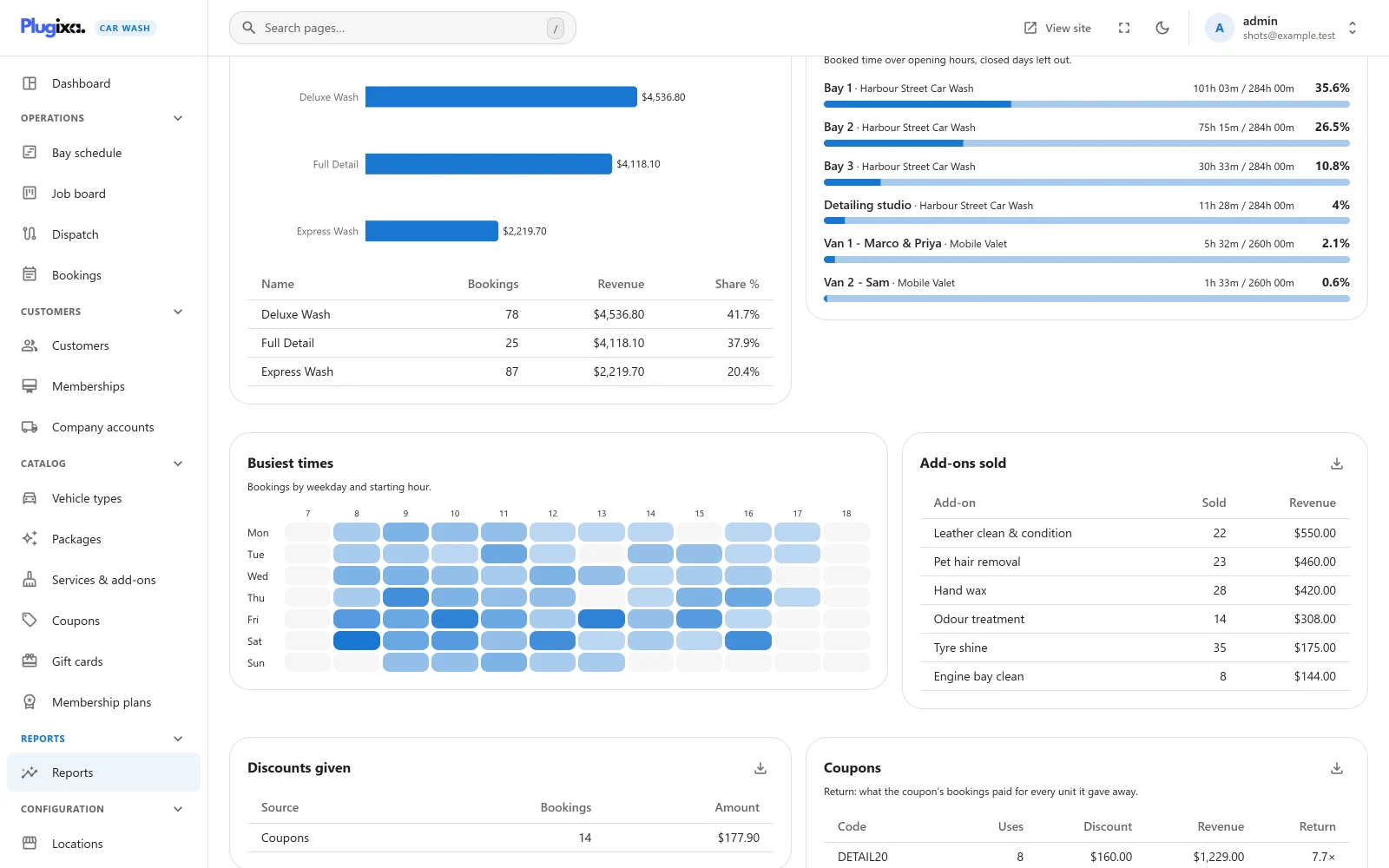
One row per active bay and mobile team, for the chosen location or all of them:
- Booked minutes: the durations of the counted bookings assigned to that bay or team. The buffer after each wash is not included.
- Open minutes: the location’s opening hours added up over every day of the period, leaving out the days it was closed. Opening hours are read in the location’s own time zone.
- Utilisation: booked minutes divided by open minutes.
Each row shows both as hours and minutes, for example “101h 03m / 284h 00m”. A bar at 85% or more turns orange. A booking that ran past closing counts in full, so a very busy bay can read over 100%. Every bay at a location has the same open minutes, because they share the location’s hours.
Busiest times
A grid with the days of the week down the side and the starting hours across the top. Each cell counts the bookings that started in that hour on that weekday, over the whole period. A darker cell means more bookings; hover a cell to see the count. Only the hours that had a booking, plus one either side, are drawn. The hours are in your WordPress time zone.
Add-ons sold
Each add-on sold with the counted bookings: how many times, and the revenue from those lines, largest first.
Discounts given
What was taken off the counted bookings, split by what took it off:
| Source | Discounts from |
|---|---|
| Coupons | Coupons |
| Memberships | Memberships |
| Company rates | Company accounts |
| Other | Anything the plugin could not match to one of the three |
Each row has the number of discount lines and their amount. Discount lines saved before the plugin recorded their source are matched to their coupon, membership or company account when Pro is installed or updated, so older periods split the same way as new ones.
Coupons
Each coupon code used on the counted bookings:
| Column | What it counts |
|---|---|
| Uses | Counted bookings that used the code. |
| Discount | What the code took off those bookings. |
| Revenue | The totals those bookings came to, after the discount. |
| Return | Revenue divided by Discount. “7.7x” means the bookings brought 7.70 for every 1.00 the coupon gave away. 0 when the coupon gave nothing away. |
Revenue by location
The counted bookings grouped by location, with each location’s share. Shown when the report covers more than one location.
How customers chose to pay
The counted bookings grouped by the payment method picked when booking, with bookings, revenue and share. It is the method chosen, not proof of payment: see Collected for money received. A booking with no method is listed as “Not chosen”.
Programs
One card per program that is installed. Programs belong to the whole business, so these cards ignore the Location choice.
| Card | Line | What it counts |
|---|---|---|
| Memberships | Active members | Memberships that are active or past due, today. |
| Joined in period | Memberships created in the period. | |
| Washes used | Membership washes used in the period. | |
| Value given | The membership discount on counted bookings in the period. | |
| Monthly recurring | What the active plans bring in a month, today. A yearly plan counts at one twelfth. | |
| Gift cards | Sold and Value sold | Cards created in the period, and their starting value. |
| Redeemed | What cards paid towards bookings in the period. | |
| Still held for customers | Unspent balance on active, unexpired cards, today. It is washes you owe, not revenue. | |
| Loyalty points | Earned and Redeemed | Points given and spent in the period. |
| Company accounts | Billed | Statements issued in the period, except voided ones. |
| Paid | Statements marked paid in the period. | |
| Unpaid statements | Every statement issued and not yet paid, today. | |
| Company rate given | The company discount on counted bookings in the period. |
See Memberships, Gift cards, Loyalty and Company accounts.
Downloading CSV
Each section with a table has a download button in its top corner. It saves the
table as a CSV file named after the section and the dates, for example
revenue-2026-09-24-2026-10-23.csv. The busiest times grid and the program
cards have no download.
The file is built in your browser from the data already on screen; nothing more is requested from the server. It is UTF-8 with a byte order mark and Windows line endings, so Excel shows accented names correctly.
Some cells hold text that a customer or a colleague typed, such as a coupon code
or a package name. A text cell that starts with =, +, - or @ is written
with a ' in front, so a spreadsheet shows it as text instead of running it as
a formula. Numbers are written as plain numbers.
Without Pro
The free edition has no Reports page. The dashboard shows today’s figures and the last 14 days. See Free vs Pro.