

Contents
Emails - Plugixa Car Wash
The plugin emails the customer when a booking is made, confirmed, moved to a new time or cancelled, and emails you when a new booking arrives online. All emails share one simple design in your accent colour, with your business name at the top.
The settings
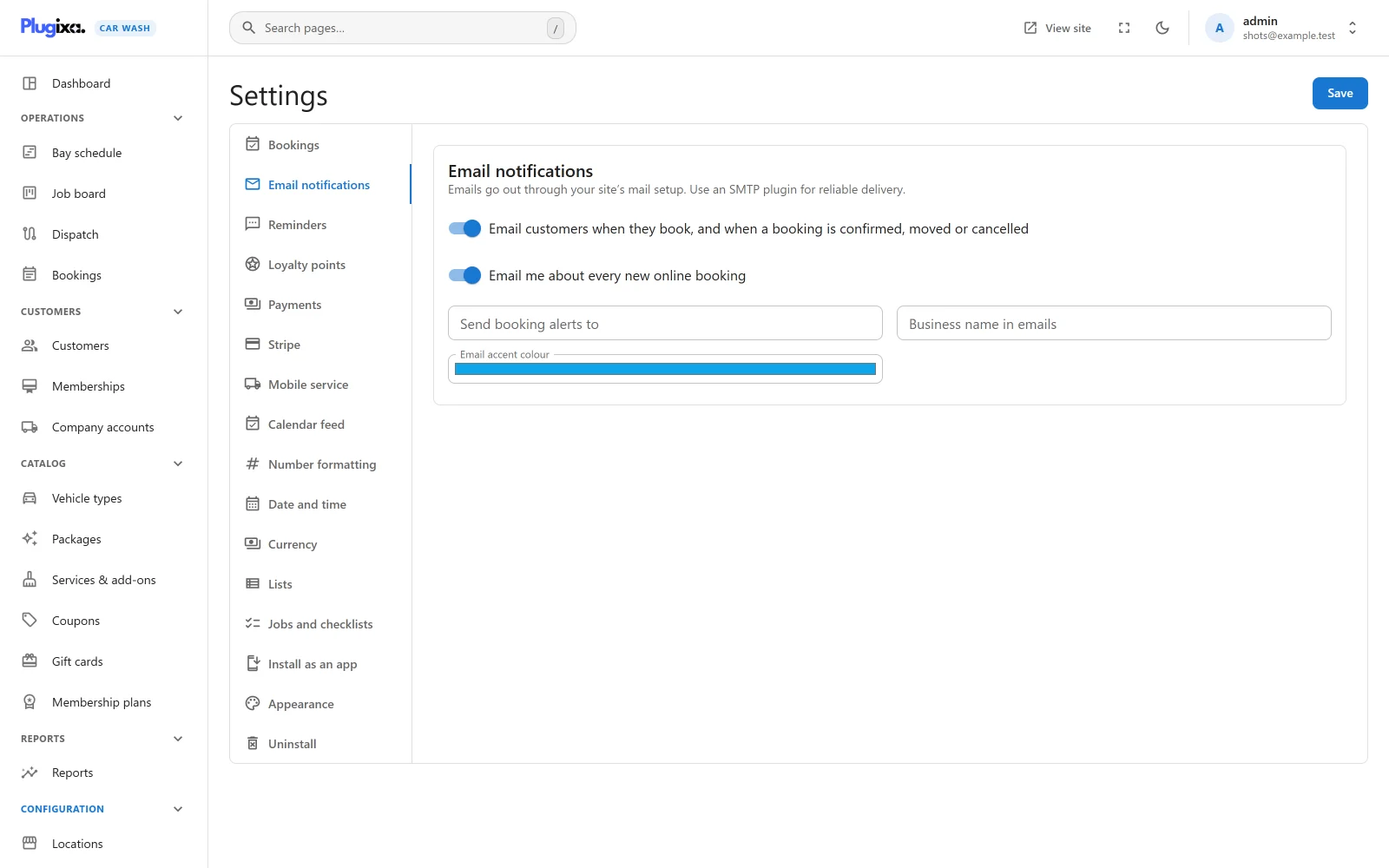
Open Settings from the Configuration group of the app’s sidebar, then Email notifications. The card says: “Emails go out through your site’s mail setup. Use an SMTP plugin for reliable delivery.”
| Setting | Default | What it does |
|---|---|---|
| Email customers when they book, and when a booking is confirmed, moved or cancelled | On | Turns every booking email to customers on or off at once. |
| Email me about every new online booking | On | Turns the new-booking alert on or off. |
| Send booking alerts to | Empty | Where the alert goes. Left empty, or set to something that is not an email address, it goes to the site’s admin email from Settings -> General in WordPress. Also used as the reply-to address of customer emails. |
| Business name in emails | Empty | Printed at the top of every email, and used as the sender’s name on the booking emails to customers. Left empty, the site title is used. Up to 120 characters. |
| Email accent colour | Blue (#0EA5E9) |
The colour of the stripe across the top of each email and of its button. |
Press Save at the top right. The Settings screen needs the plugixa_carwash_manage_settings capability. See Settings.
To silence every booking email in one move without changing these settings, switch off Email notifications in the App manager.
The emails to customers
Each customer email goes to the email address on the booking. A booking without a valid email gets none.
| Subject | Sent when | |
|---|---|---|
| You’re booked in! | “Your car wash is booked” with the reference | A booking is made and starts as Confirmed: an online booking when bookings are confirmed automatically, or a staff booking saved as Confirmed. |
| Booking received | “We have your booking request” with the reference | A booking is made and starts as Pending. It says “Thanks for booking. We will confirm your appointment shortly.” |
| Confirmed! | “Your booking CW2026-0042 is confirmed” | A Pending booking is confirmed, or a booking Awaiting payment is paid and confirmed. |
| New time | “Your booking CW2026-0042 has a new time” | Staff move a booking and its start time changes. See below. |
| Booking cancelled | “Your booking CW2026-0042 has been cancelled” | A booking is cancelled, whoever cancelled it. |
A booking made online and paid by an online method PRO starts as Awaiting payment and gets no email at first. The customer is emailed Confirmed! once the payment goes through. If they never pay, the booking is cancelled when the time to pay runs out, and they get Booking cancelled. See Payments.
Nothing is sent when a wash starts, when it is marked done, when a booking is marked a no-show or put back from a no-show, or when a booking is moved to the trash.
What a booking email holds
From top to bottom:
- Your business name and the heading, such as You’re booked in!, with one sentence under it.
- A box with the Reference, When, Where (the location) and Vehicle (the make and model and the plate, when given).
- Each line of what was booked with its price, then the Total.
- A View or cancel your booking button, for bookings made on your site.
When reads like “Saturday 24 October 2026 at 09:30”: the location’s local time, written in the site’s language, with the time in the Time format set in WordPress under Settings -> General.
The button leads back to the page the customer booked on, opened on their booking, where they can see it and cancel it within the cancellation window. See Bookings. A booking taken by staff was not made on a page, so its emails have no button. The Booking cancelled email never has one.
The New time email
Only a change of start time is news to the customer. The New time email is sent when a booking is moved with Move on the booking screen, or dragged on the Bay schedule, and its start time is different afterwards.
Moving a booking to another bay at the same time sends nothing. Neither does correcting the customer’s details on the booking.
The alert to you
| Subject | Sent when | |
|---|---|---|
| New booking | “New booking:” followed by the customer’s name (or email) and the date and time | A customer books on your site. |
It goes to the Send booking alerts to address. It says who booked, with their email and phone, shows the same details and prices as the customer’s email, and has an Open the booking button that opens the booking in the app. Reply to it and your reply goes to the customer.
Bookings taken by staff in the app do not send the alert: you already know about them. A booking Awaiting payment does send it, at the moment it is made.
Other emails
| Subject | To | Sent when | |
|---|---|---|---|
| Sign-in link | “Your sign-in link” | A customer | They ask to sign in to the customer account. The link works once, for 30 minutes. Sent only to an email that belongs to a customer. |
| Reminder PRO | “Reminder: your car wash” with the date and time | A customer | A set number of hours before a confirmed booking. See Reminders and SMS. |
| On our way PRO | “We are on our way” with the reference | A customer | A mobile team sets off to them, if that email is turned on. See Dispatch. |
| Reward PRO | “You have earned a reward” | A customer | They are given a loyalty reward code. See Loyalty. |
| Statement PRO | “Statement” with its number and the company’s name | A company’s billing email | A statement is issued. See Company accounts. |
They all use the same design, accent colour and business name.
How emails are sent
The plugin hands every email to WordPress’s own wp_mail() the moment the thing it reports happens. There is no queue and nothing is retried.
- Use an SMTP plugin. Many hosts send mail from WordPress poorly or not at all, and mail sent straight from a web server often lands in spam. An SMTP plugin, such as WP Mail SMTP or FluentSMTP, sends through a real mail service instead, and every email from this plugin goes through it without any setting here.
- The sender. The From address is always the one WordPress or your SMTP plugin sets; the plugin never invents one, because mail from an address your site does not send for fails spam checks. The booking emails to customers and the reminder email PRO go out under your Business name in emails (or the site title when that is empty) as the From name, through WordPress’s
wp_mail_from_namefilter, so no From address is needed for it. The other emails (the alert to you, the sign-in link, and with Pro the on-our-way, reward and statement emails) use the From name WordPress or your SMTP plugin sets. An SMTP plugin set to force its own From name wins over the business name. - A failed email never blocks a booking. If the mail cannot be handed over, the booking is still made and the time is still taken.
- Emails are HTML, built for mail programs rather than browsers: one 560-pixel column, no images and nothing loaded from elsewhere, so they read the same in Gmail, Outlook and a phone’s mail app.
If emails do not arrive, send a test from your SMTP plugin first. If that fails, the problem is the mail setup, not the booking.
Emails that wait for WP-Cron
Almost every email goes out at once, during the request that made the change. Two depend on scheduled tasks, which run on WP-Cron:
- Booking cancelled for a booking whose time to pay online ran out. The task runs every five minutes.
- The Pro Reminder, sent by an hourly task.
WP-Cron only runs when someone visits the site. On a quiet site, add a real server cron that calls wp-cron.php every five minutes so these go out on time.
For developers
Every email the plugin sends fires the action plugixa_carwash_before_send_mail just before it is handed to wp_mail(), with the recipients, the subject and the send options, so you can log it or divert it. See Hooks.