

Contents
Privacy and uninstall - Plugixa Car Wash
A booking plugin holds personal data by nature: the name, email, phone number, vehicle and sometimes the address of everyone who books a wash. This page lists what is stored, what leaves your server and when, and what deleting the plugin removes.
What is stored
Everything is kept in your own WordPress database, in tables named with your
database prefix and plugixa_carwash_ (shown here as {prefix}). The free
plugin creates 17 tables.
| Table | Holds | Personal data |
|---|---|---|
{prefix}bookings |
Every booking: number, location, bay or team, times, status, prices, coupon, payment method and status, where it was booked | Yes. Name, email, phone, company, vehicle make and plate, address, the customer’s message, the agreements they ticked, staff notes, and the page they booked on |
{prefix}booking_items |
The price lines of each booking | No |
{prefix}booking_events |
Each booking’s status history, with an optional note and the staff user who made the change | A user ID |
{prefix}customers |
One row per customer | Yes. Name, email, phone, company, address, notes, and a linked WordPress user ID if there is one |
{prefix}customer_vehicles |
The vehicles each customer has booked with | Yes. Make and plate |
{prefix}customer_tokens |
Sign-in links and sessions for the customer account | Linked to a customer. Only a hash of each token is stored. Expired ones are removed. |
{prefix}payments |
One row per payment or refund: method, amount, currency, status, the gateway’s reference and a note | Linked to a booking |
{prefix}coupons |
Coupons | No |
{prefix}locations |
Locations and their opening hours | No |
{prefix}location_closures |
Closed dates | No |
{prefix}resources |
Bays and mobile teams | No |
{prefix}vehicle_types |
Vehicle types | No |
{prefix}services |
Services and add-ons | No |
{prefix}packages |
Packages | No |
{prefix}package_items |
What each package includes | No |
{prefix}price_rules |
Prices and durations per vehicle type and location | No |
{prefix}booking_forms |
Booking forms | No |
The name, email and phone are copied onto each booking when it is made, as well as kept on the customer. That keeps a past booking readable when the customer record changes, and it means a customer’s details live in more than one row.
Most record tables also store the user ID of the staff member who created and last changed each row.
Pro PRO adds 17 more tables.
| Table | Holds | Personal data |
|---|---|---|
{prefix}membership_plans |
Membership plans | No |
{prefix}memberships |
Each customer’s membership, and its subscription | Linked to a customer |
{prefix}membership_uses |
Washes used on a membership | Linked to a customer |
{prefix}gift_cards |
Gift cards and their balances | Yes. Recipient name and email, purchaser name, the message |
{prefix}gift_card_transactions |
What each card paid for | Linked to bookings |
{prefix}loyalty_points |
Points earned and spent | Linked to a customer |
{prefix}fleet_accounts |
Company accounts | Yes. Contact name, email, phone, address, tax ID, notes |
{prefix}fleet_members |
Which customers belong to which company | Customer IDs |
{prefix}fleet_charges |
Bookings charged to a company | Linked to bookings |
{prefix}fleet_statements |
Statements sent to companies | Linked to a company |
{prefix}job_progress |
Each mobile job’s stage and checklist | Linked to a booking |
{prefix}job_photos |
Which photos belong to which job | Linked to a booking. The photos themselves are in the Media Library. |
{prefix}reminders_sent |
Which reminder or text went to which booking, and when | Linked to a booking |
{prefix}webhooks |
Your webhook endpoints and their signing secrets | No |
{prefix}webhook_deliveries |
Every webhook sent, with the full body and the answer, for 30 days | Yes. Each body carries the booking or customer it is about |
{prefix}roles |
Staff roles | No |
{prefix}role_assignments |
Which user has which role | User IDs |
Photos taken on a mobile job with Dispatch are ordinary Media Library attachments. A photo of a car can show its number plate.
Options
| Option | Holds |
|---|---|
plugixa_carwash_settings |
Everything on the Settings screen |
plugixa_carwash_db_version |
The plugin version the tables were set up for |
plugixa_carwash_module_set |
A fingerprint of the installed modules, to notice a change between free and Pro |
plugixa_carwash_apps |
Which apps are switched on in the App Manager |
plugixa_carwash_caps_backfilled |
A marker for a one-off update of capabilities |
plugixa_carwash_migration_failed |
Only after a failed table update: what failed |
plugixa_carwash_stripe PRO |
Stripe keys. The secret key and the webhook secret are encrypted. |
plugixa_carwash_stripe_portal PRO |
Stripe customer portal set-up for memberships |
plugixa_carwash_sms PRO |
The text message provider. The token or secret is encrypted. |
plugixa_carwash_mobile PRO |
Travel fee settings. The Google API key is encrypted. |
plugixa_carwash_dispatch PRO |
Job checklists |
plugixa_carwash_feed_token PRO |
The calendar feed’s secret |
plugixa_carwash_role_seeded PRO |
A marker for the one-off creation of the Car Wash Manager role |
The encrypted values are never sent to the browser. A screen only learns whether one is saved.
Short-lived data
- Rate limits. The public routes count requests per visitor in WordPress transients, for an hour. The key is a hash of the visitor’s IP address; the address itself is not stored.
- Travel distances PRO. A distance and drive time looked up for a mobile booking are cached for 30 days, under a hash of the two addresses.
In the customer’s browser
The booking form stores nothing in the browser. The account page keeps the
customer’s session in the browser’s local storage, under pcw_session, until
they sign out or it expires after 30 days. No cookie is set for customers.
The staff app keeps a few display preferences in local storage, such as the light or dark theme PRO. With Allow installing on PRO, the browser stores the app’s own code files and nothing else. See Dark mode and staff app.
Outside services
The free plugin contacts one outside service, Freemius, for licensing and updates. No booking or customer data is sent to it. Fonts and icons are served from your own site.
Pro contacts more, each only when you set it up and only for its job.
| Service | Edition | Contacted when | What is sent |
|---|---|---|---|
Freemius (api.freemius.com) |
Both | You activate a licence or check for an update; or, if you opt in on the screen shown at activation, as that screen lists | Your site URL, the plugin and SDK versions and your licence key. If you opt in: your WordPress user’s name and email; your site’s address, title, WordPress and PHP versions and language; the plugin’s version and state; and, unless you switch it off on that screen, the names and versions of your plugins and themes. Skip the opt-in and nothing identifying is sent. Terms, privacy. |
Stripe (api.stripe.com) |
Pro | A customer chooses to pay by card online, and comes back from Stripe; a refund made in Stripe is recorded; and for membership subscriptions | The customer’s email, the amount and currency, the booking’s id and number, the package name with the date and time, and the return addresses. Card details are typed on Stripe’s own page and never reach your site. Stripe also calls your site’s webhook address. See Stripe. |
Google Distance Matrix (maps.googleapis.com) |
Pro | A customer types their address for a mobile location, and that pair of addresses is not in the 30-day cache | The location’s coordinates or address, the customer’s address, and your API key. See Mobile service. |
Twilio (api.twilio.com) or Vonage (rest.nexmo.com) |
Pro | A reminder, a booked or a cancelled text is sent, or you send a test | The customer’s phone number, the text (your business name, the date and time, the booking number) and your credentials. See Reminders and text messages. |
| Your webhook endpoints | Pro | Each event you subscribed an endpoint to | The booking, payment, customer, job or statement the event is about. See Webhooks. |
Two more things leave your site only because somebody chooses to:
- The calendar feed PRO is fetched by whichever calendar app you subscribe it in, such as Google Calendar or Outlook, and holds customer names and phone numbers. See Calendar feed.
- Route links in Dispatch PRO open Google Maps in the staff member’s browser with the job addresses. The server sends nothing; the link does, when it is clicked.
The emails the plugin sends go through WordPress’s own wp_mail(), so they leave
through whatever mail service your site uses.
Answering a data request
The plugin does not add itself to the WordPress Export Personal Data and Erase Personal Data tools under Tools. Answer a customer’s request by hand:
- To see what you hold, open the customer in Customers. Their page lists their details, vehicles and bookings.
- To erase someone, delete their bookings for good, then the customer. A customer with an upcoming booking cannot be trashed until that booking is cancelled or moved. Deleting the customer alone leaves their name, email and phone on the bookings, because each booking keeps its own copy.
- A booking with payments cannot be deleted for good. Any payment or refund row recorded against it keeps it, because payments are your money record: “This booking has payments recorded against it, so it is kept. It stays in the trash.” For such a booking, edit out the personal details you are asked to erase instead. Deleting a booking without payments also removes everything that belongs to it: its lines, its history and, with Pro, its job progress, photo records, membership uses and webhook deliveries.
- With Pro, also check gift cards they bought or received, company accounts they are the contact for, job photos in the Media Library, and the webhook delivery log, which keeps copies for 30 days.
Your privacy policy should name the services in the table above that you use.
Deactivating
Deactivating the plugin deletes nothing. The tables, settings and capabilities stay, and reactivating picks up where you left off. Its scheduled events are cleared, and scheduled again when it is reactivated.
Deleting the plugin
By default, deleting the plugin keeps all your data. WordPress removes the plugin’s files; the tables, settings and capabilities stay, so installing it again brings everything back. This is deliberate: most people who delete the plugin are reinstalling it, or tidying up after moving from the free edition to Pro.
To erase the data when the plugin is deleted, open Plugixa Car Wash -> Settings -> Uninstall, switch on Delete all car wash data when the plugin is deleted, and save.
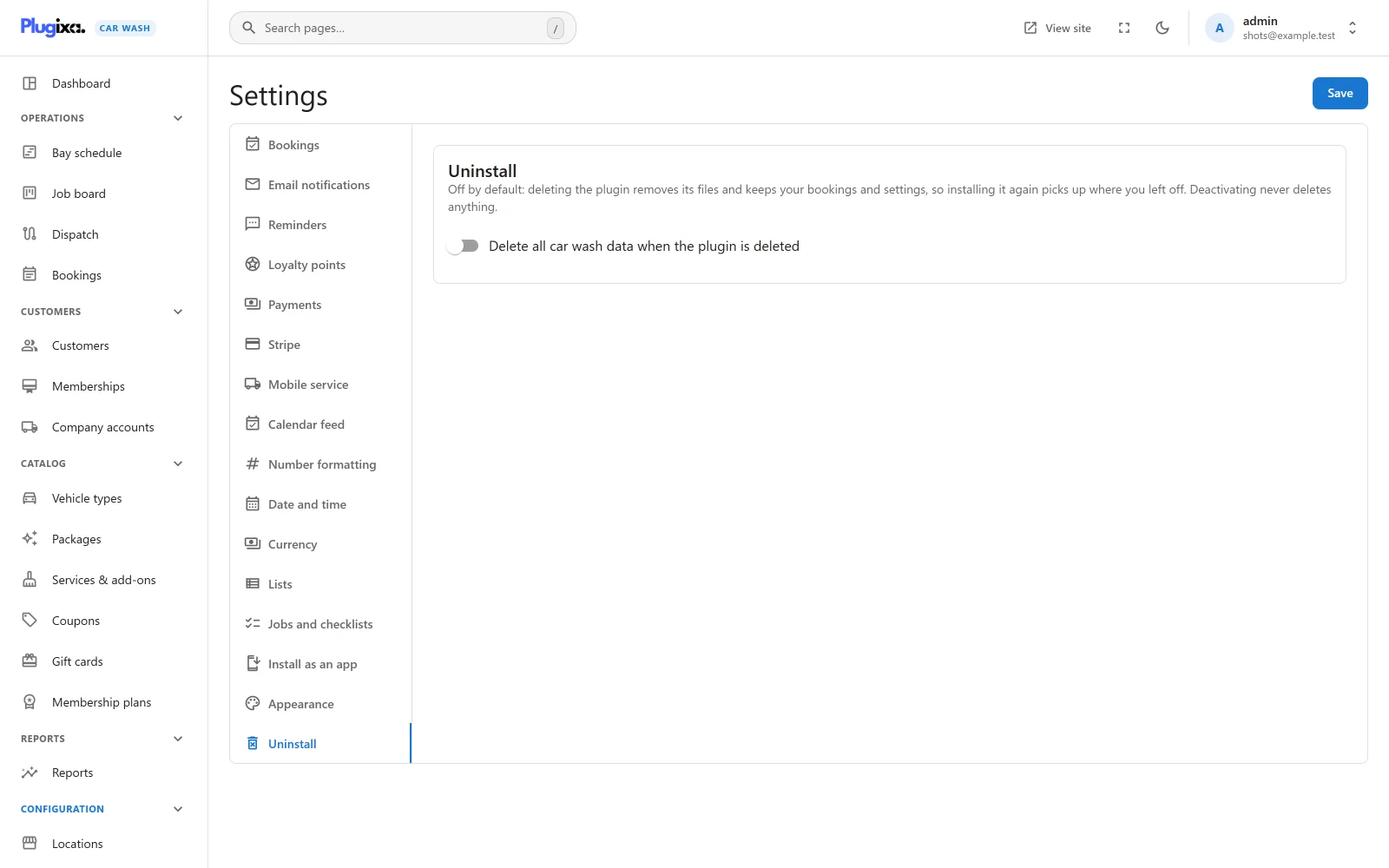
Only a user with the WordPress manage_options capability can switch it on. A
settings manager without it can save the other settings, but not this one.
Even with the switch on, nothing is erased while another copy of the plugin is installed, active or not: for example the free edition beside Pro. Both copies use the same tables, so erasing would empty the copy you keep. Delete the other copy first, or switch the setting off.
What erasing removes
When the switch is on, the user deleting the plugin may manage plugins, and no other copy is installed:
- The
plugixa_carwash_uninstallaction fires. - Every table whose name starts with
{prefix}plugixa_carwash_is dropped: all the free and Pro tables above. - Every option whose name starts with
plugixa_carwash_is deleted: all the options in the table above, including the encrypted Stripe keys, text message credentials and Google API key PRO, the calendar feed secret and the App Manager switches. - Every transient whose name starts with
plugixa_carwash_is deleted, such as the rate-limit counters. - Every scheduled event of the plugin (reminders, hold expiry, statements and the rest) is unscheduled.
- Every WordPress role whose slug starts with
plugixa_carwash, that is the Car Wash Manager role and the roles created on the Roles screen PRO, is removed. Their users keep their accounts; a user left with no role at all becomes a Subscriber. - Every
plugixa_carwash_capability is removed from every remaining role and every user.
What erasing leaves behind
These are not removed by the plugin, and you can delete them by hand afterwards:
- Job photos in the Media Library PRO.
- WordPress roles you created yourself with another plugin. They lose their car wash capabilities but stay.
- The pages you put the booking form or the account page on. Remove the shortcodes or the block from them yourself.
- Whatever Freemius stored for its own licensing. It is handled by the Freemius SDK.
Deleting the plugin while the switch is off removes none of this, and none of the data above.