

Contents
Packages - Plugixa Car Wash
A package is a wash tier a customer chooses between, such as Express, Deluxe or Full Detail. Each package has one price and one duration for a regular car, a checklist of the services it includes, and a list of the add-ons a customer can put on top of it.
The price and time for other vehicles are worked out from the vehicle type, or typed exactly in the package’s Price per vehicle table.
Open the list from Plugixa Car Wash, then Packages in the Catalog group of the app’s sidebar.
Build your services first: a package’s checklist and its add-ons are both chosen from them.
The list
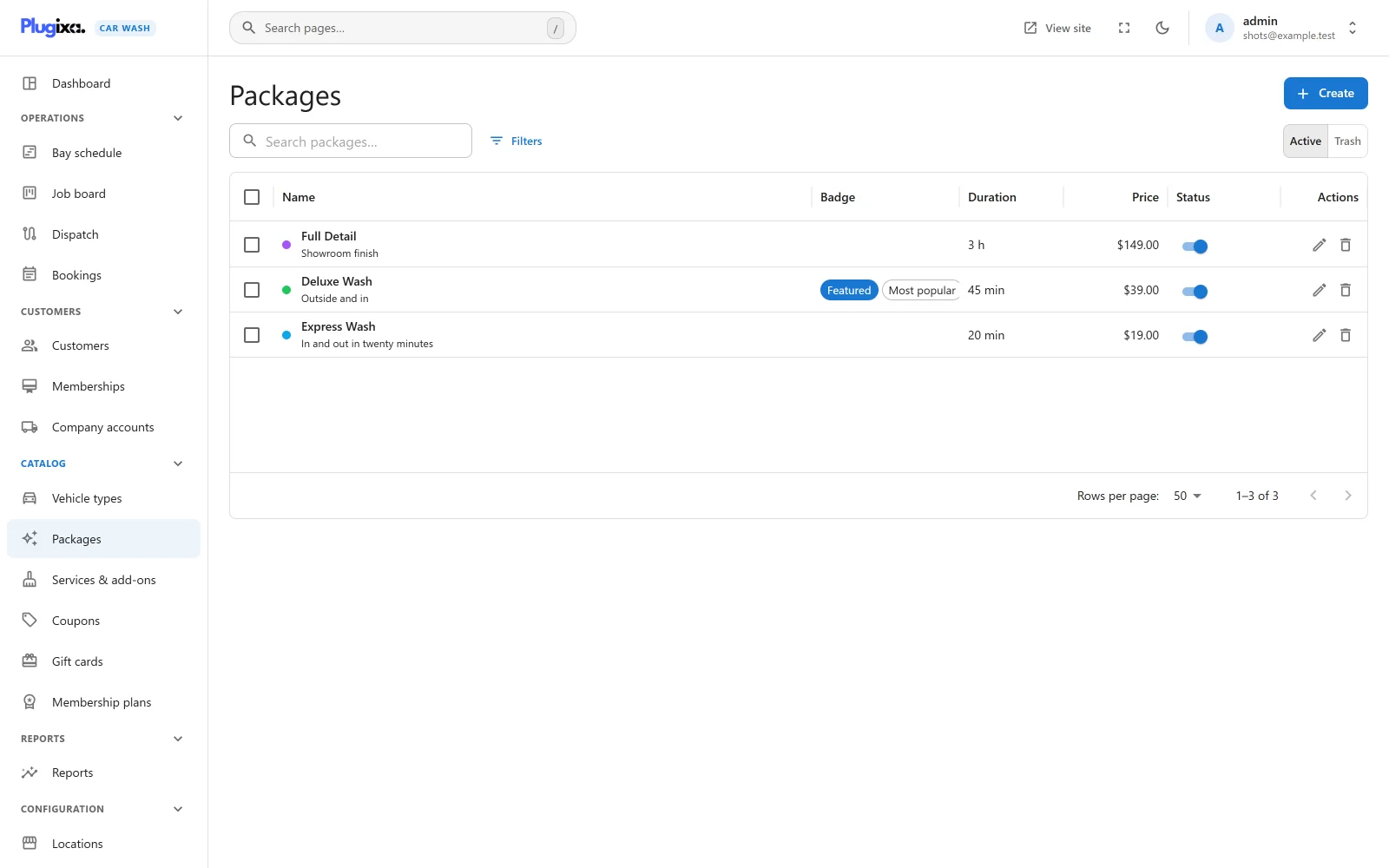
| Column | What it shows |
|---|---|
| Name | The package’s colour as a dot (or its photo as a thumbnail), the name, and the tagline underneath. |
| Badge | A Featured chip when the package is highlighted, and its badge text. |
| Duration | The base duration, written as “45 min” or “3 h”. |
| Price | The base price. |
| Status | A switch between Published and Unpublished. |
The search box reads “Search packages…”. Filters narrows the list by Price and Status. Export CSV downloads the list. Tick rows to publish, unpublish or trash several packages at once.
An empty list reads “No packages yet”, with a hint that packages are the tiers customers choose between (Basic, Deluxe, Ultimate) and that you build each from your services.
Adding a package
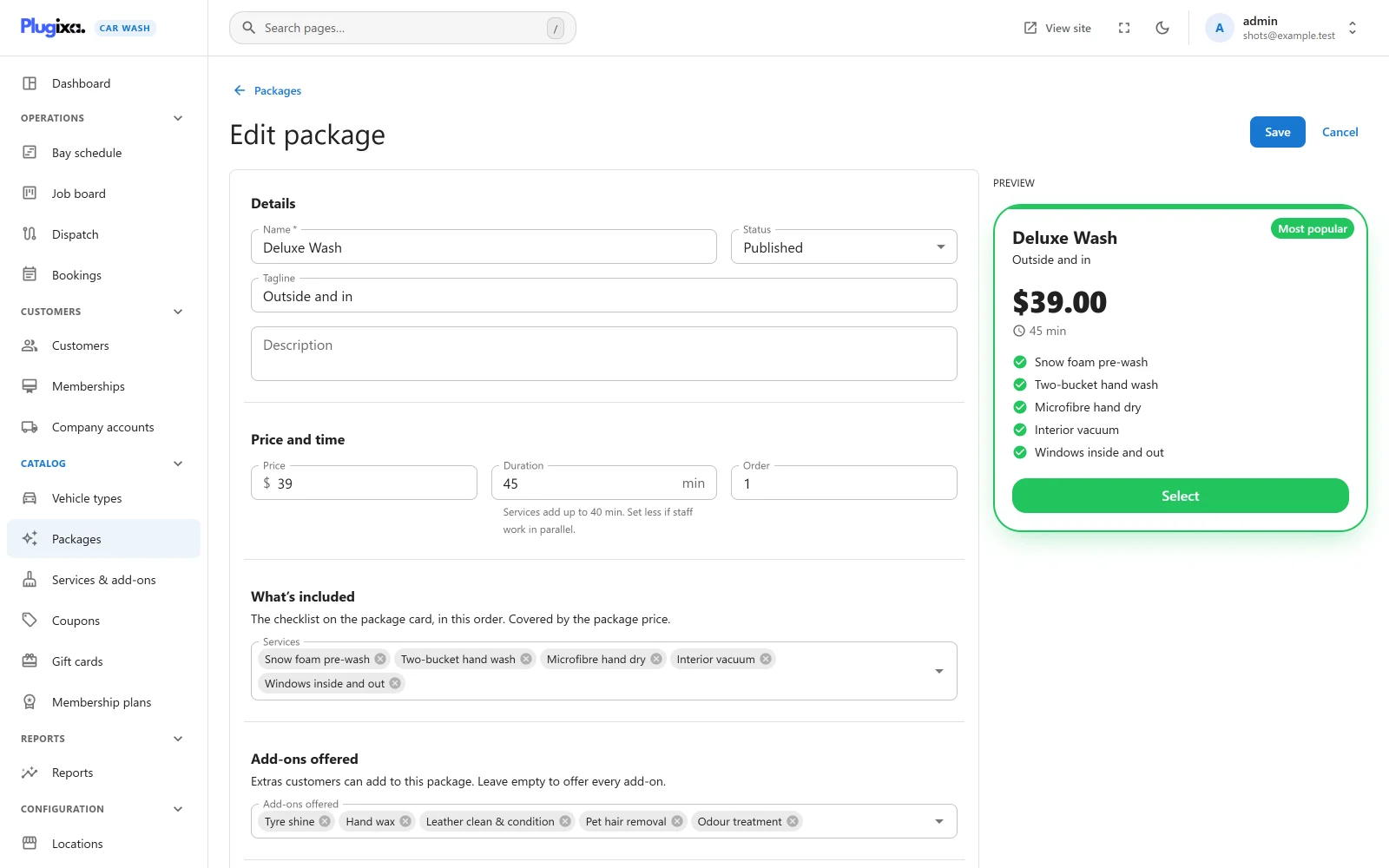
Click Create. The form is split into sections, with a live Preview of the card on the right.
Details
| Field | Default | Notes |
|---|---|---|
| Name | Empty | Required, up to 190 characters. Placeholder “e.g. Deluxe Wash”. “A name is required.” |
| Status | Published | Published or Unpublished. |
| Tagline | Empty | Up to 190 characters. One line under the name on the card. Placeholder “e.g. Our best value for a weekly clean”. |
| Description | Empty | Plain text, kept with the package. The booking form’s card shows the tagline, not the description. |
Price and time
| Field | Default | Limits | Notes |
|---|---|---|---|
| Price | 0 | 0 to 1,000,000, two decimals | The price for a vehicle that adds no fee. |
| Duration | 30 min | 1 to 1,440 minutes, in steps of 5 in the field | How long the bay is held for a regular car. The readable form appears underneath. Zero is refused with “Duration cannot be less than 1.” |
| Order | 0 | 0 to 100,000 | Lower numbers are shown first. |
When the package includes services, the duration field adds up their times for you: “Services add up to 40 min. Set less if staff work in parallel.” The package’s own Duration is what is booked; the services’ times are only a guide.
What’s included
“The checklist on the package card, in this order. Covered by the package price.”
Pick any services in the Services field. The order you pick them in is the order of the checklist. Included services cost nothing extra: their own prices are what they cost as add-ons.
An unpublished service drops out of the checklist on the booking form until you publish it again. A service cannot be trashed while a package includes it.
Add-ons offered
“Extras customers can add to this package. Leave empty to offer every add-on.”
Only services switched to Customers can add this on top of a package can be picked here. With the field empty, every published add-on is offered with this package. With some picked, only those are offered, and a booking request that asks for another one is refused with “One of the chosen extras is not available with this package.”
Price per vehicle
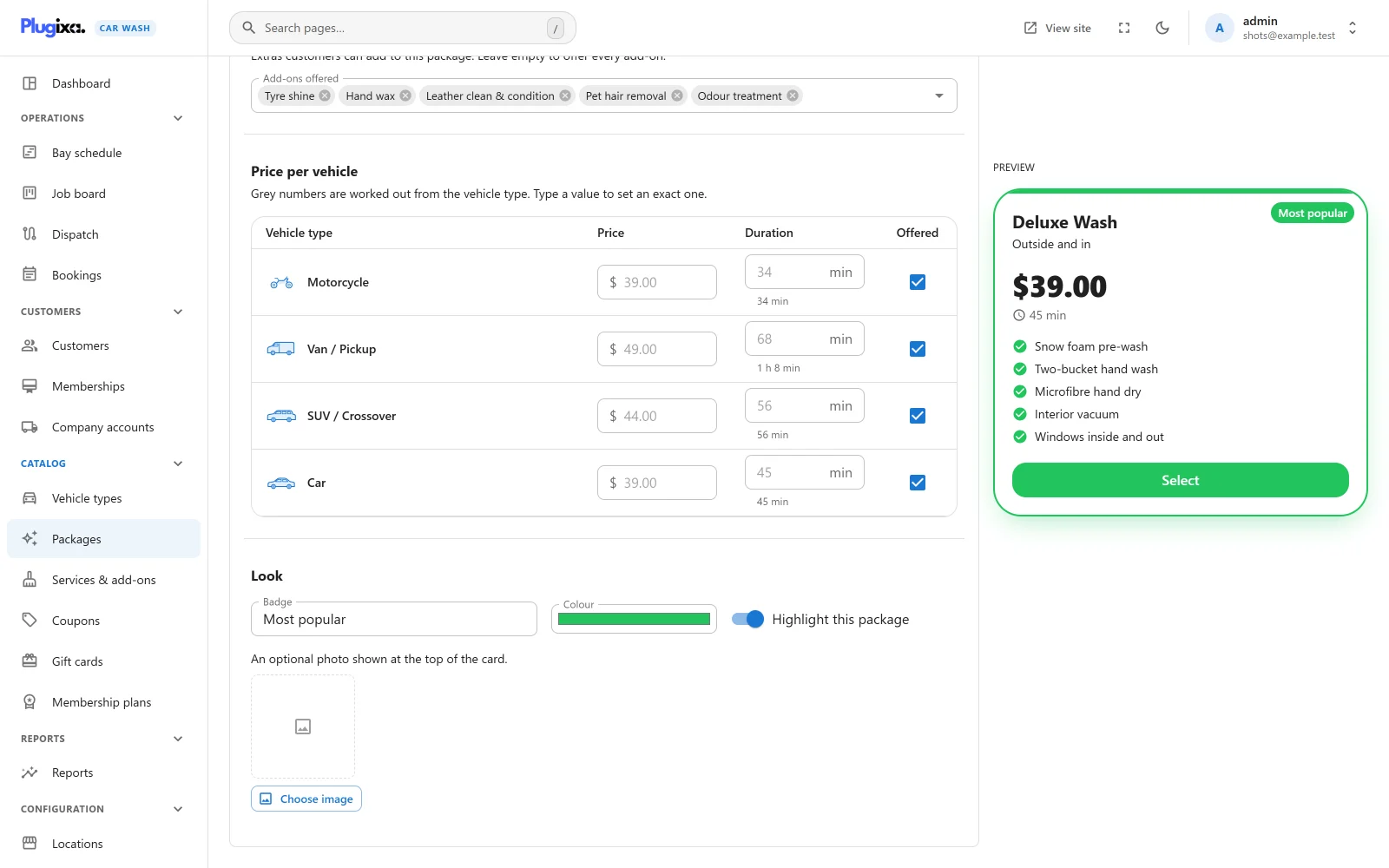
“Grey numbers are worked out from the vehicle type. Type a value to set an exact one.”
There is one row per vehicle type:
| Column | What it does |
|---|---|
| Vehicle type | The type’s icon and name. |
| Price | Grey, it shows the worked-out price: the package price plus the vehicle’s extra fee. Type a number to charge exactly that for this vehicle instead. Clear the field to go back to the worked-out price. |
| Duration | Grey, it shows the package duration x the vehicle’s time multiplier, rounded to the nearest minute, with the readable form underneath. Type a number of minutes to set an exact time. |
| Offered | Untick to withhold the package from this vehicle. The row greys out. |
In the screenshot, Deluxe Wash is $39.00 for 45 minutes. The SUV, with a $5.00 fee and a x 1.25 multiplier, shows $44.00 and 56 minutes; the motorcycle, with no fee and x 0.75, shows $39.00 and 34 minutes.
An exact price replaces both the package price and the fee. Typing $49.00 on the van row means a van pays $49.00, not $49.00 plus the van’s fee.
A typed price has to be zero or more, and a typed time between 0 and 1,440 minutes. Anything else stops the save with “A vehicle price cannot be negative, and a time must be between 0 and 1,440 minutes.” A row left grey and ticked is not stored at all, because it says the same as no row.
A package not offered for a vehicle is still shown on the booking form for that vehicle, greyed out, with “Not available for this vehicle” in place of Select. A request that books it anyway is refused with “Deluxe Wash is not available for this vehicle.”
If no vehicle type exists yet, the section says so and asks you to add vehicle types first.
Look
| Field | Default | Notes |
|---|---|---|
| Badge | Empty | Up to 40 characters, such as “Most popular”. Shown as a pill in the corner of the card. |
| Colour | #0EA5E9 |
A colour picker. Colours the stripe across the top of the card and the badge. A package with no colour uses the form’s accent colour. |
| Highlight this package | Off | Gives the card a stronger border and a shadow, and fills its Select button. Listed as Featured in the admin. |
| Photo | None | “An optional photo shown at the top of the card.” Chosen from the media library with Choose image. |
The preview
The Preview beside the form draws the card as it changes, at the same proportions as the booking form: the name (or “Package name” while it is empty), the tagline, the price and duration, the checklist and a Select button, in the package’s colour and with its badge. It shows the base price, the one a vehicle with no fee pays.
What the customer sees
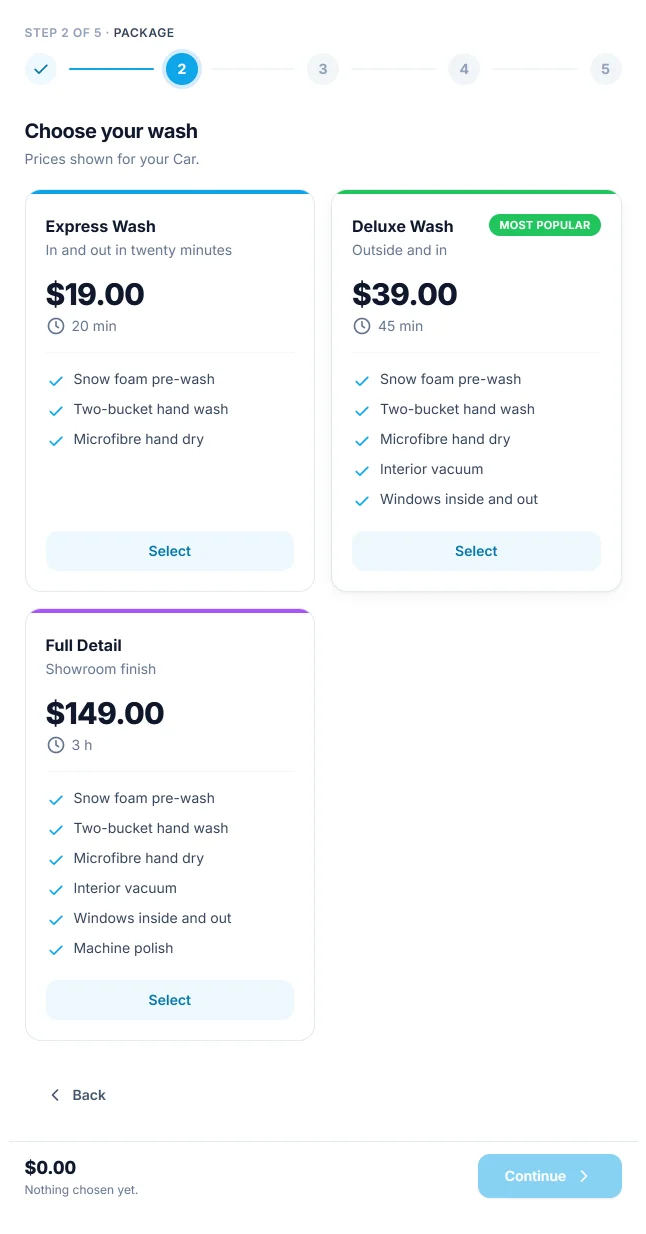
The package step is titled “Choose your wash”. Each card shows the price and duration for the vehicle chosen in the step before (“Prices shown for your Car.”), so an SUV owner never sees the car price. Cards are ordered by Order.
A booking form can offer only some packages, or none at all when it sells individual services. When a form offers exactly one package, it is chosen for the customer.
Switching to a different package keeps only the add-ons the new package also offers, and clears the chosen time, because the length of the job has changed.
A worked example
This is how the plugin prices a booking. Every amount is rounded to the currency’s smallest unit line by line, and the total is the sum of the rounded lines, so a receipt always adds up.
The catalogue:
| Item | Price | Duration |
|---|---|---|
| Package Deluxe Wash | 39.00 | 45 min |
| Add-on Hand wax | 15.00 | 20 min |
| Vehicle type SUV / Crossover | Extra fee 5.00 | Time multiplier x 1.25 |
Neither item has an exact price typed for the SUV.
Step 1: the lines
| Line | Price | Duration |
|---|---|---|
| Deluxe Wash | 39.00 + 5.00 = 44.00 | 45 x 1.25 = 56.25, rounded to 56 min |
| Hand wax | 15.00 (no fee on add-ons) | 20 x 1.25 = 25 min |
| Subtotal | 59.00 | 81 min (1 h 21 min) |
The 81 minutes are what the bay is held for, plus the location’s buffer.
Step 2: tax
Tax follows the location: its Tax rate and whether Prices already include tax. With a rate of 20%:
| Prices include tax (the default) | Prices do not include tax | |
|---|---|---|
| Subtotal | 59.00 | 59.00 |
| Tax | 59.00 - 59.00 / 1.20 = 9.83 | 59.00 x 20% = 11.80 |
| Total | 59.00 | 70.80 |
With tax included, the tax is the part of the total that is tax, and the total does not change. The summary labels it “Includes tax”. Without, the tax is added on top and labelled “Tax”.
Step 3: a coupon
With the 10% coupon WELCOME10, the discount is worked out on the subtotal before tax, added as a negative line “Coupon WELCOME10”, and the tax is worked out again on what is left:
| Prices include tax | Prices do not include tax | |
|---|---|---|
| Subtotal before the coupon | 59.00 | 59.00 |
| Coupon WELCOME10 | -5.90 | -5.90 |
| Subtotal | 53.10 | 53.10 |
| Tax | 53.10 - 53.10 / 1.20 = 8.85 | 53.10 x 20% = 10.62 |
| Total | 53.10 | 63.72 |
With an exact price
If you had typed 49.00 on the SUV row of Deluxe Wash, the package line would be 49.00, with no fee added, and the subtotal before the coupon 64.00.
Status, trash and restore
An Unpublished package is not offered on any booking form. Deleting a package moves it to the trash. A package that open bookings still use (Awaiting payment, Pending, Confirmed or In the bay) cannot be trashed: “1 upcoming booking still depends on this. Cancel or move it first.” Switch the list to Trash to Restore it or Delete permanently.
Bookings keep the prices they were made with. A changed price applies to new quotes and bookings only.
What is stored
| Table | Holds |
|---|---|
{prefix}plugixa_carwash_packages |
One row per package. |
{prefix}plugixa_carwash_package_items |
The services a package includes and the add-ons it offers, in order. |
{prefix}plugixa_carwash_price_rules |
The exact prices, exact times and “not offered” marks typed in Price per vehicle. |