

Contents
Memberships - Plugixa Car Wash
Memberships PRO let customers pay a fixed price each month or year for a number of washes, or for unlimited washes. A member who books a package their plan covers pays nothing for the wash itself, and can get a discount on extras.
You sell a membership in one of two ways:
- At the desk. The customer pays you however you like, and you add the membership in the admin. You renew it by hand.
- Online. The customer joins from their account page and pays by a Stripe subscription, which renews itself.
There are two screens: Catalog -> Membership plans for what you sell, and Customers -> Memberships for who holds one.
Plans
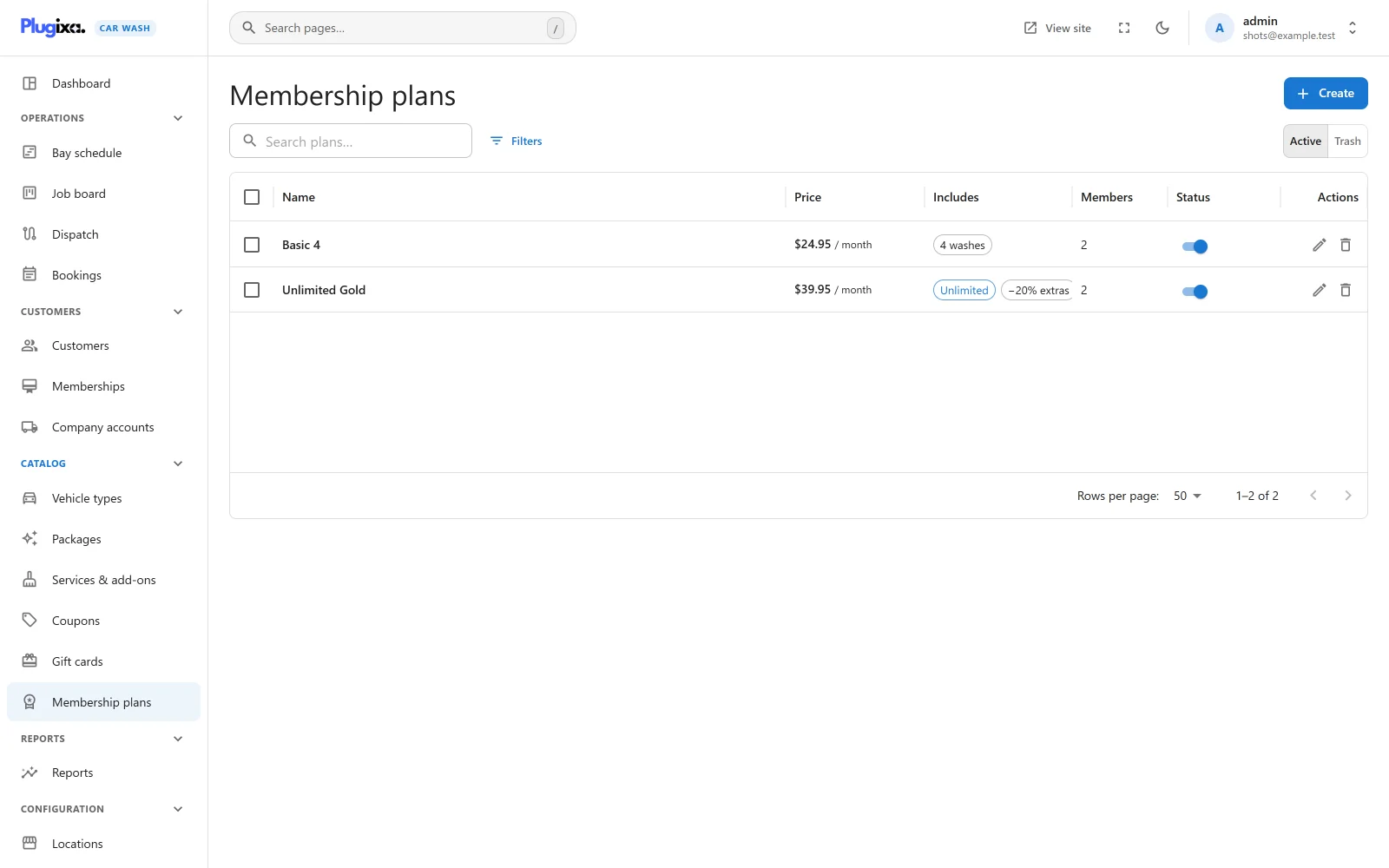
The list shows each plan’s price and period, what it includes (washes, and the extras discount when there is one), how many customers hold it, and a switch to publish or unpublish it.
Press Create to add a plan.
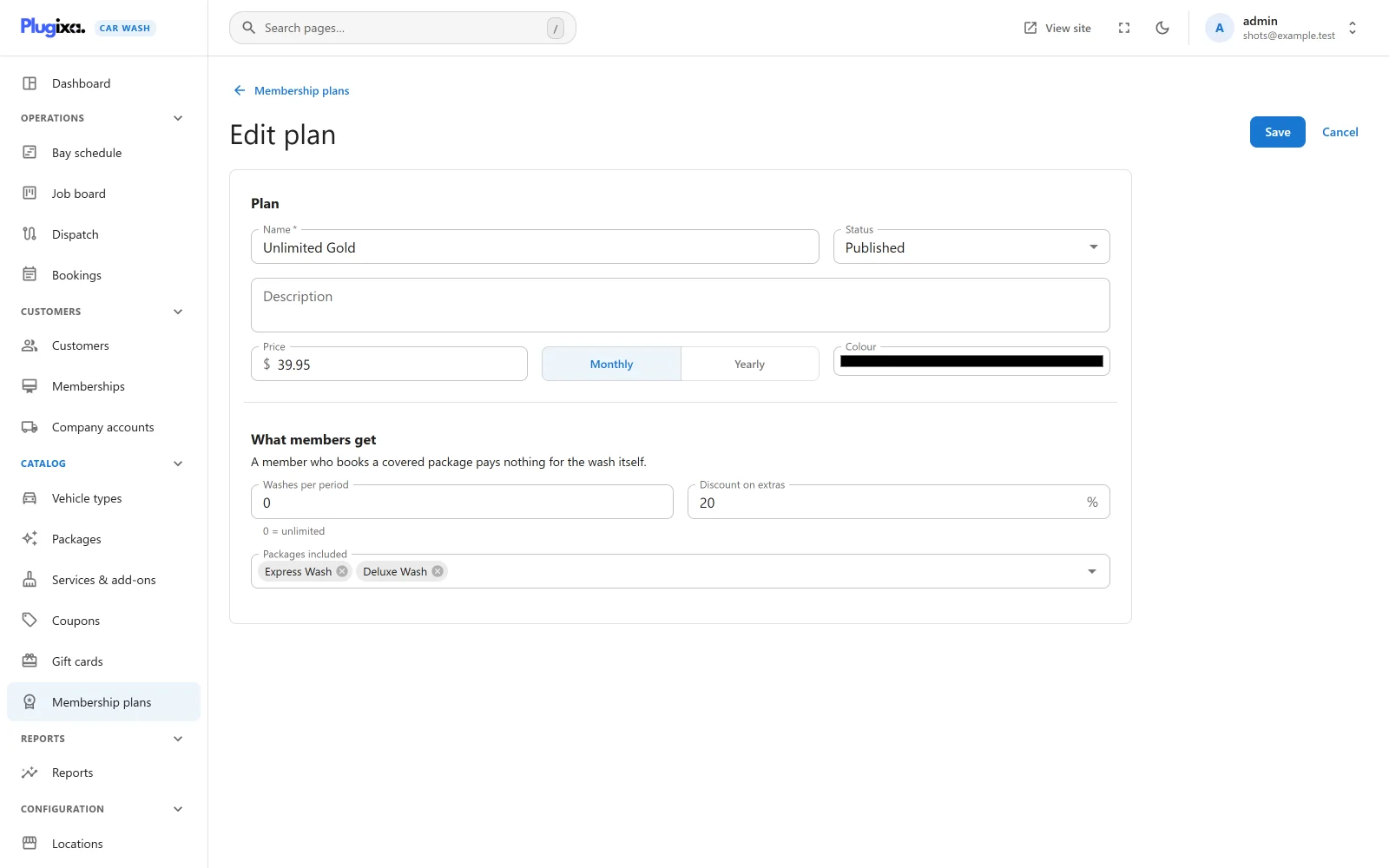
| Field | Default | Notes |
|---|---|---|
| Name | Required | What members and the account page see, for example “Unlimited Gold”. |
| Status | Published | Unpublished stops offering the plan online. Members who hold it keep it. |
| Description | Empty | For your own reference. |
| Price | Required | What the plan costs per period, 0 to 100,000. The currency is the site’s currency when the plan is created. |
| Monthly / Yearly | Monthly | The billing period. |
| Colour | None | A dot beside the plan in the Memberships list. |
| Washes per period | 0 | How many covered washes a member gets each period. 0 means unlimited. Up to 1,000. |
| Discount on extras | 0 % | Percent off add-ons booked with a covered wash, 0 to 100. |
| Packages included | All packages | The packages a member wash may be. Leave it empty to cover every package. |
A plan that customers hold (active or with a failed payment) cannot be deleted: “1 customer holds this plan. Unpublish it to stop selling it instead.”
Changing a plan changes what its members get from their next booking. A Stripe subscription keeps the price it was started at: a new price applies to people who join after the change.
Members
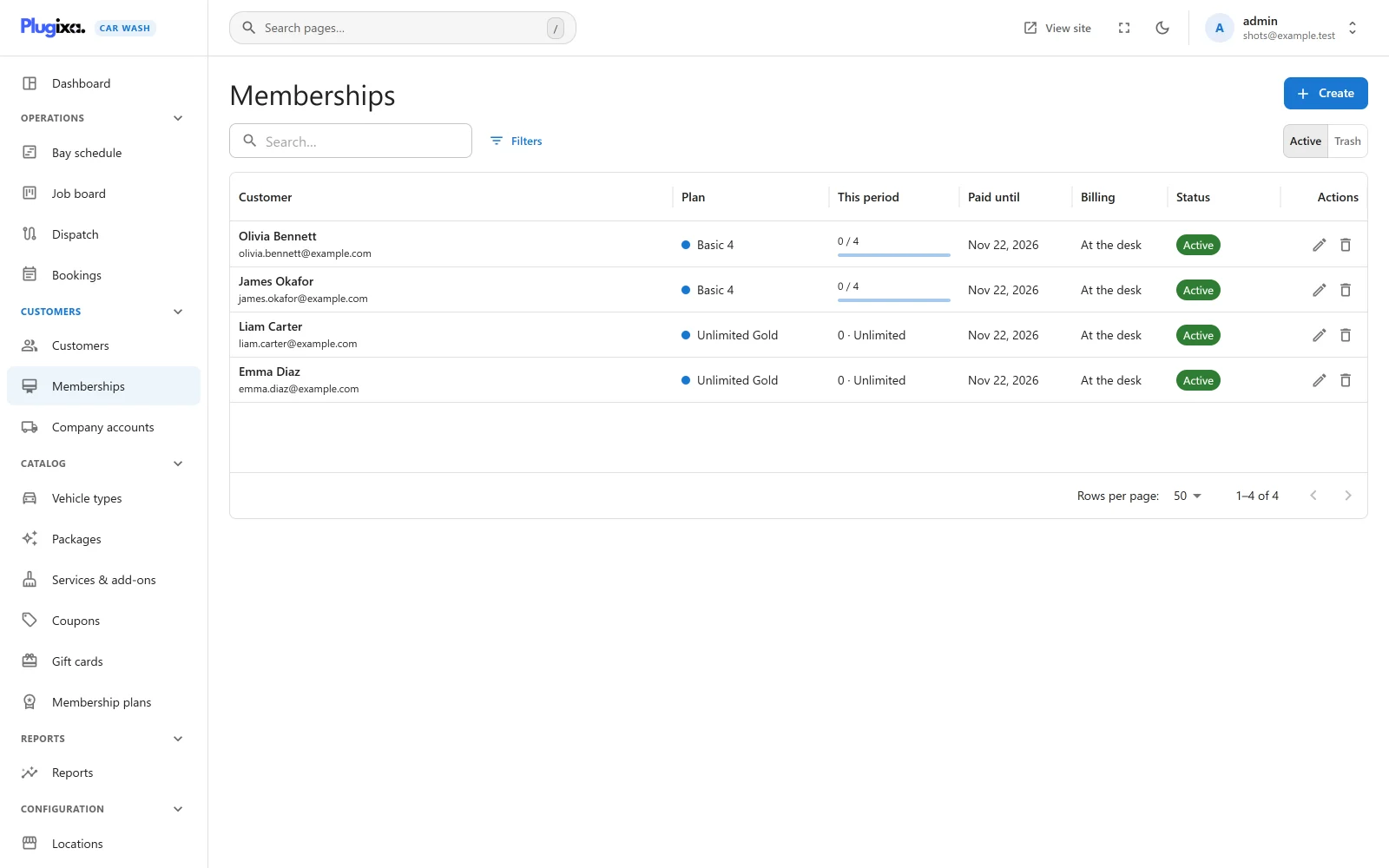
Customers -> Memberships lists every membership:
| Column | Shows |
|---|---|
| Customer | Name and email |
| Plan | With its colour |
| This period | Washes used in the current period, with a bar when the plan has a limit, or “Unlimited” |
| Paid until | The last day of the current period |
| Billing | At the desk or Stripe |
| Status | See below |
A customer’s own page also shows their membership in a side card, with Open membership, or Add membership when they have none. See Customers.
Statuses
| Status | Meaning | Member pricing |
|---|---|---|
| Active | Paid up | Yes, while today is inside the period |
| Ending | Active, but set to end at the end of the period | Yes, until then |
| Payment failed | A Stripe renewal failed and Stripe is retrying | Yes, while Stripe retries |
| Cancelled | Ended by staff, by the member, or by Stripe | No |
| Lapsed | A desk membership whose period ran out without a renewal | No |
Member pricing needs both an active or payment-failed status and today’s date inside the membership’s period. A membership past its Paid until date gives nothing, even before its status changes.
Enrolling at the desk
- Open Customers -> Memberships and press Create, or press Add membership on the customer’s page.
- Choose the Customer and the Plan.
- Leave the dates empty, or set them. Empty, the membership starts today and runs one period: a monthly plan started on 15 March is paid until 14 April.
- Add Notes if you like, and save.
The plugin keeps no payment record for a desk membership. Take the money as you normally do.
Renewing and ending a desk membership
Open the membership. The Status card shows the period, the washes used, and these buttons:
| Button | What it does |
|---|---|
| Renew one period | Starts the next period the day after the current one ends, and sets the status back to Active. A membership that has already lapsed restarts today instead. It also clears an earlier Cancel at period end. |
| Cancel at period end | The member keeps their benefits until Paid until, then the membership becomes Cancelled. |
| End now | Asks “End this membership now? Member pricing stops immediately.” and sets it to Cancelled. |
Once a day a background task looks at desk memberships past their period: one set to end becomes Cancelled, any other becomes Lapsed.
Joining online
Customers can join from their account page when:
- at least one plan is Published, and
- a Stripe secret key is saved under Settings -> Stripe, and
- the customer has no membership yet.
The account page then shows a Become a member card listing each published plan, with its price, period and washes, and a Join button for each. The button sends the customer to Stripe Checkout to start a subscription at the plan’s price, monthly or yearly. When they come back, the page says the payment is being confirmed and refreshes a few seconds later.
The membership is created when Stripe reports the completed checkout to your webhook. Without a working webhook and signing secret, the customer pays and no membership appears. Subscribe the webhook to these events:
| Event | What changes |
|---|---|
checkout.session.completed |
The membership is created, Active, from today for one period. Created once, however often Stripe sends it |
invoice.paid |
The period becomes the one Stripe billed, and the status Active |
invoice.payment_failed |
Payment failed. The member keeps their benefits while Stripe retries |
customer.subscription.updated |
Follows Stripe: set to end at the period’s end (or no longer), or Payment failed when Stripe marks the subscription past due or unpaid |
customer.subscription.deleted |
Cancelled |
For a Stripe membership, the plan and dates are set by Stripe and cannot be edited, and there is no Renew one period button. Cancel at period end and End now still work: they are sent to Stripe first, and if Stripe refuses, its message is shown and nothing changes.
Manage billing
A Stripe member sees a Manage billing button on their account page. It opens Stripe’s Billing Portal, where they update their card, see their invoices, or cancel at the end of the period. The plugin uses a portal configuration of its own for this, which always offers cancelling. See Stripe.
How a member’s booking is priced
The plugin only knows a customer is a member when the server knows who is booking:
- Online, the customer must be signed in on their account before booking. Typing a member’s email address on the booking form gives no member price.
- Staff making a booking get the member price when the booking’s email address belongs to the member.
For a member, the booking is priced as usual first. Then, if the membership is paid up on the date of the wash, the plan covers the package, and washes are left in the period that date falls in, a discount line is added:
Membership: Unlimited Gold -(package price + discount on extras)
The package line keeps its normal price, so the receipt shows what the wash was worth and that the membership paid for it. For example, with a 25.00 wash, a 10.00 wax and 20% off extras, the membership line is -27.00 and the member pays 8.00 plus any tax.
This discount is applied at priority 8 of the plugixa_carwash_quote filter:
| Priority | Adjustment |
|---|---|
| 5 | A gift card code is recognised |
| 8 | Membership |
| 9 | Company account rate |
| 10 | Coupon |
| 20 | Mobile service travel fee |
| 50 | Gift card credit |
So a coupon works on what is left to pay, never on a wash that already costs nothing, and a travel fee is not covered by the membership.
When member pricing does not apply, the booking is full price and the summary says why:
- “Your membership does not cover this package.”
- “You have used all the washes in your membership this period.”
- “Your membership is not paid up for that date yet, so this wash is charged at the normal price.” The wash is after Paid until. Once the membership is renewed, the member can book that date again at member pricing.
Before a date is picked, the summary uses today’s period. The booking is priced again for its own date when it is made.
A booking that costs nothing has no payment step. Even with Stripe as the only payment method, it is not held for a payment and goes straight to confirmed (or pending, if you confirm bookings by hand).
Counting washes
- A wash counts toward the plan’s limit when the booking is made, once per booking.
- It is counted on the date of the wash, in whichever period that date falls.
- Cancelling the booking gives the wash back. A no-show does not.
- This period in the list, the customer card and the account page counts the washes dated inside the membership’s current period.
Limits to know
- The allowance is checked against the period the wash date falls in, the same period the wash is counted in. A member with four washes a month cannot book free washes for later dates beyond what is paid: a date after Paid until is charged at the normal price.
- If two bookings for the last wash of a period are made at exactly the same moment, both can be priced as member washes, so the allowance can be exceeded by one.
What members see
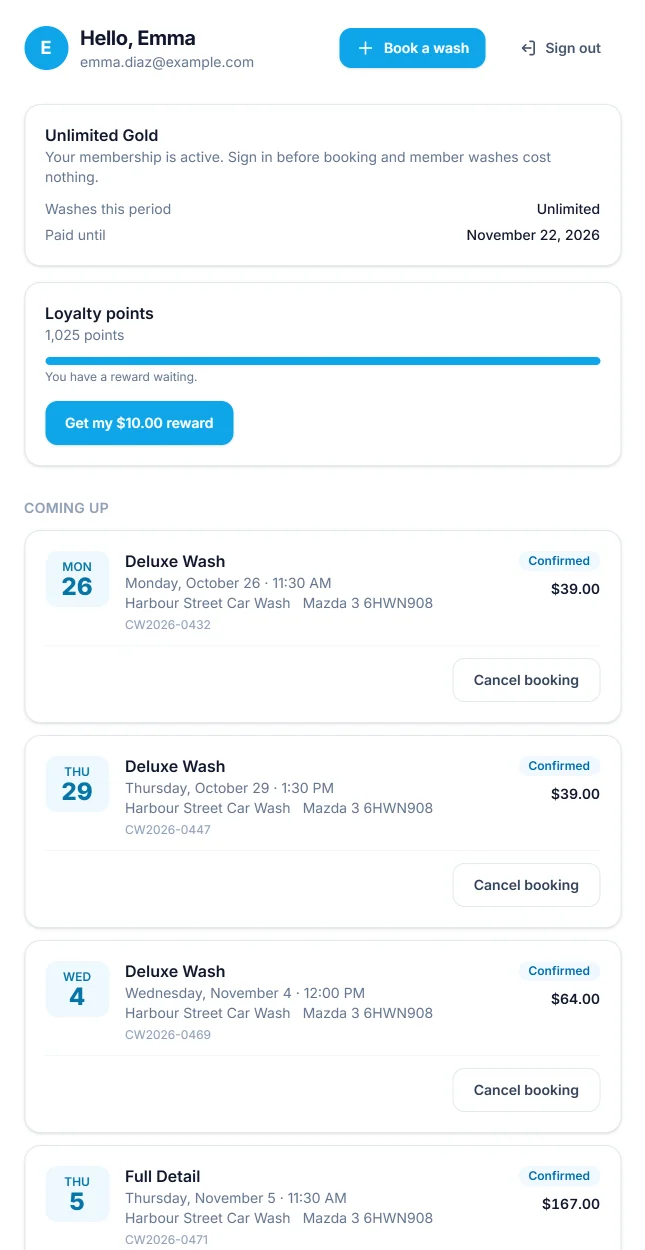
On their account page, a member sees a card titled with their plan:
- “Your membership is active. Sign in before booking and member washes cost nothing.” or, after a failed renewal, “Your last payment did not go through. Please update your card.”
- Washes this period: “Unlimited”, or “2 of 4 used” with a bar.
- Paid until for a desk membership, Renews after for a Stripe one, or Ends on when it is set to end.
- Manage billing, for a Stripe membership only.
The plugin sends no emails about memberships. Stripe sends its own receipts and payment reminders if you switch them on in your Stripe account.
If Pro is removed
Plans and memberships stay in the database and come back with Pro. Without it, nobody gets member pricing and the account page shows no membership card. Stripe goes on billing online members until you cancel their subscriptions in Stripe. See Free vs Pro.