

Contents
Dashboard - Plugixa Car Wash
The dashboard is the screen the app opens on. Open it from Plugixa Car Wash -> Dashboard in the WordPress menu, or from Dashboard at the top of the app’s own sidebar. Every other screen on these pages is reached from that sidebar.
It has two faces. Until your car wash is set up it shows a checklist. Once every step is done, the checklist steps aside and the day’s numbers take its place.
To see the dashboard a user needs the plugixa_carwash_view capability. Administrators have it. See Roles and permissions.
The setup checklist
On a new site the heading reads “Welcome” followed by your first name, and under it: “A few steps and customers can book online. Everything can be changed later.”
The card Get ready for your first booking lists five steps, with a progress bar and a count such as “2 of 5 done”.
| Step | Done when | Opens |
|---|---|---|
| Add your location | At least one location exists | A new location |
| Add your bays or mobile teams | At least one bay or team exists | A new bay or team |
| Add vehicle types | At least one vehicle type exists | A new vehicle type |
| Create your wash packages | At least one package exists | A new package |
| Create a booking form | At least one booking form exists | A new booking form |
The next step to do is highlighted and carries a Start button. The others that are not done carry Open. A finished step is ticked and struck through.
Nothing is stored about the checklist. Each step is worked out from whether its list has a record, so adding a package anywhere in the app ticks the step here. Deleting the last record of a list brings the checklist back.
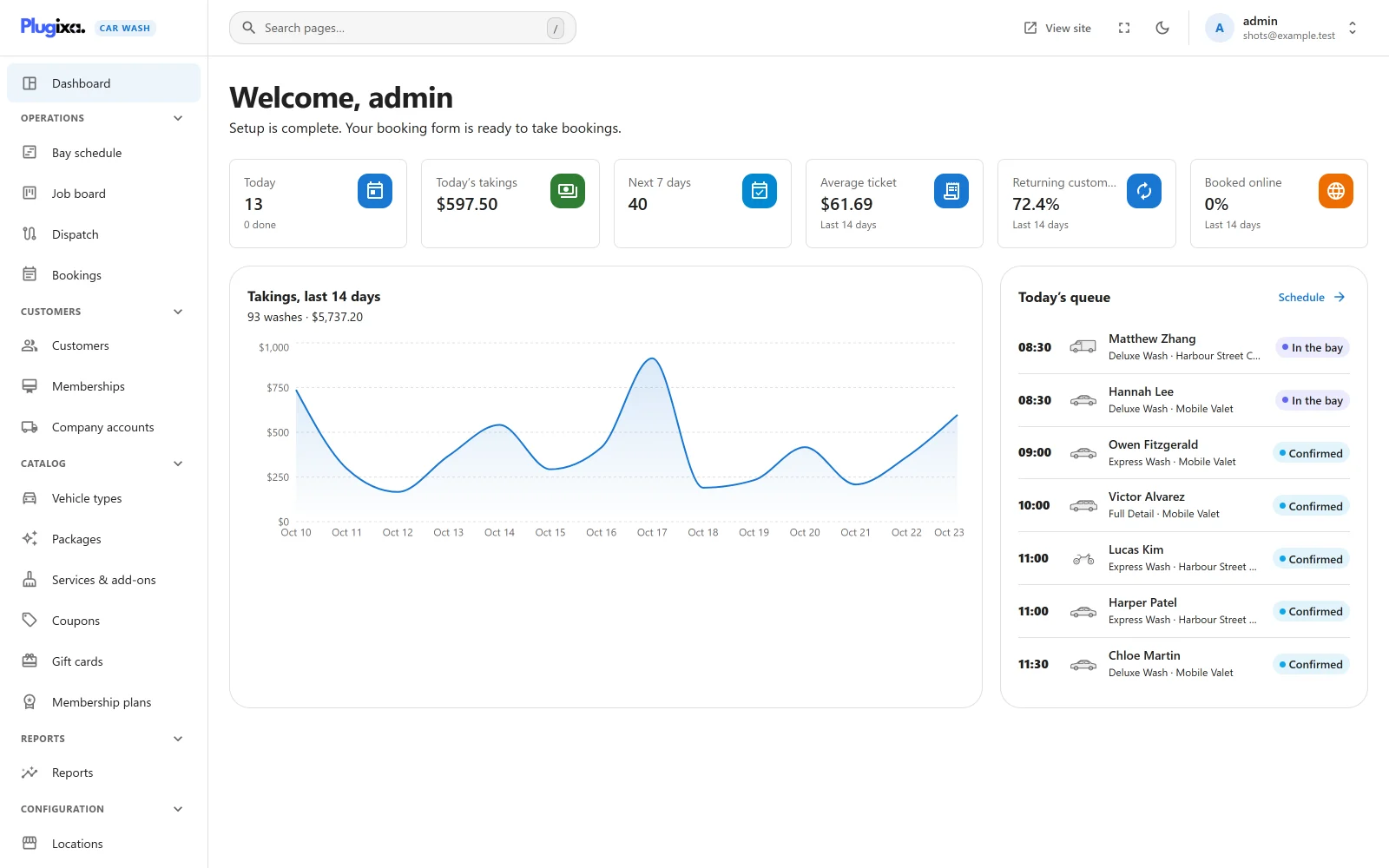
When all five are done the line under the heading changes to “Setup is complete. Your booking form is ready to take bookings.” and the operations view below appears. See Getting started for the setup in order.
The six tiles
| Tile | What it counts | Opens |
|---|---|---|
| Today | Bookings whose appointment is today, at every location. Underneath, “N done” counts those already marked Done. | Job board |
| Today’s takings | The totals of today’s bookings added together. | Nothing |
| Next 7 days | Bookings whose appointment falls from tomorrow to seven days from today. | Bookings |
| Average ticket | Takings for the last 14 days divided by the number of bookings in those days. | Nothing |
| Returning customers | Of the customers with a booking in the last 14 days, the share who had more than one booking in those days. | Nothing |
| Booked online | Of the bookings in the last 14 days, the share made on your booking form rather than by staff. | Nothing |
What every tile leaves out
- Cancelled and No-show bookings. They are not counted in any tile, including the takings.
- Bookings Awaiting payment, that is a booking held while the customer pays online. It is counted once the payment confirms it.
- Bookings in the trash.
Every other status counts: Pending, Confirmed, In the bay and Done.
Takings are booked value, not money received
“Takings” adds up what the bookings are worth, whether or not anybody has paid. Payment is often taken at the bay and recorded later, if at all, so the dashboard counts the value of the washes booked for each day.
This means Today’s takings includes cars that have not arrived yet, and a booking that is still unpaid. To see what a booking has actually paid, open it and read its Payment panel. See Payments.
Which day a booking falls on
A booking belongs to the day of its appointment, not the day it was made. The tiles cut days by the timezone set in WordPress under Settings -> General. If a location has a timezone of its own that differs from the site’s, a booking late in the evening can land on a different day here than on that location’s schedule.
The tiles count every location together. There is no location filter on the dashboard.
Takings, last 14 days
A chart of the 14 days ending today. Each point is the booked value of that day’s washes, counted by the same rules as the tiles. Hover a point to read its amount.
The line under the title gives the totals for the period, for example “93 washes · $5,737.20”.
Today’s queue
The cars booked for today at every published location, in time order. Each row shows the start time, the vehicle type’s icon, the customer’s name, the package and the status. Click a row to open the booking. Schedule at the top of the card opens the Bay schedule.
- The queue shows up to seven bookings.
- Cancelled and no-show bookings are left out. A booking Awaiting payment is shown while its hold has time left.
- With no bookings for today it reads “Nothing booked for today yet.”
- With more than one location, each row names its location after the package, for example “Full valet · Downtown”.
- “Today” is today on each location’s own clock, and each start time is that location’s local time. A location with a time zone of its own can therefore be on a different date from the site late in the evening.
- To see one location’s whole day, use the Bay schedule or the Job board, which both have a location picker.
How fresh the figures are
The tiles and the chart refresh every two minutes and the queue every minute while the dashboard is open. You do not need to reload the page.
When a figure looks wrong
| What you see | Why |
|---|---|
| Today’s takings is more than the money in the till | Takings count the value of today’s bookings, paid or not, including cars still to come. |
| Today and the queue do not agree | The queue shows at most seven cars. It also shows bookings Awaiting payment that Today leaves out, and it cuts the day on each location’s clock while the tiles use the site’s time zone. |
| A booking made by a customer who then cancelled is not counted | Cancelled and no-show bookings are left out of every figure. |
| Booked online is 0% | Every booking in the last 14 days was made by staff, for example from the New booking form. |
| Returning customers stays at 0% | Nobody had two bookings in the last 14 days. Only bookings linked to a customer count, and every booking with an email is. See Customers. |
| The checklist came back | The last record of one of the five lists was moved to the trash. Add one again. |