

Contents
Coupons - Plugixa Car Wash
A coupon is a code a customer types on the booking form to get money off. A coupon takes off either a percentage or a fixed amount, and can be limited to a period, a number of uses, a minimum booking and some packages.
Open the list from Plugixa Car Wash, then Coupons in the Catalog group of the app’s sidebar.
Switching coupons on and off
Coupons are an app of their own in the App manager, on by default. Switched off, the Coupons screen disappears, the booking form shows no promo code field and no code is taken. Your coupons and their usage counts are kept for when you switch it back on.
With the app on, the booking form shows its promo code field only while at least one coupon is Published.
The list
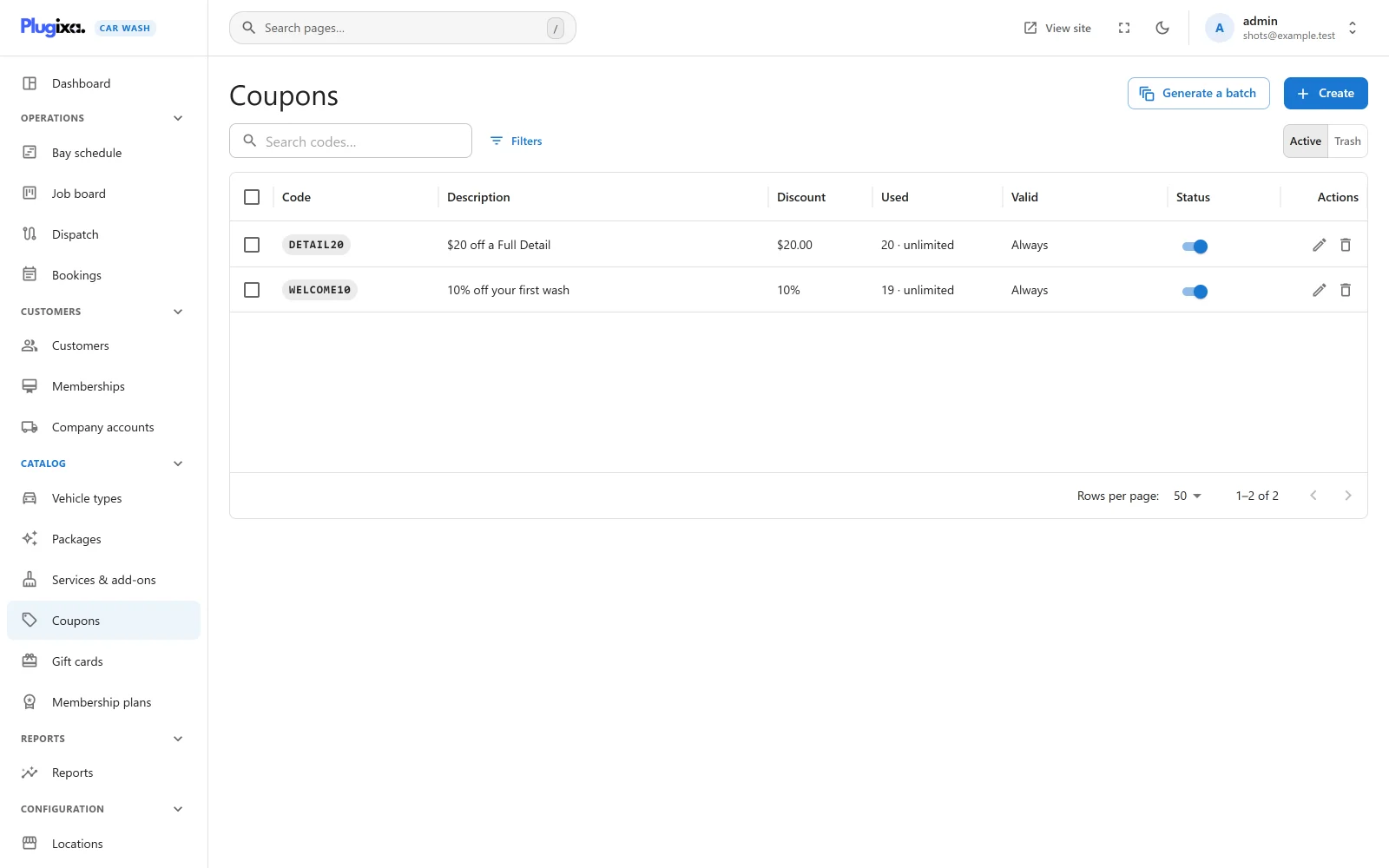
| Column | What it shows |
|---|---|
| Code | The code. |
| Description | Your own note about it. |
| Discount | A percentage such as 10%, or an amount such as $20.00. |
| Used | How many bookings have used it. With a limit, “3 / 100” and a bar; without one, “20 · unlimited”. |
| Valid | The start and end dates with an arrow between them, an ellipsis for an open end, or “Always” when neither is set. |
| Status | A switch between Published and Unpublished. |
The search box reads “Search codes…” and looks in the code and the description. Filters narrows the list by Type and Status. Tick rows to publish, unpublish or trash several coupons at once.
An empty list reads “No coupons yet” with the hint “Create a code for a promotion, or a batch of single-use codes for a flyer. The booking form shows a code field as soon as one exists.”
Adding a coupon
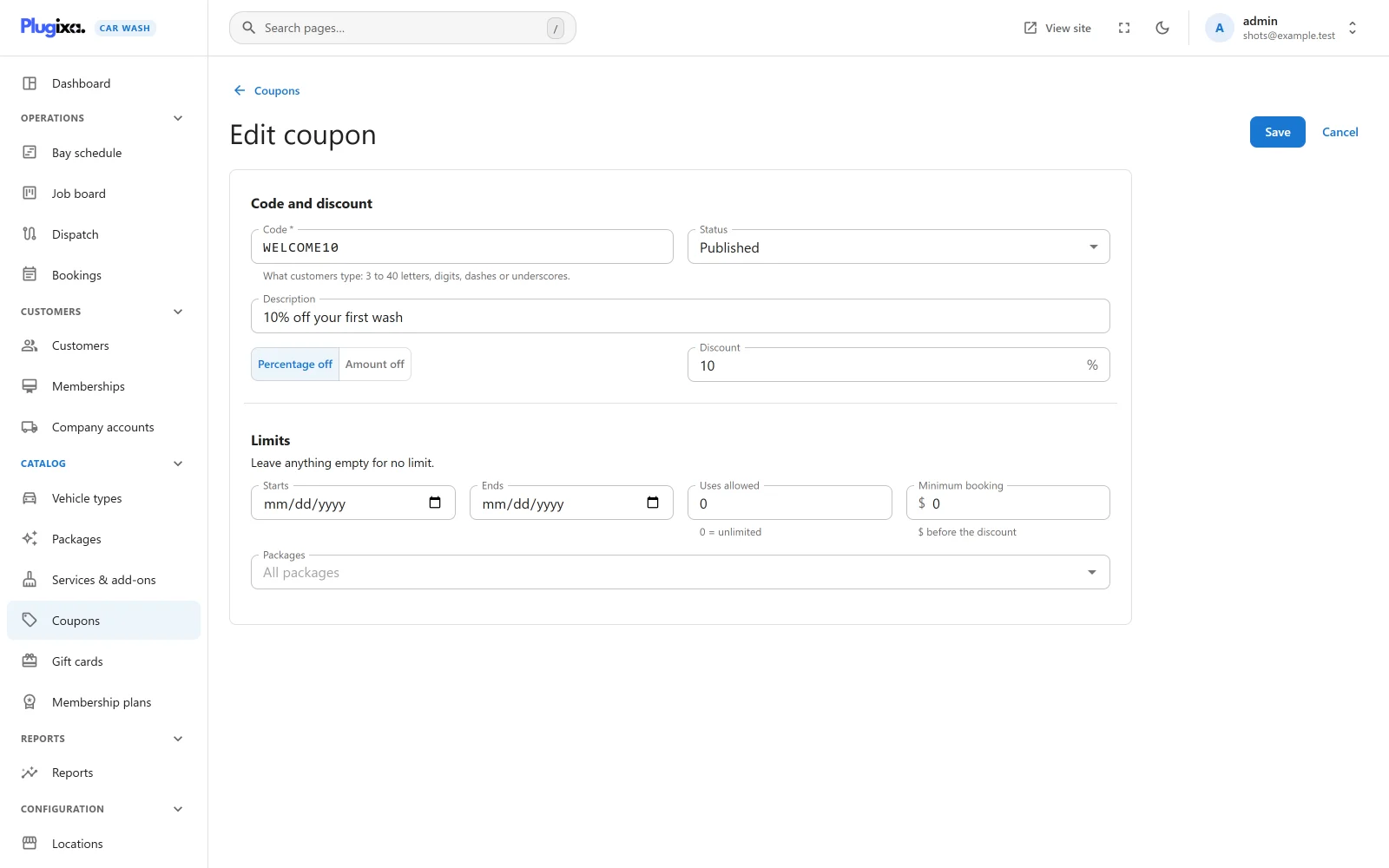
Click Create.
Code and discount
| Field | Default | Notes |
|---|---|---|
| Code | Empty | Required. “What customers type. Letters, digits and dashes.” Placeholder SUMMER10. What you type is turned into capitals as you type. |
| Status | Published | Published or Unpublished. |
| Description | Empty | Up to 190 characters, for your own reference. Placeholder “e.g. Summer flyer, 10% off”. Customers do not see it. |
| Type | Percentage off | Two buttons: Percentage off and Amount off. |
| Discount | 10 | Percentage: a number with a % sign, up to 100. Amount: an amount in your currency, with two decimals. Required, and at least 0.01. |
The rules for a code:
| Rule | Refused with |
|---|---|
| 3 to 40 characters: capital letters, digits, dashes and underscores. Spaces at either end are removed. | “A code is 3 to 40 letters, digits, dashes or underscores.” |
| No other live coupon has the same code. | “Another coupon already uses this code.” |
| A percentage is no more than 100. | “A percentage cannot be more than 100.” |
Codes are stored in capitals and compared in capitals, so a customer can type
welcome10, Welcome10 or WELCOME10.
A coupon in the trash does not hold its code: a new coupon may take it. Restoring the trashed one is then refused with “Another coupon already uses this code.” until one of the two is renamed.
Limits
“Leave anything empty for no limit.”
| Field | Default | Notes |
|---|---|---|
| Starts | Empty | The first day the code works. Empty, it works at once. |
| Ends | Empty | The last day the code works. Empty, it never ends. An end before the start is refused with “A coupon cannot end before it starts.” |
| Uses allowed | 0 | How many bookings may use the code in all. “0 = unlimited”. |
| Minimum booking | 0 | “before the discount”. The booking’s subtotal has to reach this amount. 0 sets no minimum. |
| Packages | All packages | Pick some to accept the code only on bookings of those packages. |
Both dates are whole days, counted on the site’s calendar (the time zone set in WordPress under Settings -> General), and both are included: a coupon ending on 31 December works all day on 31 December. The dates say when the code can be used, which is when the booking is made, not the date of the wash.
A code limited to packages is refused on a booking with no package, such as one made on a form that sells individual services.
Generate a batch
Generate a batch, at the top of the list, makes many codes with the same terms at once: a flyer run or a pack of vouchers.
| Field | Default | Notes |
|---|---|---|
| How many | 20 | 1 to 500. |
| Prefix | Empty | Letters and digits, in capitals. Anything else is dropped. Placeholder SPRING. |
| Type | Percentage off | Percentage off or Amount off. |
| Discount | 10 | As on a single coupon. |
| Uses per code | 1 | How many bookings may use each code. “0 = unlimited”. |
Each code is the prefix, a dash and six random capital letters and digits,
such as SPRING-7KQ2XD, or just the six characters without a prefix. A code
that already exists is drawn again. Every code becomes an ordinary published
coupon, with no dates, no minimum and every package, which you can edit one by
one afterwards.
When it is done the dialog says “20 codes created.” and lists them in a box you can select from, with a Copy all button.
What the customer sees
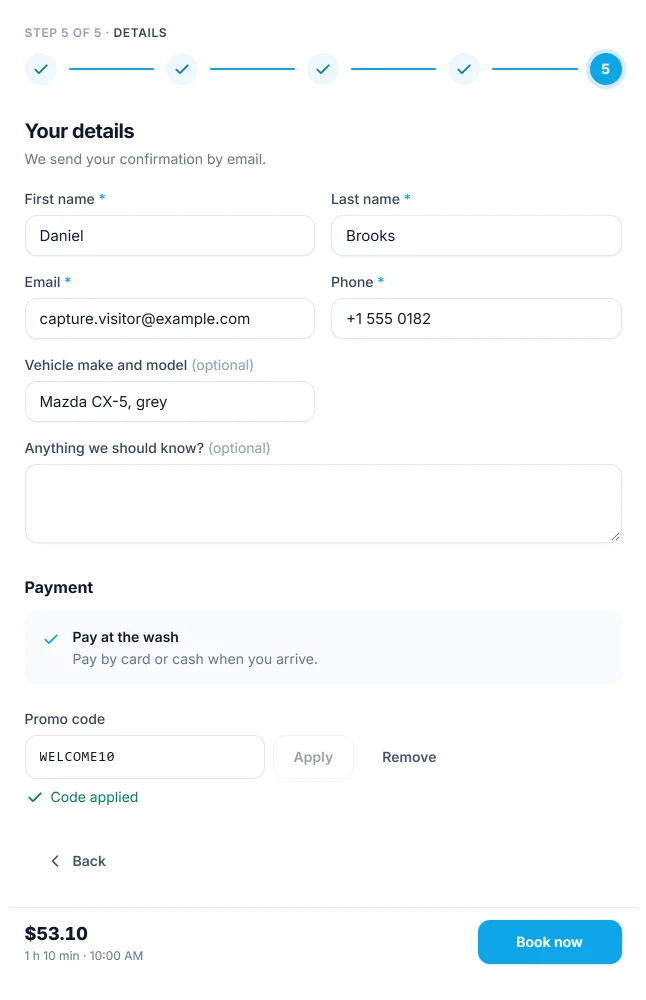
On the last step, under Payment, a link reads “Have a promo code?”. It opens the Promo code field with Apply and Remove buttons. Apply asks the server to price the booking again with the code, and the live summary shows the discount as a line of its own.
Under the field the customer reads either “Code applied” or the reason the code was not taken, from the table below. The rest of the price is unaffected: a code that does not apply never stops the customer from seeing a price.
With Pro, the same field also takes gift card PRO codes, and reward codes earned with loyalty points PRO are single-use coupons that appear in this list.
How a code is checked
A code is checked on the server each time the booking is priced, and again when it is saved. The checks run in this order, and the first one that fails gives its message:
| Order | Check | Message |
|---|---|---|
| 1 | A coupon with this code exists, is not in the trash and is Published. | “That code is not valid.” |
| 2 | Starts is today or earlier. | “That code is not active yet.” |
| 3 | Ends is today or later. | “That code has expired.” |
| 4 | The code has been used fewer times than Uses allowed. | “That code has been used up.” |
| 5 | The booking’s package is one of the Packages. | “That code does not apply to this package.” |
| 6 | The subtotal reaches the Minimum booking. | “Your booking is below the minimum for that code.” |
At the moment of booking, a code that no longer passes (it expired, or the last use went to somebody else a minute earlier) stops the booking with the same message. The customer removes the code or tries another, and books again. A booking is never saved with a code that does not apply.
How the discount is calculated
| Type | Discount |
|---|---|
| Percentage off | subtotal x percentage / 100, rounded to the currency |
| Amount off | The amount, but never more than the subtotal |
The subtotal is every line of the booking before tax: the package for the vehicle, the add-ons or services, and a vehicle surcharge where there is one. The discount is added as a negative line named “Coupon” and the code, and tax is then worked out on what is left. A booking takes one code.
The Packages page has a worked example with a 10% coupon and tax both included and added on top.
How uses are counted
When a booking with a code is created, the coupon’s Used count goes up by one, in a single step that refuses to go past Uses allowed, so two bookings racing for the last use cannot both count it. The booking keeps the code, which is shown on the booking’s page.
The count is not lowered when a booking is cancelled, expires unpaid or is deleted. To give a code more uses, raise its Uses allowed.
Status, trash and restore
Set a coupon to Unpublished to stop it at once without losing its history: a customer typing it is told “That code is not valid.” Deleting a coupon moves it to the trash; switch the list to Trash to Restore it or Delete permanently.
Bookings that used a coupon keep their discount whatever happens to the coupon afterwards.
What is stored
| Table | Holds |
|---|---|
{prefix}plugixa_carwash_coupons |
One row per coupon, with its terms and its running Used count. |