

Contents
Customers - Plugixa Car Wash
Everyone who books is added to Customers automatically, with the vehicles they have brought and every booking they have made. A regular who phones is answered by the last lines of their history.
Open it from Customers in the Customers group of the app’s sidebar.
How customers are created
You rarely add a customer by hand. Every booking, online or at the desk, files itself under a customer:
- The plugin looks for a live customer with the booking’s email address. Capitals do not matter:
Emma.Diaz@example.comandemma.diaz@example.comare the same customer. - If there is one, the booking is filed under them.
- If there is none, a new customer is created from the booking’s name, email, phone, company and address.
The customer is created only once the booking has its bay. A customer who lost the last 10:00 slot to someone faster is not left behind as an empty record.
Details are filled in, never overwritten
When a booking matches an existing customer, any detail the customer record is missing is filled in from the booking: a phone number, a company, an address, a first or last name. A detail the record already has is never replaced.
Anyone can type anyone’s email into a public form. This rule means a stranger’s booking cannot rename your regular or change their phone number. What the person typed is kept on the booking itself regardless. See Bookings.
Email files a booking, it does not prove who someone is
There is one difference between a booking made online and one taken at the desk.
- At the desk, staff type the customer’s email and the plugin treats them as that customer from the start. With Pro, a member gets their membership PRO prices at the desk too.
- Online, typing an email never unlocks anything. Whatever is tied to the person, such as a membership, member prices or a company account, applies only when the customer is signed in to their customer account. A signed-in customer’s booking always uses the account’s email, whatever was typed in the form.
Either way, the booking itself is filed under the customer with that email, so a customer’s history stays in one place however they book.
Vehicles are remembered
Each booking also records the vehicle on the customer, with its vehicle type, make and model, and plate. A vehicle already on the customer is recognised rather than added twice:
- by its licence plate, ignoring spaces and capitals, when the booking has a plate,
- otherwise by the same vehicle type and the same make and model.
Plates are stored in capitals without spaces, so 6hwn 908 is kept as 6HWN908.
Adding a customer by hand
Create on the list opens an empty customer. Only Email is required. Two live customers cannot share an email: “Another customer already uses this email address.” A customer you add by hand is matched by later bookings like any other.
The list
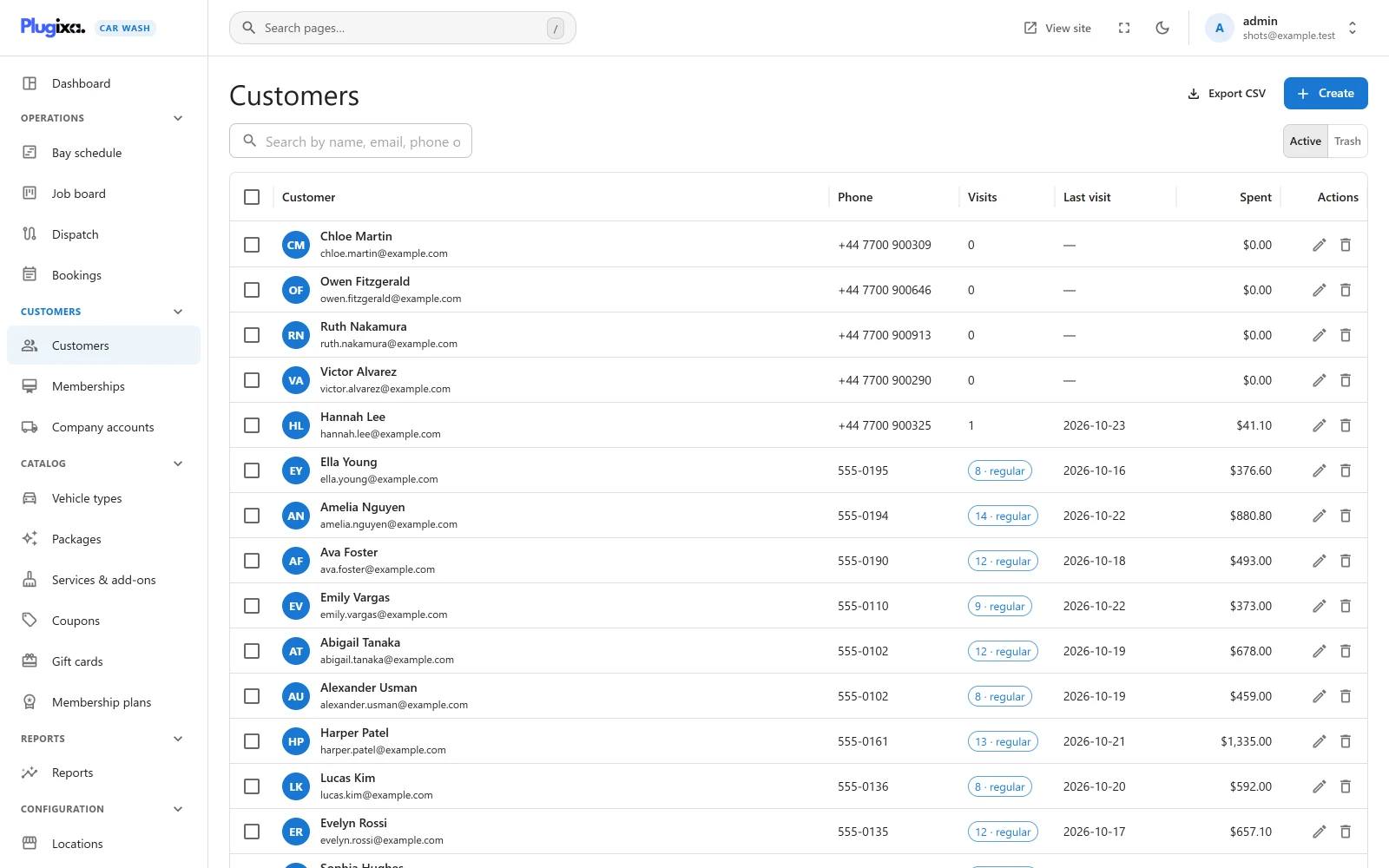
| Column | What it shows |
|---|---|
| Customer | Initials in a circle, the name (or the email when there is no name), and the email under it. |
| Phone | The phone number on the customer record. |
| Visits | The number of the customer’s washes. From two upwards it shows as a chip, for example 9 · regular. |
| Last visit | The date of the customer’s latest wash. |
| Spent | The totals of those washes added together. |
| Actions | The pencil opens the customer. The bin moves them to the trash. |
Visits, Last visit and Spent count only bookings that are Done or In the bay, and not in the trash. A booking still to come does not count until the car is in the bay, so Last visit never shows a future date. Cancelled bookings, no-shows and bookings awaiting payment never count. Spent is the value of those washes, not the money received.
Only the Customer column can be sorted, by last name.
Search
The search box matches the first and last name, the email, the phone number and the company: “Search by name, email, phone or company…”.
Acting on several customers
Tick the box at the start of one or more rows. A bar appears with Move to trash, which asks “Move N record(s) to the trash? You can restore them from the Trash view.” first. If some could not be trashed the bar says how many, for example “3 done, 0 skipped, 1 failed.”
Trash
A customer who still has an open booking, that is one Awaiting payment, Pending, Confirmed or In the bay, cannot be trashed: “1 upcoming booking still depends on this. Cancel or move it first.”
Trashing a customer does not touch their bookings, which keep their own copy of the customer’s details. A trashed customer no longer matches new bookings, so the next booking with that email creates a fresh customer with an empty history.
Export CSV
Export CSV saves the list as a spreadsheet file, for example customers-2026-10-25.csv. It is shown to users with the plugixa_carwash_export capability while the Export app is switched on. The file follows the search, sort and visible columns on screen, and its columns are Customer, Email, Phone, Visits, Last visit and Spent. It works as on the Bookings list, including the 10,000-row limit.
The customer page
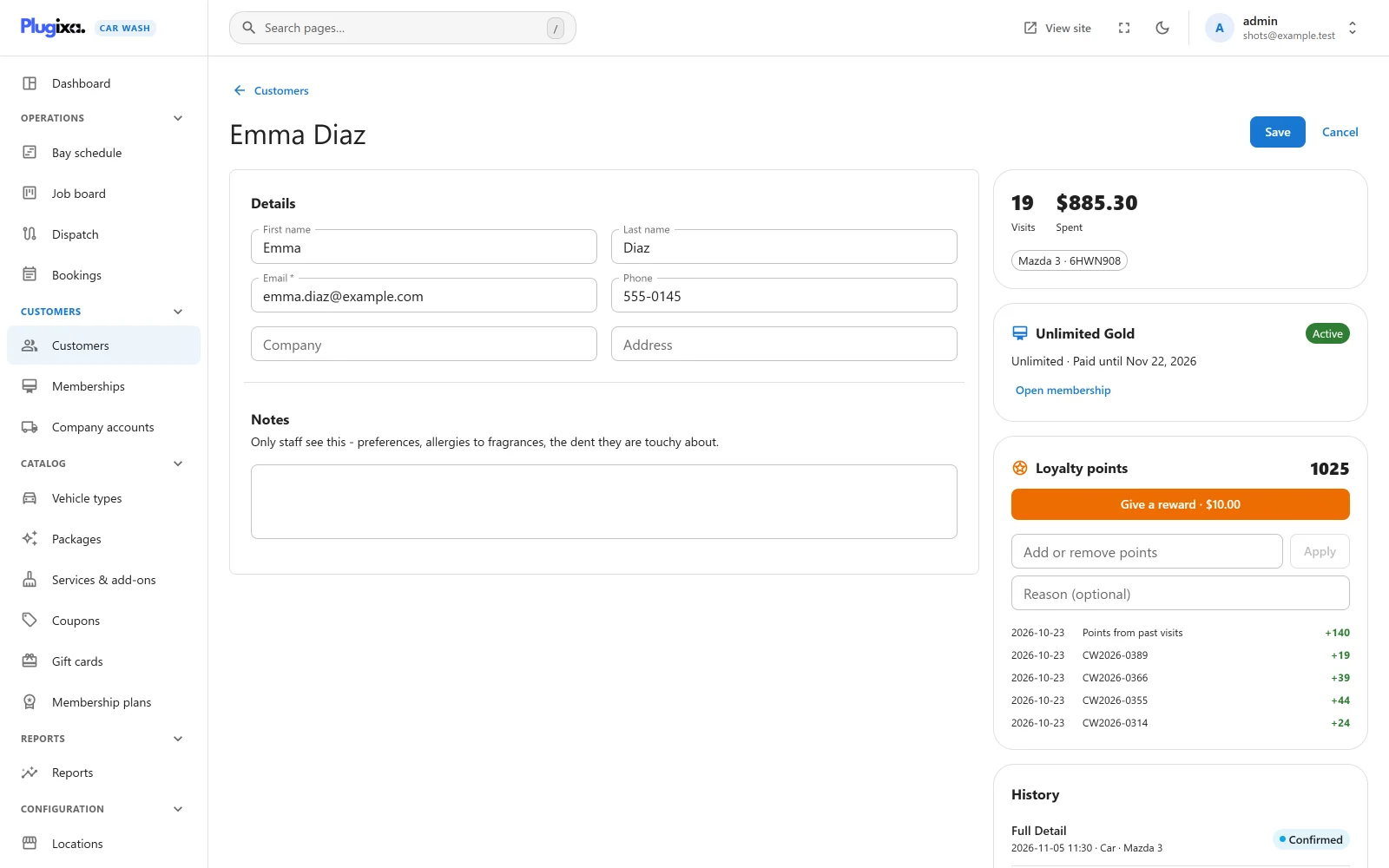
Click a customer to open them. Their details are on the left and what they have done is on the right.
Details
| Field | Notes |
|---|---|
| First name, Last name | |
| Required, and unique among live customers. Changing it changes which address future bookings match. | |
| Phone | |
| Company | |
| Address | |
| Notes | “Only staff see this”, for preferences, a fragrance allergy, the dent they are touchy about. |
Press Save at the top right to keep a change, or Cancel to leave without saving.
Editing a customer changes the customer record only. Bookings already made keep the details they were made with.
Visits, spend and vehicles
The first card on the right shows Visits and Spent for the customer, counted from their last 100 bookings by the same rule as the list: only bookings that are Done or In the bay. Under them, each remembered vehicle is shown as a chip, for example “Mazda 3 · 6HWN908”.
History
The customer’s bookings, newest first, up to 100. Each row shows the package (or the reference), the date and time, the vehicle, and the status. Click a row to open the booking.
With no bookings it says “No bookings yet.”
Panels Pro adds PRO
With Pro, more cards appear between the visits card and the history, each only when its feature is switched on:
| Panel | What it shows |
|---|---|
| Membership PRO | The customer’s plan, its washes used this period or “Unlimited”, and when it is paid until, with Open membership. A customer who is not a member shows “Not a member” and Add membership. See Memberships. |
| Loyalty points PRO | The points balance, a Give a reward button, a field to add or remove points, and the latest point movements. See Loyalty. |
| Company account PRO | The company the customer books for and whether they are a manager or a driver, with Open company account. See Company accounts. |
Who can do what
| Capability | What it allows on customers |
|---|---|
plugixa_carwash_view |
See the list and the customer pages. |
plugixa_carwash_create |
Create a customer. |
plugixa_carwash_edit |
Change a customer’s details and notes. |
plugixa_carwash_delete |
Trash, restore and delete permanently. |
plugixa_carwash_export |
Export CSV. |
Activation gives them to the Administrator role only. See Roles and permissions.
Customers do not need a WordPress user account. They reach their bookings through the link in their emails, or by signing in to the customer account with a one-time link sent to their email.