

Contents
Roles and permissions - Plugixa Car Wash
Who may use the car wash app is decided in up to three layers:
| Layer | Available in | Decides |
|---|---|---|
| Capabilities | Free | Whether somebody can open the app, and whether they may view, create, edit, delete, export and change settings. Everywhere at once. |
| Roles screen PRO | Pro | Which WordPress roles carry those capabilities, edited on a screen inside the app. |
| Permissions screen PRO | Pro | Per kind of record, what each group of people may do: all records, only their own, or none. |
Site administrators are never limited by any of them.
The capabilities
The plugin adds seven WordPress capabilities:
| Capability | Allows |
|---|---|
plugixa_carwash_manage |
Open the car wash app. Its menu, Plugixa Car Wash, is shown only to users with it. |
plugixa_carwash_view |
Read bookings, customers, the catalogue, the schedule and the settings. |
plugixa_carwash_create |
Create records: bookings, customers, packages, coupons and so on. |
plugixa_carwash_edit |
Change existing records. |
plugixa_carwash_delete |
Move records to the trash, restore them and delete them permanently. |
plugixa_carwash_export |
Download lists as CSV. |
plugixa_carwash_manage_settings |
Save changes on the Settings screen. |
Holding any of the last six also counts as holding plugixa_carwash_manage, so
somebody given only plugixa_carwash_view can open the app.
Who holds them
- Administrators hold all seven. They are granted to the Administrator role
when the plugin is activated, and any user with the WordPress
manage_optionscapability is treated as holding all of them in any case. - Nobody else, until you grant them.
In the free plugin there is no screen to grant them. Use a role editor plugin, or WP-CLI, for example:
wp cap add editor plugixa_carwash_view plugixa_carwash_create plugixa_carwash_edit
Each capability applies to every kind of record: somebody with
plugixa_carwash_delete can trash a booking, a package or a location alike.
Always administrators only
A few things check the WordPress manage_options capability rather than a car
wash capability, so they stay with site administrators whatever is granted:
- the App manager,
- the Uninstall section of Settings,
- the Pro Roles and Permissions screens.
The Car Wash Manager role PRO
With Pro, the plugin adds one WordPress role, Car Wash Manager (slug
plugixa_carwash_manager). It holds read, so its users can log in to
wp-admin, and the six car wash capabilities, so they can do everything in the
car wash app and nothing else on the site.
Give it to staff from the WordPress Users screen. It is created once, when Pro is first activated. If you delete it, it is not created again on the next update. When the plugin’s data is erased on uninstall, the role is removed. Its users keep their accounts, and anybody left with no role at all becomes a Subscriber.
The Roles screen PRO
The Roles screen edits which WordPress roles carry the car wash capabilities. Open it from Roles in the Configuration group of the app’s sidebar. It is part of the Roles app in the App manager and is shown to site administrators only.
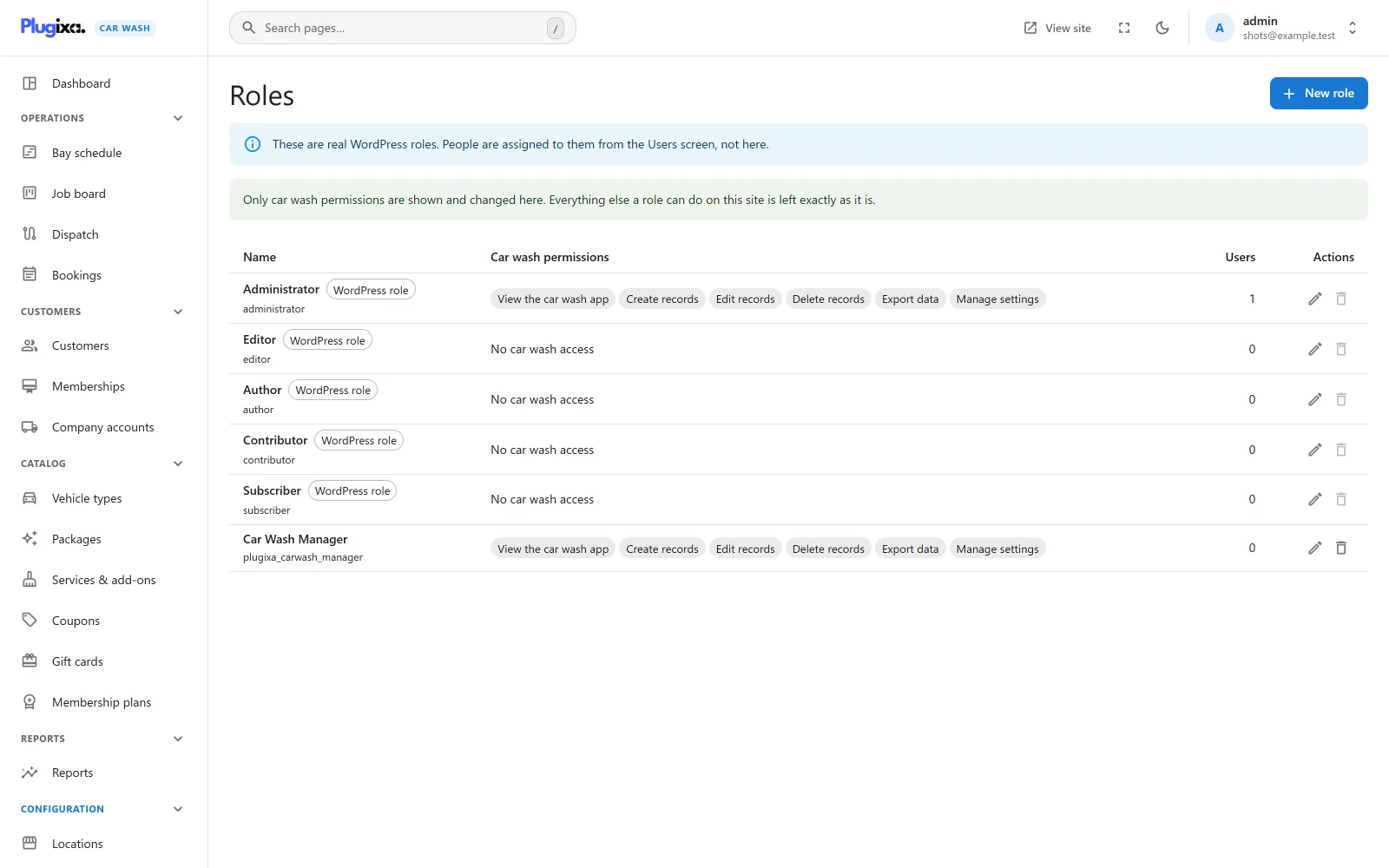
Two notes head the list: “These are real WordPress roles. People are assigned to them from the Users screen, not here.” and “Only car wash permissions are shown and changed here. Everything else a role can do on this site is left exactly as it is.”
| Column | What it shows |
|---|---|
| Name | The role’s name, a WordPress role chip for WordPress’s own five roles, and the slug underneath. |
| Car wash permissions | A chip per permission the role holds, or “No car wash access”. |
| Users | How many users have the role. |
| Actions | Edit, and delete where the role can be deleted. |
The six permissions
Each role has a tick per permission, in this order:
| Permission | Capability |
|---|---|
| View the car wash app | plugixa_carwash_view. “Open the car wash app and read bookings, customers, the catalogue and reports.” |
| Create records | plugixa_carwash_create |
| Edit records | plugixa_carwash_edit |
| Delete records | plugixa_carwash_delete. “Move records to trash, restore them and purge them.” |
| Export data | plugixa_carwash_export. “Download lists and reports as CSV.” |
| Manage settings | plugixa_carwash_manage_settings. “Change the car wash settings that apply to everybody.” |
To let every editor see the car wash app, edit Editor and tick View the car wash app.
Adding, renaming and deleting roles
New role creates a WordPress role:
| Field | Notes |
|---|---|
| Name | Required. “A role needs a name.” A name another role already has is refused with “A role with that name already exists. Choose a different one.” |
| Slug | Made from the name, starting plugixa_carwash_. It cannot be changed once the role exists, because people are assigned to it by that name. |
| Car wash permissions | The ticks above. |
A new role also gets read, so its users can log in to wp-admin.
The rules that protect the site:
| Rule | Message |
|---|---|
| WordPress’s own roles can have their car wash permissions changed, but cannot be renamed or deleted. | “This role belongs to WordPress itself. You can change what it may do in the car wash app, but not rename or delete it.” |
| Administrator keeps all six permissions. | “Administrators always hold every car wash capability. Narrowing this role would lock you out of the screen that undoes it.” |
| The role new users receive on registration cannot be deleted. | “This is the role new users are given when they register. Change that under Settings, General before deleting it.” |
| You cannot delete a role you are in. | “You are in this role yourself. Move to another role first, or you may lock yourself out.” |
Deleting a role asks “Delete this role?” first. Its users are moved to the site’s default role (the one set under Settings -> General in WordPress), and the screen confirms “Role deleted. Its users were moved to” that role.
The Permissions screen PRO
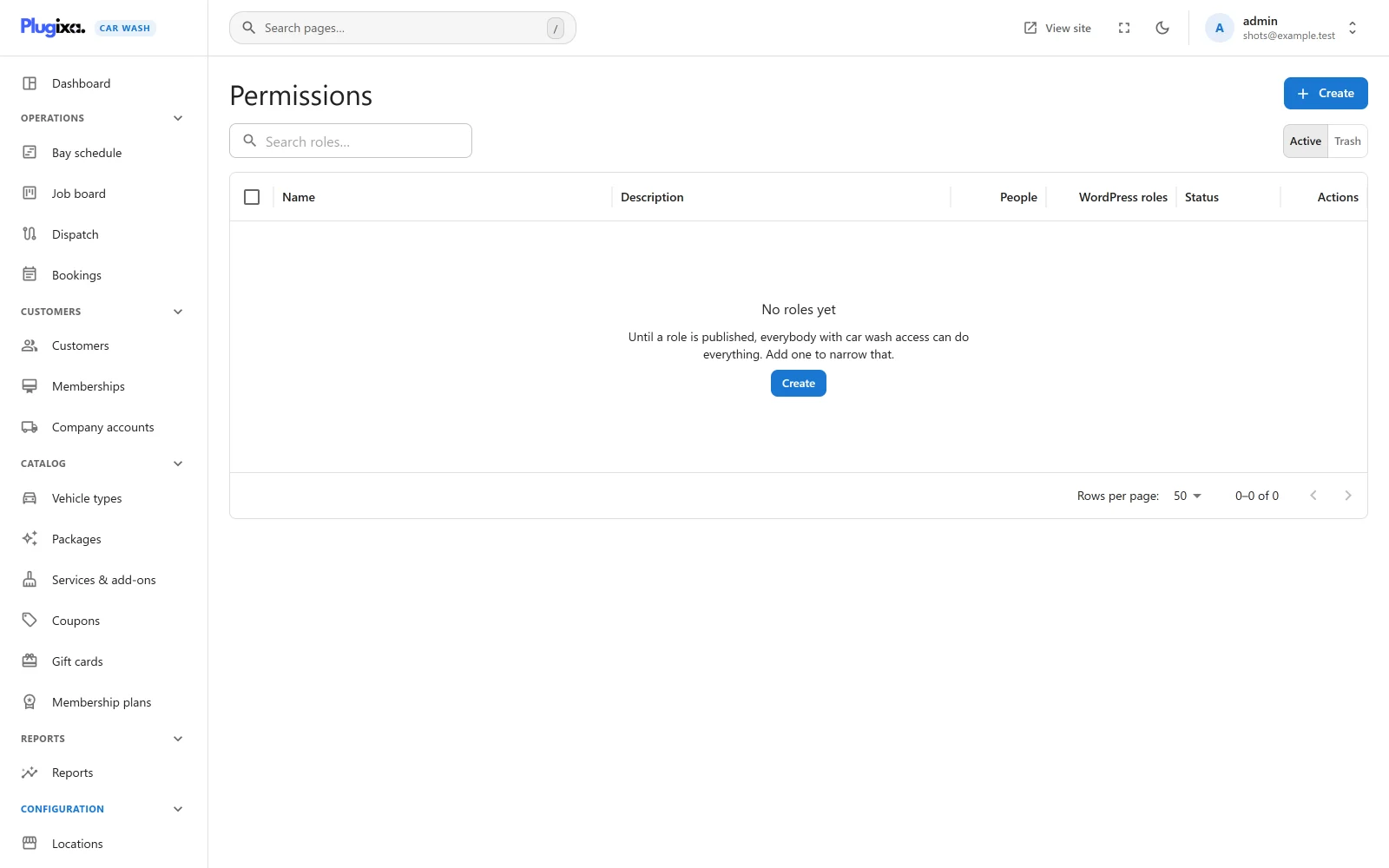
The Permissions screen goes further than capabilities. It lets you build permission roles of your own, give them to people or to whole WordPress roles, and decide per kind of record what they may do. Open it from Permissions in the Configuration group of the app’s sidebar. It is the Roles and permissions app in the App manager and is shown to site administrators only.
How it differs from the Roles screen
| Roles screen | Permissions screen | |
|---|---|---|
| What it edits | Real WordPress roles | Permission roles stored by the plugin |
| Who gets it | Users, from the WordPress Users screen | People and WordPress roles, picked on the role itself |
| How fine | Six switches that apply to every kind of record | View, Create, Edit and Delete per kind of record, each set to All, Their own or None, plus a few abilities |
| Without it | Capabilities still work | Capabilities decide everything |
The two work together. A user still needs car wash access (a capability, for example from the Roles screen) to see the app’s menu at all. Once permission roles are in force, the Permissions screen decides what they may do inside it.
Nothing changes until the first published role
While no published permission role exists, the screen enforces nothing: “Until a role is published, everybody with car wash access can do everything. Add one to narrow that.”
While you edit a role and no published role exists yet, a notice under the people pickers says what saving will do:
- With Status on Unpublished: “Permissions stay off while this role is unpublished. An unpublished role grants nothing, so saving it leaves everybody with the access they have now. Permissions switch on when the first role is published.” You can save a draft safely.
- With Status on Published: “Publishing this first role switches permissions on”. It explains that once the role is saved as published, somebody who holds no role cannot open the car wash app at all, and lists the people who would lose access (“These people would lose access: …”) or confirms “Everybody who uses the car wash app today is covered by this role.”
The notice also shows when you publish a role that was saved as a draft, since that can be the moment permissions switch on.
Permissions stay in force while at least one published role exists that is not in the trash. Unpublished roles do not count. Trashing, deleting or unpublishing the last published role takes the site back to capability rules, where everybody with car wash access can do everything again. So can switching the Roles and permissions app off in the App manager.
A permission role
| Field | Notes |
|---|---|
| Name | Required. “A role needs a name.” A name another live role already has is refused with “There is already a role with that name.” |
| Description | Optional. |
| Status | Published or Unpublished. Only published roles grant anything. |
| People | WordPress users who hold this role. |
| WordPress roles | “Everybody with this WordPress role gets these permissions, including people who join later.” |
An information line reminds you that “Administrators are always allowed everything, so that a role can never lock you out of this screen.”
Records
What the role may do with each kind of record. There is a row per kind (Bookings, Booking forms, Bays & teams, Coupons, Customers, Locations, Packages, Services, Vehicle types, and the Pro records such as Gift cards and Memberships), and a column per action, View, Create, Edit and Delete. Each cell is one of:
| Level | Means |
|---|---|
| All | Every record of that kind. |
| Their own | Only records the person created, or that are assigned to them. Lists show only those. |
| None | Nothing. New roles start at None everywhere. |
The All column at the end of a row sets the four cells of that row at once.
Exporting a list needs View on that kind of record and the Export reports and lists ability below.
Abilities
“Things that are not about one record.”
| Group | Ability | Effect |
|---|---|---|
| Insight | View the dashboard and reports | Opens the Dashboard and the Pro Reports. Without it the dashboard is closed to the role. |
| Insight | Export reports and lists | Download lists and reports as CSV. |
| Administration | Change settings | Save the Settings screen. Anyone covered by a role can read the settings. |
There is no ability for the Roles and Permissions screens: they are for site administrators only, and no role can grant them.
When somebody holds several roles
Their permissions are combined, and the most generous wins: All beats Their own, which beats None, and an ability ticked on any of their roles is theirs. A person can hold a role directly under People and another through their WordPress role.
Trash
Trashing a role takes its permissions away from everybody who held it. Restoring it gives back exactly what it granted before.
What is stored
| Where | Holds |
|---|---|
| WordPress roles and user capabilities | The seven plugixa_carwash_ capabilities, the Car Wash Manager role PRO, and roles created on the Roles screen PRO. |
{prefix}plugixa_carwash_roles PRO |
One row per permission role, with its matrix. |
{prefix}plugixa_carwash_role_assignments PRO |
Who holds each permission role: a user, or a WordPress role. |
When the plugin’s data is erased on uninstall, every plugixa_carwash_
capability is removed from every role and user. Roles you created yourself are
left in place, holding only read. See
Privacy and uninstall.