

Contents
Calendar feed - Plugixa Car Wash
The calendar feed PRO puts your bookings into Google Calendar, Outlook or Apple Calendar, next to everything else in your day. It is one private link that a calendar app subscribes to. The app fetches it again on its own, so new, moved and cancelled bookings follow without anybody exporting anything.
It is a one-way feed. Bookings are still made and changed in the plugin; editing an event in your calendar app changes nothing here.
Open Plugixa Car Wash -> Settings -> Calendar feed.
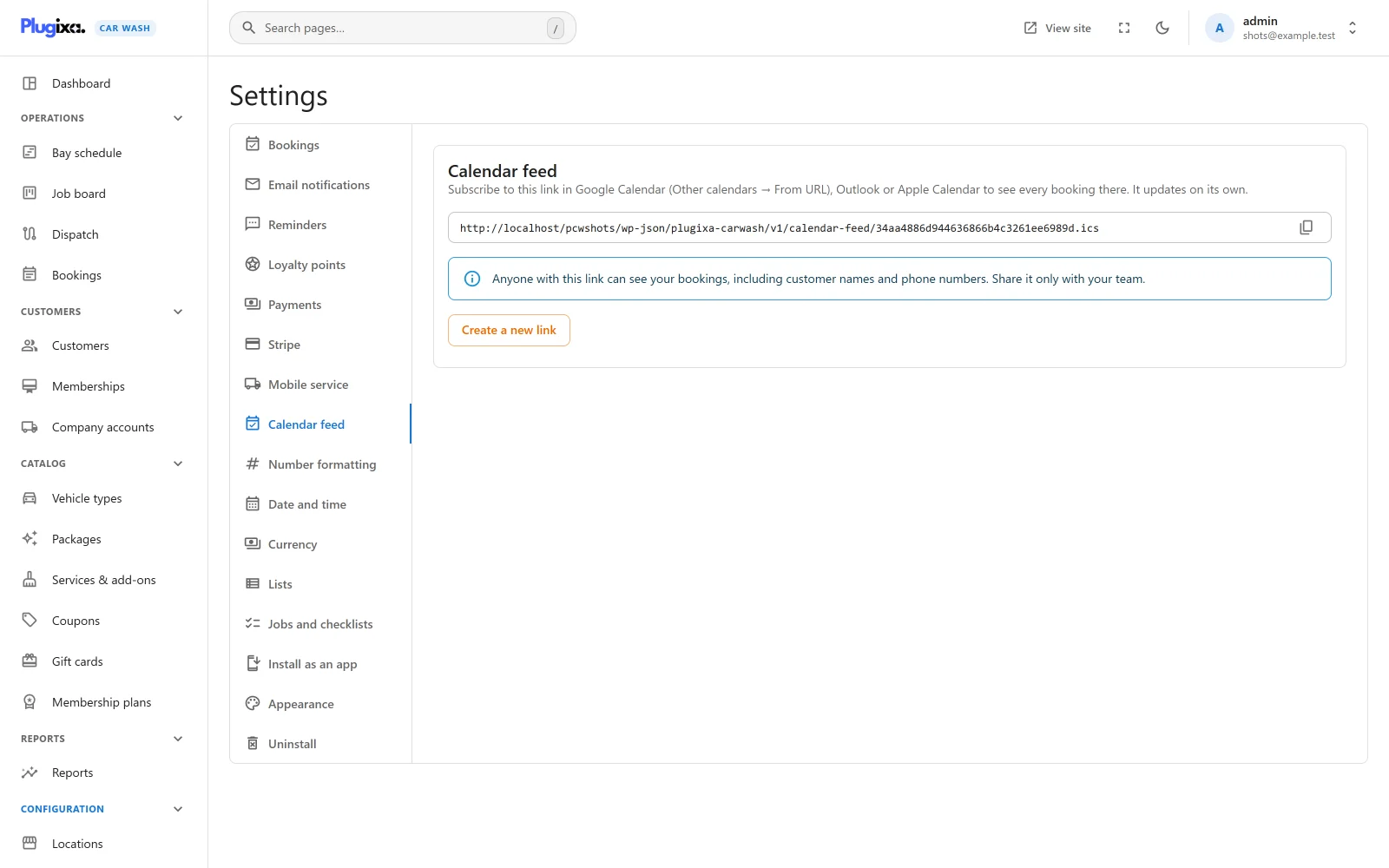
Only a user with the plugixa_carwash_manage_settings capability can see the
link or replace it. If the section is missing, the Calendar feed app is
switched off in the App Manager.
The link
The link looks like this:
https://example.com/wp-json/plugixa-carwash/v1/calendar-feed/34aa4886d944636866b4c3261ee6989d.ics
The 32 characters before .ics are a random secret created the first time the
section is opened. The secret is the only thing that protects the feed: calendar
apps cannot sign in, so anybody who has the link can read it. Use the copy button
at the end of the field to copy it.
One location only
The feed lists every location. To subscribe to one, add its id to the end of the link:
https://example.com/wp-json/plugixa-carwash/v1/calendar-feed/34aa4886d944636866b4c3261ee6989d.ics?location=2
The id is the number in the page address when you edit the location in the app,
for example #/config/locations/2/edit. On a site with plain permalinks the link already has a ?, so add
&location=2 instead.
Subscribing
Your site must be reachable from the internet: Google and Microsoft fetch the feed from their own servers, so a site on your own computer cannot be subscribed to from them.
Google Calendar, on a computer:
- Next to Other calendars, click + and choose From URL.
- Paste the link and click Add calendar.
The calendar then appears on your phone too, once it is switched on in the Google Calendar app.
Outlook on the web:
- Click Add calendar, then Subscribe from web.
- Paste the link, give it a name and click Import.
In the Outlook desktop app, use Add Calendar -> From Internet.
Apple Calendar on a Mac:
- Choose File -> New Calendar Subscription.
- Paste the link and click Subscribe.
- Set Auto-refresh to the shortest interval offered.
On an iPhone or iPad, go to Settings -> Calendar -> Accounts -> Add Account -> Other -> Add Subscribed Calendar and paste the link.
How quickly changes show
The feed asks calendar apps to fetch it every 15 minutes and tells every cache not to keep a copy. The apps decide for themselves. Apple Calendar follows the refresh interval you set. Google Calendar and Outlook fetch subscribed calendars on their own schedule, which can be several hours apart. For the live picture, use the schedule in the app.
What is in the feed
The feed holds the bookings that start from 14 days ago to 62 days ahead, up to 2,000 of them, earliest first. Bookings awaiting online payment and bookings in the trash are left out.
Each booking is one event:
| Part | Shows |
|---|---|
| Title | The customer’s name, the package and the bay or team, for example “Olivia Bennett · Deluxe Wash · Bay 2”. The booking number when all three are missing. |
| Time | The booking’s start and end. Times are sent in UTC, and your calendar app shows them in your own time zone. The buffer after the wash is not included. |
| Location | The location’s name. |
| Notes | The booking number, the customer’s phone number, the vehicle make and plate, and a link that opens the booking in the app for a signed-in user. |
| Status | Confirmed for Confirmed, In progress and Completed bookings, Tentative for Pending ones, Cancelled for Cancelled and No-show ones. |
The calendar is named after your site, followed by “Bookings”.
Every booking keeps the same event id for its whole life. A booking that is moved moves in your calendar instead of appearing twice. A cancelled booking stays in the feed, marked cancelled, until it is more than 14 days in the past, so the apps that keep cancelled events show it struck through and the others drop it.
Privacy
The feed contains customer names, phone numbers and number plates. Anyone with the link can read it, and the link does not expire. Share it only with your team, and only paste it into calendar accounts that belong to the business.
A calendar subscription can also be shared further by whoever holds it, for example by sharing the calendar with somebody else in Google Calendar.
Replacing the link
If the link has leaked, or somebody who had it leaves, click Create a new link and confirm. A new secret is made straight away:
- The old link stops working at once. Calendars subscribed with it stop updating and keep whatever they last fetched, until you remove them.
- Subscribe again with the new link everywhere the feed should still appear.
Without Pro
The free edition has no calendar feed. The secret stays stored if Pro is removed, and the same link works again when Pro returns. See Free vs Pro.