

Contents
Roles and permissions - Plugixa Exam
The plugin has its own roles, separate from WordPress’s. A WordPress Editor is not automatically an exam Author, and somebody who marks papers does not need a WordPress account with broad capabilities.
Five roles are seeded on activation. You can edit them or add your own.
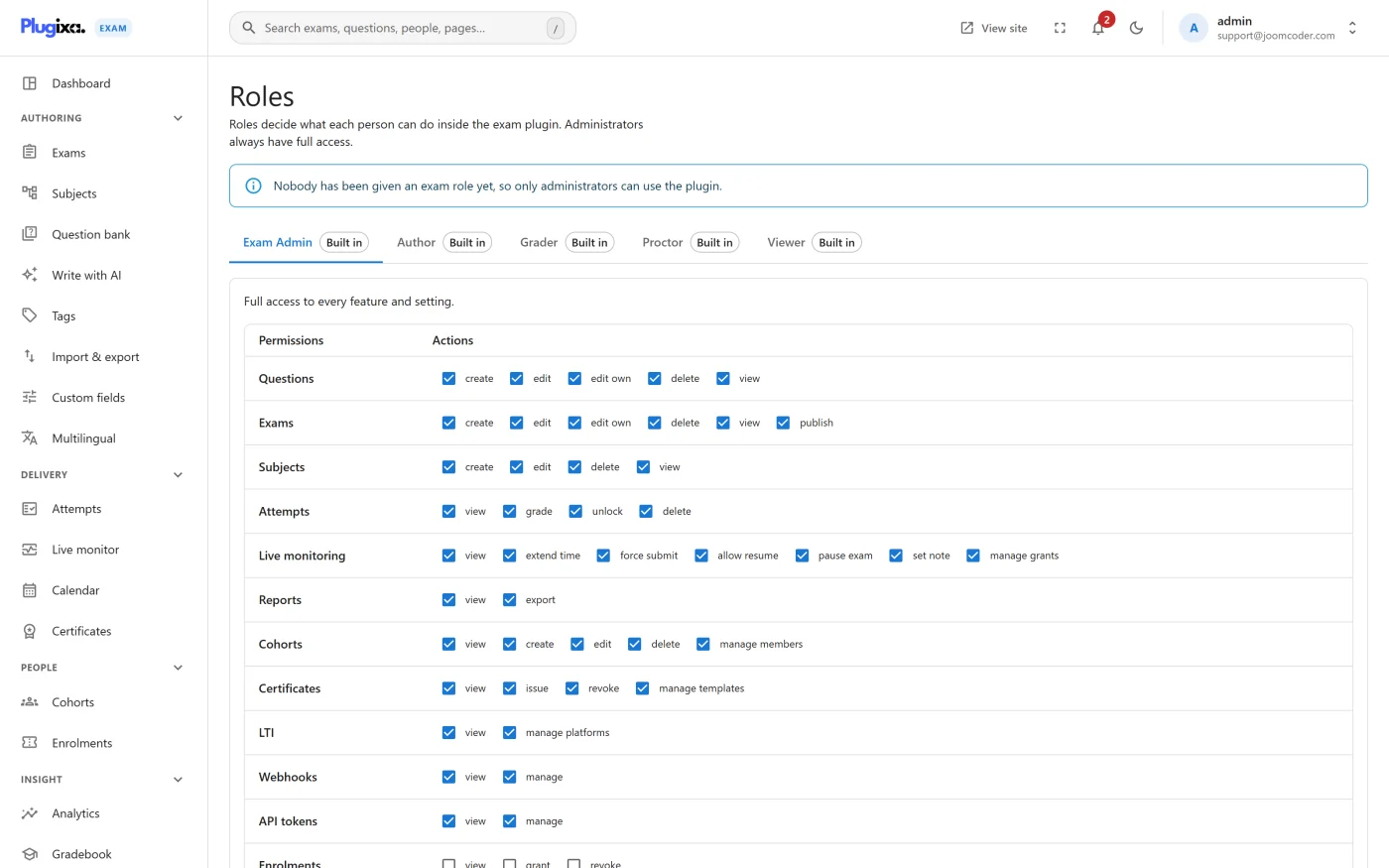
The seeded roles
| Role | What it is for |
|---|---|
| Exam Admin | Full access to every feature and setting |
| Author | Builds questions, exams and subjects. Cannot grade attempts or change settings |
| Grader | Marks attempts and reads content. Cannot author or delete anything |
| Proctor | Watches exams in progress. May extend time and allow a resume, but cannot force-submit a paper |
| Viewer | Read-only access to content and results |
The Proctor limit is deliberate. Extending time and allowing a resume are recoverable; ending somebody’s exam is not, so it needs a role that is accountable for it.
The twelve permission areas
Each role is a grid: an area, and which actions within it are granted.
| Area | Actions |
|---|---|
| Questions | create, edit, edit own, delete, view |
| Exams | create, edit, edit own, delete, view, publish |
| Subjects | create, edit, delete, view |
| Attempts | view, grade, unlock, delete |
| Monitoring | view, extend time, force submit, allow resume, pause exam, set note, manage grants |
| Reports | view, export |
| Cohorts | view, create, edit, delete, manage members |
| Certificates | view, issue, revoke, manage templates |
| LTI | view, manage platforms |
| Webhooks | view, manage |
| API tokens | view, manage |
| Configuration | manage roles, manage settings, manage custom fields, manage notifications |
Areas belonging to features you do not have simply never come up.
“Edit own”
Questions and Exams each have an edit action and a separate edit.own.
editlets somebody change anything of that kind.edit.ownlets them change only what they created.
Grant edit.own without edit for a role that should build its own material and
leave everybody else’s alone, which is the usual shape for a department where
several people write questions into one bank.
This is enforced, not advisory. In earlier versions the option appeared on the Roles screen without being checked anywhere; since 1.0.0 it is applied to both questions and exams. If you had granted it expecting it to limit somebody, it now does.
Configuration is the dangerous one
configuration -> manage_roles lets a role change roles, including its own.
Granting it is equivalent to granting everything, eventually. Keep it on Exam
Admin.
The same reasoning applies to attempts -> delete and attempts -> unlock: both
change the record of what somebody scored.
How this sits alongside WordPress
A person needs two things to use the admin: a WordPress account that can reach wp-admin, and a plugin role that grants the areas they need.
A WordPress administrator is treated as an Exam Admin, which is why a fresh install is usable before you have assigned anybody anything.
Designing roles for a real team
| Who they are | Suggested role |
|---|---|
| Subject lead writing questions | Author, with edit.own rather than edit if several leads share one bank |
| Teaching assistant marking essays | Grader |
| Invigilator for one exam session | Proctor. With Pro you can also invite an accountless invigilator by link or PIN |
| Head of department reviewing outcomes | Viewer, plus reports -> export |
| The person who owns the system | Exam Admin |
Troubleshooting
| Symptom | Usual cause |
|---|---|
| A screen is missing for someone | Their role has no action granted in that area. Missing is correct: the endpoint is blocked, not just the menu item. |
| An Author cannot publish | exams -> publish is separate from exams -> create. Grant it deliberately. |
| Somebody can see all questions but only edit a few | That is edit.own working. |
| A Proctor cannot end a stuck exam | By design. Give the task to a Grader or Exam Admin, or wait for the inactivity sweep. |
| Changing a role did not take effect | The permission is read per request; ask them to reload. If it persists, check they hold more than one role. |
What to do next
- Mark papers with the right people in Manual Marking.
- Watch a sitting with Live Monitoring PRO.
- Turn whole areas off for everybody from the App Manager in Settings.