

Contents
Notifications - Plugixa Exam
Plugixa Exams -> Email holds the templates and the sending queue.
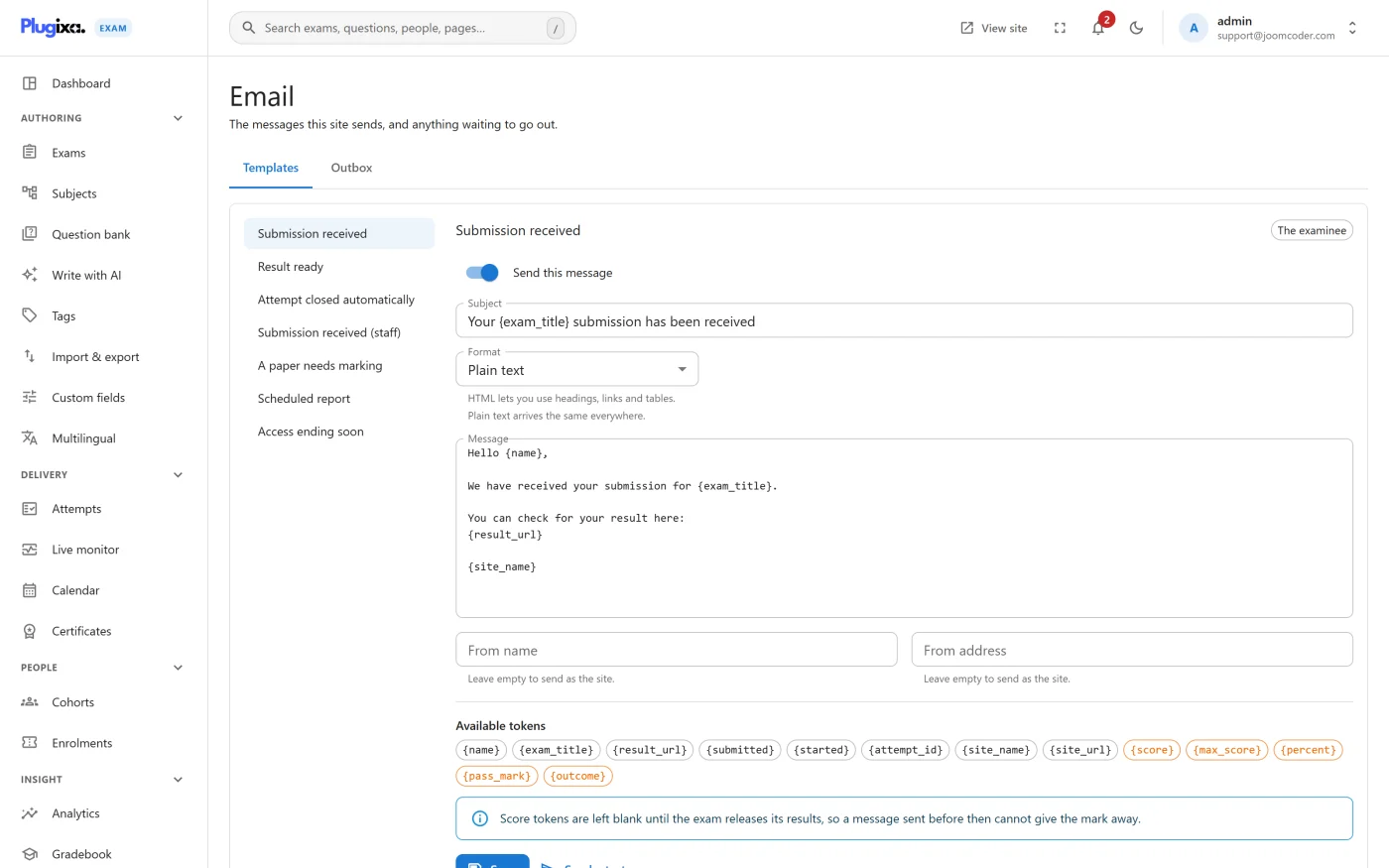
The seeded templates
Five arrive on activation. Pro adds a sixth for scheduled reports.
| Template | Goes to | On by default | What it says |
|---|---|---|---|
| Submission received | The candidate | yes | We have your paper, here is where the result will appear |
| Result ready | The candidate | yes | Outcome, score and a link to the full paper |
| Attempt closed automatically | The candidate | yes | Time or the window ran out; what you had answered was kept and marked |
| Submission received (staff) | An administrator | no | Somebody submitted, with the score |
| A paper needs marking | An administrator | yes | Something is waiting on a person |
| Scheduled report PRO | An administrator | yes | The analytics digest, as HTML |
“Submission received (staff)” is off by default on purpose: on a busy exam it is one email per candidate.
Editing a template
Each has a subject, a body and a recipient. Bodies are plain text until you switch one to HTML, and existing templates keep sending exactly as they do today until you do.
Tokens are substituted at send time. The ones you will use most:
| Token | Becomes |
|---|---|
{name} |
The candidate’s name |
{exam_title} |
The exam |
{outcome} |
Passed or failed |
{score}, {max_score}, {percent} |
The marks |
{result_url} |
A link to the paper |
{submitted} |
When it was handed in |
{site_name} |
Your site |
A withheld score blanks its tokens. If the exam’s release policy is holding the result, the score tokens resolve to nothing rather than leaking the number in an email. Write the body so it still reads sensibly in that case.
The queue
Nothing is sent inline. Messages go into a queue and a scheduled task drains it, so a slow mail server never slows down a candidate pressing Submit.
This was broken before 1.0.0 in a way worth knowing about, because the symptom is so misleading: result emails were only sent while an administrator happened to have the notifications screen open. The plugin was declaring its five-minute cron interval one line after asking WordPress to use it, so every schedule request was refused and silently retried for ever. If you are on an older build, that is what you are seeing.
If mail is not arriving, check WP-Cron is running at all before looking here. A
site with DISABLE_WP_CRON set and no real cron job will queue mail and never
send it.
Language
Emails are composed in the language of the person receiving them, where the plugin can tell who that is. A learner with a French account gets French dates and a French pass or fail, even when the marker who released the result reads the site in English.
The wording itself comes from the template you edit, so that is in whichever language you wrote it in. If you run a genuinely multilingual site, write the template in the language most of your candidates read, or use Pro’s multilingual content.
Troubleshooting
| Symptom | Usual cause |
|---|---|
| No email at all | WP-Cron is not running, or the site has no working mailer. Test with any SMTP plugin first. |
| Emails arrive only when an admin is in the admin | An older build with the cron-interval bug. Update. |
| The score is blank in a result email | The release policy is withholding it. That is the intended behaviour. |
| Staff are getting one email per candidate | “Submission received (staff)” is on. It ships off. |
| HTML shows as raw markup | The template is still set to plain text. Switch its format. |