

Contents
Access and enrollment - Plugixa Exam
Every exam answers one question before anything else happens: is this person allowed to start? Four ways of answering it ship free, and Pro adds a fifth.
Every limit here is enforced on the server. Nothing depends on a button being hidden.
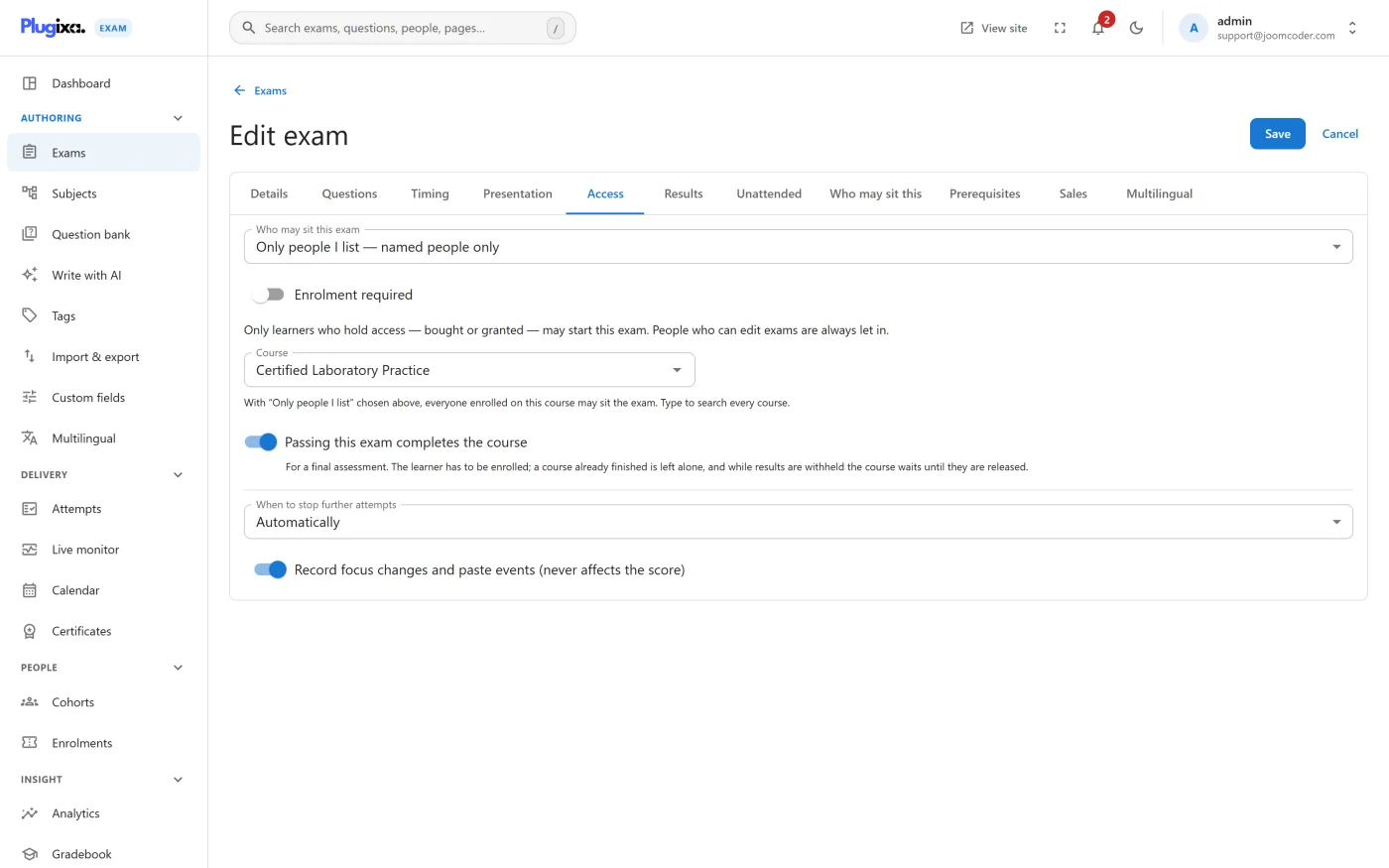
The access modes
| Mode | Who gets in | Needs an account |
|---|---|---|
| Open | Anybody who can reach the page | No |
| By role | Signed-in users whose role you nominate | Yes |
| Access code | Anybody holding the code | No |
| Guest | Anybody, after giving a name and an email | No |
| Restricted PRO | Members of a cohort | Yes |
Open
The exam is public. Good for practice papers, public self-assessment and pre-course diagnostics.
By role
Restrict to signed-in users and nominate the role that qualifies. This is the mode to use when the site already knows who its learners are.
Access code
One code, shared with a room. No accounts to create and no invitations to send, which makes it the practical choice for a class sitting an exam together.
The code is checked server-side at the gate. Sharing it further is a social problem, not a technical one: pair it with an opening window and an attempt cap if that matters.
Guest
The candidate gives a name and an email and starts. They are identified by a signed cookie, not a PHP session, and the cookie is set when they press Start, never for merely looking at an exam.
Why not a PHP session? A session cookie on every visitor breaks page caching for the whole site. The signed cookie is set only for somebody who has actually begun a paper, so a first-time visitor’s pages stay cacheable.
Attempts by guests are still attributed, still marked and still appear in results.
Restricted PRO
Access is answered by the Cohorts module: hand-picked lists of people, for exams that belong to a class rather than to a site. See Cohorts.
Without that module installed, Restricted denies everyone except administrators. That is deliberate. An exam whose restriction list cannot be read must not quietly become an open exam.
Paid access PRO
Not a sixth mode but a layer on top of any of them. Switch on Enrolment required and an exam admits only people who hold access to it - bought in your WooCommerce shop, or granted by you - for as long, and as many times, as that access allows. See Enrolments and Selling exams with WooCommerce.
Windows
| Setting | What it does |
|---|---|
| Open from | Nobody may start before this time |
| Open until | Nobody may start after this time |
| Window close action | What happens to attempts still running when the window shuts: close them, or let them run out their own clock |
run out is the humane setting for an exam with a generous window and a short
time limit: somebody who started five minutes before closing still gets their
full time.
Attempt caps and cooldowns
| Setting | What it does |
|---|---|
| Max attempts | How many sittings one person gets. 0 is unlimited |
| Cooldown minutes | How long they must wait between sittings |
The cap counts attempts still in progress. An abandoned paper is holding one of that candidate’s allowed attempts until something closes it, which is exactly why the inactivity sweep exists. If somebody reports being locked out of a retry, look for an attempt stuck in progress rather than assuming the cap is wrong. See Exam Runner.
Resuming rather than restarting
When somebody who already has an attempt in progress presses Start, they resume it. They do not get a fresh paper. This is what makes closing the browser a non-strategy, and it is why the cap counts in-progress rows.
Locking
The lock policy decides when an exam stops accepting a given candidate:
| Policy | Behaviour |
|---|---|
auto |
The plugin decides from the cap and the result |
cap_only |
Locked only when the attempt cap is used up |
manual |
Locked only when you say so |
never |
Never locked |
Choosing a mode
- A class in a room, one sitting - access code, a tight window, one attempt.
- Learners with accounts on your site - by role, a cap of two or three, a cooldown long enough to make them revise.
- A public practice paper - open, unlimited attempts, results immediately.
- Candidates who will never have accounts - guest, so you still get a name and an email against every result.
- A named group, repeatedly - cohorts PRO.
- Candidates who pay - by role, Enrolment required, and a WooCommerce
product PRO. Set Max attempts to
0so each purchase carries its own.
Troubleshooting
| Symptom | Usual cause |
|---|---|
| “You do not have access” for everyone but admins | The mode is Restricted and the Cohorts module is not installed. |
| A candidate cannot retry | An attempt is still in progress, or the cooldown has not elapsed. |
| Guests are not being asked for a name | The mode is Open, not Guest. Open asks for nothing. |
| The exam is invisible before its start time | That is the window working. Check Open from. |
| “This exam is available to enrolled learners” | Enrolment required is on and they hold no access. See Enrolments. |
| Caching serves one person’s state to another | The exam page is served uncached once somebody is signed in or has started as a guest. If you see this, check that a proxy in front of WordPress is honouring the no-cache headers. |
What to do next
- Decide what happens once they are in: Exam Runner.
- Require another exam first with Prerequisites PRO.
- Manage named groups with Cohorts PRO.