

Contents
Enrolments - Plugixa Exam
An enrolment is one person’s access to one exam: bought in the shop, or granted by you. It says how long it lasts and how many attempts it pays for. An exam with Enrolment required switched on admits only people who hold one.
Enrolments work on their own - you can grant access by hand with no shop at all - and WooCommerce creates them for you when an order is paid.
Making an exam need one
Switch on Enrolment required on the exam’s Access tab, just under Who may sit this exam. It works with every access mode and adds to it: an exam set to By role and Enrolment required needs both the role and an enrolment. Anybody who can edit exams is always let in, so authors can preview what they sell.
When somebody without one opens the exam, they are told exactly what stands in the way, because each has a different answer:
| They are told | Because |
|---|---|
| This exam is available to enrolled learners | they hold nothing for it |
| Your access to this exam ended on … | it expired |
| You have used every attempt included with your access | the attempts it paid for are spent |
| Your access to this exam begins on … | you granted it from a future date |
| Your access to this exam is not active at the moment | it was refunded, put on hold, or revoked |
Somebody already part-way through a paper can always finish it, whatever happens to their access meanwhile.
People → Enrolments
Every enrolment on the site, newest first, with the learner, the exam, where it came from (Granted by hand, or the order it belongs to, linked), its state, its end date and its attempts. Filter by status, or search for a learner by name or email.
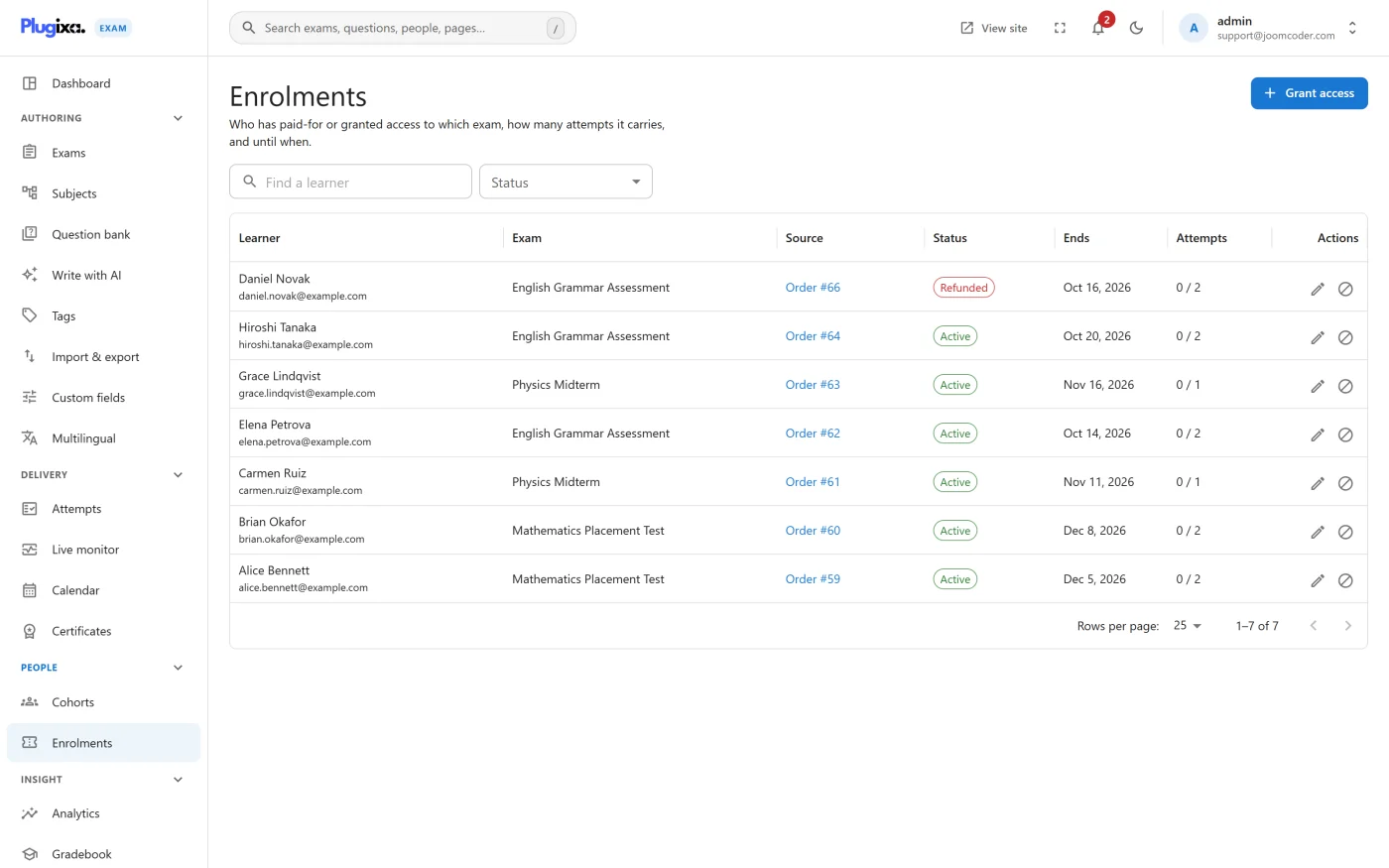
| State | Meaning |
|---|---|
| Active | May be used now |
| Not started | Granted from a date still ahead |
| Expired | Its end date has passed |
| Attempts used | Every attempt it paid for has been sat |
| On hold | The order behind it is unpaid, cancelled or in the trash |
| Refunded | The order behind it was refunded |
| Revoked | You took it away |
| Awaiting a customer | Paid, but the order has no customer yet |
Grant access
Grant access gives one person access to one exam without a purchase - a
scholarship, a replacement, a colleague. Choose the learner and the exam, the
period in days (0 never ends) and the attempts (0 is as many as the exam
allows).
Change terms, revoke, restore
- Change terms moves the end date (in your site’s time zone) or the attempts. Leave the end date empty for access that never ends.
- Revoke takes access away. It is deliberate and it sticks: an order that is later marked paid again does not bring it back. Attempts and results already sat are kept.
- Restore gives a revoked enrolment back.
How attempts are counted
Each new sitting is charged to the enrolment that let the learner in, the moment they start. Resuming a paper somebody already started costs nothing. When somebody holds several, the one that ends soonest is used first, so nothing they paid for expires unused.
The exam’s own attempt limit still applies, and it counts every attempt ever made - including ones sat under an earlier purchase. On a paid exam, set Max attempts to
0and let each enrolment carry its own; the exam form warns you when it is not.
Reminders
A learner gets one email a few days before their access ends (three by default, set under Settings → WooCommerce), unless they have already renewed or have no attempts left to use. The wording is the Access ending soon template under Notifications.
Permissions
Enrolments have their own line in Roles: view (the screen and the dashboard tiles), grant (grant, change terms, restore, resync an order) and revoke. Administrators hold all three. Seeing who paid for what, and taking access away from a paying customer, are deliberately not part of editing exams.
Privacy
WordPress’s Export Personal Data tool includes a person’s enrolments, and Erase Personal Data deletes them - the learner loses the access they asked to be forgotten from. Deleting a user deletes their enrolments too. The WooCommerce order is the financial record and is kept or anonymised by WooCommerce under your shop’s own retention settings.
For developers
| Hook | Type | Use |
|---|---|---|
plugixa_exam_enrolment_status_changed |
action | ( $id, $from, $to, $row ) - once per real change. $from is '' for a new enrolment |
plugixa_exam_enrolment_source_link |
filter | Label and link for where an enrolment came from, e.g. “Order #1042” |
Webhooks send enrolment.granted when access starts and enrolment.revoked when
it stops, with the new status in the payload.
What to do next
- Sell access through your shop: Selling exams with WooCommerce PRO
- Every other way to decide who may sit an exam: Access and enrollment