

Contents
App manager - Plugixa Exam
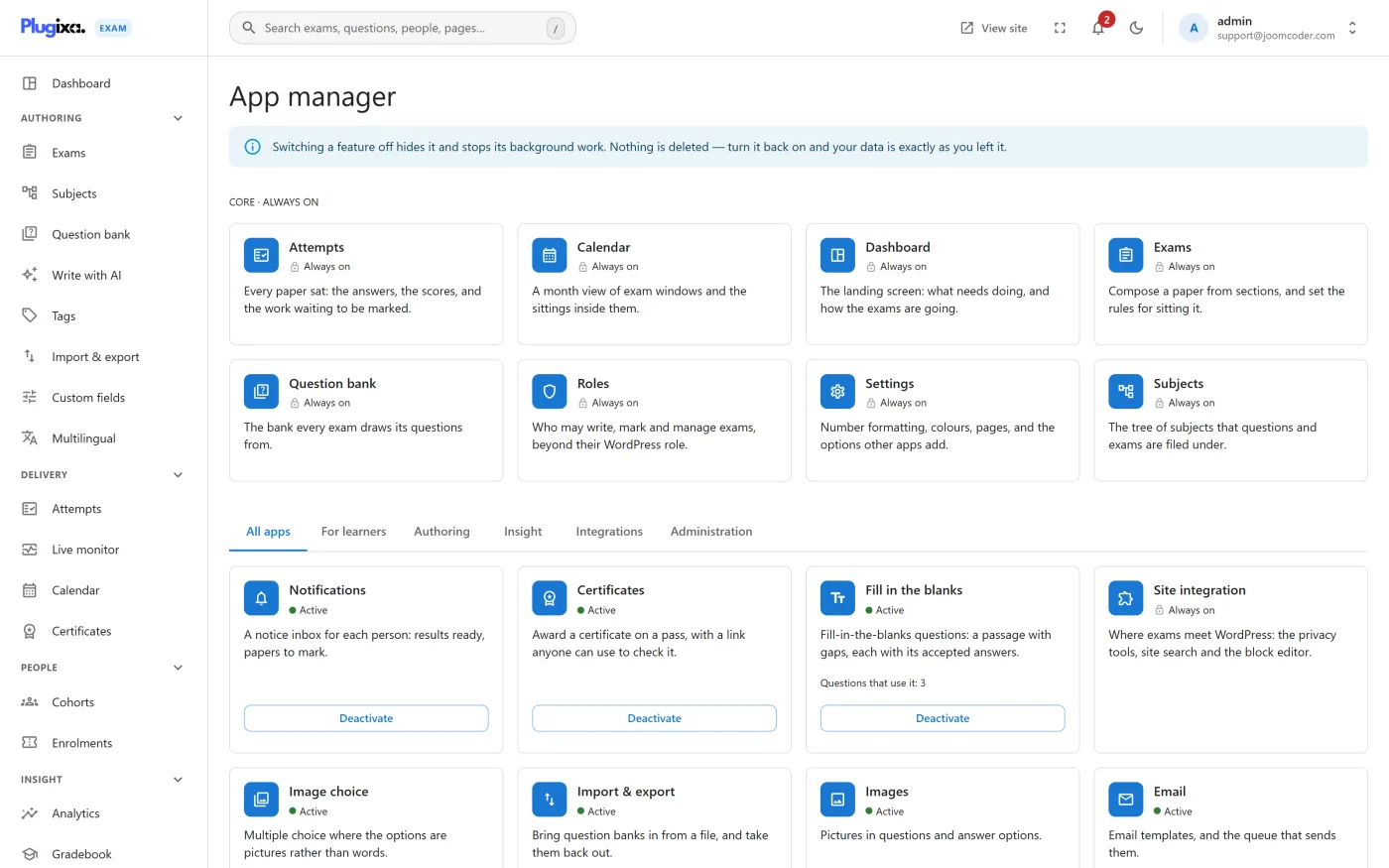
Plugixa Exams -> App manager, the last item under Administration in the sidebar. Every capability is a card with an icon, whether it is active, one sentence on what it does and an Activate or Deactivate button. Use it to hand somebody a smaller product than the one you installed.
The App manager used to be the third tab of Settings. It is a screen of its own
now; an old bookmark to #/settings?tab=apps still lands here.
Off means blocked
Switching a capability off does not merely remove its menu item. Its endpoints stop answering, its shortcodes stop registering and its blocks disappear from the inserter.
That is the difference between tidying an interface and actually reducing what the plugin does. A hidden menu item with a live endpoint behind it is not a restriction.
What can be switched off
The screen separates the core features the plugin cannot run without, which read “Always on” and have no button, from everything else. The rest is grouped in tabs: For learners, Authoring, Insight, Integrations and Administration, or all of them together under All apps. A site that only runs untimed practice quizzes can switch off certificates, invigilation, cohorts, webhooks and the rest, and never see them again.
A capability that depends on another says so on its card (“Needs Enrolments switched on first”) and cannot be activated until the one it needs is on.
Two things to know first
Nothing is deleted. Turning a capability off stops it being used, not stored. Turn it back on and its screens return with the data intact.
Question formats are the exception worth reading twice. A card that provides question types (Fill in the blanks, Image choice and the Pro formats) shows how many questions use it. Switching one off asks first, with the number of questions and published exams affected: while it is off those questions cannot be marked, anybody who sits one of those exams scores zero on them, and that score is kept. Exams that draw at random from a pool may ask them too, so the exam figure is a floor.
A question type is not the same as its editor. Switching off Images removes the upload button; it does not stop existing picture questions from rendering or being marked. The principle behind both rules is the same - a capability switch must never silently zero a paper.
Capabilities that fail closed
Switching off Cohorts does not open the exams that depend on it. An exam set to Restricted access denies everyone except administrators when nothing can read its list, because an exam whose restriction cannot be evaluated must not become an open exam.
Troubleshooting
| Symptom | Usual cause |
|---|---|
| A menu item vanished | Its capability is off. |
| A shortcode prints as raw text | Same cause. An off capability does not register its shortcode. |
| A block is missing from the inserter | Same cause. |
| A REST route 404s | Same cause, and this is the intended behaviour. |
| An Activate button is greyed out | The capability needs another one switched on first; the card names it. |
| Restricted exams stopped admitting anybody | Cohorts is off. That fails closed on purpose. |
What to do next
- Number and colour settings: Formatting and colours.
- Front-end page mapping: Pages settings.
- Per-person restrictions instead of per-site: Roles and Permissions.