

Contents
Results and reports - Plugixa Exam
A result is what a candidate gets back. What is in it, and when, is decided per exam.
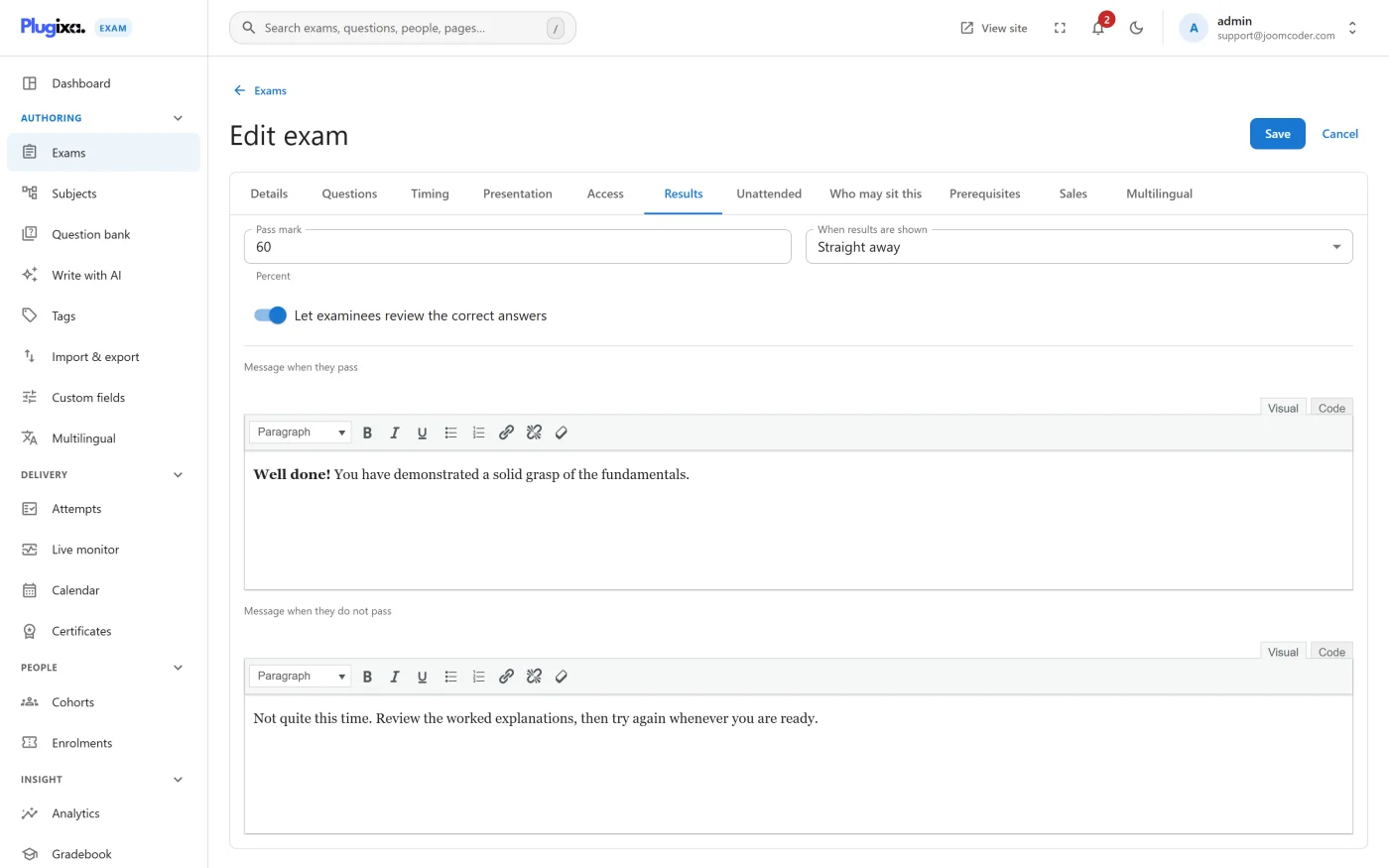
When the score appears
| Release policy | The candidate sees the score |
|---|---|
| Immediately | As soon as the paper is marked |
| When the exam closes | At the exam’s closing time |
| On a date | At a time you pick |
| By hand | Only when you release it |
Marking and releasing are separate steps, which is what lets a whole cohort’s results land at once rather than trickling out as each paper is marked.
Until a result is released, the candidate sees that the paper was submitted, not what it scored. No running total or transcript discloses it indirectly, and score tokens in emails resolve to nothing.
What a result page shows
- Pass or fail, against the exam’s pass mark, with the pass message or fail message you wrote.
- The score, as marks and as a percentage, formatted the way Settings says.
- A per-subject breakdown, so a candidate can see which parts carried them.
- The questions themselves, with the correct answers and your explanations, if the exam’s show answers setting allows it.
The per-subject breakdown is why Subjects are worth building properly. An exam whose questions all sit under one subject has nothing to break down.
Where results live
| Place | What it is |
|---|---|
/result/<id>/ |
One result, for the person it belongs to |
[plugixa_exam_result id="..."] |
The same, on a page of your own |
/my-exams/ |
The learner’s own list of everything |
| Plugixa Exams -> Attempts | Every sitting, for staff |
Result pages are never cached and send DONOTCACHEPAGE. One person’s result
must not be served to the next visitor.
Showing answers, or not
Show answers is separate from the release policy. You can give a score immediately and withhold the paper, which is the usual shape for an exam that will be re-used: the candidate learns the outcome, not the answer key.
For a practice paper, turn both on and write good explanations.
Reports PRO
Pro adds the aggregate view: item analysis across a cohort, per-student trends, CSV export and scheduled email digests. See Analytics.
Troubleshooting
| Symptom | Usual cause |
|---|---|
| “Submitted” but no score | The release policy is holding it, or an essay is still unmarked. |
| No per-subject breakdown | Every question on the paper is under the same subject. |
| The candidate sees the answers and should not | Show answers is on for that exam. |
| Two candidates see the same result | Should be impossible: result pages are uncached and send DONOTCACHEPAGE. Check a proxy or CDN in front of WordPress. |
A score reads oddly, like 65.5555 |
Number formatting. Set decimal places in Settings. |
What to do next
- Understand how the number was produced in Grading.
- Mark what the machine could not in Manual Marking.
- Give learners their own view with Learner Portal.