

Contents
Calendar - Plugixa Exam
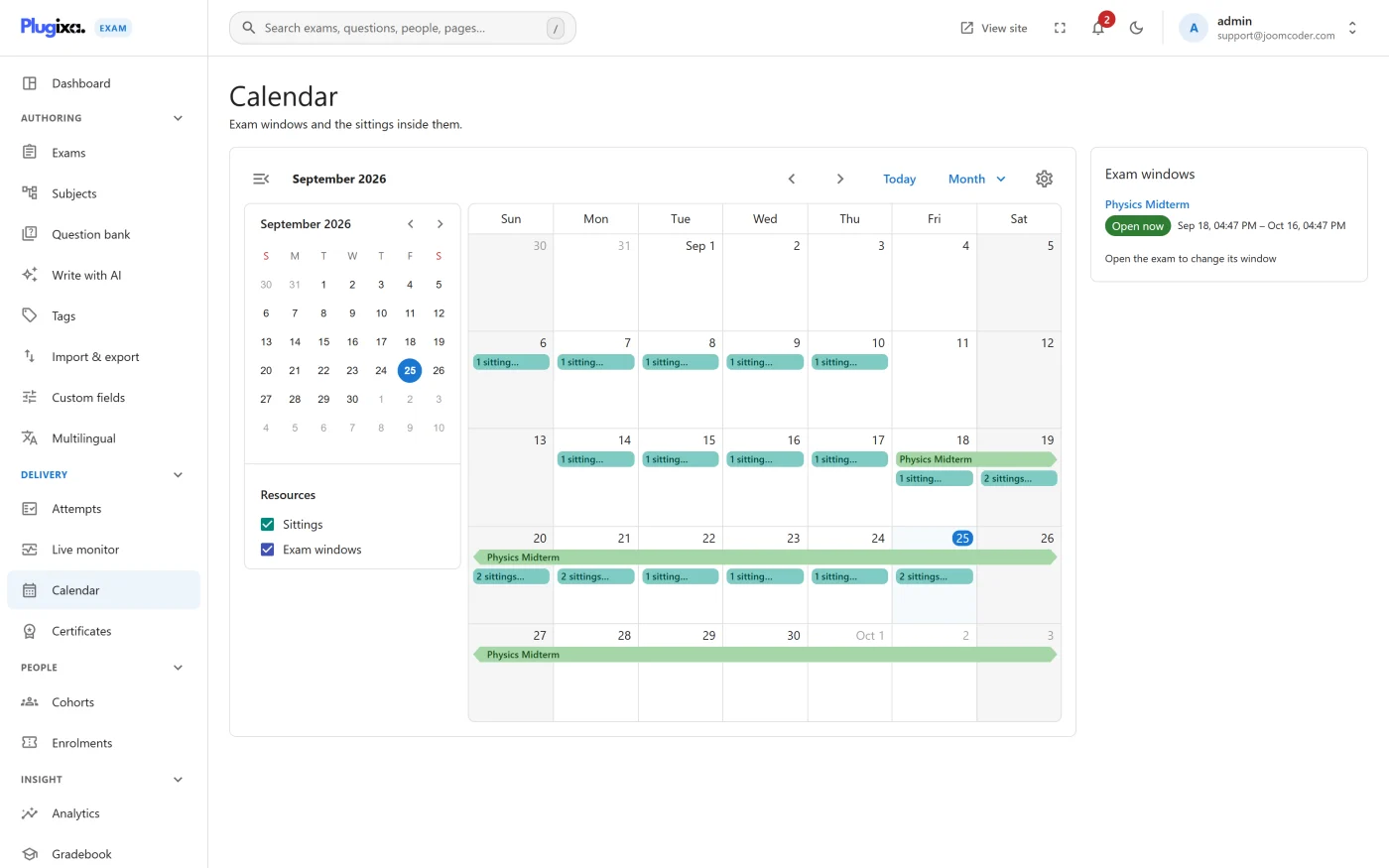
Exams have opening and closing times. The calendar puts them on a grid.
What it shows
Every exam with a window, as a bar spanning the days it is open. Exams with no window do not appear, because there is nothing to place.
The view is the point rather than the data: two exams that overlap by a day, or a week with nothing in it and then four on a Thursday, are obvious here and invisible in a list.
What you can tell at a glance
- Collisions. Two exams open to the same cohort at the same time.
- Gaps. A fortnight where nothing is scheduled.
- Cliffs. Several windows closing on the same evening, which is also when everybody will be sitting them at once.
It is a view, not a scheduler
Windows are set on each exam’s Timing tab. The calendar shows them; it does not create them. See Exams.
Troubleshooting
| Symptom | Usual cause |
|---|---|
| An exam is missing | It has no opening or closing time set. |
| A bar spans more days than expected | The window is longer than the time limit. Those are different settings: the window is when you may start, the limit is how long you get. |
| An exam appears but nobody can start it | The window is open but the access mode, cap or a prerequisite is refusing. |
What to do next
- Set the windows in Exams.
- Understand what closes a running attempt in Exam Runner.
- Watch a sitting in progress with Live Monitoring PRO.