

Contents
On this page
Privacy settings - Plugixa Exam
Plugixa Exams -> Settings -> Privacy. One section, saved with the Save button at the top of the screen.
Exam data is always part of WordPress’s own Tools -> Export Personal Data and Tools -> Erase Personal Data. There is no switch for that, and there never will be: answering a personal-data request is an obligation, not a feature. What this section controls is what else happens automatically, without anybody asking at the time.
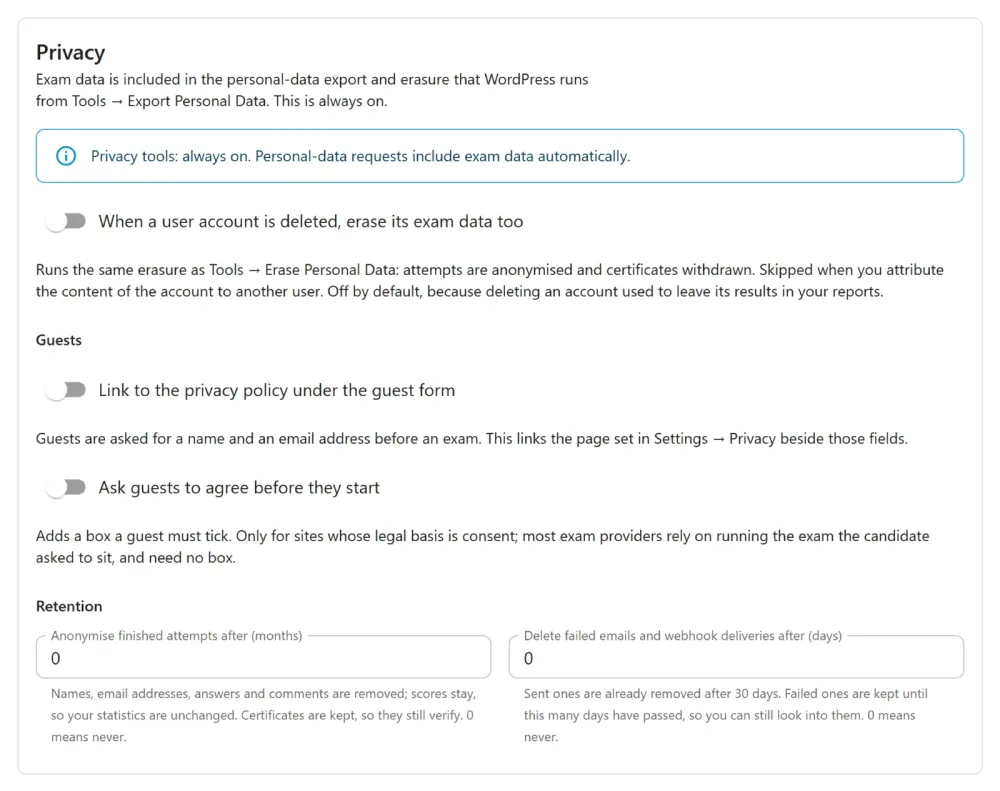
Every option here is off when you install or update. Turning one on is a decision about your site’s data. An update never makes it for you.
When a user account is deleted
When a user account is deleted, erase its exam data too.
When this is on, deleting a WordPress account runs the same erasure as Tools -> Erase Personal Data for that account: its attempts are anonymised, its certificates withdrawn, its uploaded files deleted.
- Skipped when you attribute the account’s content to another user on the delete screen. That choice says “keep this person’s work”, so it is kept.
- Off by default. Until 1.3.0, deleting an account left its results in your reports, and many sites rely on that. A school deleting last year’s leavers still reports on last year’s cohort.
Guests
Guests are asked for a name and an email address before an exam starts.
| Option | What the guest sees |
|---|---|
| Link to the privacy policy under the guest form | A “How we use your details” link to the page set in WordPress’s Settings -> Privacy. Nothing appears if no privacy policy page is set, so there is never a link to nowhere. |
| Ask guests to agree before they start | A box they must tick: “I agree to my name, email address and answers being kept to run and mark this exam.” The exam does not start without it. |
The consent box is checked on the server too, not only by the browser. A guest who gets past the form without ticking it is sent back with “Please tick the box to agree before starting.”
Do you need the box? Only if your legal basis for keeping exam data is consent. Most exam providers rely on running the exam the candidate asked to sit, which needs no box. Ask whoever advises you on data protection. A box you don’t need is also a box a candidate can refuse.
Retention
| Setting | What happens | 0 means |
|---|---|---|
| Anonymise finished attempts after (months) | A finished attempt’s name, email address, answers, uploaded files, passage notes and comments are removed once it is this old. Its score is kept, so your statistics stay the same. | Never |
| Delete failed emails and webhook deliveries after (days) | Messages that could not be delivered are deleted once they are this old. | Never |
- Certificates are kept. Retention anonymises the attempt behind a certificate but not the certificate itself, so it still verifies for whoever the holder shows it to. Only the holder asking to be erased withdraws it.
- Live papers are never touched. Only finished attempts count, measured from when they were handed in.
- Sent emails and webhooks are already removed after 30 days. The second setting is about the failed ones, which used to be kept forever.
- The first run happens within an hour of saving, and cannot be undone. The screen warns you as soon as you type a number. A large backlog is worked through in batches a few minutes apart.
- No scheduled job exists until you set a period. Setting both back to 0 removes it again.
Suggested privacy-policy text
WordPress’s Settings -> Privacy -> Policy Guide includes a Plugixa Exam section you can copy into your own policy. It describes your site as it is set up:
- the apps you have switched on (certificates, file uploads, LTI, leaderboards, integrity signals)
- whether IP addresses are recorded
- the retention period you chose
It is a suggestion. It changes no page.
Troubleshooting
| Symptom | Usual cause |
|---|---|
| The privacy link does not appear | No page is set in WordPress’s Settings -> Privacy. |
| Deleting a user left their results | The option is off, or the delete reassigned their content. |
| Old attempts are still named | Retention is 0, or the first run has not happened yet (up to an hour). |
| A certificate still shows a name after retention | That is intended. Retention keeps certificates; an erasure request withdraws them. |
What to do next
- What is stored and what each tool does: Privacy and GDPR.
- The other sections of this screen: Formatting and colours.
Quick Links
Share