

Contents
On this page
Member library - Plugixa Video
Signed-in viewers get a place of their own: the videos they started, the channels they follow, the videos they saved and the playlists they built. It all lives on one page, the member library, and in a few buttons under every video.
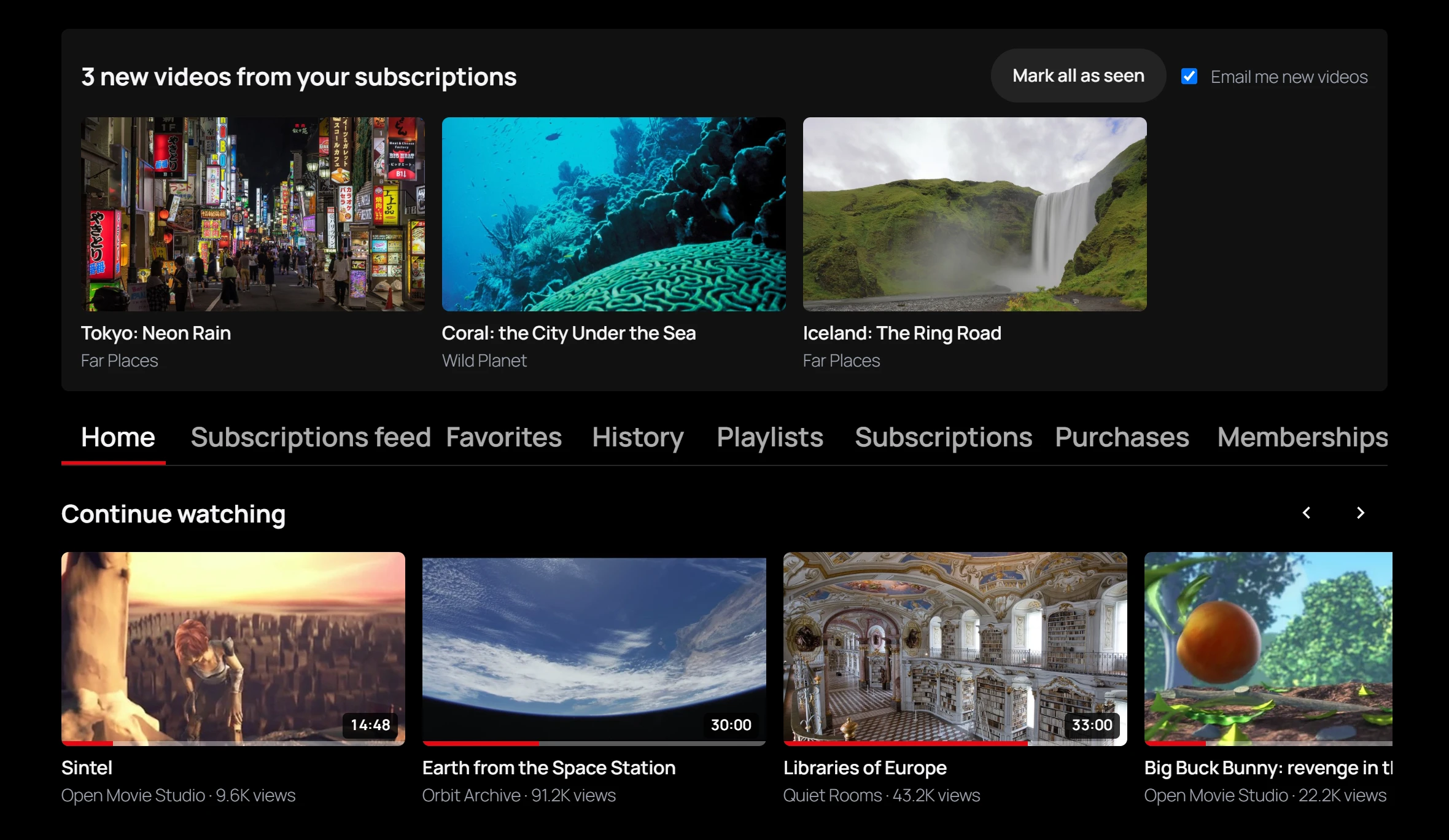
Create the library page
The setup wizard creates it for you: a page called My library. To make one yourself:
-
Add a page and put the shortcode in it:
[pvx_library]Or add the Member video library block, or the Elementor widget of the same name.
-
On a block theme, choose the Video: Full-width page template for it.
-
Publish the page, then choose it as Library page in Settings -> General -> Pages.
A visitor who is not signed in sees “Sign in to see your library.” with a way to sign in. The library holds nothing personal in the page itself: each viewer’s own videos are loaded after the page opens, so the page can be cached like any other.
The tabs
| Tab | What is in it |
|---|---|
| Home | Continue watching, New from your subscriptions and Favorites, as rows. |
| Subscriptions feed | The newest videos from the channels the viewer subscribed to, 24 at a time with Load more. |
| Favorites | The videos saved with the heart button. |
| History | The videos watched, most recent first, with how far each was watched. |
| Playlists | The viewer’s playlists, and a box to create a new one. |
| Subscriptions | The channels the viewer follows, with their subscriber count. |
The Subscriptions feed and Subscriptions tabs need the Channels app, and Playlists the Playlists app. When one is switched off in the App manager, its tab is not shown. Pro adds Purchases PRO and Memberships PRO tabs: see Selling videos.
An empty tab says what fills it, such as “Save videos with the heart button to find them here.” or “Subscribe to channels to see their new videos here.”
Continue watching
The videos the viewer started and did not finish, the most recent first, up to 20. A video counts as finished once 95% of it was watched, and then leaves the row. The same positions let the player resume where the viewer left off. Only videos played in the plugin’s own player are tracked: HLS and MP4, not YouTube or Vimeo.
History and favorites
History lists up to 50 videos and Favorites up to 50, the newest first. The Home tab shows the first 12 favorites.
Playlists
Type a name in New playlist name and click Create: the playlist is created private. Click a playlist to open it, play it in order, and edit or reorder it. See Playlists.
Under every video
On a video page, signed-in viewers act on the video with the buttons under its title:
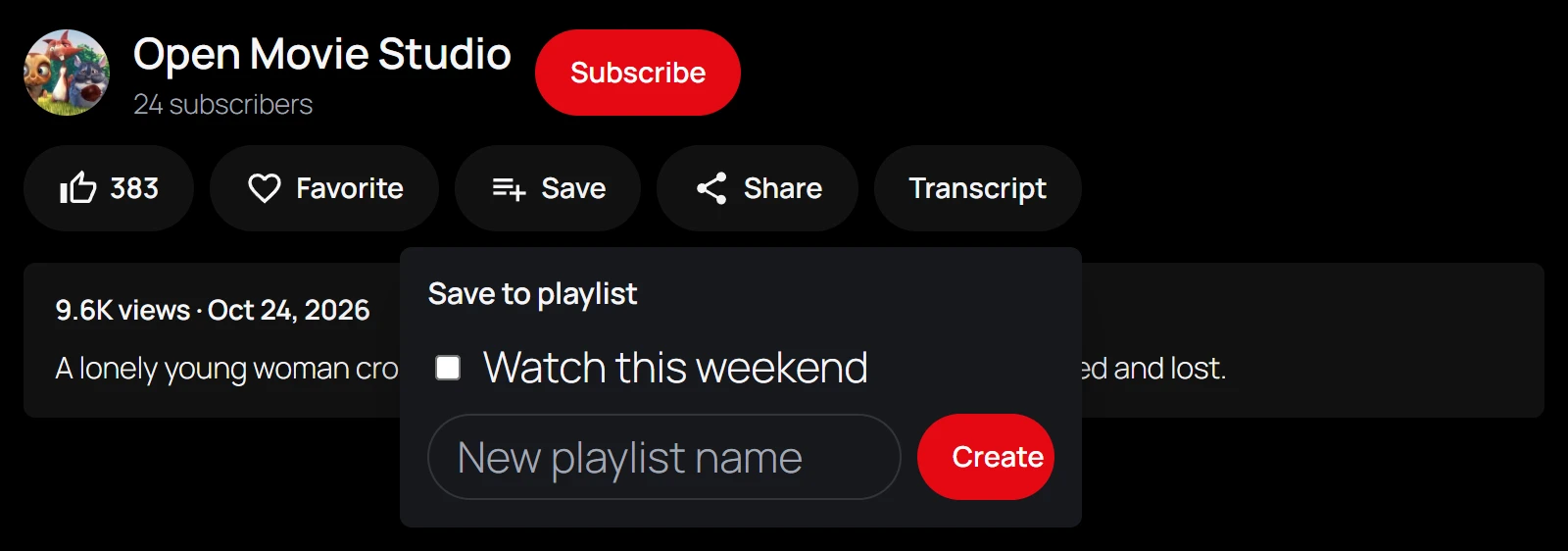
| Button | What it does |
|---|---|
| Like (thumb) | Likes the video. The button shows the number of likes. |
| Favorite | Adds the video to Favorites: “Added to favorites”. Click again to remove it. |
| Save | Opens Save to playlist: tick the playlists to add the video to, or type a New playlist name and click Create. |
| Share | Opens the device’s share sheet, or copies the video’s link: “Link copied”. |
| Subscribe | Next to the channel’s name, above the buttons. Adds the channel’s new videos to the Subscriptions feed. |
A guest who clicks Like, Favorite or Save is sent to sign in. Share works for everyone.
Likes and favorites need the Library app, shown as Viewer library in the App manager, which is on by default. Saving to a playlist needs the Playlists app too. Switched off, the buttons go away and the data is kept.
Comments
Viewers comment on videos with WordPress comments, under the video. Comments follow your WordPress discussion settings, and you moderate them in Comments like any other.
Privacy
Everything in the library belongs to the viewer and is handled by WordPress’s own privacy tools, under Tools -> Export Personal Data and Tools -> Erase Personal Data:
| Exported | Erased |
|---|---|
| Favorite videos, with the date saved | Yes |
| Liked videos | Yes |
| Watch history, with position, completed and last watched | Yes |
| Channel subscriptions | Yes |
| Playlists, with their videos and visibility | Yes, except featured playlists, which are part of your catalog |
| Video access records | No: they may be tied to purchases |
Deleting a user also deletes their favorites and likes. Deleting a video removes it from everyone’s favorites and likes. See Privacy and uninstall.
Quick Links
Share