

Contents
On this page
Plugixa Video - User Documentation
Welcome to the official documentation for Plugixa Video, a plugin that turns a WordPress site into a video platform. You add videos once, from a file you upload, an HLS stream, an MP4 or a YouTube or Vimeo link, choose who may watch each one, and your visitors watch them in one player, on your own site. You manage everything from a single admin app in WordPress.
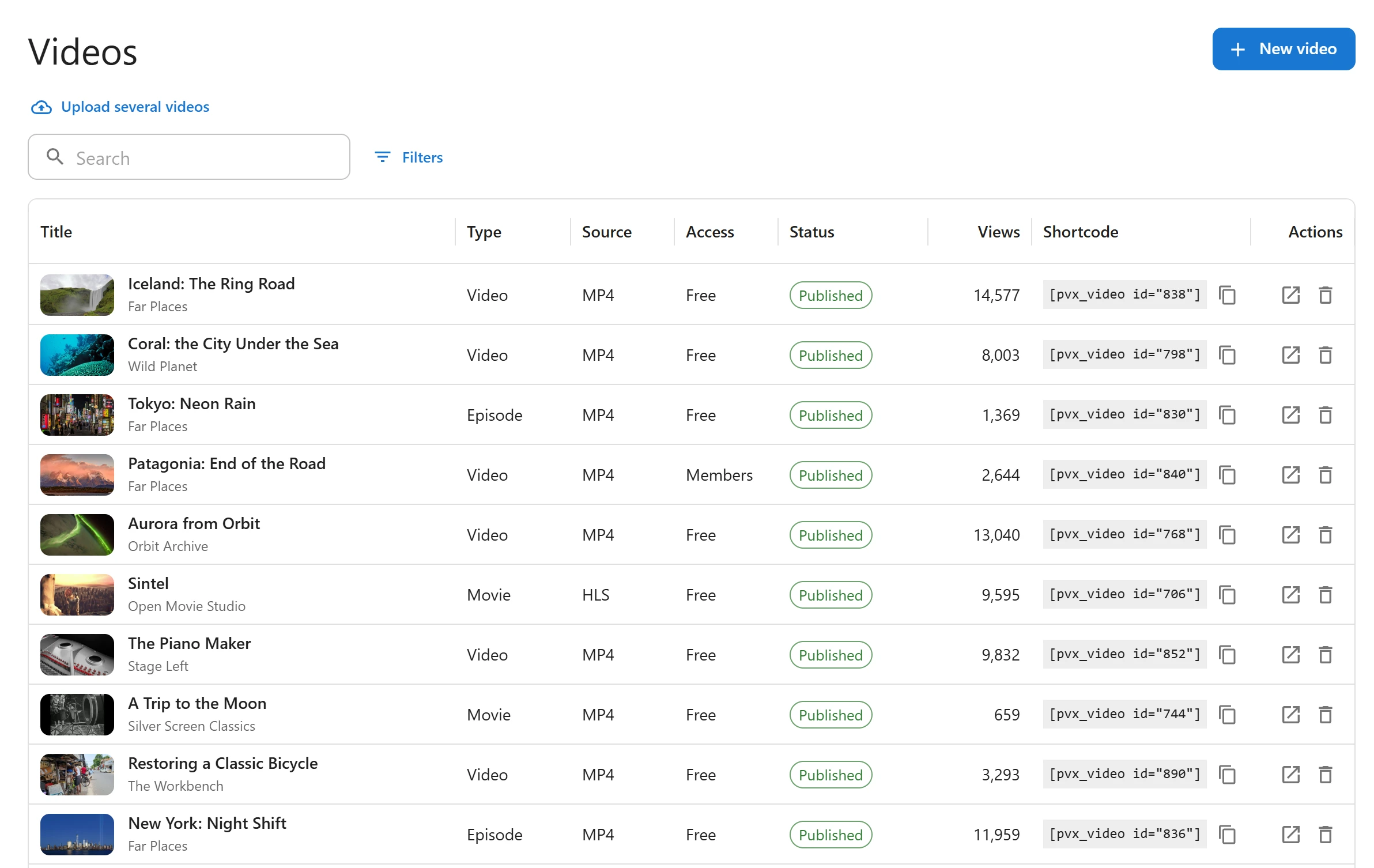
The plugin ships in two editions:
- Free - the video library with HLS, MP4, YouTube and Vimeo sources and MP4 files from the media library, free and members-only videos, unlisted videos, scheduled releases, channels and subscriptions, playlists with autoplay, favorites, history and resume playback, chapters, the Up next block, a browse page with search and filters, likes and comments, a view counter, a video sitemap, blocks and Elementor widgets.
- Pro PRO - everything in Free, plus uploads with HLS conversion through FFmpeg on your server, subtitles and a clickable transcript, password-protected videos, related videos, movies and series, a creator role with optional moderation, analytics without cookies, selling videos (pay-per-view, rentals and memberships with Stripe and PayPal), invoices and creator earnings, audience insights, conversion up to 1080p, Bunny Stream for encoding and delivery, imports from YouTube and Vimeo, AI subtitles, extra audio tracks, new-video notifications, custom fields and a player logo. Conversion up to 4K and revenue sharing with creators need the Pro licence for unlimited sites (the Unlimited plan).
Nothing in the free edition is time-limited. See the complete Free vs Pro comparison.
What makes it different
| Decision | What it means for you |
|---|---|
| The page never contains the video address | The player asks your server for the playable source after the page loads, and the server answers only after checking who may watch. A cached page cannot leak a members-only video. |
| One player for every source | HLS, MP4, YouTube and Vimeo play in the same player with the same controls. YouTube videos load from youtube-nocookie.com and Vimeo videos with Do Not Track. |
| Uploads work with or without FFmpeg PRO | With FFmpeg on your server, an upload is converted to adaptive HLS in the background. Without it, a file browsers can play is published as it is, in one quality. |
Key concepts
| Term | What it is |
|---|---|
| Video | One item in the library, with its source, poster, access rule and its own page at /video/<slug>. |
| Type | What a video is: Video, or with Pro Movie or Episode PRO. An episode belongs to a series. |
| Source | Where the video plays from: an uploaded file PRO, an HLS stream, an MP4, or a YouTube or Vimeo link. |
| Access | Who may watch: Free (everyone), Members (signed-in users) or Paid PRO. |
| Rendition PRO | One quality of an uploaded video converted to HLS, such as 720p. |
| Channel | A creator’s or brand’s page that signed-in viewers can subscribe to. |
| Series PRO | A show with seasons and episodes, each episode a full video. |
| Playlist | Videos in an order you choose. Members make their own too. |
| App | A feature you can switch off and on in the App manager. An app that is off keeps its data. |
Where to start
| Section | Description |
|---|---|
| Getting started | Install, run the setup wizard, add a first video and put it on a page |
| Free vs Pro | What each edition contains |
Your library
| Section | Description |
|---|---|
| Videos | The Videos list, the video form, types, statuses and scheduling |
| Video sources | HLS, MP4, uploads, YouTube and Vimeo, and Fetch details |
| Uploading and encoding PRO | Uploads, FFmpeg, the HLS qualities and where the files live |
| Access control | Free, members and paid videos, and how the video address is protected |
| Channels | Channel pages and subscriptions |
| Movies and series PRO | Seasons, episodes, Continue watching and Coming soon |
| Playlists | Your playlists and your members’ playlists |
| Categories and tags | How the library is organized and how it feeds the browse page |
Watching
| Section | Description |
|---|---|
| The player | Controls, keyboard shortcuts, qualities and resume |
| Subtitles and transcript PRO | Subtitle tracks and the clickable transcript |
| Chapters | Timeline marks from the description |
| Browse and search | The browse page, search and filters |
| Member library | Favorites, history, playlists and subscriptions |
| Related videos and Up next PRO | What plays next and how it is chosen |
| SEO | Structured data and the video sitemap |
| Appearance | Colors, width and page templates |
Putting videos on your pages
| Section | Description |
|---|---|
| Shortcodes | Every shortcode and its attributes |
| Blocks | The block editor blocks |
| Elementor | The Elementor widgets |
| Page layouts PRO | Layouts for video and channel pages |
| Player logo PRO | Your logo over the player |
Selling videos
| Section | Description |
|---|---|
| Selling videos PRO | Pay-per-view and rentals |
| Membership plans PRO | Recurring memberships that unlock paid videos |
| Orders and refunds PRO | Orders, refunds and disputes |
| Invoices and earnings PRO | Receipts, invoices and creator earnings |
| Stripe PRO | Card payments through Stripe Checkout |
| PayPal PRO | Payments through PayPal |
| Audience insights PRO | Where viewers leave, buffering and revenue |
More Pro features
| Section | Description |
|---|---|
| AI subtitles PRO | Generate and translate subtitles |
| Audio tracks PRO | Several languages for one video |
| Bunny Stream PRO | Encoding and delivery through Bunny |
| YouTube and Vimeo import PRO | Importing and syncing videos |
| Notifications PRO | The new-video badge and email digests |
| Custom fields PRO | Your own fields on videos, movies, channels and series |
Running the site
| Section | Description |
|---|---|
| Creators and moderation | The creator role and reviewing what creators publish |
| Analytics | Views, watch time and top videos, without cookies |
| Settings | Every settings tab |
| App manager | Switching features off and on |
| Privacy and uninstall | What is stored, what is sent and what uninstalling removes |
| Troubleshooting | Common problems and their causes |
For developers
| Section | Description |
|---|---|
| REST API | The pvx/v1 routes |
| Hooks | Actions and filters |
System requirements
- WordPress: 6.9 or higher
- PHP: 8.2 or higher
- REST API: the player and the public pages talk to your site through the WordPress REST API, so it must be reachable by visitors who are not signed in.
- FFmpeg (optional): needed to convert uploads to adaptive HLS. PHP must be allowed to
run it (
proc_open). Without FFmpeg, MP4 uploads play as uploaded. See Uploading and encoding. - Background jobs: conversions run in a background queue that needs site traffic or a server cron job running WP-Cron.
Videos are stored as WordPress posts, and uploaded files under
wp-content/uploads/plugixa-video/. They stay in place when the plugin is deactivated,
and by default when it is deleted. See
Privacy and uninstall.
Getting help
- Check Troubleshooting first.
- Read the page for the screen you are using.
- Email support at support@plugixa.com.
License
Plugixa Video is licensed under the GPL v2 or later. Pro features are part of the Pro build of the plugin.
Quick Links
Share