

Contents
On this page
Notifications - Plugixa Video
Notifications PRO tells members when a channel they subscribe to publishes a new video. They see it in two places: a panel at the top of their library, and an email digest that groups the new videos into one message.
Notifications is an app in the App manager, on by default in Pro. It needs the Channels app, because subscriptions are what it notifies. If the Email digests tab is missing from Settings, switch the app on.
Who is notified, and when
A notification is written for every subscriber of the video’s channel at the moment the video goes live:
- when it is published, or created already published;
- when a scheduled video’s date arrives.
A video with no channel notifies nobody. A video that is unpublished and published again does not notify the same member twice. Members subscribe from a channel’s page; see Channels.
The panel in the library
On the member library page, a signed-in member sees a Notifications panel above the library’s tabs.
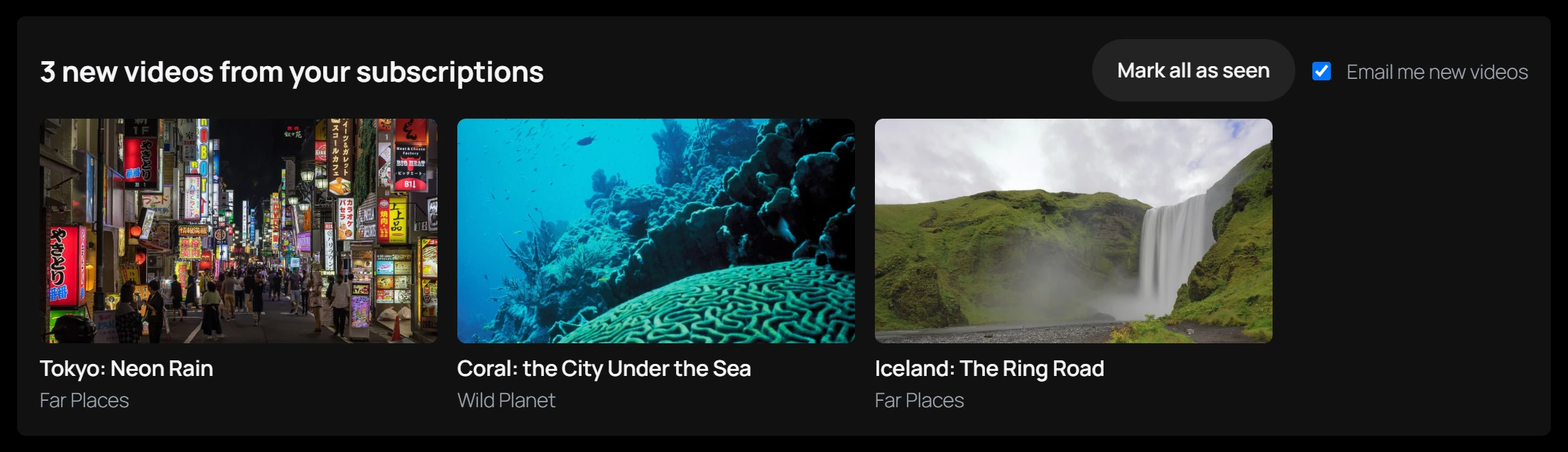
- The heading counts the unseen videos: “3 new videos from your subscriptions”, or “No new videos from your subscriptions.”
- The unseen videos are shown as cards, each linking to its video page.
- Mark all as seen clears the count and the cards.
- Email me new videos is the member’s own switch for the digest. It is ticked by default and greyed out when digests are off for the whole site.
Seeing a video in the panel and receiving it by email are separate: marking videos as seen does not remove them from the next digest, and the other way round.
Email digests
Open Settings -> Email digests. Only users who can manage the plugin’s settings can change it.

| Field | Default | Choices |
|---|---|---|
| Send subscribers a digest of new videos | Daily | Never, Daily or Weekly |
“Members can turn the emails off from their library or from the link in every email.”
How digests are sent
A WordPress scheduled task (WP-Cron) runs once a day. It sends each member who has videos not yet emailed one digest, unless:
- digests are set to Never;
- the member turned the emails off;
- digests are Weekly and the member’s last digest is less than seven days old. Their videos wait for the next one.
The email goes to the member’s account address, through WordPress’s own mailer, so it uses
whatever mail setup your site has. Its subject reads, for example, “[Your site] 3 new videos
from your subscriptions”. The body lists up to 12 new videos, each with its title and link,
followed by a link to the member’s library and a one-click unsubscribe link. The email also
carries a List-Unsubscribe header, so mail apps can show their own unsubscribe button.
Only published videos are listed: a video taken offline in the meantime is left out.
WP-Cron runs when your site has visits. On a quiet site, digests can go out later than planned.
Unsubscribing
The link at the bottom of every digest turns the emails off without signing in, and shows “You will no longer receive new-video emails. You can turn them back on in your library.” The link is signed for that member, so it cannot be changed to unsubscribe someone else.
A member can turn the emails back on with Email me new videos in the library panel.
Privacy
Notifications are stored per member and per video. They are included in WordPress’s personal data export (Tools -> Export Personal Data) under “Video notifications”, with the unsubscribe choice, and removed by Tools -> Erase Personal Data. They are also deleted when the user account is deleted. See Privacy and uninstall.
Quick Links
Share